

Skip to content

Get This Special Discount!

Save 20% OFF
FluentCommunity
  • Features
  • Use CasesExpand
    • Online Course
      Education
      Brands
      Workplace
      Social Network
      Professional
      Club & Association
      Nonprofits
      Coaching
      Creator
      • Buddyboss alternative
        FluentCommunity: The Ultimate BuddyBoss Alternative

        Read More

        Ashik Elahi
        Ashik Elahi
        February 7, 2025
      All Blogs
  • Pricing
  • Blog
  • Integration
  • Roadmap
  • DocsExpand
    • User Doc
    • Developer Docs
  • Account

Get This Special Discount!

Save 20% OFF
FluentCommunity

Getting Started

  • Introduction to FluentCommunity 
  • Install FluentCommunity
  • FluentCommunity Onboarding Guide
  • Global Activity Feed

Space Management

  • How to Create a Space
  • Managing Privacy of Spaces
  • Manage Members of Space 
  • Editing or Deleting a Space
  • Space Links
  • Add Custom Links
  • Activity Feeds
  • Activity Feed View
  • Creating & Managing Posts
  • Community Post Sorting in FluentCommunity
  • Creating and Managing Polls 
  • Handling Comments & Reactions
  • Documents/Files for Space
  • Membership Invitation for Spaces

Course Management

  • Creating and Managing Course
  • Course Privacy 
  • Course Enrollment Management
  • Course Links
  • Documents/Files for Course Lesson
  • Quiz Module

Member Management

  • Member Management
  • Members Profile
  • Follower & Block Module
  • Members List/Grid Layout View
  • Social Links Customization
  • Add Users to Spaces/Courses from Profile

Monetization

  • Monetizing Your Spaces
  • Monetizing Your Courses
  • Monetizing Your Spaces/Courses with Paymattic
  • Collect Recurring Payments for Private Spaces/Courses

Leaderboard Management

  • Leaderboard Management 

Notifications & Messaging

  • Real-Time Chat
  • Global Email Notifications
  • Profile Notification Settings 
  • FluentCommunity Chat

Customization

  • Theme Compatibility Feature
  • Color Customization
  • Welcome Banner

Integration

  • Integrating FluentPlayer with FluentCommunity
  • FluentSocket with FluentCommunity
  • FluentCart Integration with FluentCommunity 
  • FluentCRM Integration with FluentCommunity
  • Fluent Forms Integration with FluentCommunity
  • Paymattic Integration with FluentCommunity
  • Giphy Integration with FluentCommunity
  • Configuring CloudFlare R2 
  • Configuring Amazon S3
  • Configuring BunnyCDN

Migration

  • FluentCommunity BuddyPress Migration
  • FluentCommunity BuddyBoss Migration

Administration

  • General Settings 
  • Customize your Portal 
  • Manager Settings
  • Features & Addons Settings
  • Menu Settings
  • Space Group Settings
  • User Badge
  • Portal Access Settings
  • Generating a Sitemap
  • Privacy Settings
  • Media Module 
  • Manage Topic
  • Content Moderation Settings 
  • Customizing Login/Signup Form 
  • Access Management Through FluentCRM Tags

Miscellaneous

  • Report/Analytics
  • Community as Homepage
  • Adding Custom CSS & JavaScript
  • Incoming Webhook in FluentCommunity
  • Create an XML Sitemap in FluentCommunity

Changelog

  • Changelog
View Categories
  • Home
  • Docs
  • Space Management
  • Membership Invitation for Spaces

Membership Invitation for Spaces

Growing your community is an exciting milestone! FluentCommunity provides a dedicated Invitations feature that allows you to easily generate special links to invite new members to join a specific Space.

This guide will walk you through exactly how to create, manage, and share membership invitations.

  • You must be logged into your WordPress dashboard.
  • You must have Administrator or Moderator privileges for the specific Space you want to invite members to.

Step 1: Navigating to the Invitations Menu #

To start bringing people in, you first need to access the invitation dashboard for your chosen Space.

Go to your community portal and select Spaces from the main top navigation menu.

Find the Space you want to grow and click the View Space button.
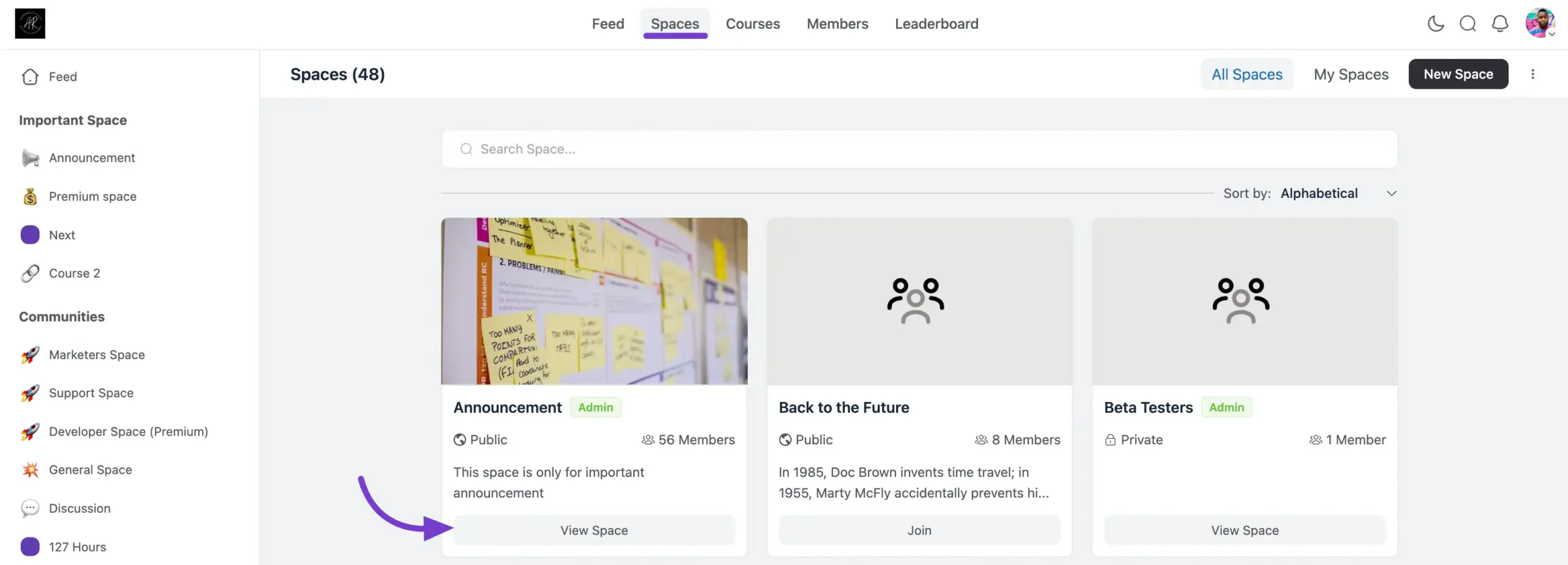
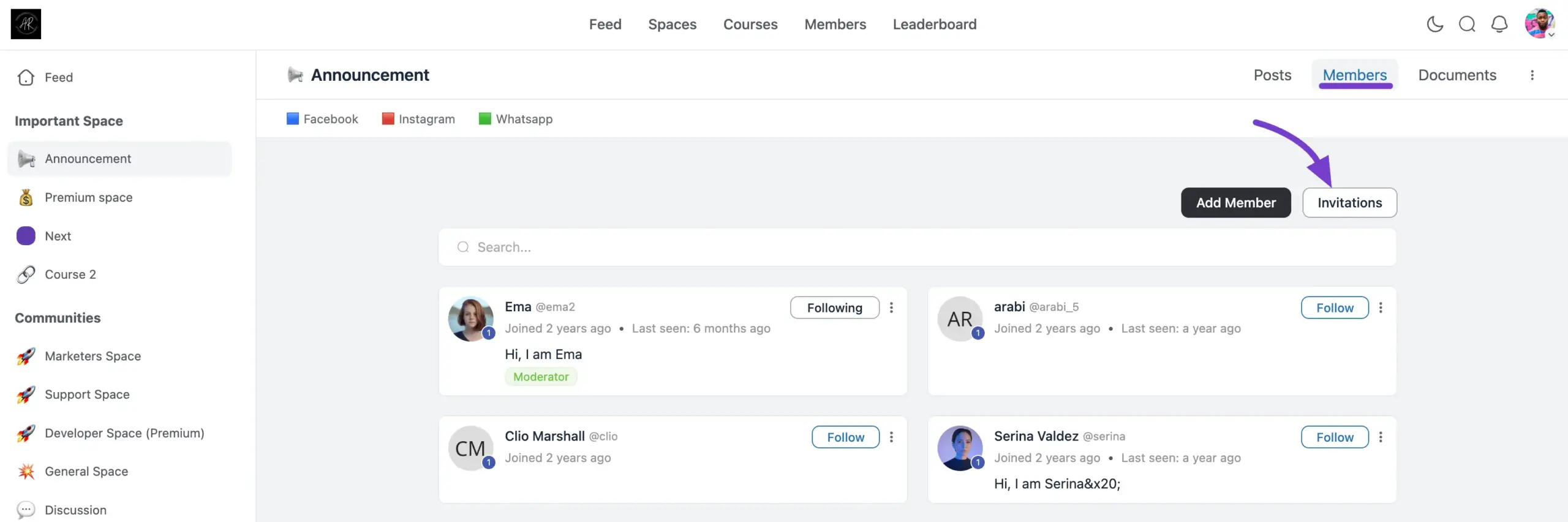
Once inside the Space, click on the Members tab located in the top-right menu.

Click the Invitations button (located right next to the Add Member button).
    Step 2: Monitoring Active Invitations #

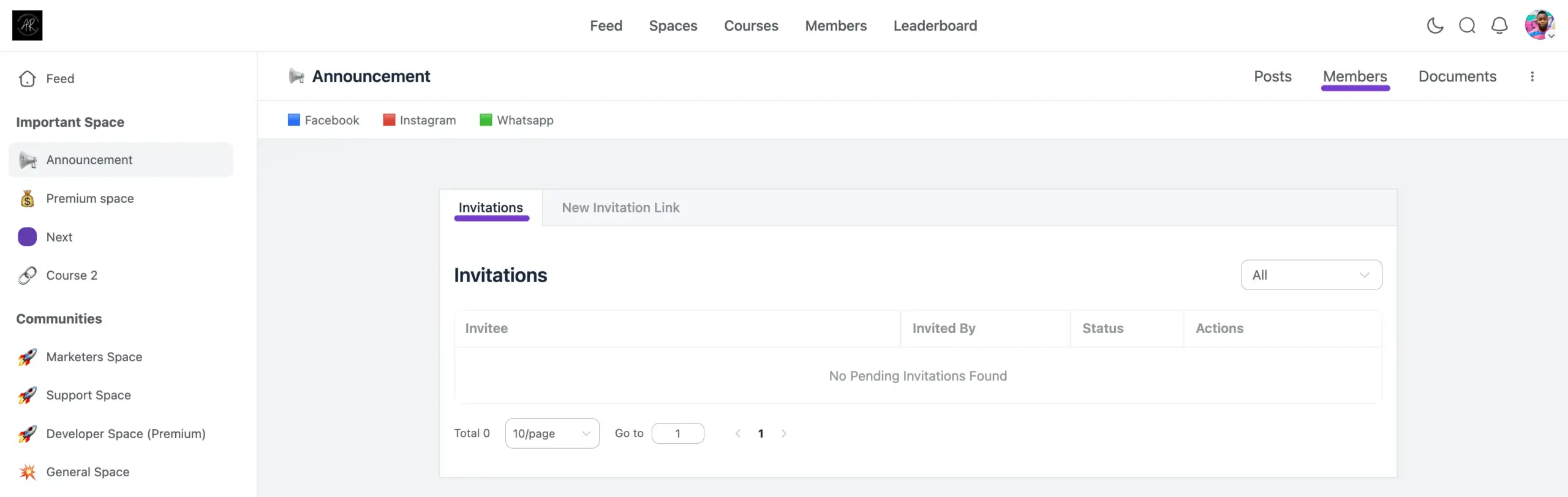
    When you open the Invitations area, you will default to the Invitations tab. This is your command center for tracking the status of all the invites you have sent out.

    Here is what you will find in this dashboard:

    • Invitee: Displays the list of all the invitation links you have created or the specific users you have invited.
    • Invited By: Shows the user profile of the host or admin who generated the invitation.
    • Status: Quickly check if a specific invitation link is Pending, Accepted, Active, or Expired.
    • Actions: Need to clean up? You can delete any specific invitation from the list here.
    • Filter (Top Right): Use the dropdown menu to filter your list based on the invitation status, helping you quickly find expired or pending links.
    Step 3: Creating a New Invitation Link #

    Ready to bring in new faces? Generating a shareable link is the easiest way to invite groups of people to your Space.

    1. From the Invitations dashboard, click the New Invitation Link tab.
    2. Invitation Link Title: Give your link a clear name (e.g., “Spring 2026 VIP Invite”) so you can easily track it later in your dashboard.
    3. Limit the number of uses: Want to create an exclusive group? Enter a number here to cap how many people can use this specific link. Leave it empty for unlimited uses.
    4. Expire Date: Click the calendar field to set a specific date for the link to stop working. Leave it empty if you want the link to remain active permanently.
    5. Click the Create Invitation Link button.
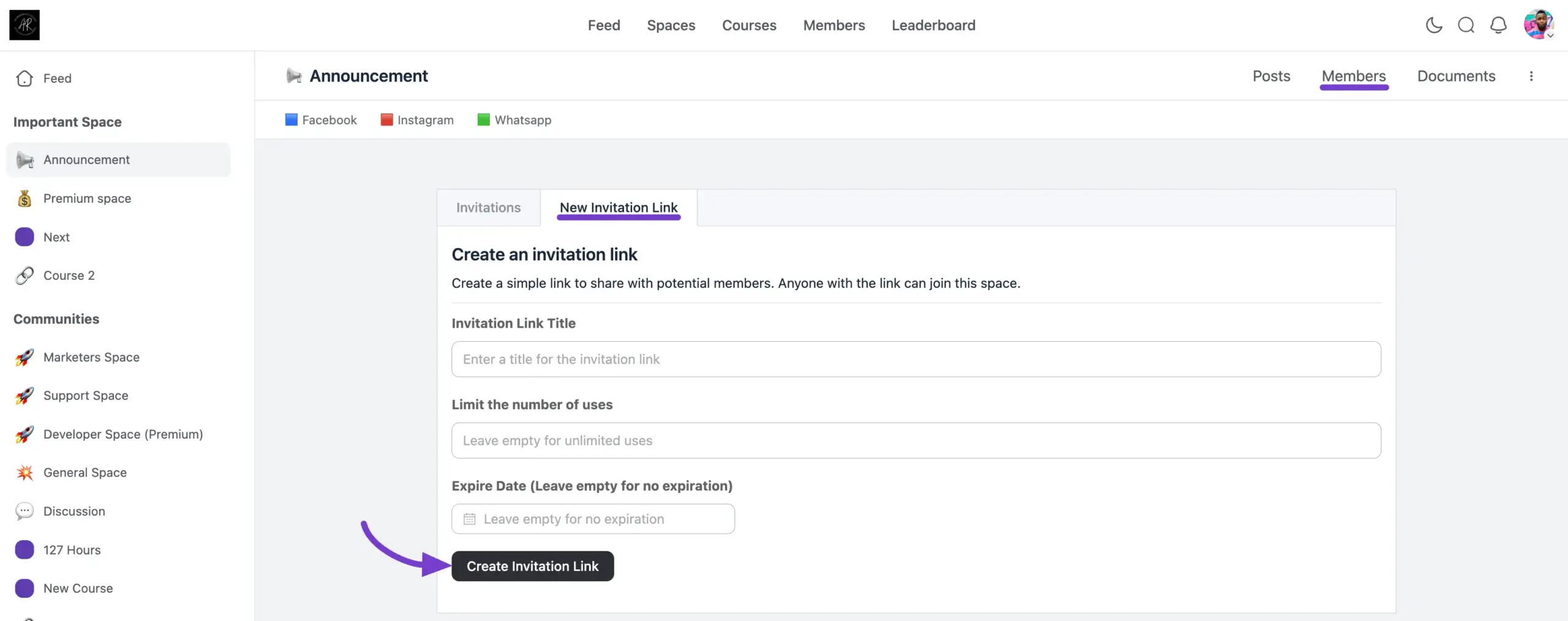
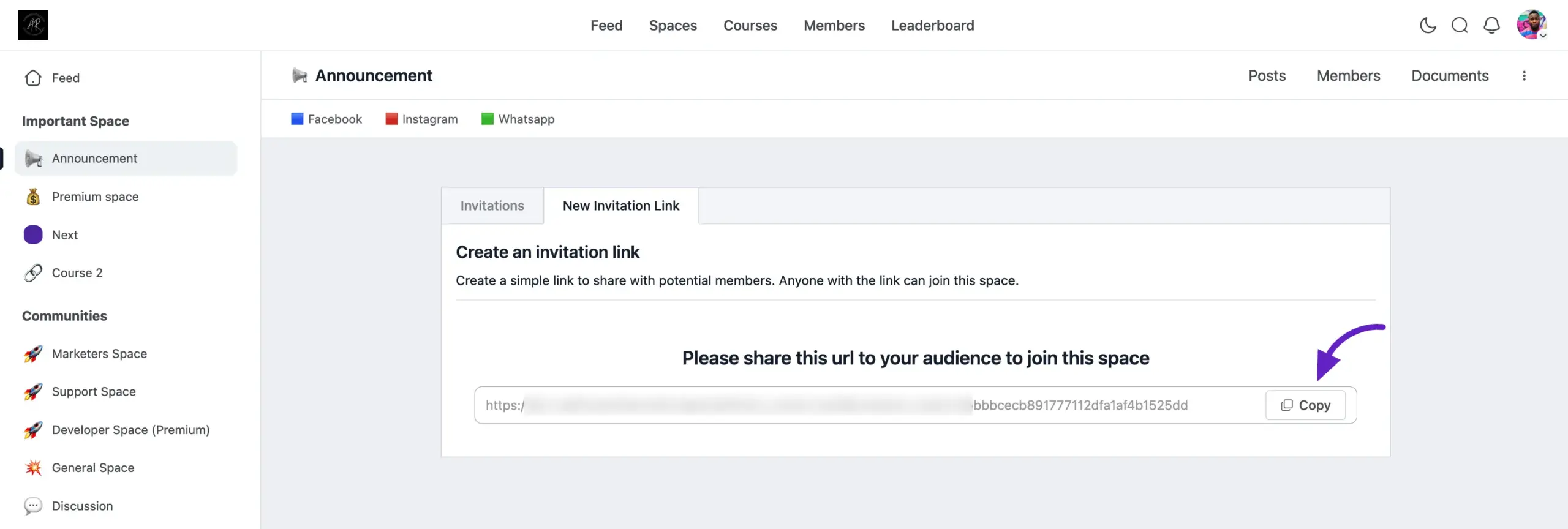
    Once created, simply copy the link and share it via email, social media, or direct message with the people you want to add!
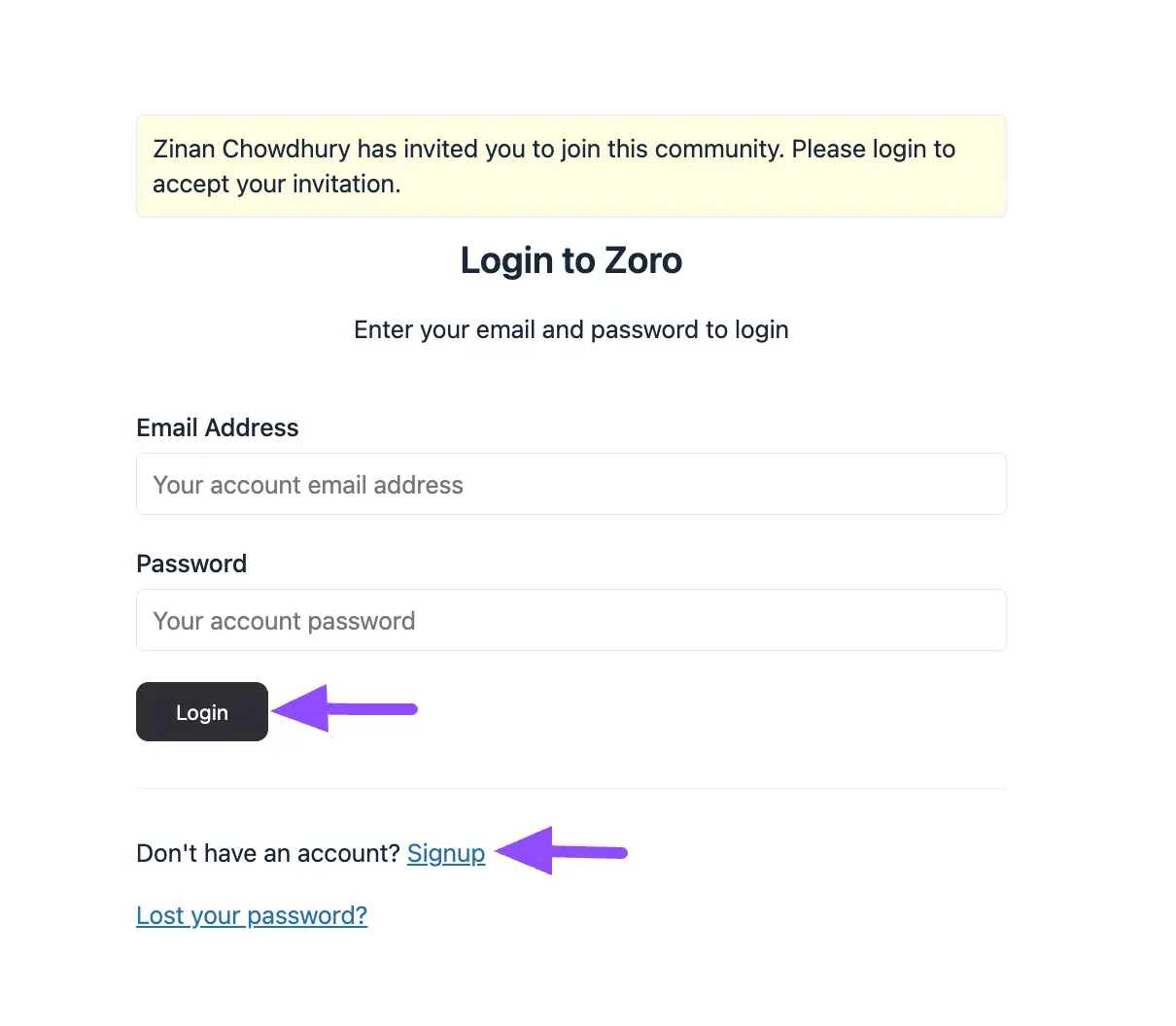
    ✨ Note: When users click your invitation link, the system is smart! If they are already logged into your community, they will be instantly added to the Space. If they are brand new, they will automatically be prompted with a friendly Login/Registration form to create their account before joining.

    🔍 Example: If you are running a special promotion, you can create a link titled “Promo 50,” limit the uses to exactly 50 people, and set it to expire on Friday. It’s a great way to build urgency and excitement!
    What are your Feelings

    Share This Article :

    • Facebook
    • X
    • LinkedIn
    • Pinterest
    Still stuck? How can we help?

    Still stuck? How can we help?

    Updated on May 5, 2026
    Documents/Files for SpaceHow to Create a Space
    Table of Contents
    • Step 1: Navigating to the Invitations Menu
    • Step 2: Monitoring Active Invitations
    • Step 3: Creating a New Invitation Link

    Launch Your Own Social Media Platform Today!

    Establish a meaningful connection with your people.

    Buy Now

    FluentCommunity is the fastest and the most efficient community plugin for WordPress

    Social
    • WordPress
    • Facebook
    • YouTube
    • X
    • LinkedIn
    RESOURCES
    • About Us
    • Features
    • Blog
    • Documentation
    • Support
    • Online Community 101
    • FluentCommunity 101 Course
    • Account
    • Brand Guideline
    Popular
    • FluentCommunity: What It Is, Why We Built It, and Where It’s Headed
    • BuddyBoss migration with FluentCommunity
    • 9 Best Patreon Alternatives for 2025
    • Top 7 Udemy Alternatives for 2025
    Use Cases
    • For Education
    • For Social Network
    • For Workplace
    • For Brands
    • For Online Course
    • For Professionals
    • For Club & Org.
    • For Coaching
    • For Nonprofits
    • For Creators
    comparisons
    • Free vs Pro
    • vs BuddyBoss
    • Vs Learndash
    • vs Circle
    • vs Patreon
    Our products
    • Fluent Forms
    • FluentCRM
    • FluentBooking
    • FluentBoards
    • FluentSupport
    • FluentSMTP
    • FluentSnippets
    • Ninja Tables
    • WP Social Ninja
    • Paymattic
    • AzonPress
    • FluentAffiliate
    • FluentCart
    Miscellenoues
    • Wall Of Love
    • Share Your Story

    © 2026 FluentCommunity A Brand of  WPManageNinja™ | Privacy Policy | Terms & Conditions

    Join the Waitlist

    Get early access and be the first to experience FluentCommunity

    Join Waitlist (#4)
    • Features
    • Use Cases
      • For Online course
      • For Education
      • For Brands
      • For Workplace
      • For Social Network
      • For Professionals
      • For Club & Org.
      • For Coaching
      • For Nonprofits
    • Blog
    • Pricing
    • About
    • Roadmap
    • Docs
      • User Doc
      • Developer Docs
    • FluentCommunity 101 Course
