

Skip to content

Get This Special Discount!

Save 20% OFF
FluentCommunity
  • Features
  • Use CasesExpand
    • Online Course
      Education
      Brands
      Workplace
      Social Network
      Professional
      Club & Association
      Nonprofits
      Coaching
      Creator
      • Buddyboss alternative
        FluentCommunity: The Ultimate BuddyBoss Alternative

        Read More

        Ashik Elahi
        Ashik Elahi
        February 7, 2025
      All Blogs
  • Pricing
  • Blog
  • Integration
  • Roadmap
  • DocsExpand
    • User Doc
    • Developer Docs
  • Account

Get This Special Discount!

Save 20% OFF
FluentCommunity

Getting Started

  • Introduction to FluentCommunity 
  • Install FluentCommunity
  • FluentCommunity Onboarding Guide
  • Global Activity Feed

Space Management

  • How to Create a Space
  • Managing Privacy of Spaces
  • Manage Members of Space 
  • Editing or Deleting a Space
  • Space Links
  • Add Custom Links
  • Activity Feeds
  • Activity Feed View
  • Creating & Managing Posts
  • Community Post Sorting in FluentCommunity
  • Creating and Managing Polls 
  • Handling Comments & Reactions
  • Documents/Files for Space
  • Membership Invitation for Spaces

Course Management

  • Creating and Managing Course
  • Course Privacy 
  • Course Enrollment Management
  • Course Links
  • Documents/Files for Course Lesson
  • Quiz Module

Member Management

  • Member Management
  • Members Profile
  • Follower & Block Module
  • Members List/Grid Layout View
  • Social Links Customization

Monetization

  • Monetizing Your Spaces
  • Monetizing Your Courses
  • Monetizing Your Spaces/Courses with Paymattic
  • Collect Recurring Payments for Private Spaces/Courses

Leaderboard Management

  • Leaderboard Management 

Notifications & Messaging

  • Global Email Notifications
  • Profile Notification Settings 
  • FluentCommunity Chat

Customization

  • Theme Compatibility Feature
  • Color Customization
  • Welcome Banner

Integration

  • FluentCart Integration with FluentCommunity 
  • FluentCRM Integration with FluentCommunity
  • Fluent Forms Integration with FluentCommunity
  • Paymattic Integration with FluentCommunity
  • Giphy Integration with FluentCommunity
  • Configuring CloudFlare R2 
  • Configuring Amazon S3
  • Configuring BunnyCDN

Migration

  • FluentCommunity BuddyPress Migration
  • FluentCommunity BuddyBoss Migration

Administration

  • General Settings 
  • Customize your Portal 
  • Manager Settings
  • Features & Addons Settings
  • Menu Settings
  • Space Group Settings
  • User Badge
  • Portal Access Settings
  • Generating a Sitemap
  • Privacy Settings
  • Media Module 
  • Manage Topic
  • Content Moderation Settings 
  • Customizing Login/Signup Form 
  • Access Management Through FluentCRM Tags

Miscellaneous

  • Report/Analytics
  • Community as Homepage
  • Adding Custom CSS & JavaScript
  • Incoming Webhook in FluentCommunity
  • Create an XML Sitemap in FluentCommunity

Changelog

  • Changelog
View Categories
  • Home
  • Docs
  • Member Management
  • Member Management

Member Management

Managing members in FluentCommunity is straightforward. As an admin, you have full control over adding members and managing their access, based on the privacy settings of each space and course. Here’s a comprehensive guide on how member management works in Spaces and Courses.

Adding Members to Spaces #

FluentCommunity admins can easily add and manage members in any space. If you need a detailed guide on providing access and managing members effectively, refer to this documentation.

The WordPress Admin acts as the default admin of FluentCommunity and has the authority to add any user to a space. In contrast, the FluentCommunity Admin can only approve member requests to join space and remove members but cannot add new members directly.

Member Access Based on Space Privacy #

Public Space #

For spaces with Public privacy settings, members can join effortlessly. They simply visit the space page and click the Join Space button. No admin approval is required, and members gain instant access.

Private Space #

When a space is set to Private, the joining process becomes more controlled. Members will encounter a lock screen and must request to join.

  • Request Process: Members send a join request, which the admin can review.
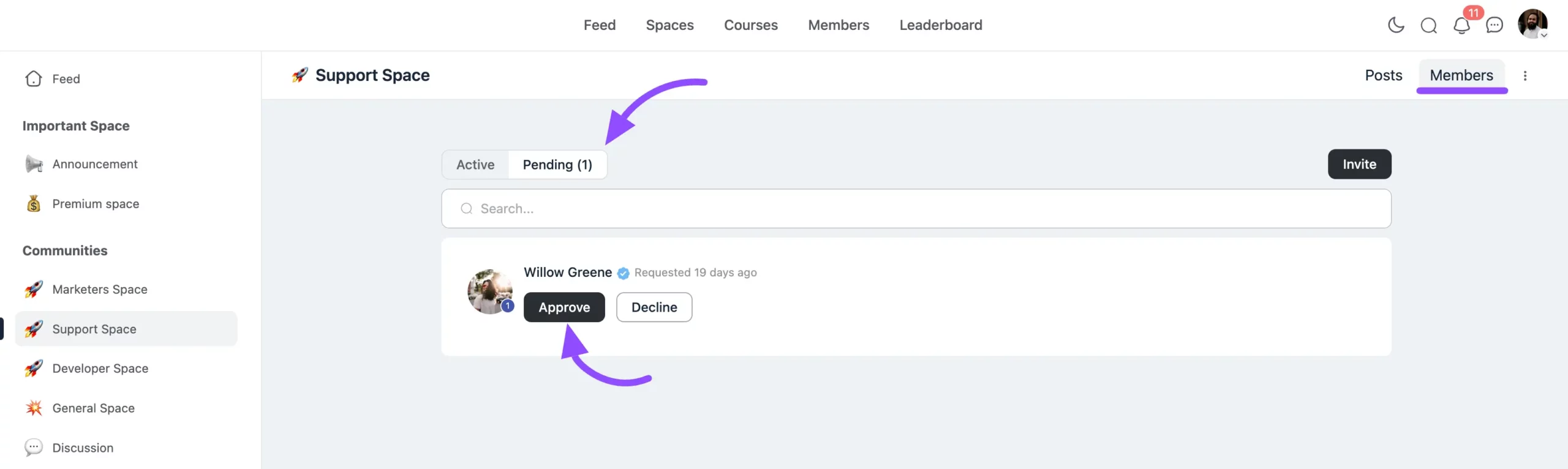
  • Admin Approval: Admins receive notifications of pending member requests. By navigating to the Members section, they can view all pending requests and click the Approve button to grant access.
Private spaces can be monetized to charge for membership access. Refer to this documentation for more details on monetization.

Secret Space #

Secret spaces offer the highest level of privacy. Members can only join through a direct invitation from the admin. For guidance on inviting and managing members in a Secret space, refer to this documentation.

Adding Members to Courses #

WordPress Admin, FluentCommunity Admin, and Course Admin have the ability to manage student enrollments in courses. For detailed instructions on enrolling students, please refer to this guideline.

Public Course #

Public courses are accessible to any community member without admin approval. Members can visit the course page and click Enroll to begin learning immediately.

Private Course #

In Private Courses, only admins or moderators can grant access to students from the WordPress users list. This means a student must already be a registered WordPress user on the site before the admin or moderator can give them access. While students without access can still see the private courses listed in the Course section of FluentCommunity, they won’t be able to enter or view the course content.

Secret Course #

In Secret Courses, only admins or moderators can grant access to students from the WordPress users list. Unlike private courses, secret courses remain completely hidden in the Course section of FluentCommunity for students who don’t have access.

Private & Secret Courses can be monetized to charge for access. Refer to this documentation for more details on monetization.

Removing Members from Spaces and Courses #

In FluentCommunity, it is important to note that you cannot remove a member directly from the global member view section. Member removal is context-specific, meaning you must remove them from the specific Space or Course they are part of.

Removing Members from a Space To remove a member from a specific Space:

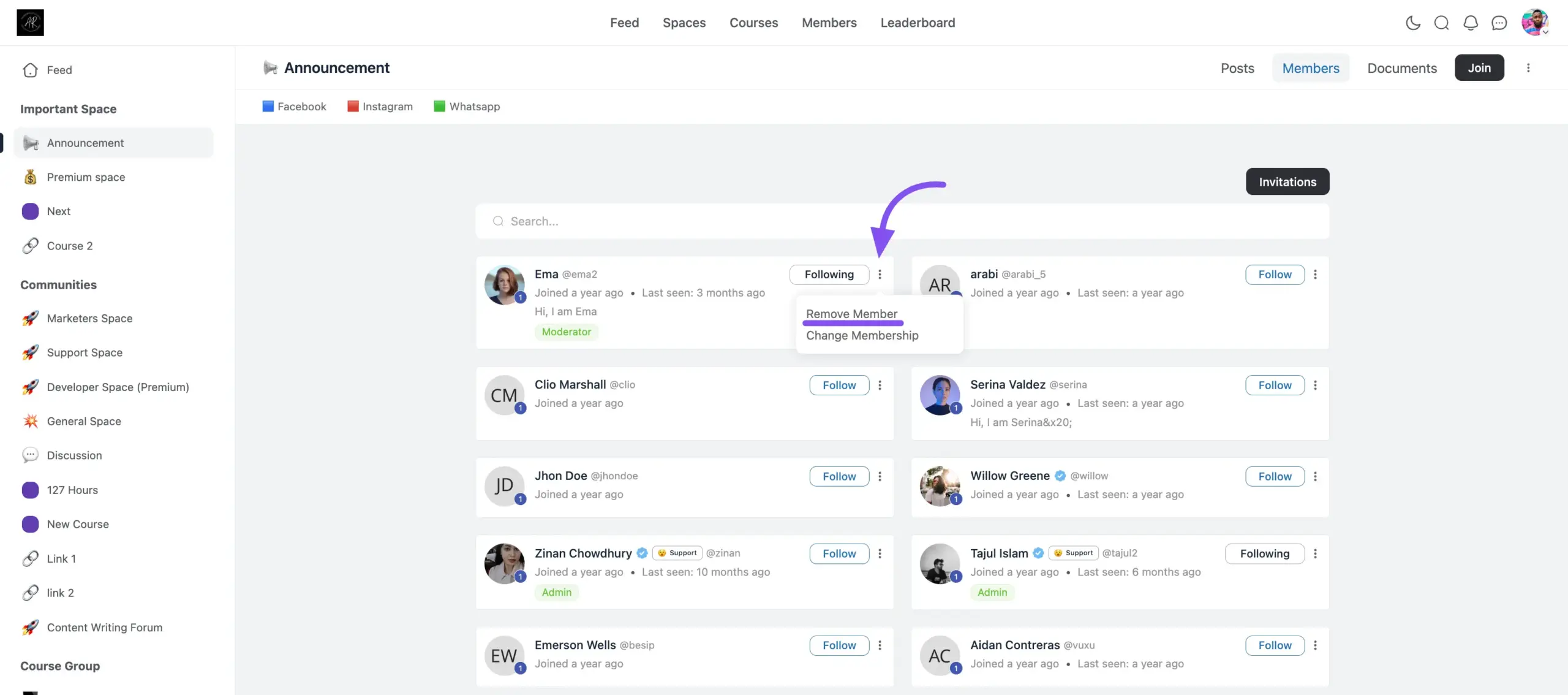
  1. Navigate to the specific Space (e.g., “Announcement” or “General Space”).
  2. Click on the Members tab to view the list of participants.
  3. Locate the member you wish to remove and click the three-dot menu icon next to their name.
  4. Select Remove Member to revoke their access to that space.
Removing Students from a Course To remove a student from a specific Course:

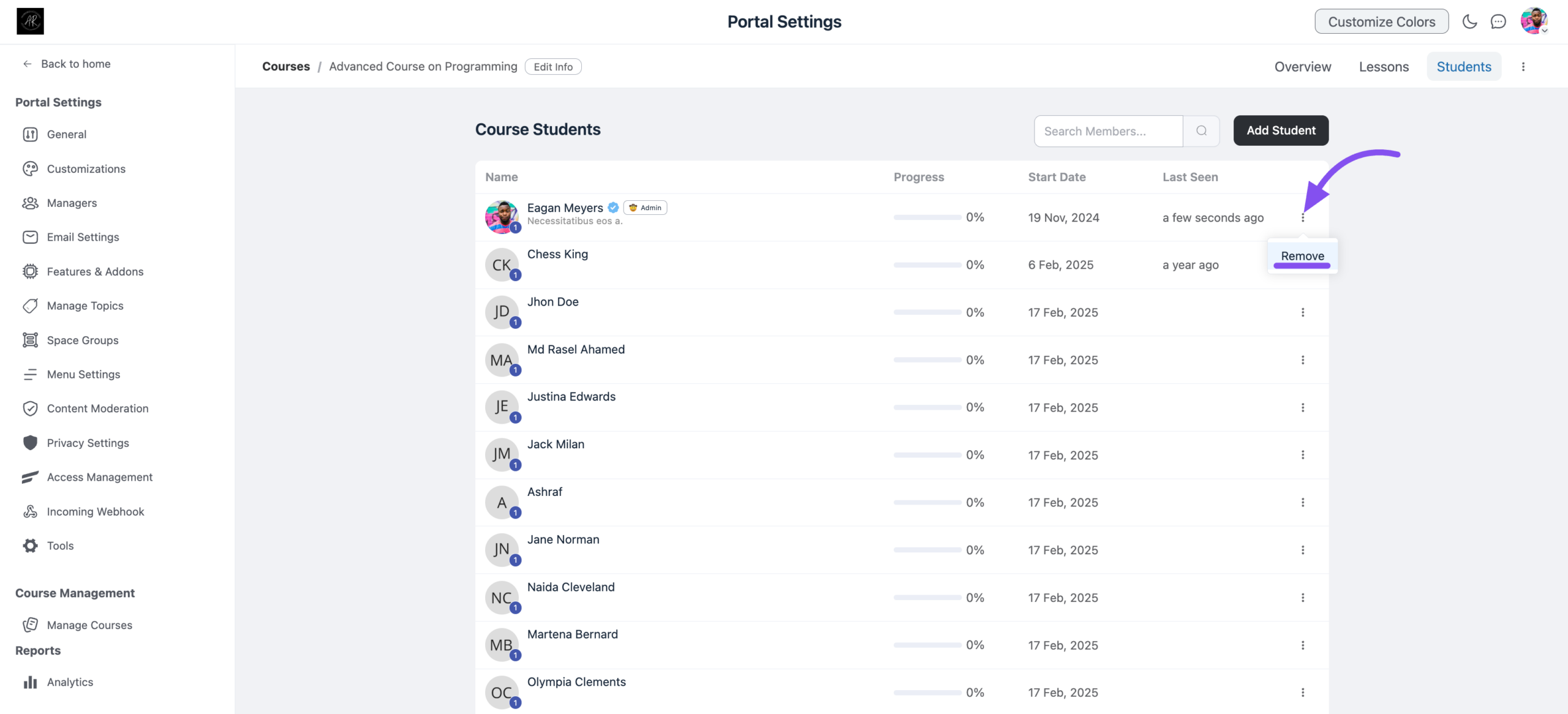
  1. Navigate to the specific Course portal.
  2. Go to the Students tab.
  3. Find the student in the list, click the three-dot menu icon next to their name, and select Remove.
Assigning Roles to Community Members #

There are four roles available for community members, which can only be assigned by the WordPress Admin. For more information on the available roles and how to assign them, read this documentation.

This approach to member and course management ensures your community runs smoothly while offering flexibility and privacy. For further details or guidance, feel free to contact us. 

What are your Feelings

Share This Article :

  • Facebook
  • X
  • LinkedIn
  • Pinterest
Still stuck? How can we help?

Still stuck? How can we help?

Updated on January 23, 2026
Social Links CustomizationMembers Profile
Table of Contents
  • Adding Members to Spaces
    • Member Access Based on Space Privacy
      • Public Space
      • Private Space
      • Secret Space
  • Adding Members to Courses
    • Public Course
    • Private Course
    • Secret Course
    • Removing Members from Spaces and Courses
    • Assigning Roles to Community Members

Launch Your Own Social Media Platform Today!

Establish a meaningful connection with your people.

Buy Now

FluentCommunity is the fastest and the most efficient community plugin for WordPress

Social
  • WordPress
  • Facebook
  • YouTube
  • X
  • LinkedIn
RESOURCES
  • About Us
  • Features
  • Blog
  • Documentation
  • Support
  • Free vs Pro
  • vs BuddyBoss
  • vs Circle
  • vs Patreon
  • Online Community 101
  • FluentCommunity 101 Course
  • Account
  • Brand Guideline
Our Products
  • Fluent Forms
  • FluentCRM
  • FluentBooking
  • FluentBoards
  • FluentSupport
  • FluentSMTP
  • FluentSnippets
  • Ninja Tables
  • WP Social Ninja
  • Paymattic
  • AzonPress
  • FluentAffiliate
  • FluentCart
Use Cases
  • For Education
  • For Social Network
  • For Workplace
  • For Brands
  • For Online Course
  • For Professionals
  • For Club & Org.
  • For Coaching
  • For Nonprofits
  • For Creators
Popular
  • FluentCommunity: What It Is, Why We Built It, and Where It’s Headed
  • BuddyBoss migration with FluentCommunity
  • 9 Best Patreon Alternatives for 2025
  • Top 7 Udemy Alternatives for 2025

© 2026 FluentCommunity A Brand of  WPManageNinja™ | Privacy Policy | Terms & Conditions

Join the Waitlist

Get early access and be the first to experience FluentCommunity

Join Waitlist (#4)
  • Features
  • Use Cases
    • For Online course
    • For Education
    • For Brands
    • For Workplace
    • For Social Network
    • For Professionals
    • For Club & Org.
    • For Coaching
    • For Nonprofits
  • Blog
  • Pricing
  • About
  • Roadmap
  • Docs
    • User Doc
    • Developer Docs
  • FluentCommunity 101 Course
