

FluentCommunity Q3 2026 Updates: PWA App, Push Notifications, and an Advanced Quiz Builder

Table of Content
Subscribe To Get
WordPress Guides, Tips, and Tutorials


The third quarter of 2026 was the busiest stretch FluentCommunity has had since launch. Between July 8 and September 18, we released six versions, and together they changed how a community on WordPress looks, feels, and reaches its members. Version 2.7.0 opened the quarter with a Space Media Gallery, FluentPlayer lesson controls, and smarter moderation. Two weeks later, version 2.7.5 added audio posts, LaTeX support in lessons, and theme modes.
In August, version 2.8.0 turned your community into an installable app and introduced signed plugin updates. Then September brought three releases in just over two weeks: push notifications in 2.9.0, Pages for Spaces in 2.10.0, and the Space Menu Manager with an advanced quiz builder in 2.11.0.
That is a lot to keep track of, especially if you update your site without reading every release note. So this post brings the whole quarter together in one place. Instead of walking through each version in order, we have grouped the features by what they help you do, whether that is sharing richer content, reaching members on their phones, organizing your spaces, teaching better courses, or keeping your community safe. Along the way, we point out which features need FluentCommunity Pro, so you know exactly what to expect when you update.
Richer Ways to Share Content
A community is only as lively as the things its members can post. This quarter, we widened that range well beyond text and single images. As a result, members can now browse a space’s media in one place, share audio alongside photos and videos, and publish posts that only open through a direct link.
A Media Gallery for Every Space
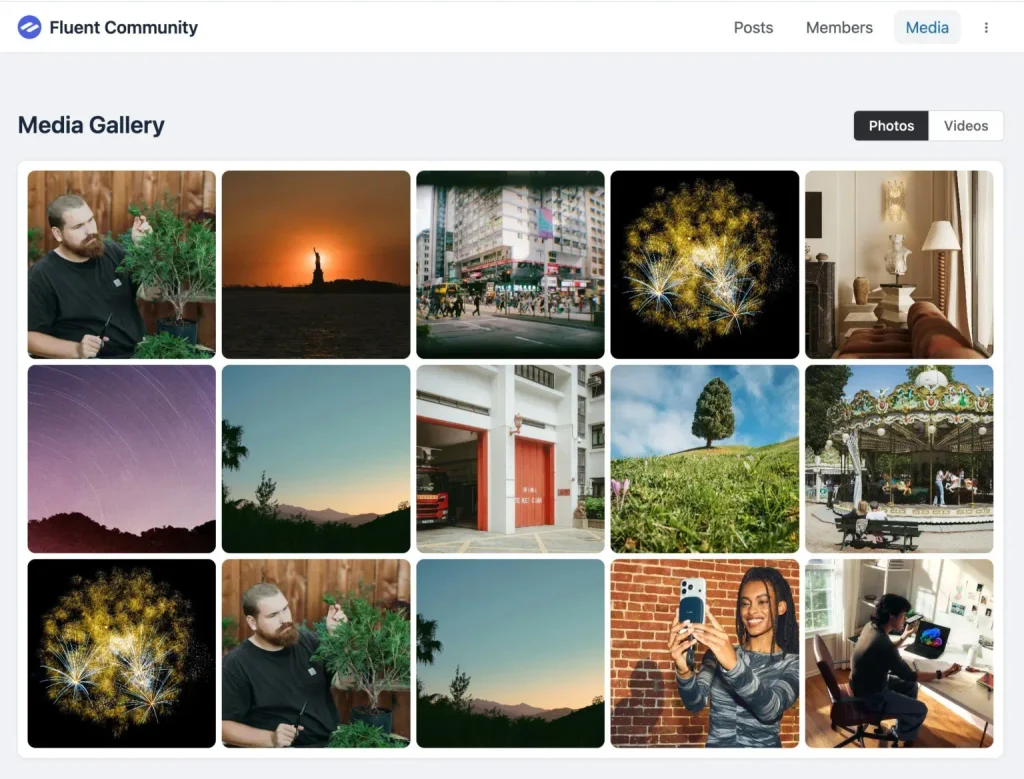
Photos and videos are some of the most engaging things members share, but they used to get buried in the feed within days. Version 2.7.0 introduced the Space Media Gallery, a Pro feature that gathers every image and video shared in a space into one clean, browsable grid. A new Media tab appears in the space, with simple toggles to switch between images and videos. Members can open any item in a modern lightbox and then jump straight back to the original post. The gallery is off by default, so you enable it from the space settings only where a gallery makes sense.
Audio Posts and an Audio Gallery
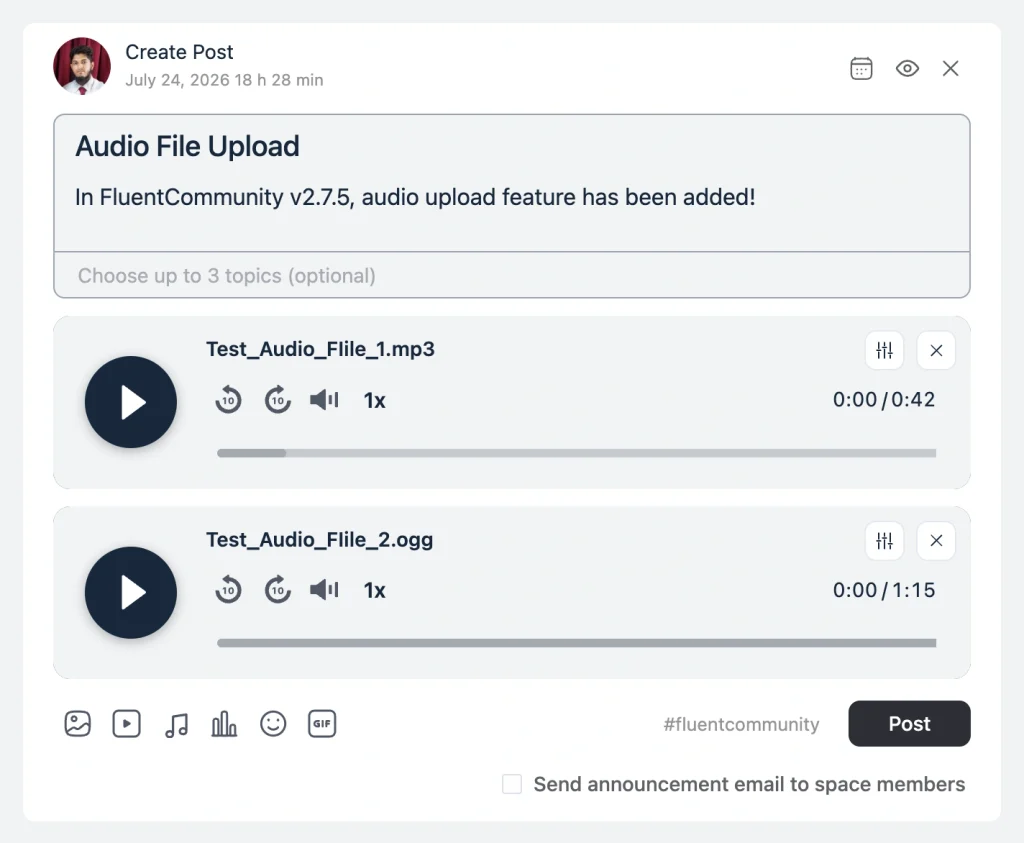
Version 2.7.5 gave members a completely new way to share. Podcast episodes, voice notes, recorded Q&A sessions, music, and meditation tracks can now be posted through a new Audio tab in the feed composer, the same way members already share photos and videos. Audio uploads run through FluentPlayer, so members get a real player in the feed instead of a bare download link. To switch it on, you install FluentPlayer and turn on the Enable FluentPlayer Audio setting, and your existing upload permissions still decide who can post.
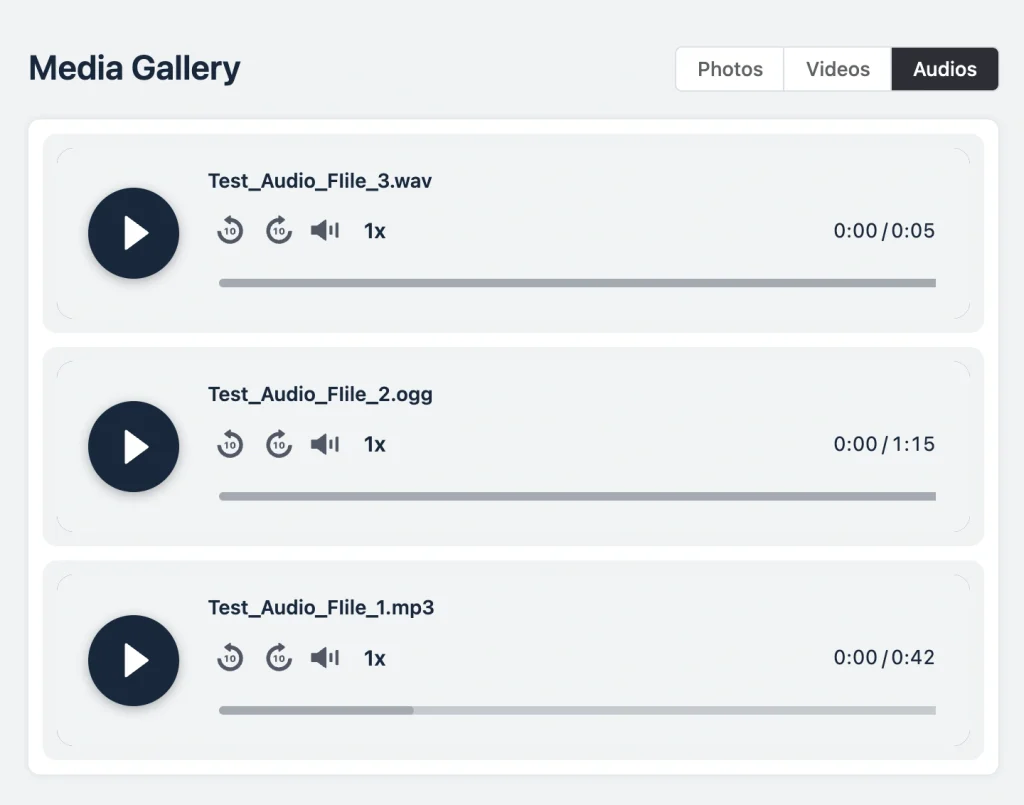
Before posting, members can rename each track to something readable and add a thumbnail so the player shows cover art. Once audio starts flowing, it collects under a new Audios tab in the Space Media Gallery, right next to Photos and Videos. That tab only appears in spaces that actually have audio, so quieter spaces stay uncluttered. And if FluentPlayer ever fails to load, the post falls back to the browser’s built-in audio player, so members can still listen.
Unlisted Posts You Share by Link
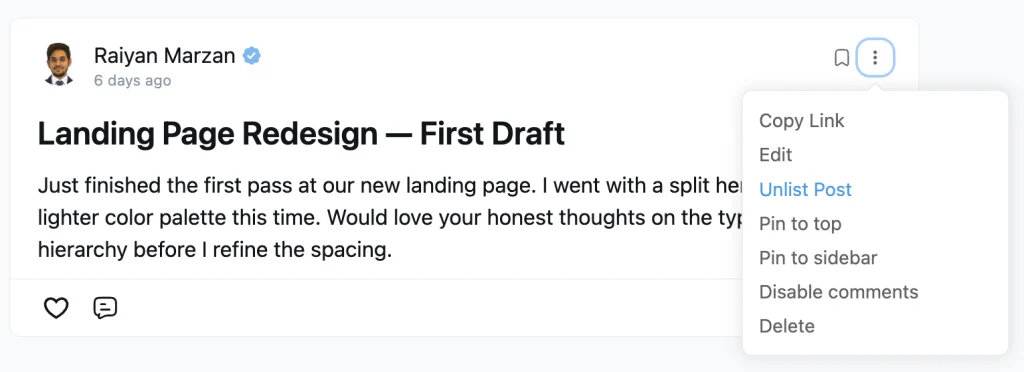
Not every post belongs in everyone’s feed. Meeting notes for one team, an early draft that needs feedback, or a resource you only share when someone asks all fit this description. Version 2.8.0 added unlisted posts, a Pro feature built for exactly these cases. An unlisted post stays hidden from all feeds and listings, yet anyone with the direct link can open it normally.
Making a post unlisted takes one checkbox in the composer, and you can switch an existing post from its edit screen. Unlisted posts carry a clear badge, and authors still see their own unlisted posts on their profile timeline. Moderators also get a matching visibility filter in the feed sort dropdown, so reviewing every unlisted post takes a couple of clicks.
Your Community on Every Home Screen
Most members check their communities on a phone, often in spare minutes between other things. So we spent a large part of Q3 making FluentCommunity feel at home there. First, your community became an app members can install, and then it gained the ability to notify them the moment something happens.
Install Your Community as an App
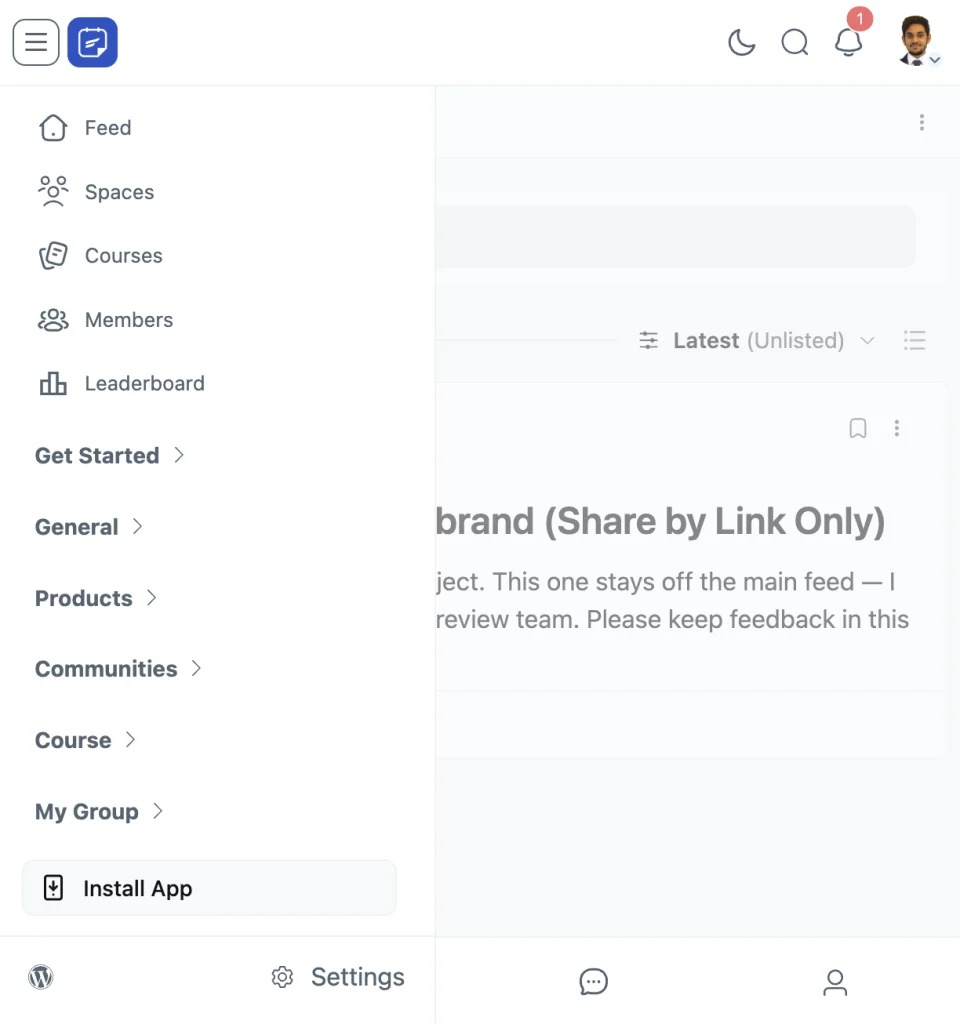
The headline of version 2.8.0 was the Progressive Web App module, a Pro feature that adds an Install App entry to the portal sidebar. With one tap, your community installs like any other app, with your icon on the home screen, your name under it, and no browser bar around your content. In the settings drawer, you choose the App Name, a Short Name for the label under the icon, a Splash Screen Color, and your own App Icon. The installed app also follows your community’s look, including light and dark mode.
September then made the app feel more complete. In 2.9.0, the app’s scope widened to cover your whole site, so WordPress pages built with a FluentCommunity page template stay inside the app instead of opening in an in-app browser. On iOS, the installed app gained pull-to-refresh, which matters because an installed app has no reload button. Android icons also look sharper, since developers can now declare a mask-safe icon that fills the whole shape.
Push Notifications That Bring Members Back
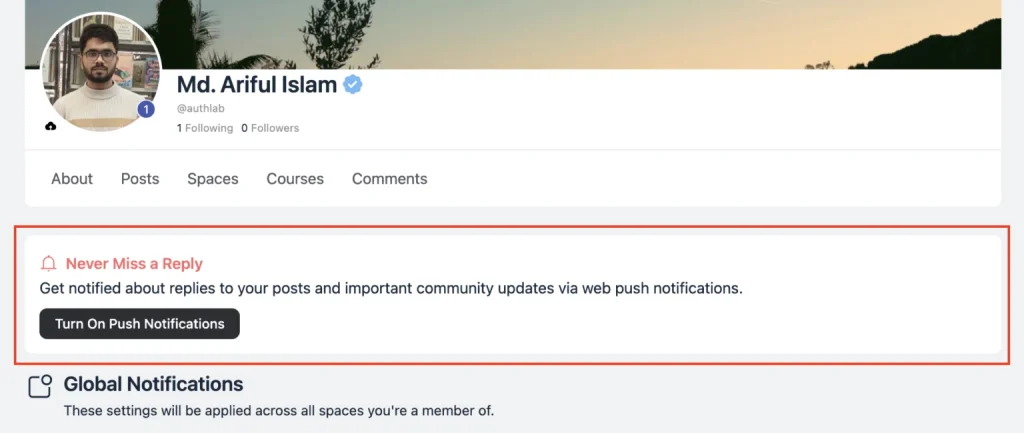
Email is not always fast enough. When someone replies to a member’s post, that member often finds out hours later. Version 2.9.0 solved this with web push notifications, which arrive on desktop and mobile within seconds, even when the community tab is closed. Push runs on FluentNotify, our free push plugin, which you install from Settings, then Features & Addons, and connect with your Firebase credentials.
After that, a friendly “Never Miss a Reply” prompt invites members to turn notifications on with one tap. You decide where that prompt appears, choosing from the feed sidebar, the profile sidebar, the notification preferences page, and the notifications dropdown. Members get real control as well. Their preferences page now shows an Email column and a Push column side by side, so they can pick a channel for each event, including comments on their post, replies, mentions, and new comments on a post they commented on. Meanwhile, you set default preferences for anyone who has not made a choice yet.
Version 2.10.0 refined the experience further. Opening a push now clears the matching in-app notifications, so the badge reflects reality. In addition, when a push reaches a member, the in-app toast for the same event stays quiet, so nobody gets told twice.
Organize Your Spaces Your Way
As a community grows, good structure matters as much as good content. Members need to find the right information quickly, and you need control over how each space is laid out. With that in mind, the updates below give you permanent pages, custom menus, ordered topics and badges, and a portal that adapts to how each member likes to read.
Pages for Your Spaces
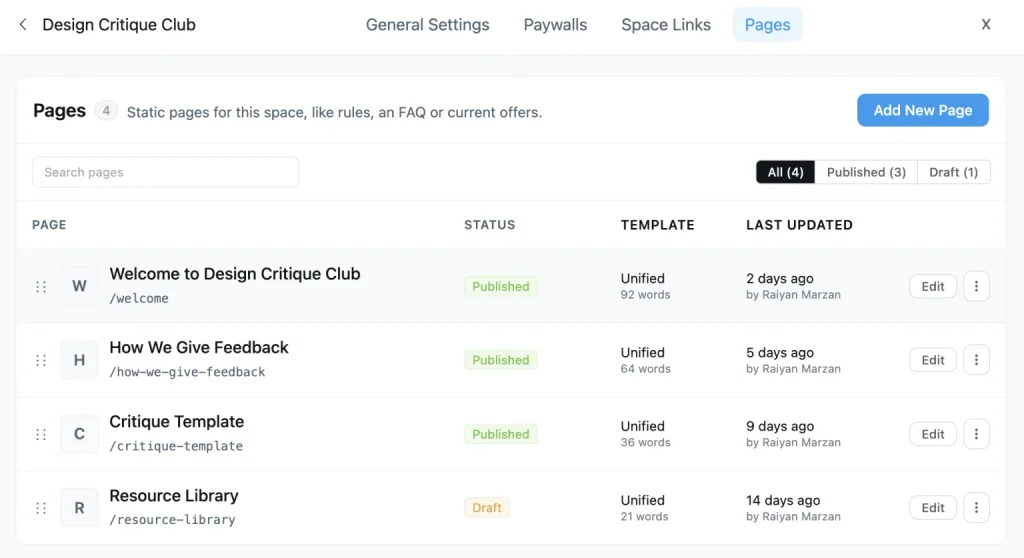
Every community owner knows this situation. You write a helpful welcome post, members keep posting, and a few weeks later that post is buried. Version 2.10.0 fixed this with Pages for Spaces, a Pro feature that gives permanent content a home inside the space where it belongs. Each space now has a Pages tab, where you create a page with the same block editor you already use for posts and lessons.
You can keep a page as a draft until it is ready, and you can drag pages into the order you want members to read them. Pages can take comments too, so a guide becomes a conversation instead of a notice board. As a result, a “Start Here” page can help new members get going, a guidelines page keeps your rules easy to find, and an FAQ page saves you from answering the same questions every week.
The Space Menu Manager
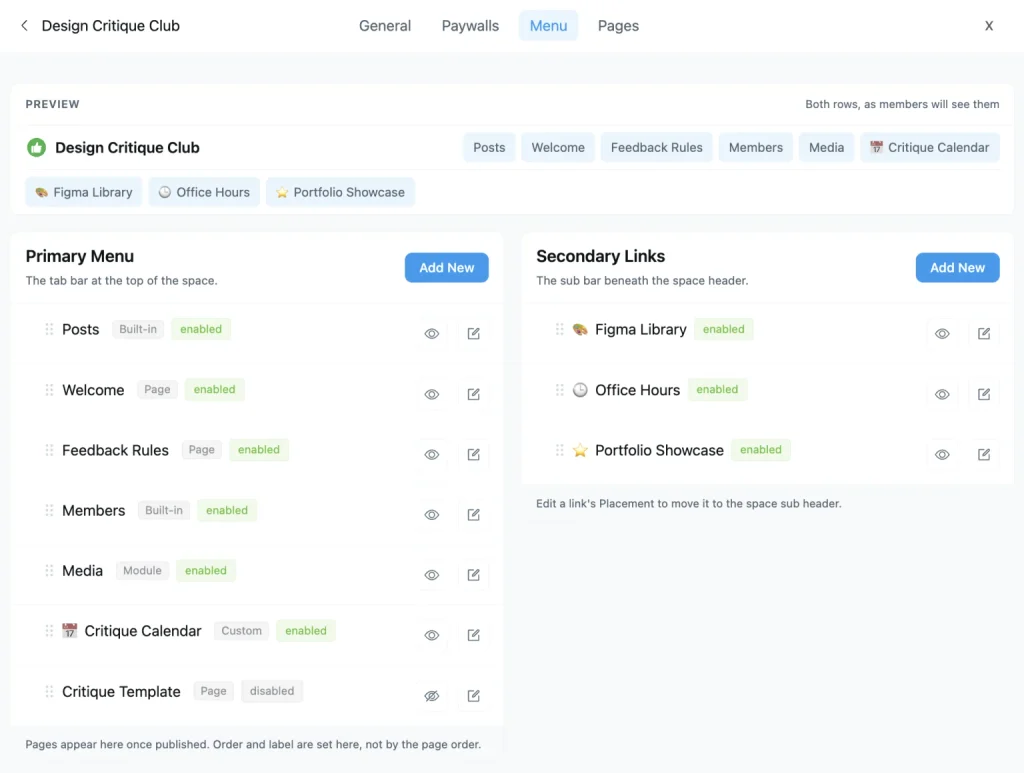
Until version 2.11.0, the tabs across the top of a space came in a fixed order. Now every space’s settings include a Menu tab that shows the Primary Menu and the Secondary Links side by side, with a live preview of both rows. From there, you drag tabs into the order you want, rename any tab, give it an emoji or SVG icon, and hide the ones your space does not use.
You can also add your own tabs that link to any URL or to one of the space’s pages. For each link, you decide who sees it, whether that is everyone, logged-in members, logged-out visitors, or members of specific spaces and courses. Newly published space pages join the menu automatically, and at least one tab always stays visible, so you can never hide your way into a space nobody can navigate.
Drag-and-Drop Topics and Badges
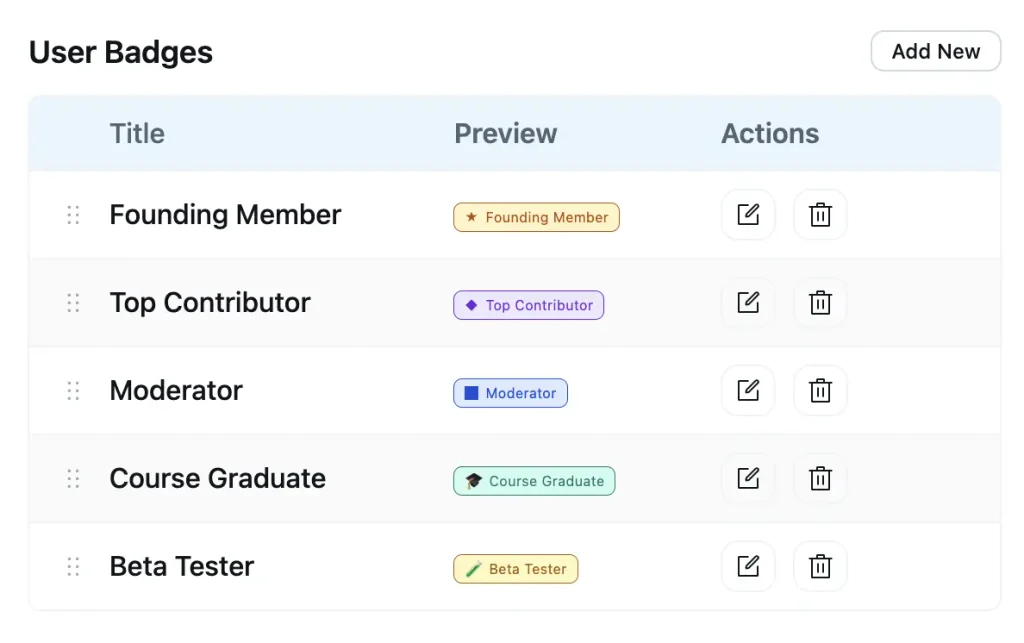
Topics and badges used to appear in whatever order they were created. Since 2.9.0, you can drag them into place. In your Topics settings, which is a Pro feature, the order you set is what members see in the topic navigation bar in spaces and in the topic filters on courses. User Badges settings, also Pro, work the same way, so you can lead with the badge that matters most on member profiles.
A Collapsible Sidebar and Theme Modes
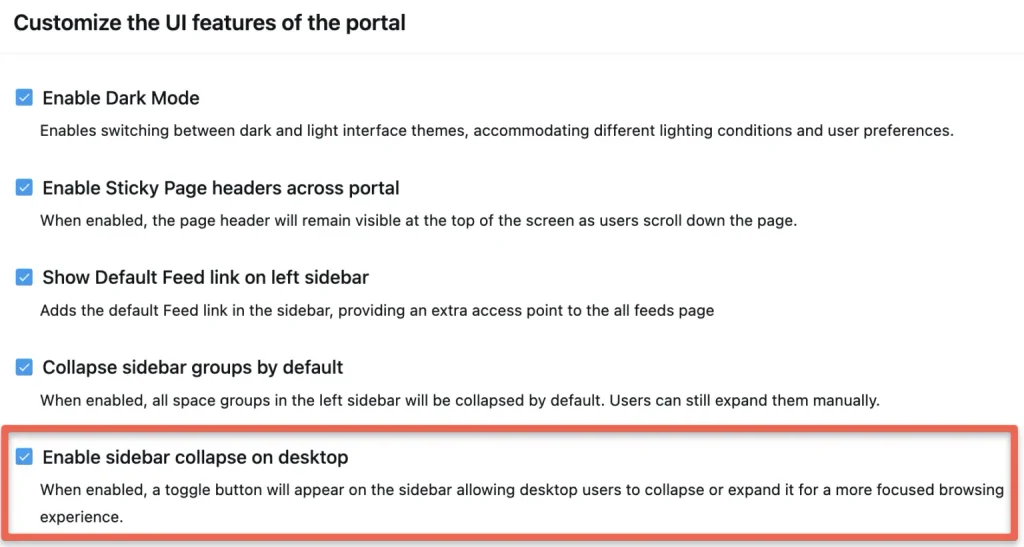
Sometimes members simply want more room to read and write. Version 2.7.0 added a collapsible desktop sidebar, a Pro feature that gives the feed and courses more breathing space with a single click. The choice is remembered across visits, and the portal loads in the right state from the first paint.
Version 2.7.5 followed with a Default Theme Mode setting, which lets you decide whether the portal opens in Light, Dark, or System mode. System is the friendly choice for most communities, because members who keep their devices in dark mode get a dark portal automatically. The theme also resolves before the page paints, so members no longer catch a flash of the wrong theme.
A Stronger Learning Experience
FluentCommunity is a learning platform as much as a community platform, and Q3 pushed that side forward in every release. The focus moved from simply delivering lessons to making sure students actually learn from them. Therefore, you will find better video controls, richer lesson content, and a quiz builder that teaches as well as tests.
FluentPlayer Video and Completion Controls
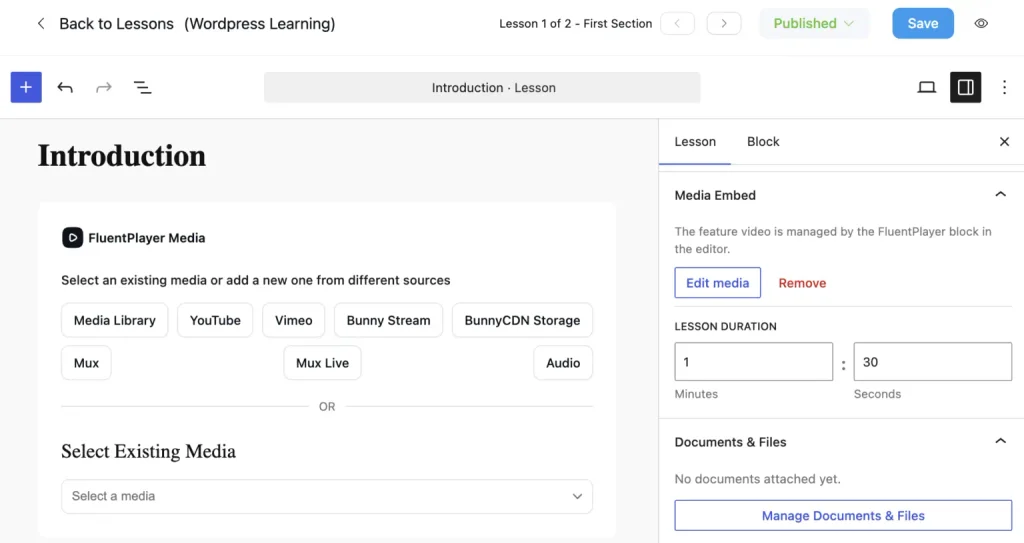
Course creators received attention in almost every release this quarter. It started in 2.7.0, when a FluentPlayer video block became available as a lesson’s feature media, right from the lesson editor.
More importantly, video lessons now know whether students actually watched. A new option lets you require video completion before a lesson can be marked complete. Watch coverage is tracked as the video plays; skipping ahead does not count, and you set the threshold. If you prefer a hands-off flow, you can turn on auto-complete instead, and the lesson marks itself done the moment the video ends.
Details and LaTeX Blocks in Lessons
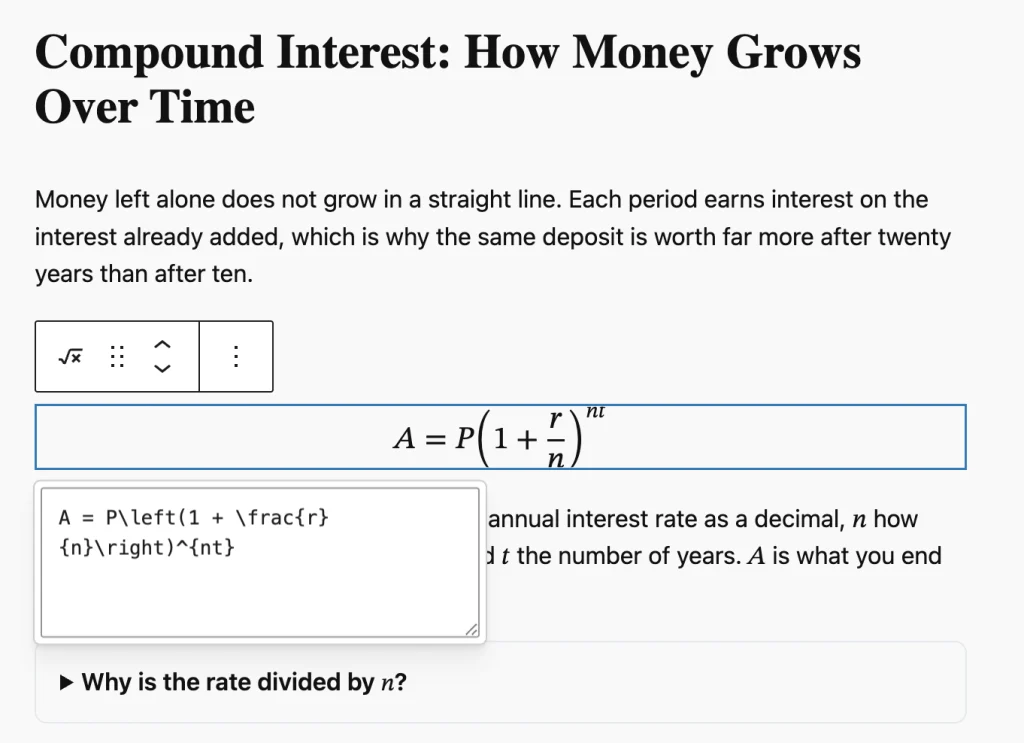
Version 2.7.5 made lesson content richer. The Details block lets you tuck hints, extra reading, or answers behind a click, which is perfect for “try it yourself” questions. The new Math block lets you write formulas in LaTeX and see them render as you type, either as a full-width equation or inside a sentence, heading, or list. Formulas are saved in a format browsers understand natively, so screen readers can read the maths aloud. Keep in mind that the Math block needs WordPress 6.9 or newer.
An Advanced Quiz Builder
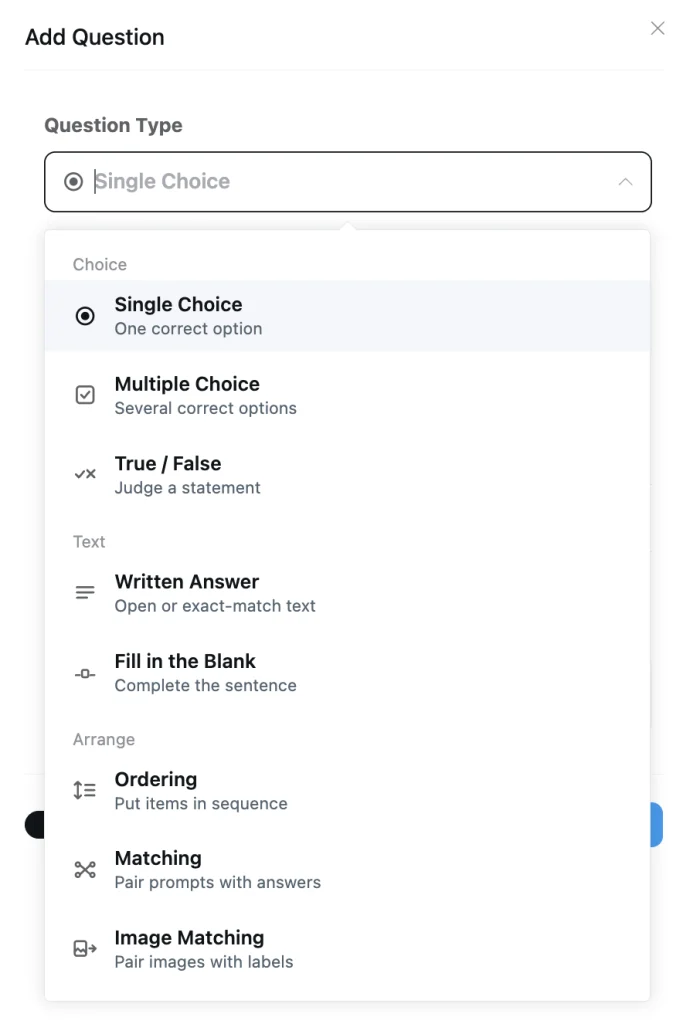
Quizzes received their biggest upgrade since launch in version 2.11.0. Course quizzes, a Pro feature, now include six more question types beyond single and multiple choice. True / False judges a single statement, Written Answer accepts open reflection or exact answers graded automatically, and Fill in the Blank lets each gap accept more than one correct answer. Ordering asks students to arrange steps in sequence, Matching Pairs prompts with answers, and Image Matching pairs images with labels. Every type is graded on the server, and correct answers never reach the student’s browser.
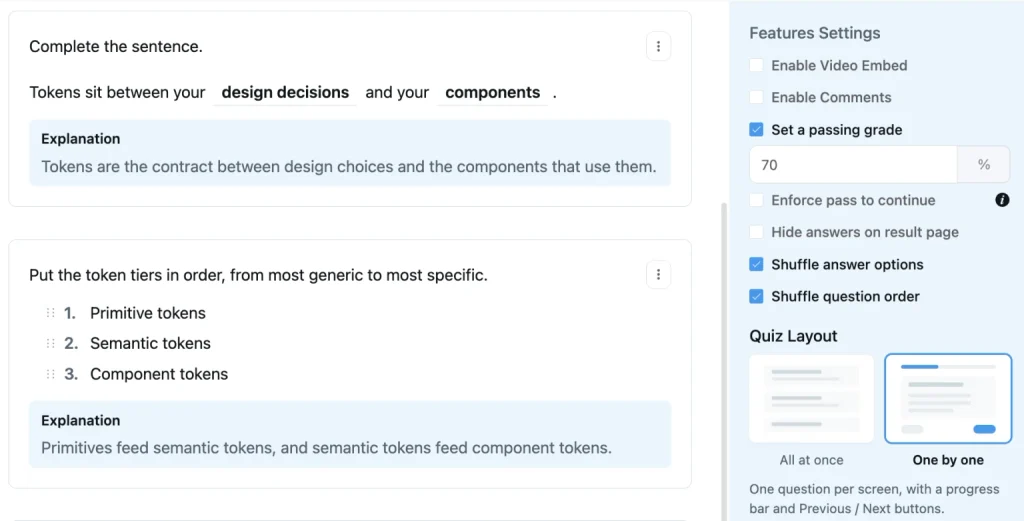
Alongside the new types, a Quiz Layout setting lets you choose between showing all questions at once and showing them one by one, with a progress bar and Previous and Next buttons. You can shuffle answer options and question order as well, so students stop memorising where the right answer sits. Finally, each question can carry an Explanation, also a Pro feature. After submitting, students see a View Explanation link under every question that has one, which turns a score into an actual lesson.
Restart a Course
Version 2.11.0 also added course progress restart. Students can choose Restart Course from the course menu to reset their progress to 0% and work through the material again. Course admins get a matching Restart Progress action for any student in the course members list, and both actions ask for confirmation first.
Moderation, Chat, and Member Management
Running a community means looking after people, not only content. That includes keeping discussions healthy, keeping chats under control, and handling everyday member tasks without extra steps. The following updates make each of those jobs lighter for admins and moderators, and a little smoother for members too.
Smarter Moderation Tools
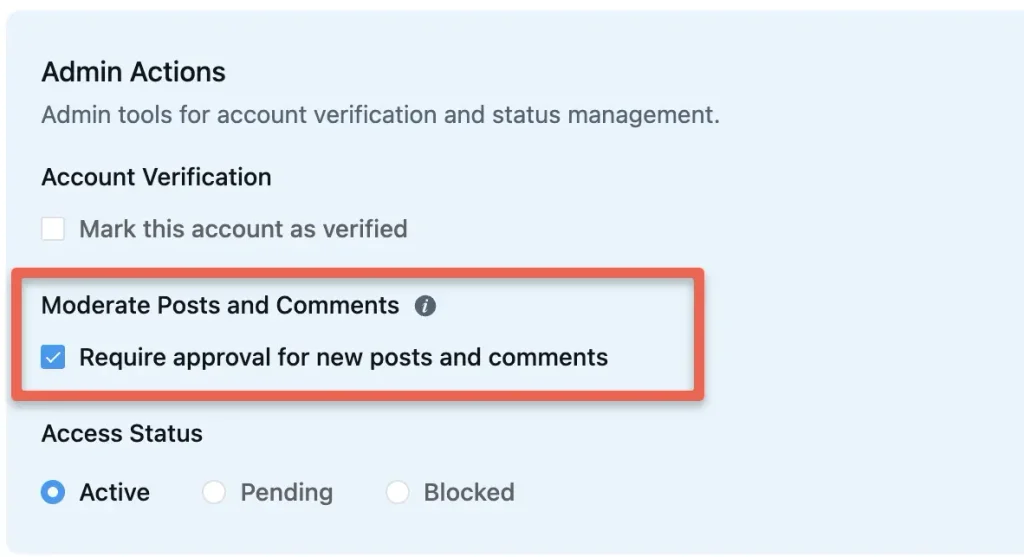
Keeping a community healthy takes work, so 2.7.0 added two Pro tools to make it lighter. With auto-flag thresholds, a member’s new posts and comments are sent for review automatically once enough different people report them. It counts distinct reporters instead of raw reports, so a single unhappy user cannot game the system. You can also flag a member by hand, using a “Moderate Posts and Comments” toggle on their profile that routes everything they post into your review queue. Admins and moderators cannot be flagged, so your team stays out of the way.
Fluent Messaging 2.9.0
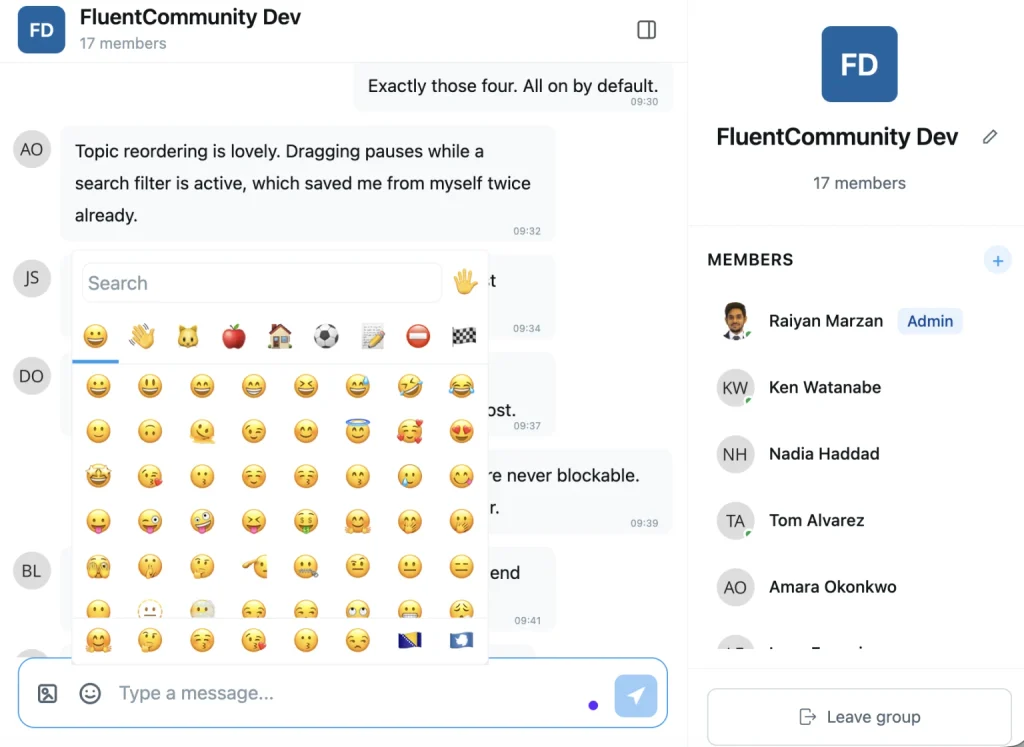
Fluent Messaging, the chat plugin for FluentCommunity, had its largest release yet alongside 2.9.0. Space and group chats are now moderatable, which means an admin or moderator can block a member from a chat. The blocked member keeps reading the conversation but cannot send, react, or upload. Group admins can also delete any member’s message, not only their own.
Busy chats became easier to use too. There is a member search in space and group chats, the member list loads as you scroll, and older messages arrive the same way without the scroll position jumping. The composer gained a proper emoji picker with search, image previews gained previous and next navigation, and a link to a member’s profile can open a direct message straight in the chat widget.
Easier Member Management
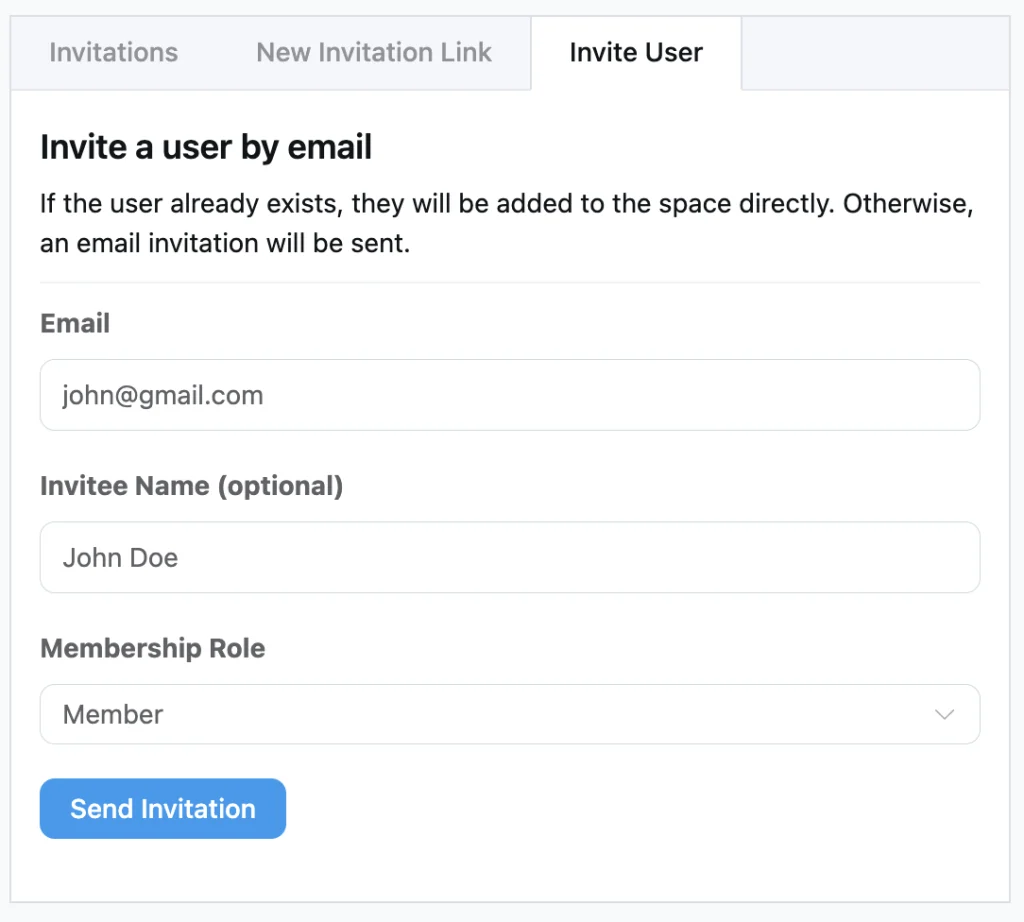
Growing a space is simpler since 2.7.0. From the Add Member and Space Invitations screens, you can invite people by email, a Pro feature, with an optional name so the invitation feels personal. Existing members are added right away, and anyone new gets an email invite to join. In the same release, members gained a short profile headline that shows on the members directory.
Version 2.7.5 then let members change their password from the profile edit screen, and it let managers rename documents in the space documents section, which is a Pro feature, without re-uploading them. After that, 2.8.0 added a sort direction control on the All Members page, space member lists, and course student lists. You can now flip any sort between ascending and descending, and your choice is saved per list.
Better Reach in Search and Email
Great discussions are of little use if nobody outside your community can find them, or if your emails never reach the inbox. In Q3, we worked on both problems. Consequently, your public content is now easier for search engines and AI tools to read, and your notification emails go only to addresses that can receive them.
Search-Ready Community Pages
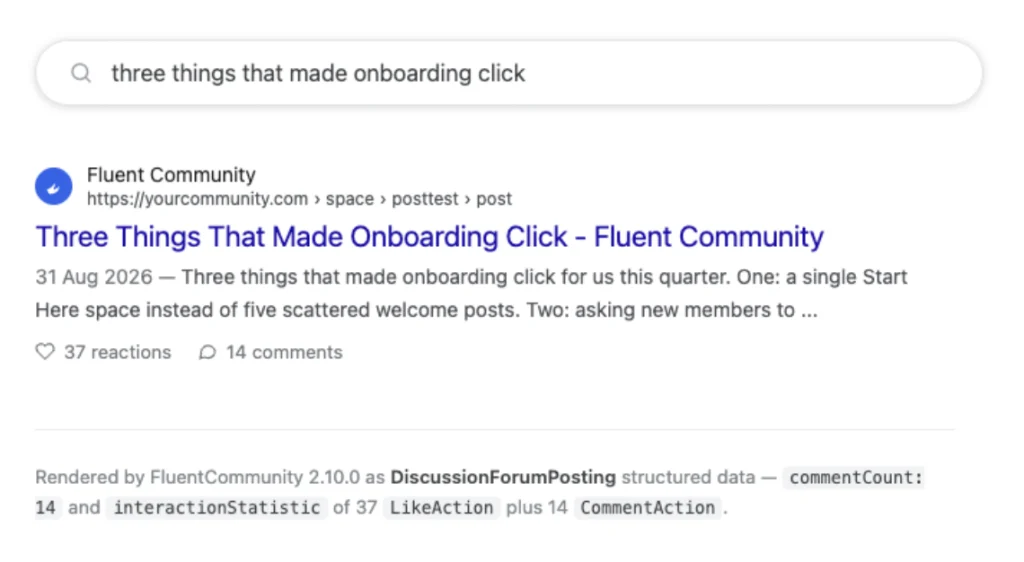
Version 2.10.0 fixed a problem most community owners never knew they had. The community portal is an app, so when a search engine or AI crawler asked for a post, it often received an empty page. Now, when a crawler asks for a post, a space, or a course, the server sends back the real page in plain HTML, including the title, the post, the images, and the comments.
Consequently, search engines can read whole threads on the first visit, AI engines can read your community at all, and link previews in chat apps show the post title and image.
Nothing private is exposed, because this only renders what a logged-out visitor is allowed to see. There is nothing new to switch on either. You update to 2.10.0 with the Pro plugin, and your community access needs to be set to Everyone in the general settings. Earlier in the month, 2.9.0 had already added canonical tags for spaces, courses, and lessons, so their tab URLs consolidate onto one address.
Smarter Email Delivery
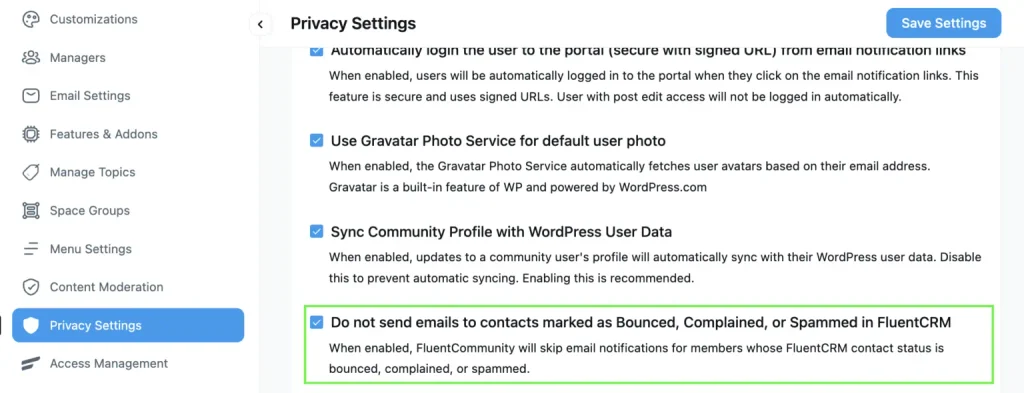
If you run FluentCRM alongside your community, 2.8.0 stops sending community emails to addresses that can no longer receive them. When a member’s CRM contact is marked as bounced, complained, or spammed, notification emails skip that address automatically, which protects your sender reputation. Affected members see their email status in notification preferences, along with a re-confirm button that sends a fresh double opt-in email.
On top of that, 2.7.0 improved how community emails render across email clients, and 2.7.5 laid out New Posts notification preferences as a table with one row per space.
Security, Speed, and Stability
Not every improvement shows up as a new button or a new tab. A large share of this quarter’s work happened under the surface, where it protects your site and keeps it running smoothly. Here is what changed in how FluentCommunity is updated, secured, and tuned for busy communities.
Signed and Verified Updates
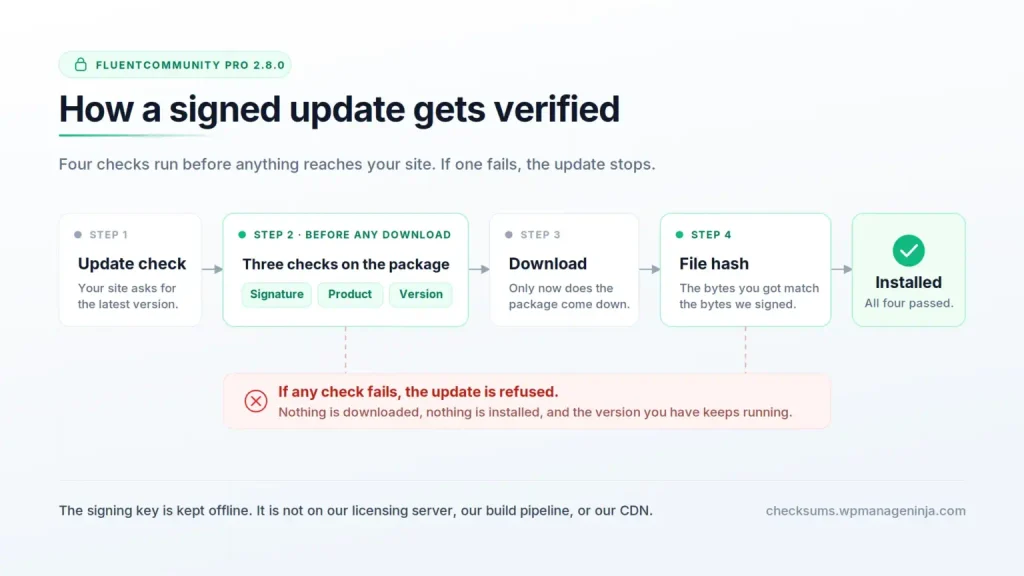
From version 2.8.0 onward, every FluentCommunity Pro release is signed with a key that is kept offline. Before WordPress downloads an update, the plugin verifies that the package was genuinely built and signed by us, that it is FluentCommunity Pro and not another product, and that the file hash matches what we signed. If any check fails, the update is refused, and nothing is installed. Therefore, even if an update server were compromised, an attacker could not push code to your site.
Tighter Access Controls
Every release this quarter included security work. Access checks were hardened across spaces, feeds, comments, documents, and lock screens in 2.7.0 and 2.7.5. Version 2.8.0 brought a plugin-wide access-scoping audit and made notifications and emails show the community profile name instead of the WordPress account name. Version 2.9.0 then locked site-level settings to site admins, limited moderators to reports from their own spaces, and required a logged-in member for link previews.
A Faster, More Accessible Portal
Performance improved steadily as well. Feed caching now refreshes in the background, the activity ticker polls less, permission checks are cached per member, and new database indexes speed up notifications, comments, and member lists. Meanwhile, 2.9.0 delivered a full accessibility pass that cleared four screen-reader blockers reported by real users and improved keyboard navigation across the portal and chat.
Stability kept pace with everything else. Double clicks no longer create duplicate posts, comments, or reactions. Two-factor logins work again from the portal, the post editor works on older iPhones running iOS 15, and the plugin is tested against WordPress 7.1. In fact, version 2.9.0 shipped with zero open reports on our internal bug board.
Update and Explore
Taken together, the Q3 releases make FluentCommunity better at five things: sharing richer content, reaching members wherever they are, organizing what they find, teaching them once they enroll, and protecting the community they have joined. If you have not updated yet, start with the feature that solves your most pressing problem. Set up the PWA and push notifications if engagement is slipping, publish a “Start Here” page if new members keep asking the same questions, or rebuild one quiz with the new question types if you sell courses.
For the complete changelogs, read the full release notes for FluentCommunity 2.7.0, 2.7.5, 2.8.0, 2.9.0, 2.10.0, and 2.11.0. For a closer look at the last month of the quarter, see What We Shipped in FluentCommunity in September 2026. Then update your site, try what is new, and tell us what you build with it.

Prema Anjum
My full name is Anzuman Ara Chowdhury. But people know me as Prema Anjum. I’m a Digital Marketer by profession, a WordPress community contributor, and a travel enthusiast by heart.

![SEO Title: 5 Best Community Portal Software [WordPress + SaaS Options]](https://fluentcommunity.co/wp-content/uploads/2026/10/community-portal-software-featured-1-1024x536.webp)

Add your first comment to this post