

Introducing PWA & Signed Update -FluentCommunity 2.8.0

Table of Content
Subscribe To Get
WordPress Guides, Tips, and Tutorials


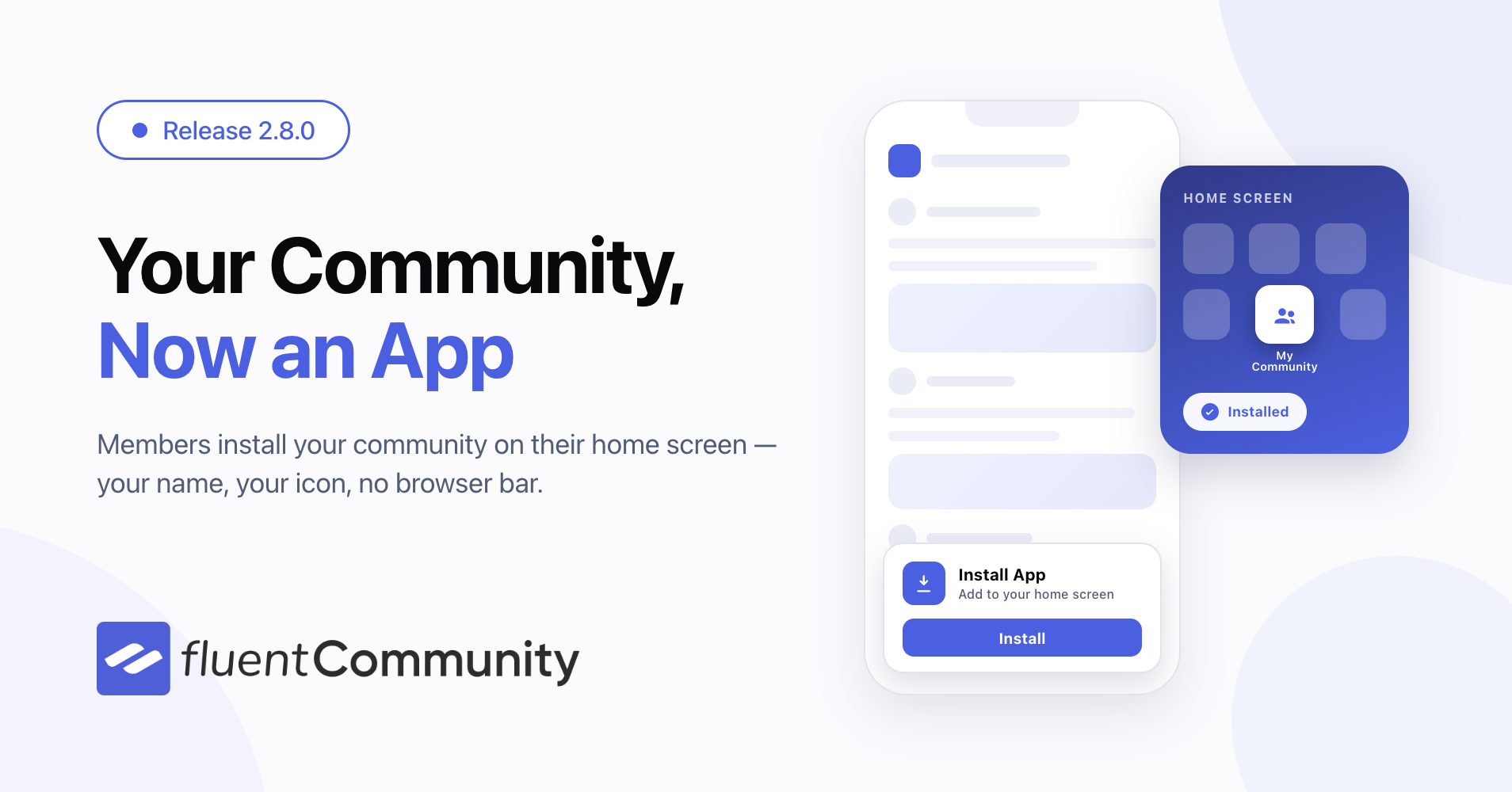
FluentCommunity 2.8.0 brings your community to your members’ home screens. This release lets members install your community as an app on their phone, gives you a way to share posts by link only and makes member lists sortable in the direction you actually want.
At a glance: the new Progressive Web App (PWA) module adds an install option right in the portal sidebar, complete with your own app name and icon. Unlisted posts stay hidden from every feed and listing but open normally through their direct link. And the new sort direction control on member and student lists lets you flip any sort between ascending and descending — and remembers your choice. Rounding it out: FluentCRM-aware email bounce suppression, a plugin-wide access-scoping security audit, and more than twenty bug fixes.
Turn Your Community Into an App
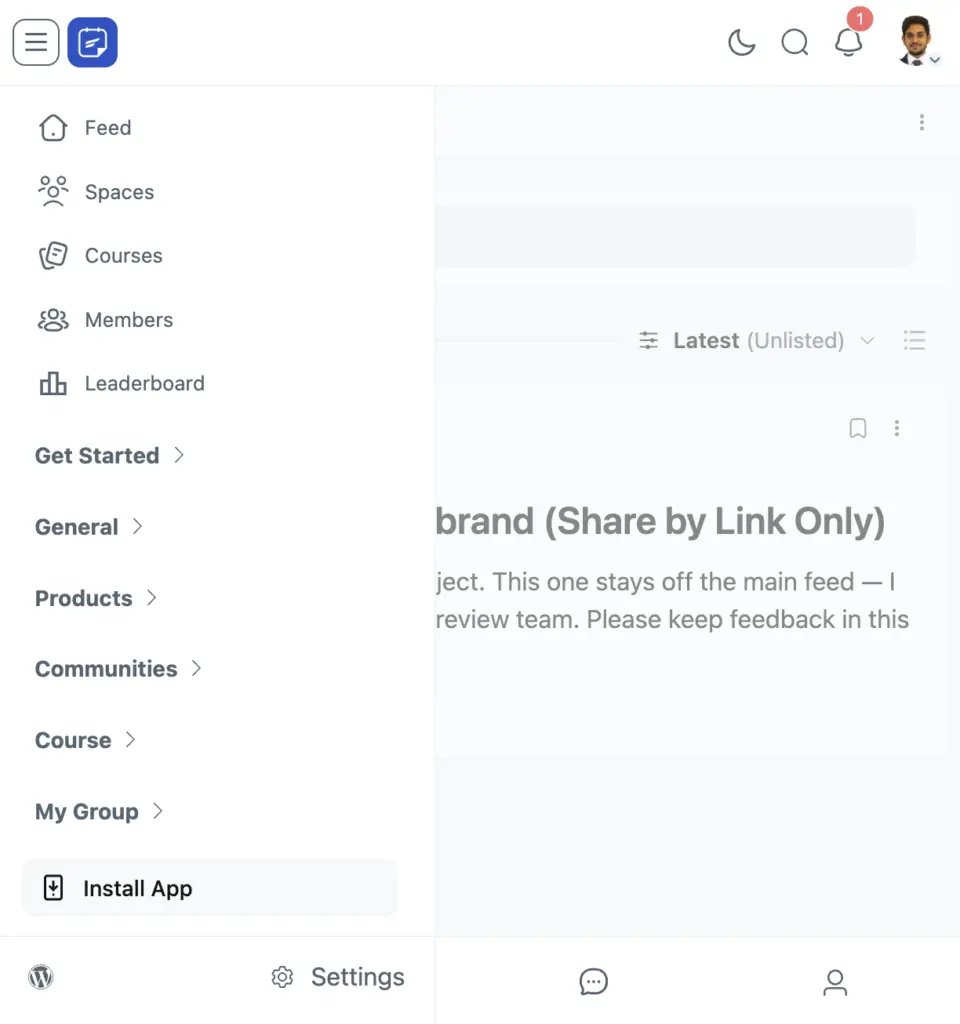
Your members already open your community every day — now they can pin it to their home screen like any other app. The new PWA module (pro) adds an Install App entry to the portal sidebar. One tap, and your community installs as an app: your icon on the home screen, your name under it, and no browser bar around your content.
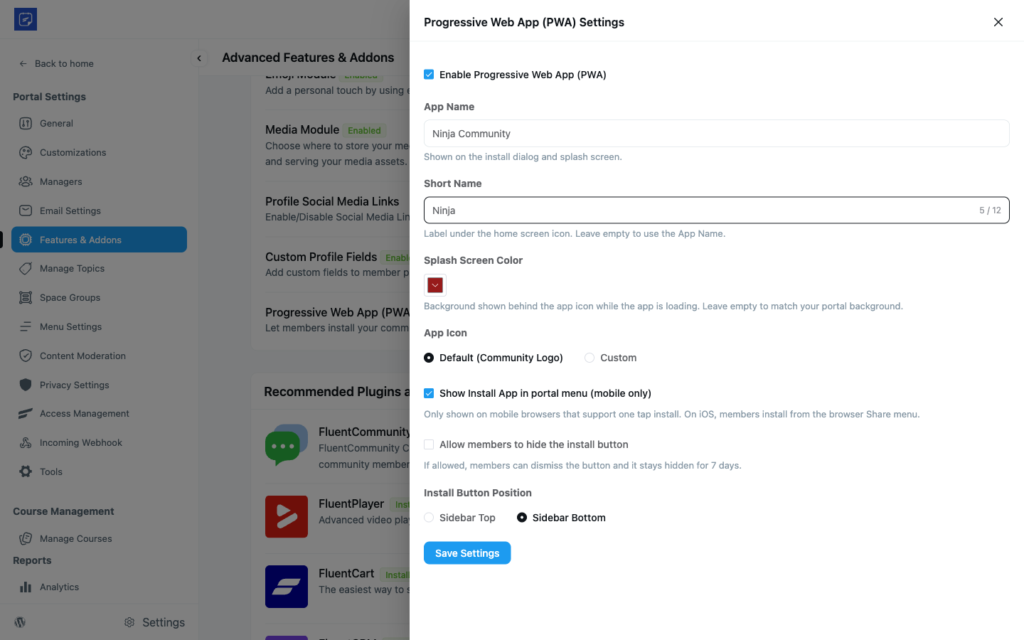
You control how the app presents itself. In the new settings drawer you can set the App Name, a Short Name for the label under the icon, a Splash Screen Color shown while the app loads, and upload your own App Icon. The icon upload checks dimensions for you, so what you upload is what installs cleanly.
The installed app follows your community’s look, including light and dark mode — the app’s title bar stays in sync with the member’s color mode. For developers, six filters cover the finer details like the install button text, theme color, and screen orientation, so agencies can tune the experience without extra settings screens.
Signed and Verified Plugin Updates
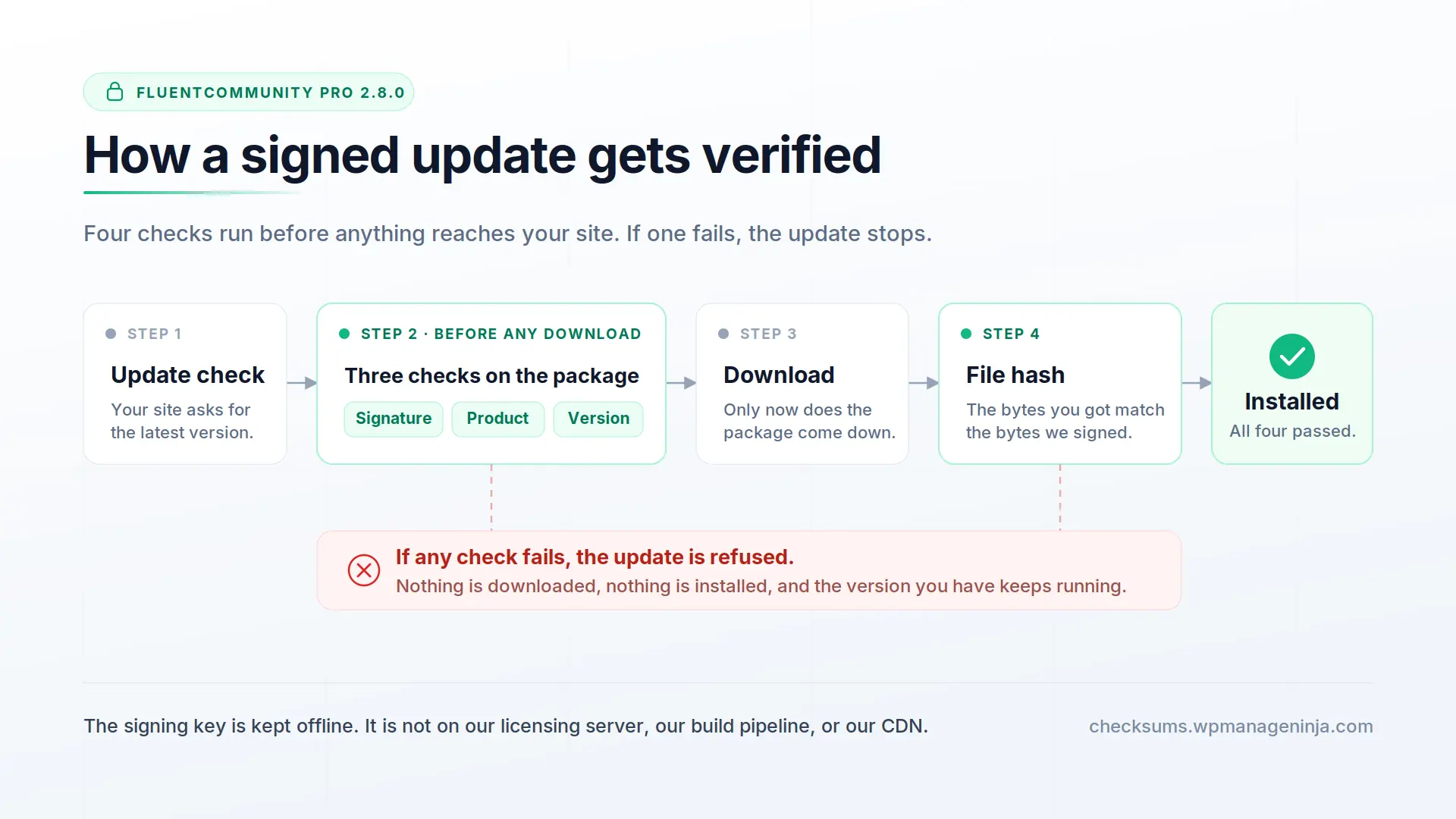
Every FluentCommunity Pro release is now signed with a key that is kept offline. It is not on our licensing server, not in our build pipeline, and not on our CDN. The matching public key is compiled into the plugin itself, so your site does not fetch anything at update time to run the check.
From 2.8.0 onward, the plugin verifies four things before WordPress downloads an update:
- Signature: the package was genuinely built and signed by us.
- Product: the package is FluentCommunity Pro, not a real package for a different product replayed under our name.
- File hash: the bytes you receive match the bytes we signed.
If any check fails, the update is refused and nothing is installed. Most of this runs before the download starts, so a forged update costs a signature check instead of a multi-megabyte transfer.
We also publish file-level checksums for every release at checksums.wpmanageninja.com, so you can compare the files on your server against what we shipped.
Even if our update server gets compromised, an attacker still could not push code to your site, because the signing key is not on those machines. It closes one specific door, the supply chain attack.
Share Posts by Link Only
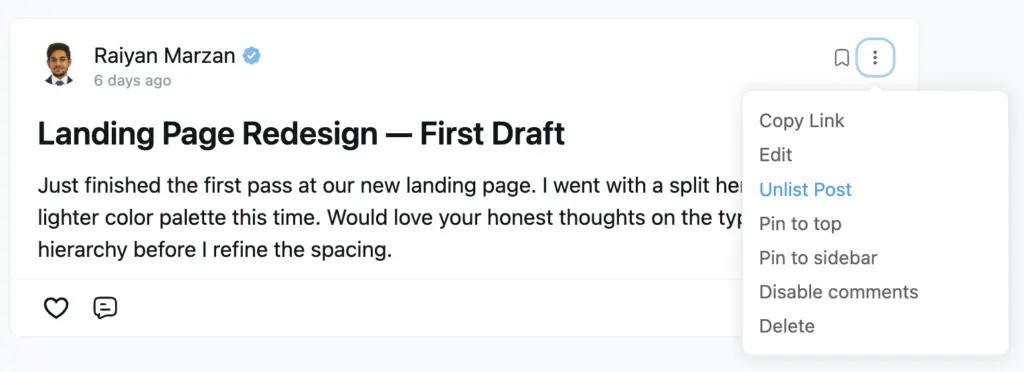
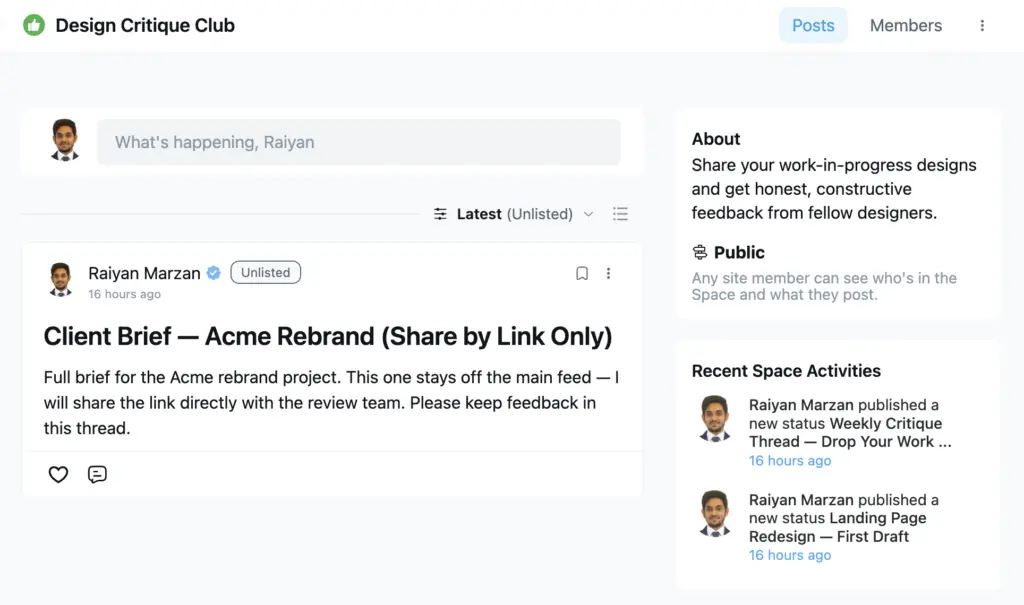
Sometimes a post is not for everyone’s feed. Meeting notes for one team, an early draft you want feedback on, a resource you only share when someone asks — 2.8.0 adds unlisted posts (pro) for exactly this. An unlisted post is hidden from all feeds and listings, but anyone with the direct link can open it normally.
Making a post unlisted is one checkbox in the composer, and you can switch an existing post to unlisted from its edit screen. Unlisted posts carry a clear badge so there is never confusion about what is visible where. You still see your own unlisted posts on your own profile timeline, so they are easy to find again — but nobody else scrolls past them.
Moderators get a matching visibility filter in the feed sort dropdown, so reviewing all unlisted posts in one place takes a couple of clicks. The filter remembers your last choice between visits.
Sort Member and Student Lists Your Way
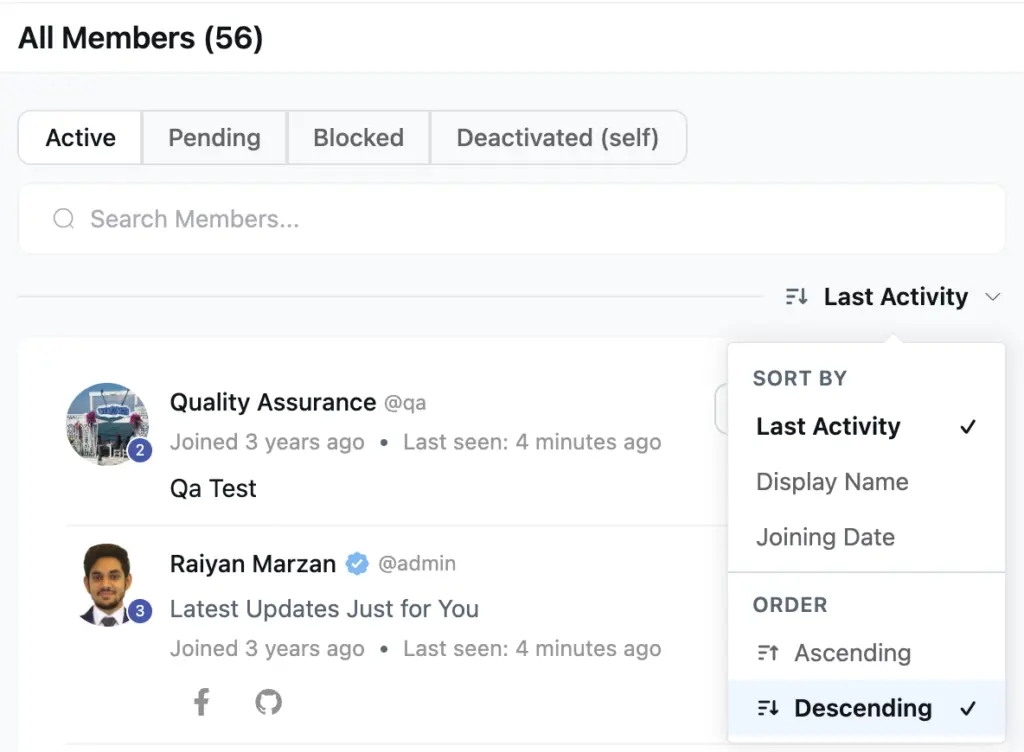
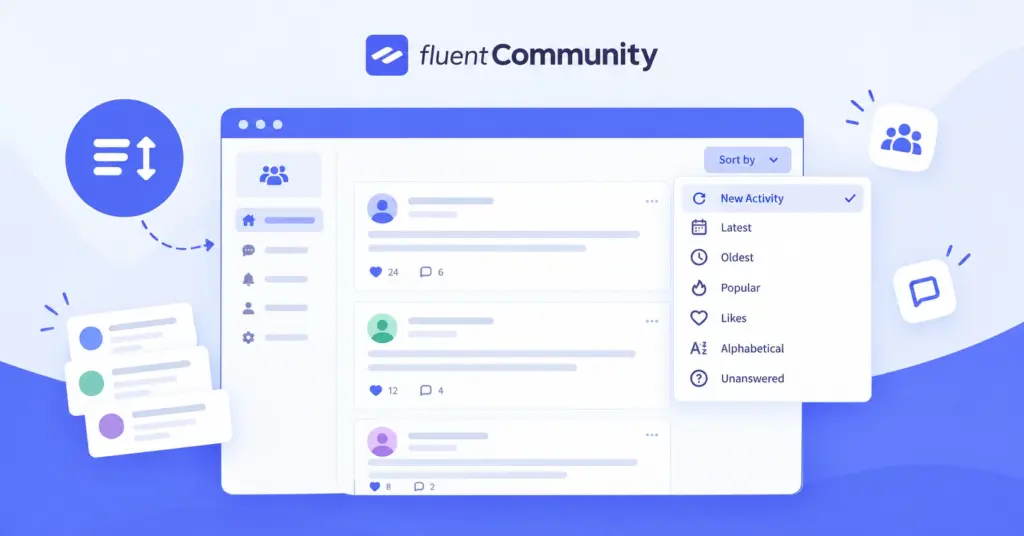
Member lists could always be sorted by different fields — but only in one fixed direction. 2.8.0 replaces the plain sort select with a cleaner dropdown that separates what you sort by from which direction it goes. Want the longest-standing members first instead of the newest? Flip to ascending and you have it.
The control works on the All Members page, space member lists, and course student lists. Each field keeps a sensible default — joining date and last activity start newest first, names start A to Z — and the arrow on the button flips to show the active direction. Your choice is saved per list and restored the next time you come back.
Behind the scenes, new database indexes keep these sorts fast even on communities with very large member counts.
Smarter Email Delivery with FluentCRM
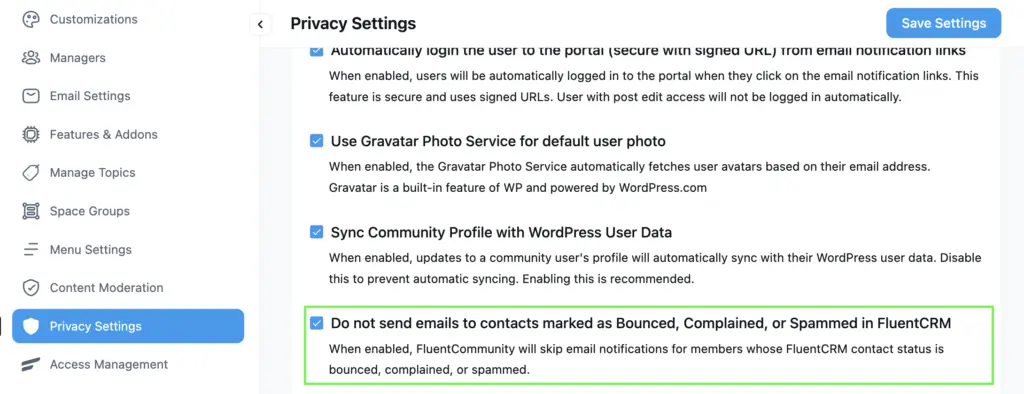
If you run FluentCRM alongside your community, 2.8.0 stops sending community emails to addresses that can no longer receive them. When a member’s CRM contact is marked as bounced, complained, or spammed, community notification emails skip that address automatically — protecting your sender reputation instead of hammering a dead inbox. The behavior is controlled by a new privacy setting, and developers can fine-tune it with a filter.
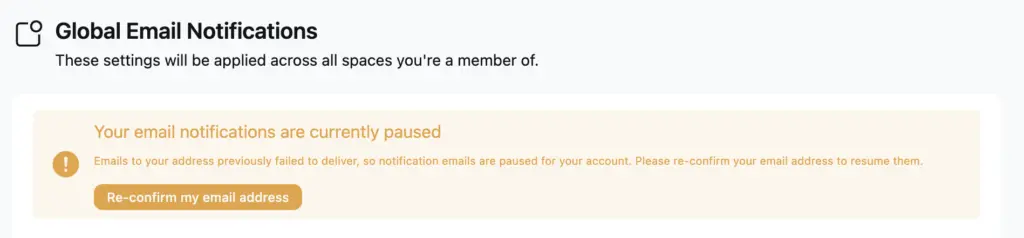
Affected members are not left in the dark. Their notification preferences screen shows the email status, along with a re-confirm button that sends a fresh double opt-in email — one click on their side, and notifications resume once the address is confirmed again.
Stronger Privacy for Your Members
Notifications and emails now show the community profile name. Previously, some notification and email flows used the WordPress account name — often a member’s full legal name from registration — instead of the display name they chose for the community. Every actor name in notifications and outgoing emails now uses the public profile name, and developers can adjust it through a new filter.
Permission checks got stricter too. Space ID values in permission checks are now strictly validated, closing a gap where a malformed request value could reach the access check. Nothing changes in daily use — it is simply a tighter lock on the door.
Bug Fixes and Stability
Time and navigation behave correctly. Member join times no longer show hours in the past on sites with a timezone offset, and profile dropdown links now navigate reliably on iOS — Safari’s tap handling was closing the menu before the link could follow through.
Course lessons duplicate cleanly. Duplicating a lesson no longer copies documents that were already deleted from the source lesson, and a cleared document list stays cleared on the duplicate.
Accessibility keeps improving. The back buttons in the space, feed, and course customizer screens are now proper buttons — reachable by keyboard and labeled for screen readers. Sort controls announce their direction, too.
Media and video behave. Pasted YouTube playlist links no longer spin forever in the feed — they now play with the full playlist intact. Editing a post no longer deletes its uploaded media from remote storage, replacing a native video with an image on edit works as expected, feed videos stop forcing fullscreen on Android, unsupported HTML embeds render a clean fallback instead of broken output, and the emoji picker is no longer hidden when opened inside a popover.
Courses and quizzes. Lessons set to public view no longer show a misleading lock icon, the lesson table of contents can collapse again on mobile, and members who are not enrolled now see a disabled quiz submit button with a clear hint instead of a redundant enroll prompt.
Signup and settings. Social login buttons show up on the signup form again, creating a space group no longer allows an empty title or slug, media inserts work under strict SQL mode, and link fields accept the flexible values they should — partial paths, hash links, and dynamic placeholders included.
Pro fixes. Members can see their own scheduled posts again, the Popular Spaces report ranks by actual popularity instead of age, cloud storage URLs work for file names with special characters, and two misspelled developer hooks were corrected (the old names still fire with a deprecation notice).
Everyday polish. Loading skeletons got their spacing back, the logo picker buttons in settings match the rest of the UI, and the password-change setting labels and the editor’s divider menu item now translate properly into your community’s language. The onboarding license screen was also redesigned with clearer status and renewal actions.
Ready for WordPress 7.1. FluentCommunity 2.8.0 is fully tested against WordPress 7.1, including the lesson editor updates the new release brings.
Wrapping Up
FluentCommunity 2.8.0 puts your community one tap from your members’ home screens, gives you a quieter way to share posts, and hands you real control over how member lists sort. Along the way it keeps your emails out of dead inboxes with FluentCRM bounce suppression, and hardens the whole plugin with a full access-scoping security audit.
Update whenever you are ready — and let us know what you build with it.
FluentCommunity 2.8.0
- Introduced: Progressive Web App (PWA) Module
- Added: Unlisted Post Visibility with Feed Status Filter
- Added: Sort Direction Control on Member and Student Lists
- Added: FluentCRM Bounce Suppression with Email Re-Confirm Flow
- Improved: Customizer Back Button Keyboard Accessibility
- Improved: WordPress 7.1 Compatibility
- Improved: Quiz Submit Disabled for Non-Enrolled Members
- Improved: Onboarding License Management Experience
- Security: Plugin-Wide Access Control and Data Protection Hardening
- Fixed: Full Legal Name Exposed in Notifications and Emails
- Fixed: Lesson Duplication Copying Deleted Documents
- Fixed: Member Join Time Off by Site Timezone
- Fixed: Profile Dropdown Links Not Redirecting on iOS
- Fixed: Missing Padding on Loading Skeletons
- Fixed: Unstyled Logo Picker Buttons in Input Group
- Fixed: Untranslated Password-Change and Slash-Menu Labels
- Fixed: YouTube Playlist Links Spinning Forever in Feed
- Fixed: Feed Edit Deleting Media from Remote Storage
- Fixed: Replacing Native Video with Image on Post Edit
- Fixed: Feed Videos Forcing Fullscreen on Android
- Fixed: Unsupported HTML Embed Rendering Broken Output
- Fixed: Emoji Picker Hidden Inside Popovers
- Fixed: Social Login Buttons Missing on Signup
- Fixed: Media Insert Failing Under Strict SQL Mode
- Fixed: Link Fields Rejecting Valid Paths and Placeholders
- Fixed: Empty Title or Slug When Creating Space Group
- Fixed: Misleading Lock Icon on Public-View Lessons
- Fixed: Mobile Lesson Table of Contents Cannot Collapse
- Fixed: Self-Reaction Block Hooks Not Working
- Fixed: Members Denied Access to Own Scheduled Posts
- Fixed: Popular Spaces Report Ranking Oldest Spaces
- Fixed: Cloud Storage URLs for Keys with Special Characters
- Fixed: Misspelled Manager and Sitemap Hook Names

Shahjahan Jewel
Hello, this is Jewel, CEO & Head of Ideas at WPManageNinja. I am obsessed with WordPress since 2009. My aim is to be a user-centric developer first, and a serial entrepreneur second. You will find me discussing various tech issues and trying to come up with scalable solutions on different forums when I am not busy coding.


Add your first comment to this post