

What We Shipped in FluentCommunity in September 2026

Table of Content
Subscribe To Get
WordPress Guides, Tips, and Tutorials


September was one of the busiest months FluentCommunity has had since launch. In just over two weeks, we released three major versions, and each one added features that community owners had been asking for. Version 2.9.0 arrived on September 3 with push notifications, a much bigger Fluent Messaging, drag-and-drop ordering, and a full accessibility pass. Version 2.10.0 followed on September 14 with Pages for Spaces and server-rendered pages that search engines and AI tools can finally read.
Then version 2.11.0 landed on September 18 with the Space Menu Manager and the biggest quiz upgrade the course builder has ever received.
That is a long list, and it is easy to miss something when you update your site and move on with your day. So instead of asking you to read three separate release notes, we have put every notable feature in one place. This post goes through them one by one, explains how each feature works, and tells you which ones need the Pro plugin. Whether you run a membership community, sell courses, or support customers inside FluentCommunity, you will find at least a few features here that change how your members use your site. Let’s start with the one that brings them back.
Push Notifications with FluentNotify
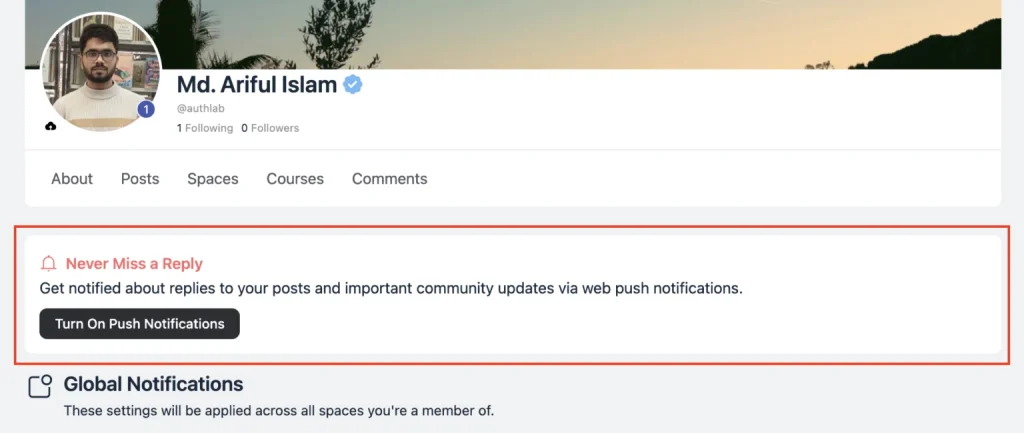
Email has always been the default way to tell a member that someone replied to them, and it has always been a slow one. With version 2.9.0, FluentCommunity supports web push notifications, so a reply or a mention appears on a member’s desktop or phone within seconds, even when your community tab is closed.
Push notifications run on FluentNotify, our free push plugin. You install it from the Features & Addons screen in FluentCommunity settings, and then connect it with your Firebase credentials from the FluentNotify settings page. Our Firebase setup guide covers that step in detail. After that, members see a “Never Miss a Reply” prompt that lets them turn notifications on with one tap. If they dismiss it, the prompt stays away for a week.
You decide where that prompt appears. There are four placements to choose from, which are the feed sidebar, the profile sidebar, the notification preferences page, and the notifications dropdown, and you can enable as many as you like.
Per-Member and Community-Level Preferences
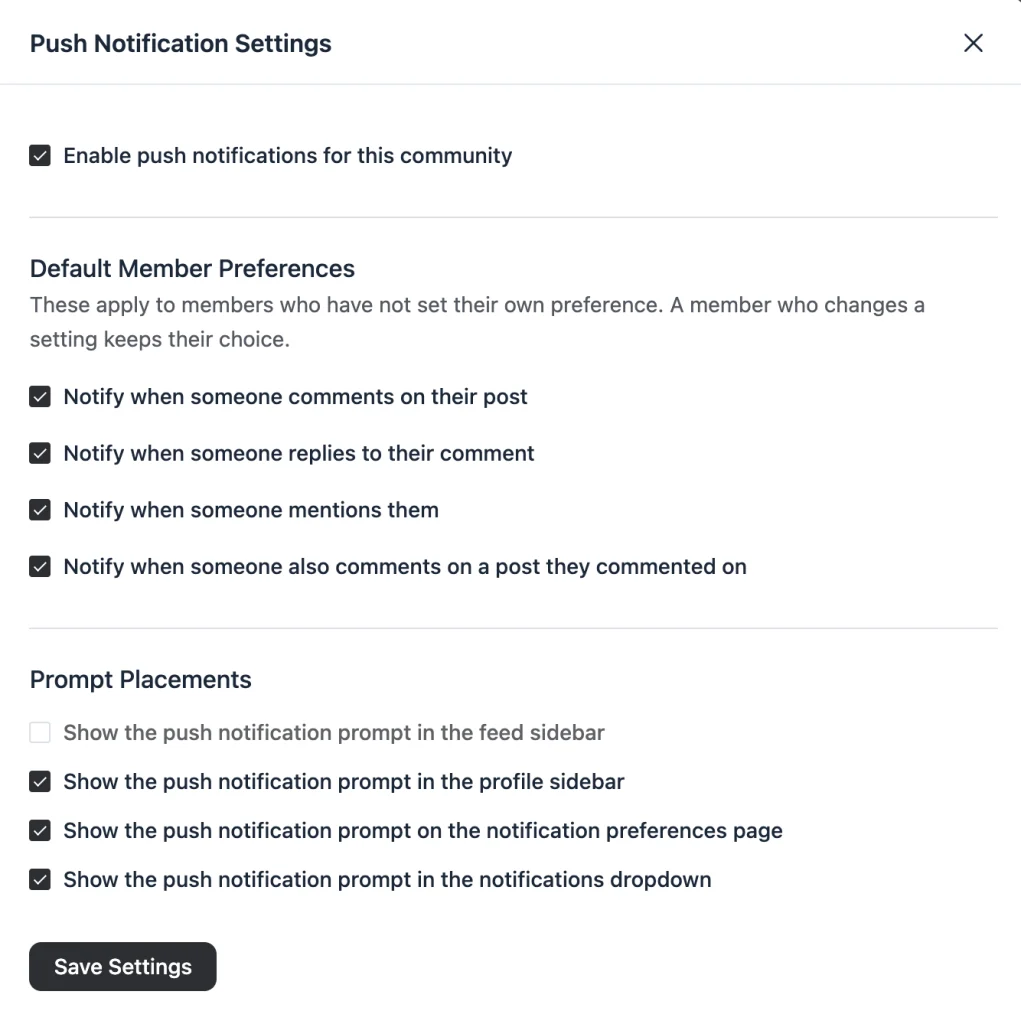
Members get real control over what reaches them. Their notification preferences page now shows an Email column and a Push column side by side, so they can pick a channel for each event. Those events cover comments on their post, replies to their comment, mentions, and a new one that fires when someone else comments on a post they already commented on.
On your side, you can set default preferences for every member who has not made a choice yet, and you can turn push off for the whole community with one switch.
Smarter Notifications in 2.10.0
The follow-up release made push feel more polished. Opening a push notification now marks the matching in-app notifications as read, so the badge count stays accurate. The in-app toast also stays quiet when a push has already been delivered, which means members are no longer told twice.
In addition, the Push Settings drawer now guides you through connecting FluentNotify, and it offers to activate the plugin for you if it is installed but switched off.
Fluent Messaging 2.9.0: Chat Moderation and More
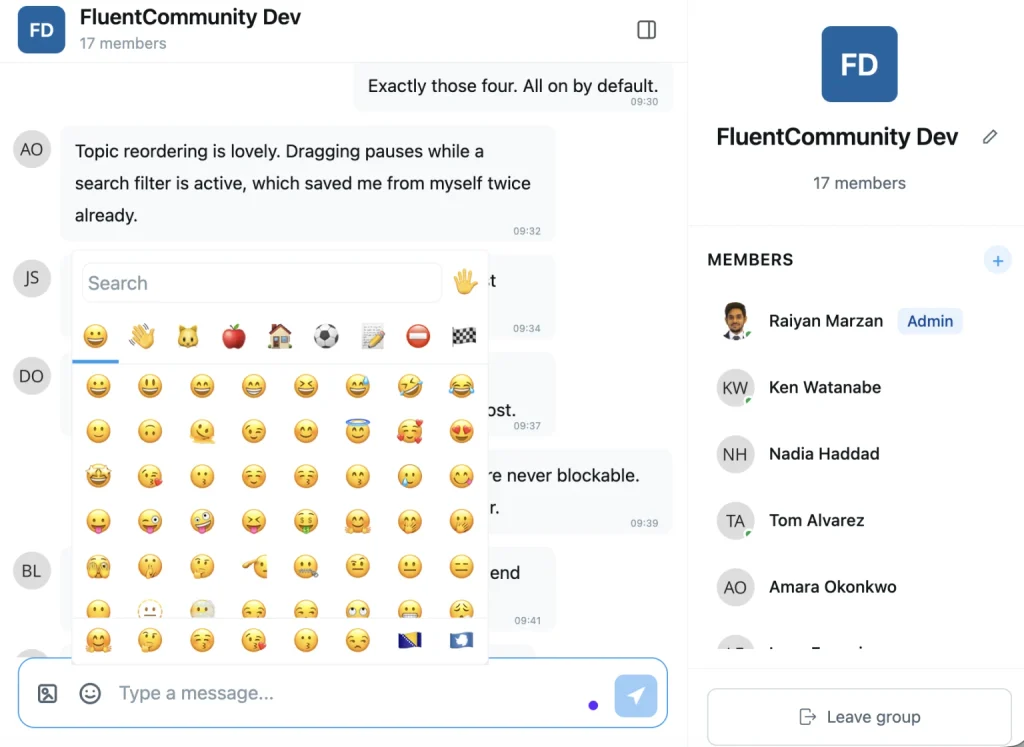
Fluent Messaging, the chat plugin for FluentCommunity, received its largest release on the same day as 2.9.0. The headline feature is chat moderation. An admin or moderator can now block a member from a space or group chat. That member can still read the conversation, but they cannot send messages, react, or upload files. Group admins can also delete any member’s message, not only their own.
Beyond moderation, busy chats became much easier to use. A new member search helps you find one person in a list of hundreds. The member list loads as you scroll and can be collapsed when you want the messages at full width. Older messages load the same way when you scroll up, and the scroll position no longer jumps while they arrive.
The composer improved as well. It now has an emoji picker with search that inserts the emoji where your cursor is. Image previews gained previous and next navigation, so you can move through a conversation’s images without closing the preview. Member menus now include a View Profile option, and a link on a member’s profile can open a direct message right inside the chat widget. Finally, the chat interface was redesigned to match the rest of FluentCommunity, right-to-left languages render correctly, and chat resyncs when you return to the tab.
Drag-and-Drop Ordering for Topics and Badges
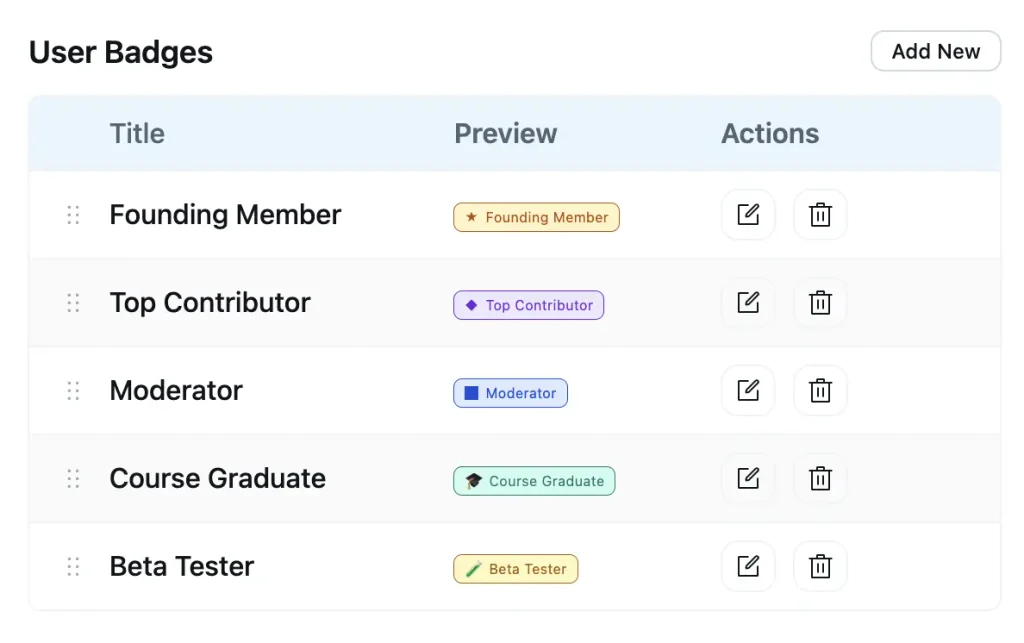
Topics and badges used to appear in whatever order they were created. Now you can drag them into place. In your Topics settings, which is a Pro feature, you grab the handle on any row and drop it where it belongs. That order is what members see in the topic navigation bar in spaces and in the topic filters on your courses.
User Badges settings, also a Pro feature, work the same way. The order you set is the order badges appear on member profiles, so you can lead with the badge that matters most. Reordering pauses while a search filter is active, so you never save an order based on a partial list, and arrow keys work as an alternative to dragging.
An Accessible Portal for Every Member
Version 2.9.0 included a full accessibility pass across the portal. The work cleared four screen-reader blockers that real users had reported, and it improved keyboard navigation throughout. The same treatment went into Fluent Messaging, so the chat interface now has keyboard navigation and screen reader labels across the board. As a result, members who navigate without a mouse can take part in your community properly.
A Bigger, Better Installed App
The PWA module, a Pro feature, arrived in August and lets members install your community as an app. September made it feel more complete. In 2.9.0, the app’s scope widened to cover your whole site. Previously, any WordPress page built with a FluentCommunity page template opened in an in-app browser with a URL bar. Now those pages stay inside the app.
On iOS, the installed app gained pull-to-refresh, which matters because an installed app has no browser reload button. Android icons look sharper too, since developers can now declare a mask-safe icon that fills the whole shape. Launching from the iOS home screen was also fixed for both Safari and Chrome.
Pages for Your Spaces
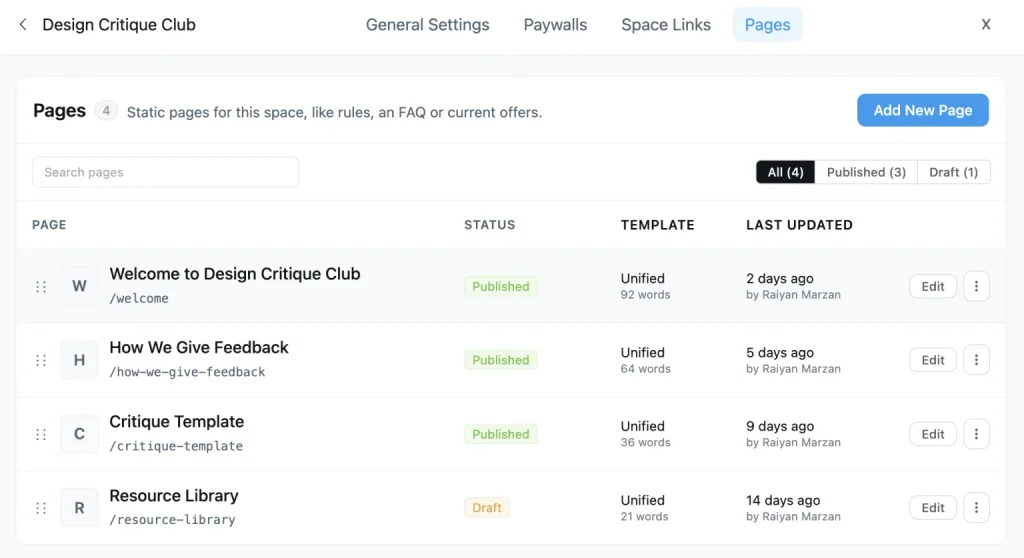
Every community owner knows this situation. You write a helpful welcome post, members keep posting, and a few weeks later that post is buried. Version 2.10.0 solves this with Pages for Spaces, a Pro feature that gives permanent content a home inside the space where it belongs.
Each space now has a Pages tab. From there, you create a page with the same block editor you already use for posts and lessons, with headings, images, and embeds all available. You can keep a page as a draft and publish it when it is ready, and you can drag pages into the order you want members to read them.
Pages can take comments too, so members can ask a question in the same place that raised it. If you start editing and click away by accident, the portal now stops and asks before you lose your work.
There are many ways to use pages. A “Start Here” page helps new members get going, a guidelines page keeps your rules easy to find, and an FAQ page saves you from answering the same questions every week. Customer communities can use pages for setup instructions and troubleshooting tips, while a study group might publish a syllabus.
The feature itself came from a conversation at WordCamp Europe in Kraków between our CEO, Shahjahan Jewel, and Remkus de Vries, who runs his own community on FluentCommunity.
Server-Rendered Pages for Search Engines and AI
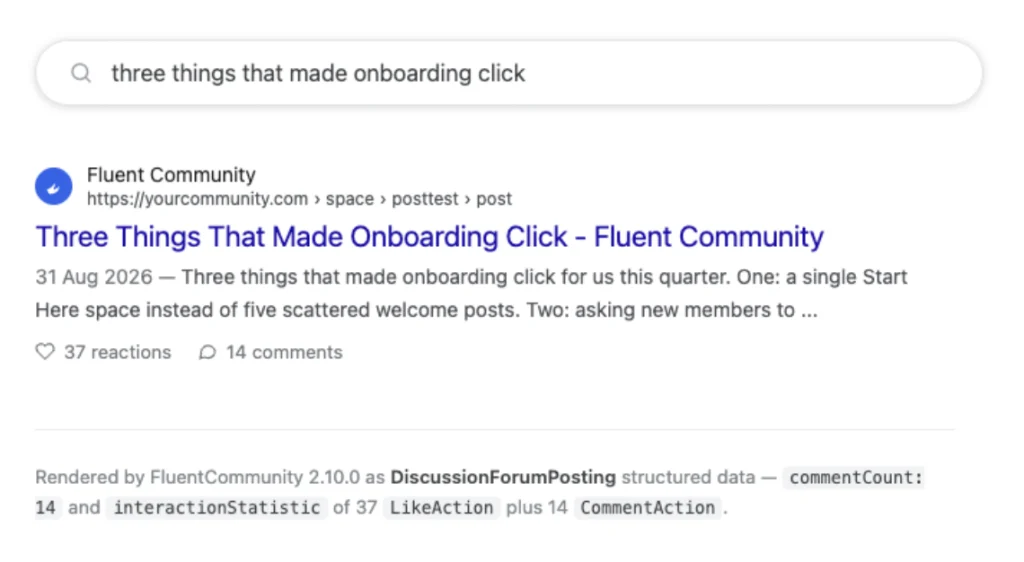
This is the feature your members will never notice, and it may be the most valuable one of the month. The FluentCommunity portal works like an app, which is why it feels fast. However, crawlers that do not run JavaScript received an empty page when they tried to read a post. That included many search engine bots, AI crawlers, and the link preview tools used by chat apps.
Starting with 2.10.0, the server sends crawlers the real page in plain HTML. That page includes the title, the post, the images, the comments, and the like and comment counts. Search engines can therefore read an entire discussion on the first visit, including the answers in the comments.
AI tools such as ChatGPT, Claude, and Perplexity can read your public threads and use them as sources. Links shared in Slack, WhatsApp, or LinkedIn now show the post’s own title and image. Space pages also list their posts with links to older pages, so a crawler can work through everything in a space rather than only the newest ten posts.
Courses get the same treatment. A course page describes its lessons in the structured format search engines use for course results, a paid course lists its real price, and each lesson page states which course it belongs to.
Privacy is fully respected. Only content a logged-out visitor can already see is rendered. Private and secret spaces are never included, and a paid course shows its lock screen and prices, never its lessons. There is nothing new to switch on. You need the Pro plugin and your community access set to Everyone in general settings, which is the same setting that enables your sitemap.
Space Menu Manager
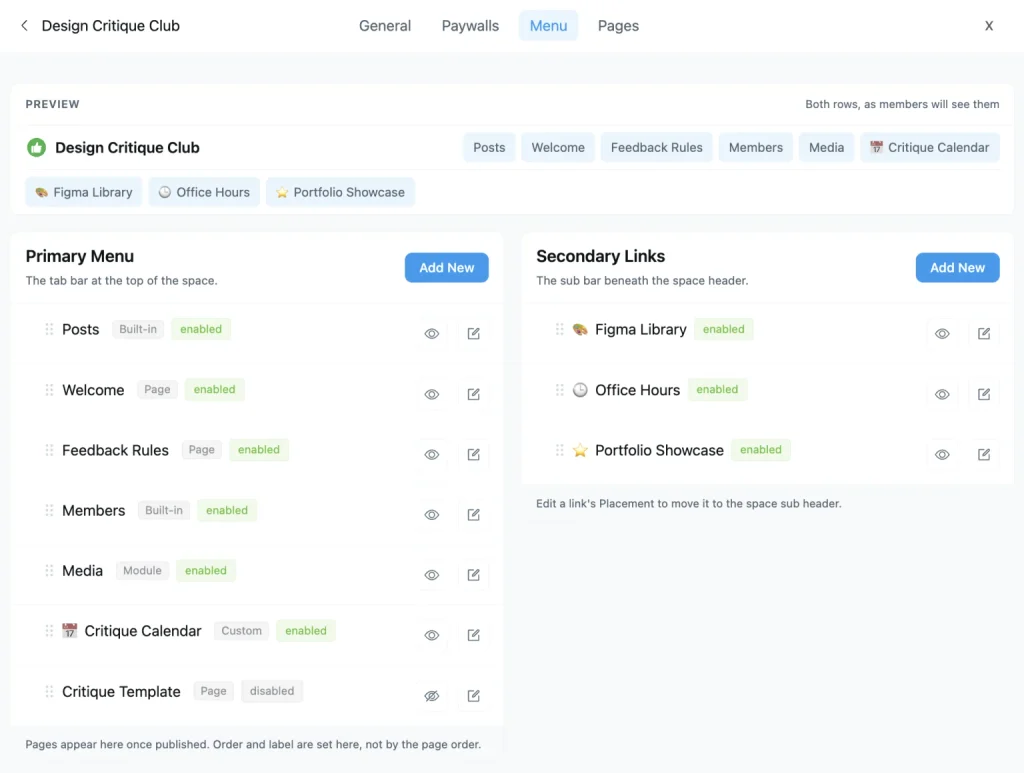
Until September, the tabs across the top of a space came in a fixed order. Version 2.11.0 hands that menu over to you. Open any space’s settings, and you will find a new Menu tab. It shows the Primary Menu, which is the tab bar at the top of the space, and the Secondary Links in the sub bar below it, along with a live preview of both rows.
You can drag tabs into any order, rename them, give each one an emoji or SVG icon, and hide the ones your space does not use without deleting anything. You can also add your own tabs that link to any URL or to one of the space’s pages, and choose whether each opens in a new tab.
Every link has its own visibility setting, so you can show it to everyone, to logged-in members, to logged-out visitors only, or to members of specific spaces and courses. Links can move between the tab bar and the sub bar, and newly published space pages join the menu automatically. As a safety net, at least one tab always stays visible.
Advanced Quiz Builder
Course creators received the other half of 2.11.0, and it is the biggest quiz upgrade since the Quiz Module launched. Quizzes are a Pro feature.
Six New Question Types
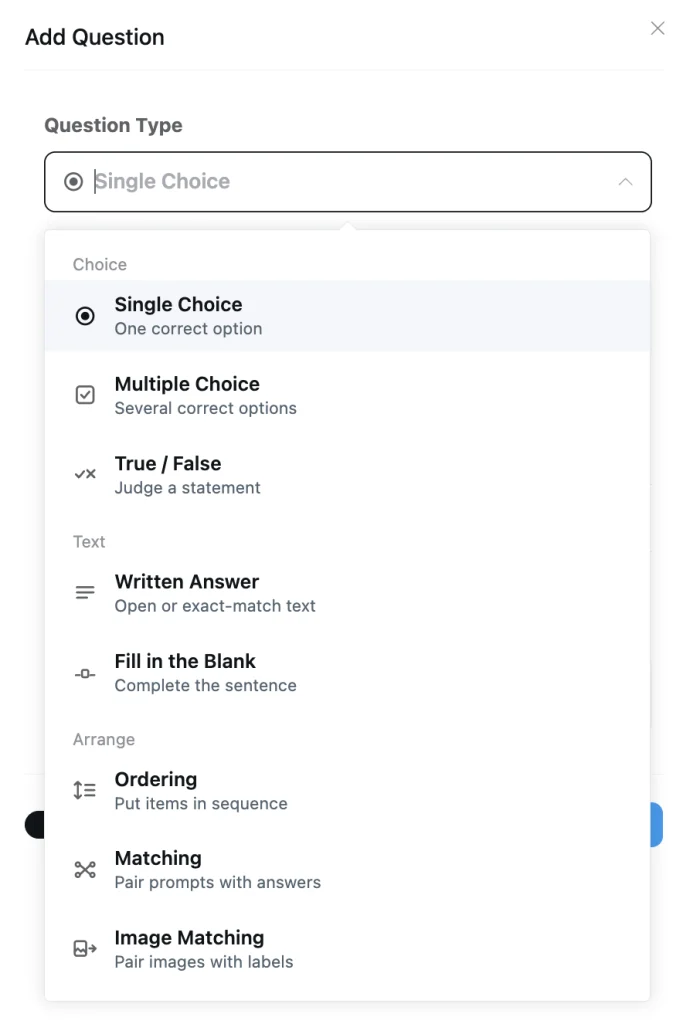
Quizzes now go well beyond single and multiple choice. True / False questions ask students to judge one statement. Written Answer questions can accept any response for reflection, or you can set exact answers and let the quiz grade them. Fill in the Blank questions let students complete a sentence, and each gap can accept more than one correct answer. Ordering questions ask students to arrange steps in sequence by dragging or with arrow keys.
Matching questions pair prompts with answers, with optional extra answers as distractors, and Image Matching does the same with pictures and labels. Every type is graded on the server; the correct answers never reach the student’s browser, and ordering and matching items are shuffled for each student.
One-by-One Quiz Layout
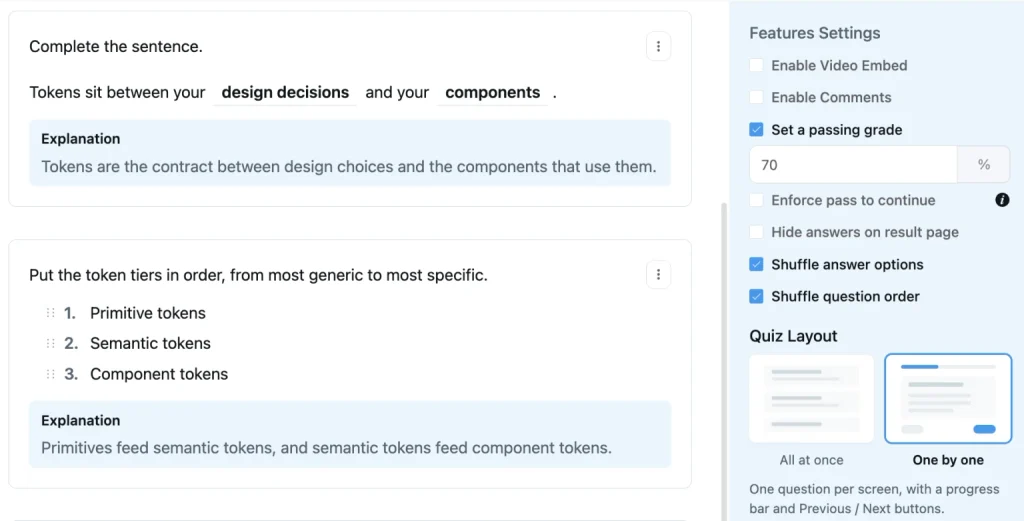
A long quiz on one page can feel overwhelming. The new Quiz Layout setting lets you choose between “All at once,” which is the classic single page, and “One by one,” which shows a single question per screen with a progress bar and Previous and Next buttons. Grading works the same either way, and the result page still lists every question for review.
Shuffle Questions and Answers
Two new settings sit beside the layout option. You can shuffle the answer options and shuffle the question order, so students stop memorizing where the right answer sits. Your own editing order stays untouched.
Answer Explanations
Each question can now carry an explanation, written with the same formatting tools as a post. After submitting a quiz, students see a View Explanation link under every question that has one, whether they got it right or wrong. Explanations stay hidden until a student has attempted the quiz, and they remain hidden if you have chosen to hide answers on the result page.
Course Progress Restart
Version 2.11.0 also lets students start a course over. A student can choose Restart Course from the course menu to reset their progress to 0% and work through the lessons again. Course admins have a matching Restart Progress action for any student in the course members list. Both actions ask for confirmation first.
More Improvements Across the Month
Several smaller features shipped alongside the big ones. Spaces, courses, and lessons now have canonical tags, so their tab URLs no longer compete with each other in search results. Uploaded videos show their first frame in the card layout instead of a grey placeholder.
The “New Activity” sort no longer pushes a post to the top after an admin pins it, locks its comments, or edits it. Space, course, and feed settings became real pages, so the back button works, and links can be shared. Dark mode is more consistent, and the space header menu fits properly on phones.
The portal login now works with the latest FluentAuth, which keeps magic login links and two-factor login running smoothly. Developers received new action hooks that fire when a lesson or section is created or published, plus a filter to override a space’s permalink.
Security and Stability
Each release tightened security. Link previews now require a logged-in member with an active profile. Site-level settings such as onboarding, licensing, and registration toggles verify admin rights before responding. Moderators see reports only from the spaces they moderate, and bulk member import checks your permission to create WordPress accounts first.
Stability improved just as much. Double clicks no longer create duplicate posts, comments, or reactions. Two-factor logins work again from the portal, and the post editor works on older iPhones running iOS 15. In fact, version 2.9.0 shipped with our internal bug board at zero open reports.
Final Words
Taken together, September’s releases make FluentCommunity better at reaching members, organizing what they find, and teaching them once they enroll. If you have not updated yet, start with the feature that solves your most pressing problem.

Shahjahan Jewel
Hello, this is Jewel, CEO & Head of Ideas at WPManageNinja. I am obsessed with WordPress since 2009. My aim is to be a user-centric developer first, and a serial entrepreneur second. You will find me discussing various tech issues and trying to come up with scalable solutions on different forums when I am not busy coding.

![SEO Title: 5 Best Community Portal Software [WordPress + SaaS Options]](https://fluentcommunity.co/wp-content/uploads/2026/10/community-portal-software-featured-1-1024x536.webp)

Add your first comment to this post