

Introducing Insights, Custom Ordering and Live Unread Badges

Table of Content
Subscribe To Get
WordPress Guides, Tips, and Tutorials


Most community owners can tell you how many members they have. Far fewer can tell you how many of them ever posted, which spaces are carrying the place, or who is waiting on a reply. FluentCommunity 2.12.0 answers those questions with Insights, a reporting section built from scratch to replace the old Reports screen.
Alongside it, this release lets you put your spaces and courses in the order you want rather than the order they were created, and makes the unread badges in the sidebar update while you watch.
Know What Your Community Is Actually Doing
The old Reports screen gave wrong answers to simple questions. Weekly charts dropped to zero, the last day of a range was left out, a twelve-month view mixed the same month from different years, and “Total Members” quietly showed the same figure as “New Members”. Rather than patch that, we rebuilt reporting as Insights.
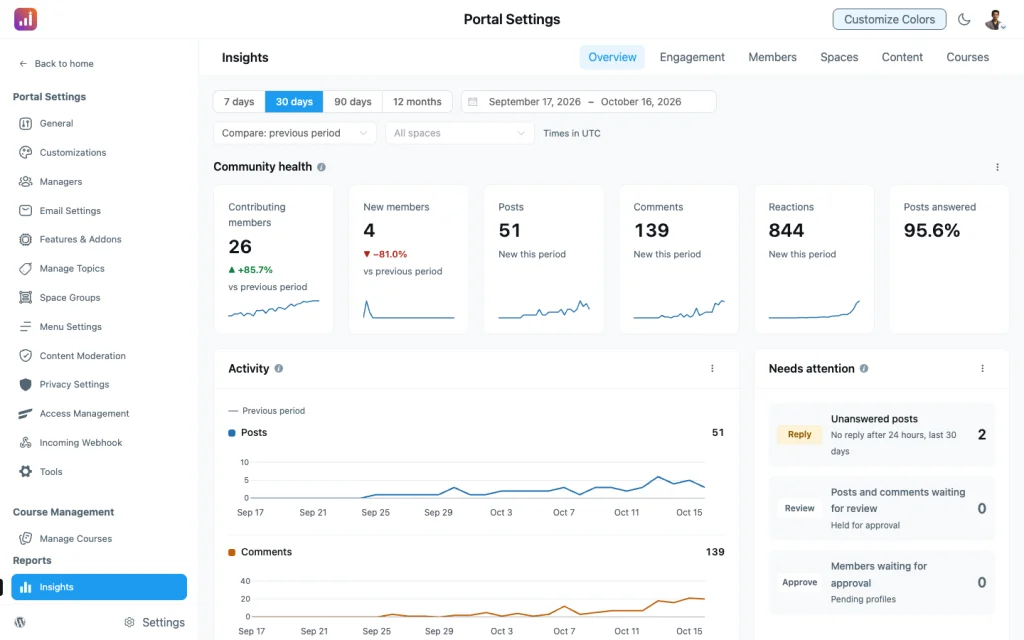
Every page works the same way. Pick a range — 7 days, 30 days, 90 days or 12 months, or your own dates — and every card recalculates against it, with each number compared to the previous period of the same length. Buckets follow your site’s timezone and your WordPress week-start setting, so a week means what it means to you.
The Overview page ships in the free plugin: a summary row, an activity trend, active and new members, your busiest spaces, and a Needs Attention list that links straight to the posts and reports waiting on you. If courses are enabled you also get a free Courses page with a summary and enrollments.
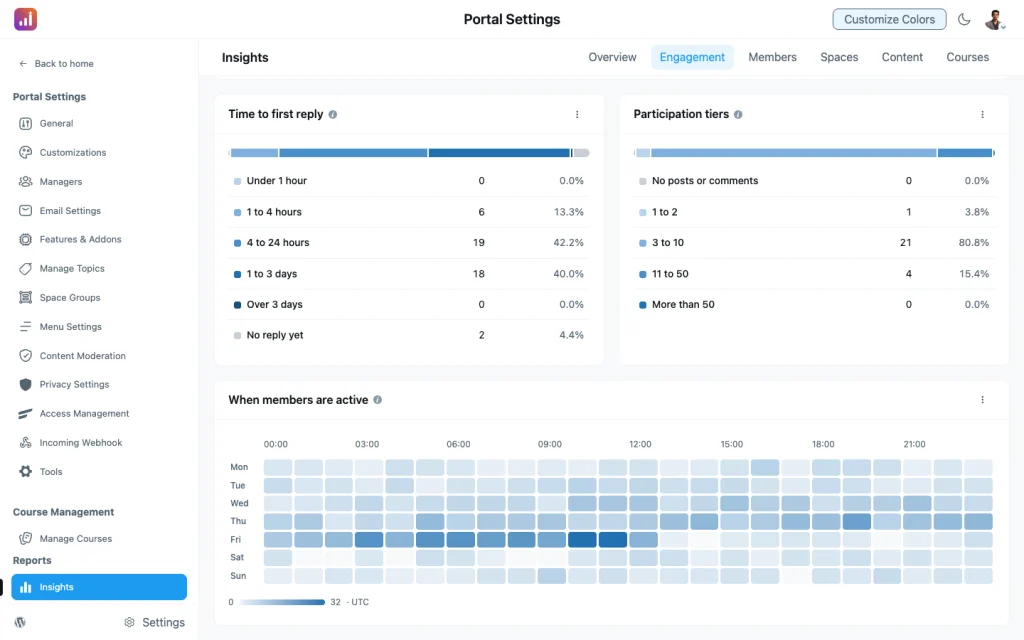
Five more pages come with pro: Engagement, Members, Spaces, Content and Moderation. They answer the harder questions.
- How many members ever contribute? A participation breakdown splits lurkers from occasional posters from regulars.
- When is the community awake? A heatmap of activity by day and hour.
- Do new members stick? Retention cohorts follow each joining group month by month.
- How fast do people get a reply? Responsiveness and reply times, plus a list of posts nobody has answered.
- Which spaces and posts are pulling their weight? Space comparison, top posts, topics and hashtags.
Without pro those pages still appear, showing what each card would tell you, so you can see what you are missing before you decide. Any card’s table can be exported to CSV.
One thing worth knowing: member visits were never stored before, only the latest one. Insights starts recording daily activity from the day you update, so the longer it runs the more it can tell you. Past posts, comments and reactions are backfilled, but visits begin now.
Insights also loads only when you open it, instead of riding along with the rest of the admin app.
Put Spaces and Courses in the Right Order
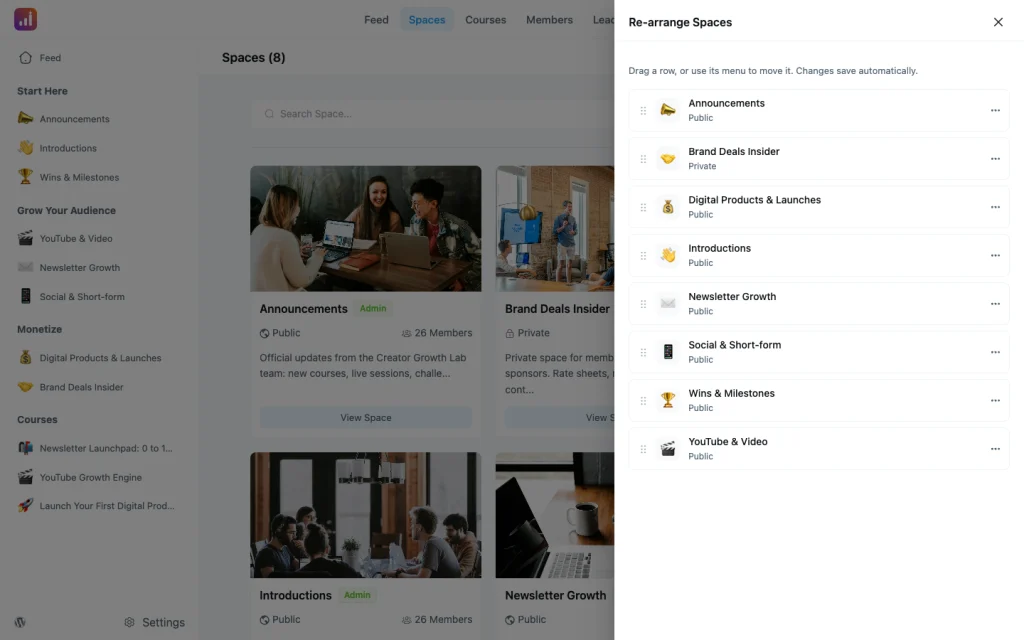
Your discover and courses listings used to decide their own order. Now admins get a Re-arrange option in the page menu: drag spaces or courses into the order members should meet them, and save without leaving the page.
Two settings sit alongside it in Customization Settings. Pick the default sort members see on each listing, and, if you want everyone to see the same thing, turn the sort dropdown off so your order is the only order.
New spaces and courses no longer sink below the custom order, and secret spaces show up in the drawer for the people allowed to see them.
Unread Badges That Keep Up
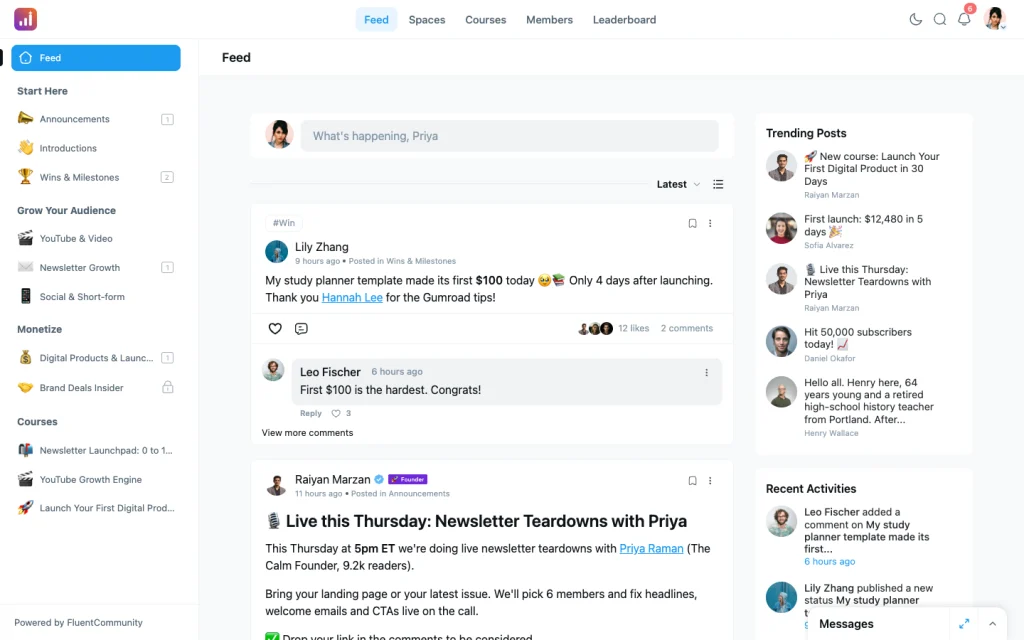
The sidebar badge used to count from your last visit to the site, so it never moved while you had the page open and often came back after a reload. It now tracks when you last opened each space, and new posts bump the count live as they arrive.
The counts are also more honest. Badges appear only for spaces you have joined, your own posts no longer count against you, and duplicate memberships no longer inflate the number.
Posts older than 14 days never count as unread, so a quiet space does not keep a badge forever. Large sites can lower that with the fluent_community/unread_badge_max_days filter.
Smaller Things That Add Up
Email links mark their notification as read. Open a post from a notification email or the daily digest and the matching notification clears itself, instead of sitting unread in the bell.
Pull to refresh feels right on iOS. In the installed app the indicator now follows your finger, stiffens as you pull, and stays put while the page reloads. It stays still for members who have asked their device to reduce motion.
Member filters got much faster. The space membership table stored member IDs as text, which stopped MySQL using its own index: on one site with 13,000 contacts the FluentCRM space filter took 86 seconds. The column is now numeric and the filter queries it directly.
Large uploads are kinder to memory. BunnyCDN uploads (pro) now stream from disk instead of being held whole in memory. The block editor also starts faster.
Security Hardening
This release closes a batch of issues found in a security review of the portal. Username changes now respect the setting that is meant to forbid them, used invitation tokens cannot be replayed at signup, and signup rate limiting runs before any account lookup.
Shortcodes are stripped from saved content and run only for authors who can edit posts, storage settings are limited to super admins, and status and privacy updates accept only known values. Mention search no longer reaches outside your own spaces when the member directory is restricted.
Bug Fixes and Stability
Access and privacy. The activity feed no longer shows posts from spaces a member has lost access to, or from spaces that were made private after the fact, while activity from public courses is visible to visitors again. Feed search stopped matching hidden comments, and space moderators can see their invitations.
Signing in and staying in. The return link survives the portal login instead of being cut short or coming back with a stray backslash. A tab left idle for hours renews its session quietly rather than ending it, and signup passwords are saved exactly as typed.
Content that behaves. Deleting a post now clears it from every feed, its counts and any pinned slot, and a pinned post no longer appears twice after someone comments. Dates and calendars follow your WordPress date format and week start, and new spaces, courses and posts keep umlauts in their URLs.
Everyday polish. Space header tabs stop wrapping onto two lines and come back when the window widens. The mention popup stays on screen in long posts. Admins and moderators can find secret spaces on the Spaces page, space admins keep their post options when returning to a space, locked lessons can no longer be marked complete, and course breadcrumb and menu links open in a new tab again. In the installed app, documents on iOS now offer a way back.
Wrapping Up
FluentCommunity 2.12.0 gives you a reporting section that answers real questions, control over how your spaces and courses are presented, and badges that tell the truth about what you have missed.
Update whenever you are ready — and let us know what you build with it.
Full Changelog
FluentCommunity 2.12.0
- Introduced: Insights Reporting for Members, Content and Courses
- Added: Custom Ordering for Spaces and Courses via a Re-arrange Drawer
- Added: Default and Locked Sort Options for Spaces and Courses
- Added: Email Notification Links Mark Their Notification as Read
- Improved: Realtime Space Unread Badges for Joined Spaces
- Improved: Unread Badge Window Raised to 14 Days with a Filter
- Improved: PWA Pull to Refresh Feels More Natural on iOS
- Improved: Space Membership Schema and Indexes for Faster Filtering
- Improved: BunnyCDN Uploads Streamed From Disk
- Improved: Faster Block Editor Startup
- Security: Access, Shortcode and Signup Hardening Across the Portal
- Fixed: Activity Feed Showing Posts From Spaces a Member Left Behind
- Fixed: Activity From Public Courses Hidden From Visitors
- Fixed: Deleted Posts Lingering in Feeds, Counts and Pinned Slots
- Fixed: Return Link Lost or Mangled After Portal Login
- Fixed: Dates and Calendars Ignoring WordPress Date and Week Settings
- Fixed: Session Ending After a Long-Idle Tab Renewed Its Nonce
- Fixed: Mention Popup Drifting Off-Screen in Long Posts
- Fixed: Umlauts Dropped From New Space, Course and Post URLs
- Fixed: Feed Search Matching Hidden Comments
- Fixed: Space Header Tabs Wrapping or Staying Hidden After Resize
- Fixed: Secret Spaces Hidden From Admins on the Spaces Page
- Fixed: Space Moderators Could Not See Invitations
- Fixed: Locked Lessons Could Be Marked Complete
- Fixed: Course Breadcrumb and Menu Links Not Opening in a New Tab
- Fixed: Pinned Post Shown Twice After a Comment
- Fixed: Space Admins Losing Post Options on Return
- Fixed: Signup Passwords Altered Before Saving
- Fixed: iOS App Documents Opening With No Way Back
- Fixed: Required Fields Blocking Admin Profile Edits
- Fixed: Cloud Media Deleted or Signed Through the Wrong Provider

Shahjahan Jewel
Hello, this is Jewel, CEO & Head of Ideas at WPManageNinja. I am obsessed with WordPress since 2009. My aim is to be a user-centric developer first, and a serial entrepreneur second. You will find me discussing various tech issues and trying to come up with scalable solutions on different forums when I am not busy coding.






Add your first comment to this post