

Best SureDash Alternative for WordPress Communities in 2027

Table of Content
Subscribe To Get
WordPress Guides, Tips, and Tutorials


SureDash has made it easier to build a community inside WordPress. You install a plugin, pick a layout, and your site gets a member portal with spaces, profiles, and discussions. For many site owners, that’s a good start.
However, a community needs more than a place to read posts. Members need to talk to each other, share their own updates, and keep coming back. When you look at the SureDash free version closely, you’ll notice some limits. Only admins can create posts. The course builder, member directory, and private spaces need the Pro version. There’s also no built-in chat or polls in its feature list.
That’s why many WordPress users start looking for a SureDash alternative. They want a plugin that gives members a real voice, includes learning tools, and still keeps everything on their own site.
FluentCommunity is one of the strongest options here. It combines a social community with a built-in LMS. It also includes real-time chat, polls, activity feeds, and moderation tools.
In this post, we’ll look at what SureDash offers, where it falls short for some users, and how FluentCommunity works as a SureDash alternative. We’ll also cover when SureDash might still be the right pick for you.
What Is SureDash?
SureDash is a WordPress community plugin from Brainstorm Force, the team behind Astra, SureCart, and SureMembers. Its plugin page describes it as a way to turn your WordPress site into a full community platform. Your members don’t need a separate app, and there are no monthly per-member fees.
The free version gives you a member dashboard with light and dark modes. You get three portal layouts: Classic, Modern, and Application. It also includes custom login and registration pages, with Google and Facebook sign-in. On top of that, you get discussion forums with threaded replies, reactions, mentions, badges, and real-time notifications.
SureDash also leans into AI. You can create a portal with one click using AI, or start from a preset. It supports AI assistants through the WordPress Abilities API and MCP.
The bigger tools sit in SureDash Pro. These include the Course Builder, member-created posts, private spaces, the Resource Library, events, the Member Directory, email notifications, and the leaderboard. Course quizzes and LearnDash migration are Pro features too.
In short, SureDash gives you a clean portal for free. But most of the features that make a community feel alive come with the paid plan.
Why People Look for a SureDash Alternative?
Every plugin has trade-offs. With SureDash, a few of them show up quickly once you start running a real community.
Members can’t post in the free version. The SureDash FAQ says it clearly. In the free version, only admins can create posts. Members can comment and react, but they can’t start their own discussions. For a community, that’s a big gap. A space where only the owner posts works more like a blog with comments than a community.
Courses need Pro. If you want to teach inside your community, you’ll need SureDash Pro for the Course Builder, lesson progress tracking, and quizzes.
Private spaces need two products. According to the FAQ, restricting spaces by membership requires both SureDash Pro and SureMembers. So your setup cost grows as your needs grow.
No chat or polls listed. The SureDash feature list doesn’t include real-time chat or polls. If your members need to message each other or vote on ideas, you’d have to find another tool.
It’s still a young plugin. At the time of writing, SureDash has 1,000+ active installations on WordPress.org. Its reviews are mixed. Some users praise the support and the SureMembers connection. Others mention bugs and slow fixes.
None of this makes SureDash a bad plugin. It simply means it may not fit every type of community.
FluentCommunity: A SureDash Alternative Built for Engagement
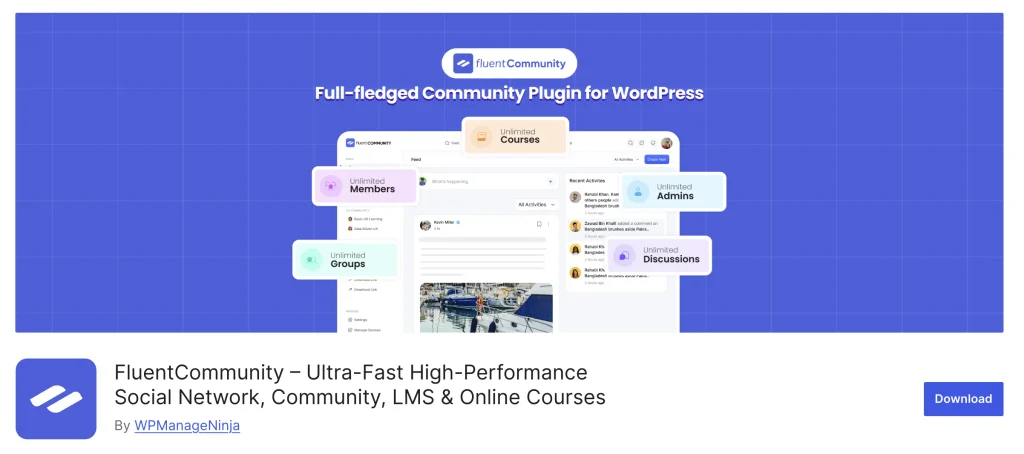
FluentCommunity is a WordPress community plugin from WPManageNinja, the team behind Fluent Forms, FluentCRM, and FluentCart. Its WordPress.org page describes it as a plugin that combines social networking tools with a built-in Learning Management System. It’s also a no-code tool, so you don’t need any coding skills to set it up.
At the time of writing, FluentCommunity has 8,000+ active installations. Now, let’s look at how it handles the gaps we discussed above.
Members Get Their Own Voice
In FluentCommunity, members can create posts, comment, react, and mention each other. They can follow topics with hashtags, bookmark posts, and see everything in an activity feed. This is the core of the free plugin.
That changes the feel of your community. Members don’t wait for you to start every conversation. They share wins, ask questions, and help each other. As a result, your community stays active even on days you don’t post.
You also get post scheduling, so you can plan your own announcements ahead of time.
A Built-In LMS
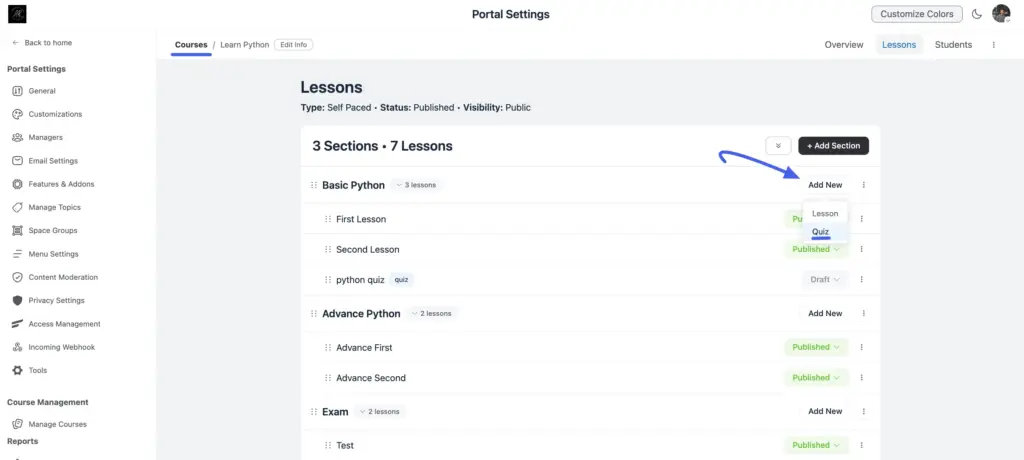
FluentCommunity comes with its own LMS. You can build courses with a Gutenberg-based course editor, add video lessons through FluentPlayer, and track student progress. You can also use drip content, free lesson previews, course welcome banners, and lesson discussions.
Lesson discussions matter more than they seem. Students can ask questions right under the lesson they’re watching. Other students can answer, too. So learning and community happen in the same place.
If you want to sell courses, FluentCommunity connects with FluentCart for course monetization. For advanced needs, the Pro version adds the quiz module and sequential lesson lock.
Real-Time Chat
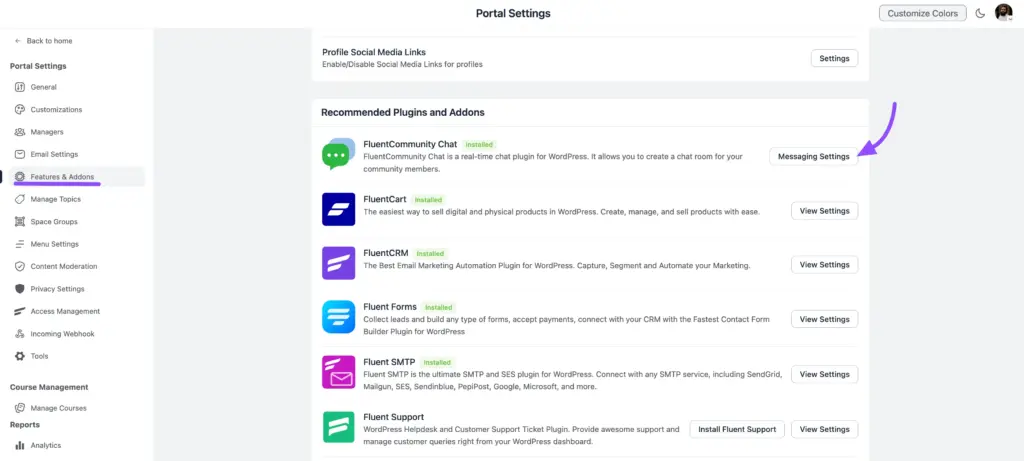
FluentCommunity includes real-time chat for private conversations between members. This is a free add-on called FluentCommunity Chat.
Chat fills a gap that feeds can’t. Some questions are too small for a full post. Others are private. With chat inside your community, members don’t need to move to WhatsApp, Discord, or email. They stay on your site.
Polls and Surveys
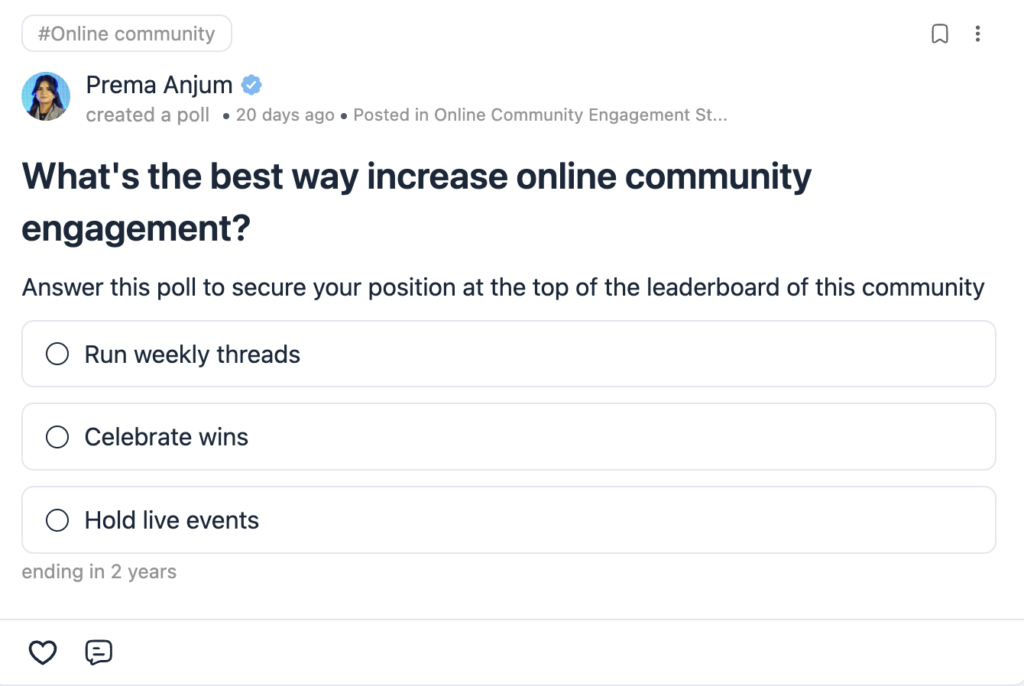
You can add polls and surveys right inside a post. Members vote with one click, and you see the results as they come in.
This is useful for quick decisions. For example, you can ask which topic your next workshop should cover. Or you can check which time works best for a live session. It’s also an easy way to get quiet members to take part.
Privacy, Moderation, and Control
FluentCommunity gives you privacy settings for your spaces, so you can decide who sees what. You can also turn on user approval, which means new members wait for your approval before they join.
For safety, you get content moderation tools. Plus, a role manager lets you control what different users can do. In the Pro version, you also get a dedicated Manager role, so you can share the workload with trusted members.
Profiles, Directory, and Leaderboards
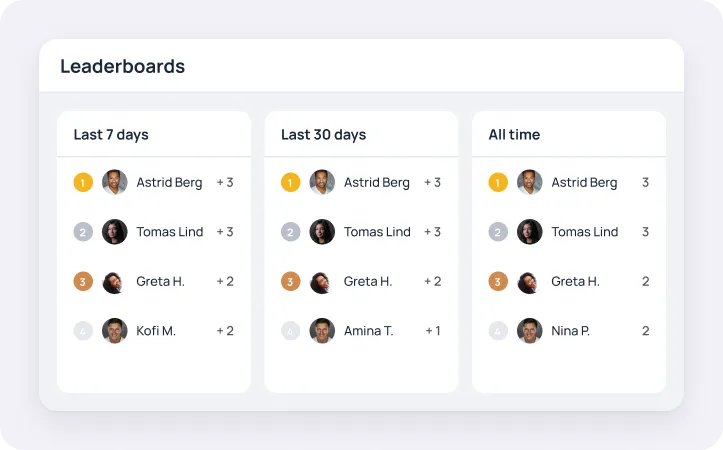
Members get user profiles with custom profile fields. There’s also a member directory, so people can find and connect.
To boost engagement, the Pro version adds leaderboards, user badges, and a verification sign. These small touches give active members recognition. In turn, other members are encouraged to join in more.
Media That Feels Native
Members can upload files, images, videos, and audio. They can also use GIFs and emojis. Video uploads run through FluentPlayer, so you don’t need an outside video host for basic needs.
If your community shares a lot of media, the Pro version offers a media gallery and cloud storage with Amazon S3, BunnyCDN, or Cloudflare R2. It also adds a secure Document Library for files you want to protect.
Branding and Member Experience
You can customize your branding, add custom sidebar links, set a welcome message, and use custom slugs. Members can switch between dark and light mode. You also get an email digest, so members get a summary of what they missed.
Lightweight and No-Code
According to the plugin’s FAQ, FluentCommunity is lightweight and won’t slow down your website. That matters because community pages get a lot of traffic from logged-in members.
You also don’t need any coding skills. The setup wizard handles the basics, and you manage everything from a clean dashboard. So even if you’re new to WordPress, you can launch your community without hiring a developer.
Easy Migration From BuddyBoss and BuddyPress
If you’re coming from BuddyBoss or BuddyPress, FluentCommunity has a built-in migration tool. For large BuddyBoss communities, the plugin page also recommends a WP-CLI command for a smoother move.
Works With the Fluent Ecosystem
FluentCommunity works on its own. You don’t need any other Fluent plugin to use it. However, it also connects with FluentCRM, FluentCart, Fluent Support, FluentSMTP, and Fluent Forms for free.
This means you can run email marketing, sell courses, handle support tickets, and build forms, all inside the same WordPress site. The Pro version also adds webhooks and automation actions for more advanced workflows.
SureDash vs FluentCommunity: Quick Comparison
Here’s a side-by-side look based on each plugin’s WordPress.org listing.
| Feature | SureDash | FluentCommunity |
| Member-created posts | Pro only | Included |
| Course builder | Pro only | Included (built-in LMS) |
| Quizzes | Pro | Pro |
| Real-time chat | Not listed | Free add-on (FluentCommunity Chat) |
| Polls & surveys | Not listed | Included |
| Member directory | Pro | Included |
| Leaderboard | Pro | Pro |
| Space privacy | Pro + SureMembers | Privacy settings included |
| Social login (Google/Facebook) | Free | Not listed |
| AI portal setup | Free | Not listed |
| Migration tool | LearnDash (Pro) | BuddyBoss/BuddyPress |
| Cloud storage | Bunny.net (Pro) | S3, BunnyCDN, R2 (Pro) |
| Ecosystem | SureMembers, SureCart, OttoKit | FluentCRM, FluentCart, Fluent Support, FluentSMTP, Fluent Forms |
| Active installs | 1,000+ | 8,000+ |
As you can see, the biggest difference is what each plugin includes for free. SureDash keeps member posting, courses, and the directory in Pro. FluentCommunity includes them in the core plugin.
When SureDash Might Still Be the Right Choice?
To be fair, SureDash does some things well. If your site already runs on Astra, SureCart, and SureMembers, SureDash fits right into that stack. Its free version also includes Google and Facebook sign-in, which FluentCommunity doesn’t list. And if you like setting things up with AI, SureDash offers one-click AI portal creation and MCP support.
SureDash also makes sense if you mainly need a resource portal or a members’ dashboard where you share content and members react to it. In that case, admin-only posting may not bother you.
On the other hand, if you want members to post, chat, vote, and learn in one place, FluentCommunity gives you more of that from the start.
The best way to decide is to list what your community needs in its first year. Then check which plugin covers those needs without extra add-ons or upgrades.
How to Get Started With FluentCommunity
Getting started is simple. First, install FluentCommunity from the WordPress plugin directory. Then run the setup wizard, which walks you through the basic settings.
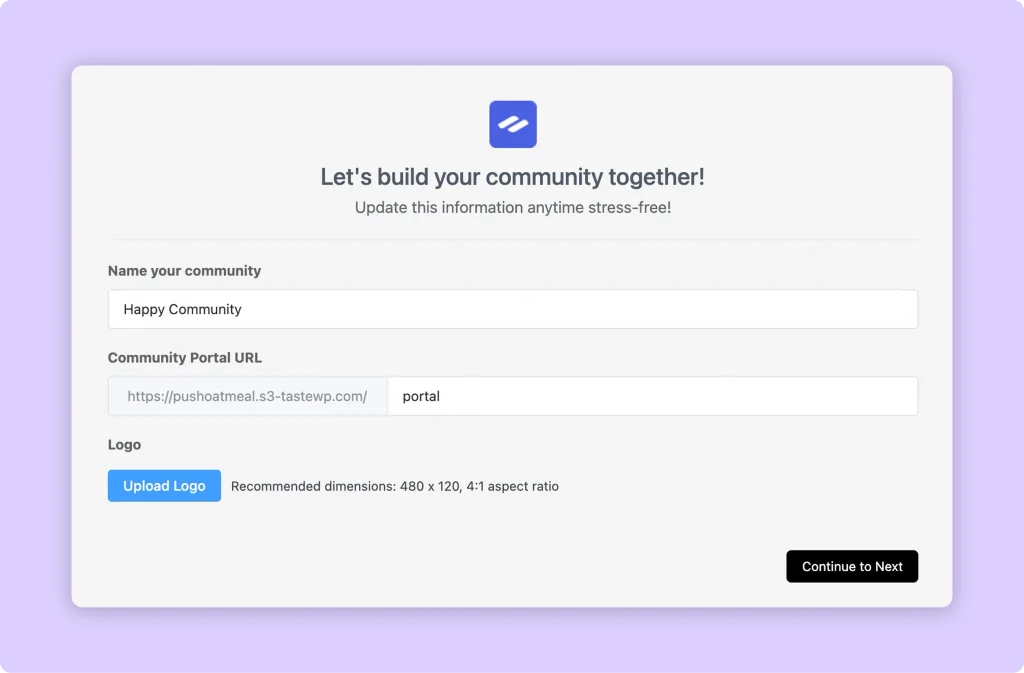
Next, create your first spaces. You can make one for general discussion, one for announcements, and one for each course or topic. After that, set your privacy and user approval settings based on who you want to let in.
Then add your branding, write a welcome message, and invite your first members. If you plan to teach, open the course editor and build your first course with lessons and drip content.
Finally, turn on chat and run your first poll. These two features help new members feel welcome and get them talking early.
Final Thoughts
SureDash is a solid start for building a community portal in WordPress. However, many of its key community features sit behind the Pro plan, and members can’t post in the free version.
FluentCommunity takes a different approach. It gives members a real voice with posts, chat, and polls. It also includes a built-in LMS, moderation tools, and a member directory in the core plugin. And because it connects with the Fluent ecosystem, you can grow your community, courses, and email marketing from one WordPress site.
So, if you’re looking for a SureDash alternative that keeps your community active and fully under your control, FluentCommunity is worth a close look.

Prema Anjum
My full name is Anzuman Ara Chowdhury. But people know me as Prema Anjum. I’m a Digital Marketer by profession, a WordPress community contributor, and a travel enthusiast by heart.






Add your first comment to this post