

FluentCommunity 2.6.0: Course Welcome Banners, One-Click Lesson Duplication, Smoother Quiz Editor and More

Table of Content
Subscribe To Get
WordPress Guides, Tips, and Tutorials


FluentCommunity 2.6.0 is all about courses that sell themselves and tools that save you time. We looked at the first thing a visitor sees when they land on a course, the repetitive work of building lessons, and the moments that slow moderators down — then fixed all three.
Here’s what’s new at a glance: Course Welcome Banners turn every course into its own landing page, Duplicate lets you copy any lesson or quiz in one click, and a new First Comment Approval option keeps spam out without slowing real members down. You also get instant video thumbnails in feeds, a glow highlight on new posts and comments, a smoother quiz editor, and full WordPress 7 readiness.
Course Welcome Banners
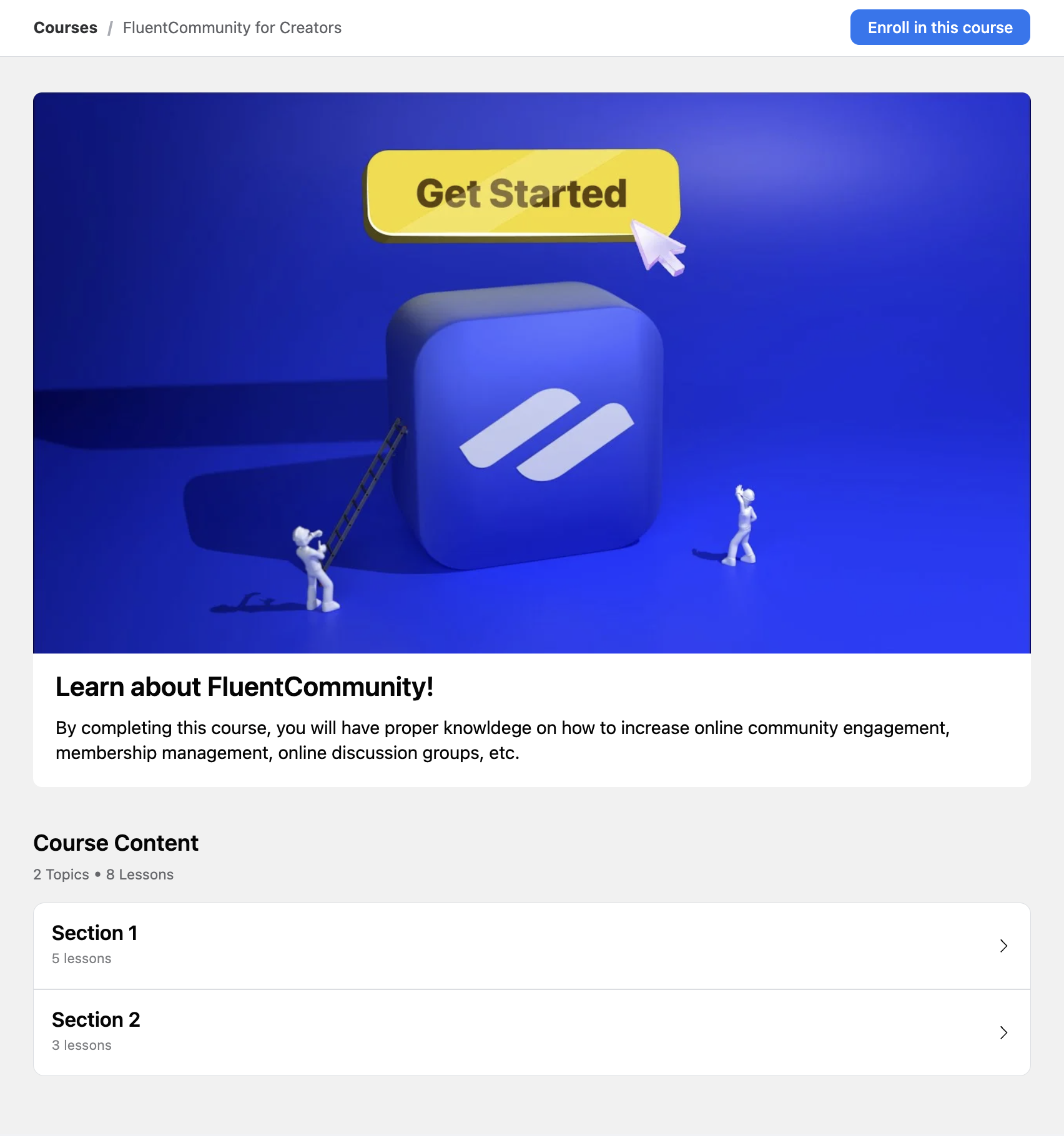
Every course can now show its own welcome banner (pro), with two completely separate views — one for visitors who have not enrolled yet, and another for members already inside the course. The Not Enrolled view is the new landing experience: a bold image or a short intro video, a headline that captures what the course is really about, a description that explains who it is for and what they will learn, and call-to-action buttons that lead straight to enrollment, a free preview, a community space, or anywhere else you want the visitor to go next. The result is a course landing page that sells the value of joining at a glance, instead of a plain list of sections and lessons.
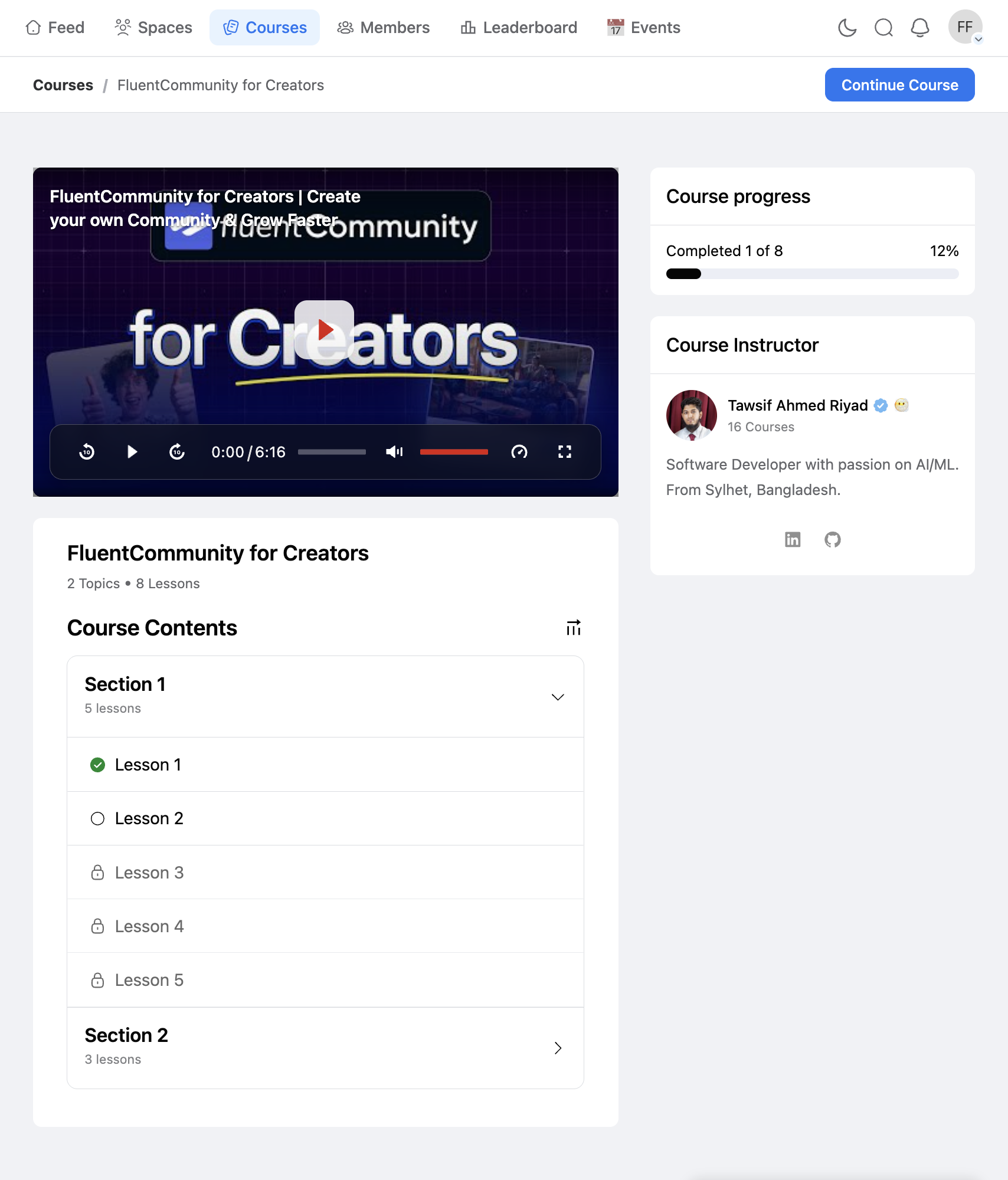
The Enrolled view is shown the moment a member opens the course after joining. It is the right place for a personal welcome video from the instructor, a “start here” message that orients first-time learners, a reminder about office hours or community guidelines, or a link to the course discussion space. You decide whether members can dismiss it — turn on the dismiss option and the banner stays hidden for the next 7 days after a member closes it, so returning students go straight to the lessons without seeing the same intro every visit. When that period ends, the banner returns — useful if you update the message between course cohorts.
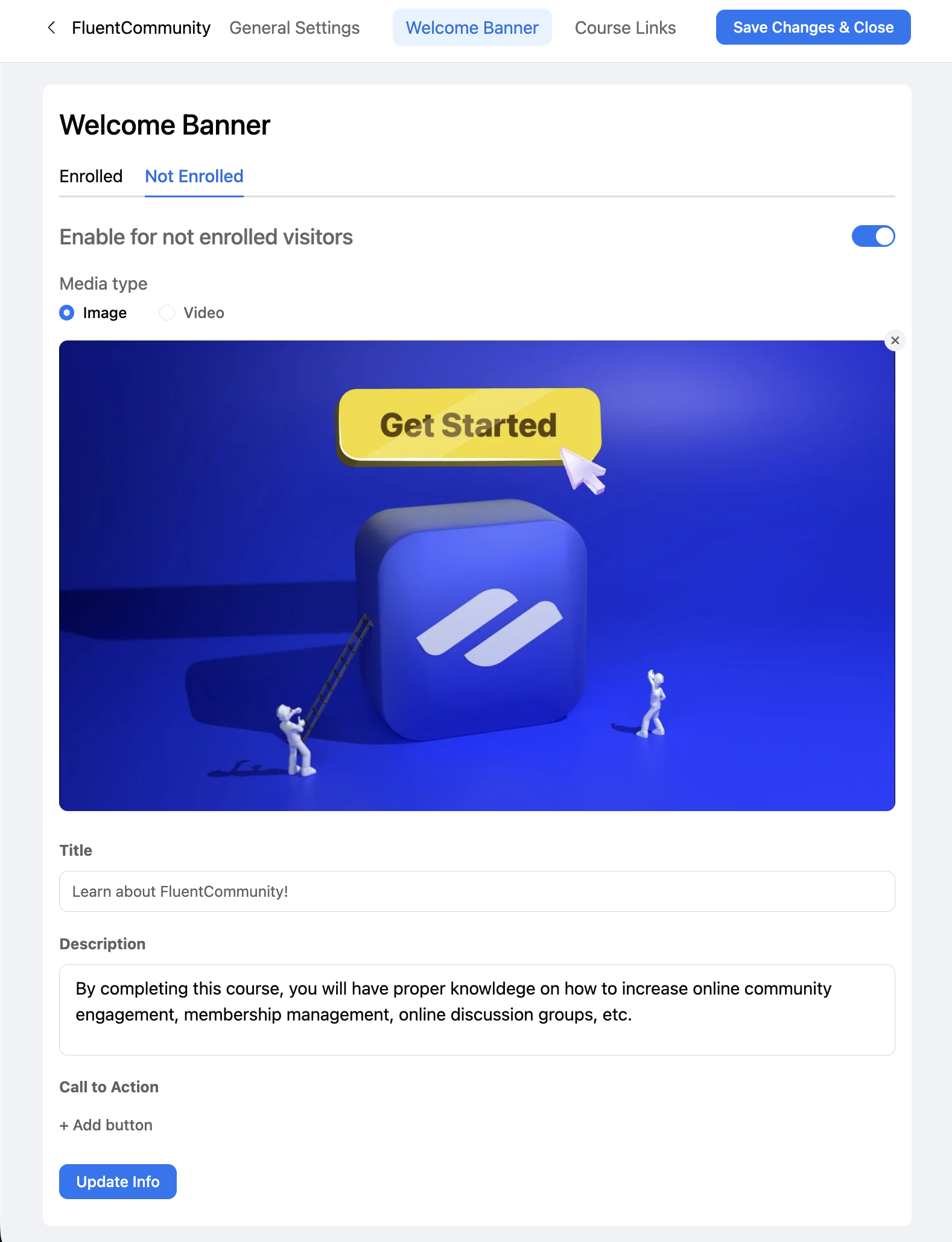
Both views are configured side by side from a dedicated Welcome Banner tab inside Course Edit. Switch between Enrolled and Not Enrolled, pick the media type (image or video), upload or paste a link, write the copy, add the buttons, and save once. Each course carries its own message, so a free intro course can lead with “Get started for free” while a high-ticket cohort program leads with “Apply now” — without touching a single template, theme file, or block.
- A proper landing page for every course, with no extra page builder or theme work
- Two distinct messages from the same place — one for prospects, one for members
- Native video support for course intros, instructor welcomes, and walkthroughs
- Multiple CTA buttons per view for layered actions (enroll + free preview, start here + join community)
- Optional one-click dismiss for enrolled members, with a 7-day quiet period before the banner returns
- Per-course configuration, so messaging stays specific instead of generic across the whole site
Duplicate Lessons and Quizzes in One Click
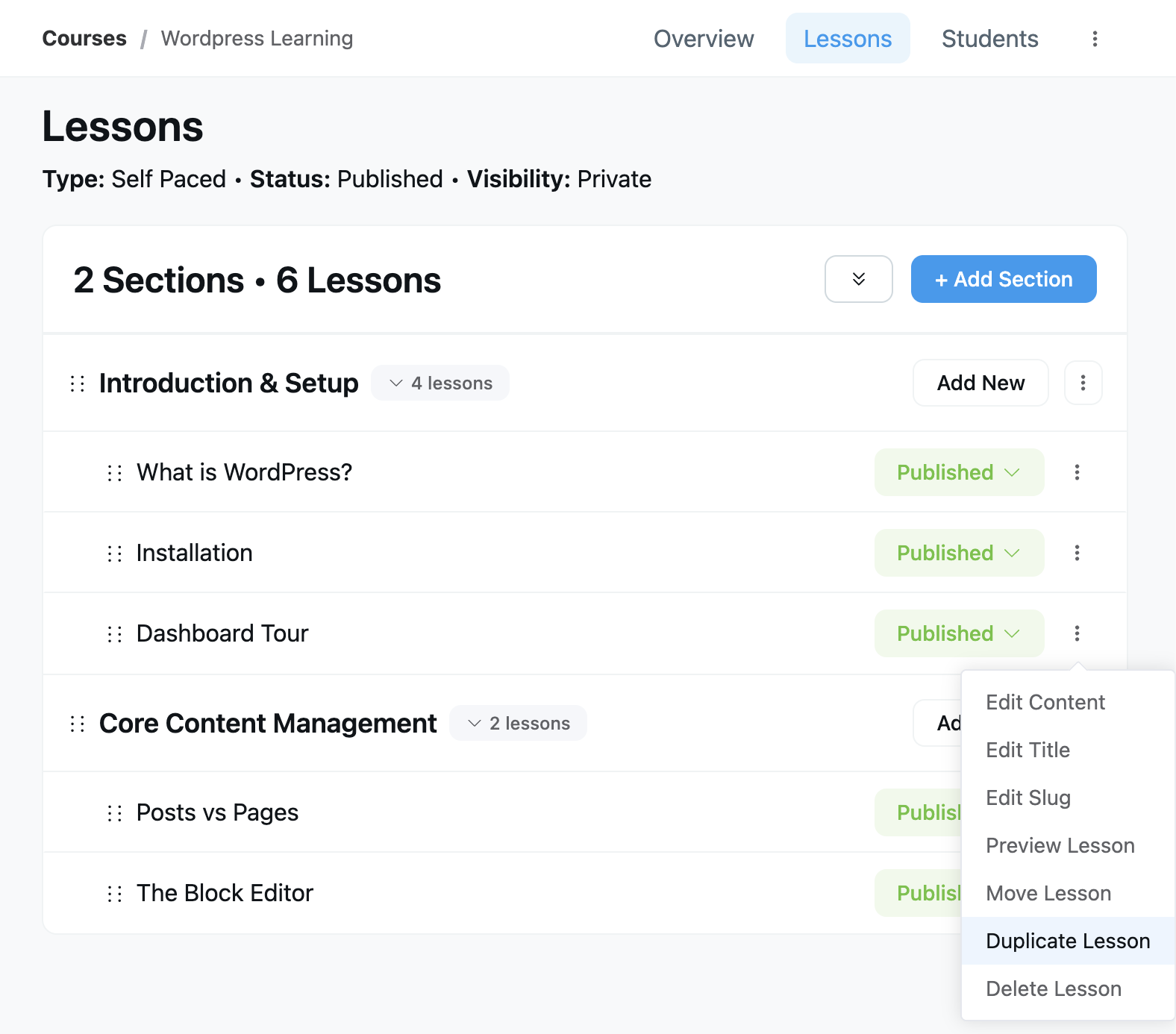
Course creators can now duplicate any lesson or quiz with a single click from the lesson dot-menu inside Course Edit. The copy includes the full content — body, media, settings, and for quizzes, every question and answer option — and lands right under the original as “Lesson Name (Copy)”. From there, rename it and tweak only the parts that need to change. Individual quiz questions can be duplicated too, straight from the question’s own menu inside the quiz editor.
This is the shortcut every course creator has been asking for. Many lessons in a course share the same structure: an intro paragraph, a media block, a checklist, a wrap-up. Same for quizzes — most courses use a consistent question format throughout. Instead of rebuilding that shape from scratch each time, start from a known-good lesson and adjust only what is different. The result is faster course building, fewer formatting mistakes, and a more consistent learning experience for members.
- Building a course where every lesson follows the same template
- Creating quiz variants for practice rounds, retakes, or different difficulty levels
- Drafting new lessons that reuse the same downloadable resources or video block layout
A Smoother Quiz Editor
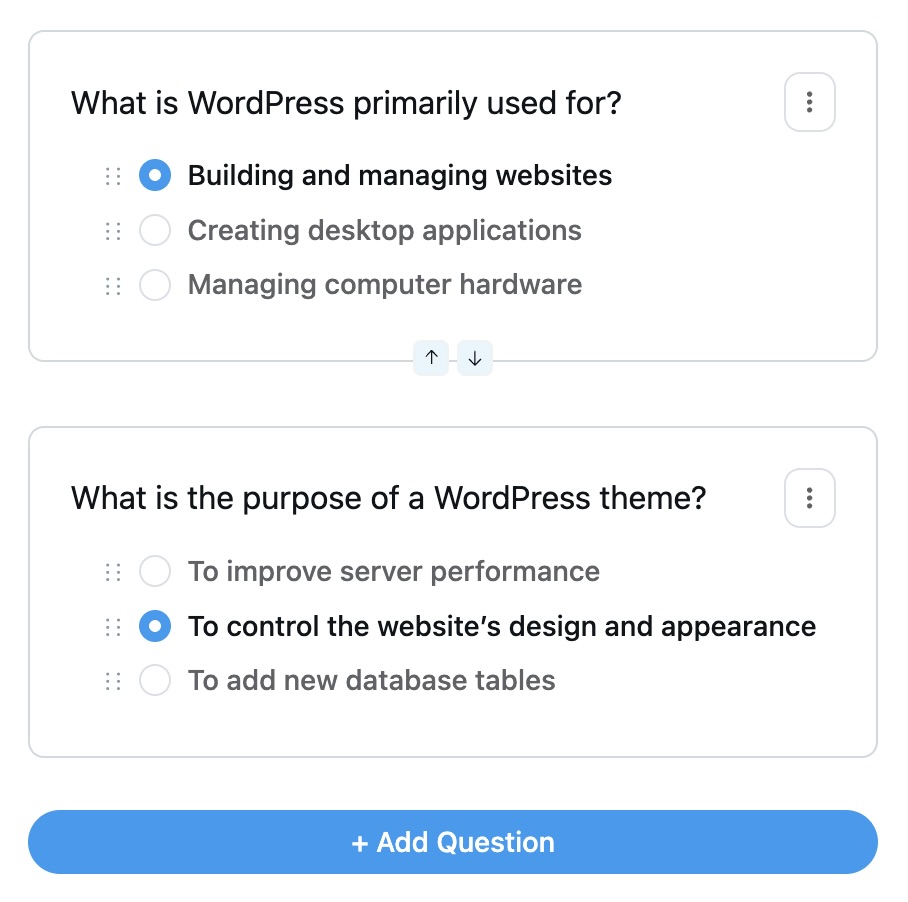
Building a quiz used to mean a lot of small frictions. This release smooths them out: a cleaner question modal, easier answer-option reordering, and brand-colored inputs that make the editor feel like the rest of your portal. Newly added or duplicated questions glow briefly so you always see exactly what just landed.
The whole editor is now fully keyboard-accessible too — add, reorder, and duplicate questions without touching the mouse. Faster for power users building long quizzes, and friendlier for everyone else.
Require Approval for First Comment
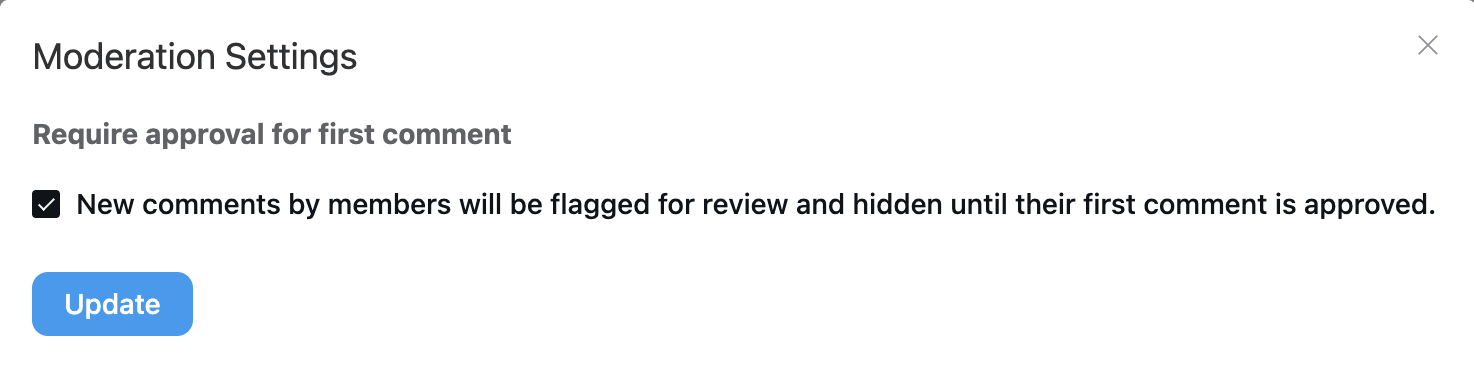
Spam accounts usually reveal themselves on their very first comment. With the new Require Approval for First Comment option in Moderation settings, a member’s first comment is held for review and stays hidden until a moderator approves it. Once they pass that first check, they comment freely like everyone else.
It works just like the existing first-post approval, so you can gate both posts and comments for newcomers — or only one of them. Real members barely notice the speed bump; spammers never make it through.
A Feed That Feels More Alive
Your new posts and comments now glow. The moment you publish, your post or comment lights up with a soft, theme-aware highlight so you can spot exactly where it landed — especially handy in busy feeds and long comment threads.
Embedded videos get instant thumbnails. When someone shares a video in a post, the preview image is now prepared the moment the post is saved — so feeds show a proper video card right away instead of a blank embed waiting to load.
Image galleries show where you are. Swiping through a multi-image post or a lesson lightbox now shows a page indicator, so you always know how many images are left.
Smaller touches. The full-layout dropdown rows in feeds are now clickable across the entire row, and reply threads stay open while you keep the conversation going.
Course Builder and Admin Polish
Clearer lock screens. The default course lock screen now adapts its message to your paywall setup, so visitors see the right next step instead of a generic notice.
Course cards that speak status. Action buttons on course cards now pick up theme-aware colors based on status, so Published, Draft, and In-Progress are easy to tell apart at a glance.
Better in any language. Translation coverage got a sweep across the portal — including lesson duration labels — and Pro now ships with German (de_DE) translation files out of the box. Space forms also validate topics and titles before saving, catching mistakes early.
Bug Fixes and Stability
Ready for WordPress 7. FluentCommunity runs cleanly on WordPress 7, so you can update with confidence the day you’re ready.
Polls behave. Reordering poll options no longer mixes up who voted for what, and clearing an option’s text no longer deletes the option.
Tighter privacy. Comment notifications no longer leak content to the wrong subscriber, the FluentCRM profile view no longer shows space memberships from other contacts, and verification badges survive joining a space through an invitation link.
Smoother lessons and video. Lesson videos show up without a hard refresh, lesson media previews work properly with FluentPlayer, and iPad Safari no longer traps you in full-screen lessons.
Everyday polish. The block editor renders for contributors again, Bunny Stream embeds lay out correctly in the composer and feeds, the Recent Activities widget stays fresh, the notification popover scrolls cleanly, the Scroll-to-Top button sits where it should on every layout, comments scroll correctly inside the feed modal, section URL placeholders work in hyperlinks, and a PHP warning in the digest email is gone.
Wrapping Up
FluentCommunity 2.6.0 focuses on the moments that matter most — the first impression a course makes, the hours you spend building lessons, and the trust your members place in a well-moderated community. Course Welcome Banners give every course a real front door, and one-click duplication gives you those hours back.
A few weeks ago we asked our community where the Courses module should go next, and the response was loud and clear: you want us to push it further. This release is the first answer — Welcome Banners, lesson and quiz duplication, and a smoother quiz editor all came out of that direction, with more course improvements already in the works. The thread is still open, so if you have a course feature on your wishlist, that’s the place to tell us.
Full Changelog
- Introduced: Course Welcome Banners (pro)
- Added: First Comment Approval Moderation Option
- Added: Page Indicator in Image Carousel
- Added: Duplicate Actions for Lessons and Quizzes
- Added: Server-Side Thumbnails for Embedded Videos in Feeds
- Added: Glow Highlight for New Posts and Comments
- Added: German (de_DE) Translation Files (pro)
- Improved: WordPress 7 Compatibility
- Improved: Course Quiz Setup Editor UX
- Improved: Comment Reply Thread Stay-Open Behavior
- Improved: Theme-Aware Status Colors on Course Card Buttons
- Improved: Paywall-Aware Default Lock Screen Description
- Improved: Clickable Full Layout Dropdown Row in Feeds View
- Improved: Validation for Space Topic and Title Fields
- Improved: Translation Coverage Across Portal UI Strings
- Fixed: Poll Vote Misattribution on Option Reorder
- Fixed: Poll Options Deleted When Input Cleared
- Fixed: Verification Badge Removed on Space Join via Invitation Link
- Fixed: Course Creator Bypass on Private Space Approval
- Fixed: Comment Notification Content Leak Across Subscribers
- Fixed: Space Membership Data Bleed in FluentCRM Profile View
- Fixed: Lesson Video Missing Until Hard Refresh
- Fixed: Lesson Media Preview with FluentPlayer
- Fixed: iPad Safari Full-Screen Lesson Trap
- Fixed: Block Editor Not Rendering for Contributors
- Fixed: Bunny Stream Embed Layout in Composer and Feed Views
- Fixed: Stale Recent Activities Sidebar Widget
- Fixed: Notification Popover Scroll and Overflow
- Fixed: Scroll-to-Top Button Positioning Issues
- Fixed: Comment Scroll Behavior Inside Feed Modal
- Fixed: Section URL Placeholder Breaks in Hyperlinks
- Fixed: Undefined Variable Warning in Digest Email

Shahjahan Jewel
Hello, this is Jewel, CEO & Head of Ideas at WPManageNinja. I am obsessed with WordPress since 2009. My aim is to be a user-centric developer first, and a serial entrepreneur second. You will find me discussing various tech issues and trying to come up with scalable solutions on different forums when I am not busy coding.




Add your first comment to this post