

How to Encourage Online Community Participation and Involvement

Table of Content
Subscribe To Get
WordPress Guides, Tips, and Tutorials


Here’s a number that surprises most community owners. In one study of four online communities with almost 64,000 members, fewer than 1 in 4 people ever wrote a single post.
So if your space feels quiet, you’re not doing it wrong. You’re normal.
The good news is that quiet members aren’t a lost cause. With a few small changes, you can move people from reading, to posting to helping run the place.
Key Takeaways
- Community participation means members add something others can see: posts, replies, reactions, poll votes, or help
- Most communities follow a 90-9-1 pattern, so a quiet majority is expected, not a failure
- The biggest single lever is replying to a newcomer’s first post quickly and personally
- Move members one rung at a time: reader, contributor, collaborator, leader
- Track four numbers: participation rate, time to first reply, newcomer return rate, and contributor spread
What Is Online Community Participation?
Online community participation is any action a member takes that adds something to the community, like writing a post, replying, reacting, voting in a poll, or answering someone’s question. Reading alone is not participation. Community involvement goes one step further: members take on part of the responsibility for the community itself.
That difference matters because it changes what you measure and what you ask for. A member who reads every post is getting value. A member who replies is creating value. A member who welcomes newcomers is creating the conditions for everyone else to create value.
Participation vs Engagement vs Involvement
These three words get used like they mean the same thing. They don’t, and mixing them up leads to the wrong goals:
| Term | What it means | Example |
| Engagement | Any interaction, including passive ones | Opening the digest, reading a thread, clicking a link |
| Participation | A visible contribution others can respond to | Posting a question, replying, voting in a poll |
| Involvement | Ownership of how the community runs | Welcoming new members, moderating a space, hosting a session |
Here’s a simple way to picture it. Engagement is showing up to the party. Participation is joining a conversation. Involvement is helping host. You want all three, but you build them in that order.
Why Most Members Never Post
If most of your members are silent, you’re in good company. Jakob Nielsen described this pattern back in 2006 as participation inequality: roughly 90% of people in an online community read without contributing, 9% contribute a little, and 1% create most of the activity.
It’s a rule of thumb, not a law. But real data backs it up. A study published in the Journal of Medical Internet Research looked at four long-running online communities with 63,990 members and 578,349 posts. Fewer than 25% of members posted even once. The top 1% of members created 74.7% of all the content.
There’s good news in the industry data, though. In the CMX Community Industry Report, 34% of community professionals said they struggle to consistently engage members, down from 55% when CMX first asked in 2020. In other words, people who work on participation on purpose are getting better at it.
The Real Reasons People Stay Quiet
Silence is rarely about laziness. When you talk to quiet members, the reasons for low community participation usually sound like this:
- They don’t know what to say or what’s “allowed”
- They’re worried about looking silly in front of experts
- They can’t tell which space their question belongs in
- They posted once, nobody replied, and they didn’t try again
- Nobody ever asked them to do anything
Notice that almost every reason on that list is something you can design around. That’s the whole idea behind the rest of this guide.
One more thing before we move on. Reading has real value. Some members will happily read for years and still renew, buy, and recommend you. The goal isn’t 100% posting. The goal is to make sure anyone who wants to step forward finds it easy, safe, and worth it.
The Community Participation Ladder: From Reader to Leader
Researchers Jennifer Preece and Ben Shneiderman described a useful model called the Reader-to-Leader Framework. It says people move through four roles in online spaces: reader, contributor, collaborator, and leader. Each step needs a different kind of nudge.
You’re not trying to flip a switch from “lurker” to “superfan.” You’re trying to move each member up one rung. A reader who votes in one poll has made real progress, and that tiny step makes the next one easier.
Here’s how the ladder maps to what you actually do:
| Rung | What it looks like | Your job | FluentCommunity tools |
| Reader | Browses, reads, lurks | Make the first step tiny and obvious | Welcome Banner, clear spaces, polls |
| Contributor | First post, comment, or vote | Reply fast and make it feel worth it | Mentions, notifications, moderation queue |
| Collaborator | Regular back-and-forth, helps others | Create rhythm and reasons to return | Post scheduling, email digest, group chat |
| Leader | Welcomes, moderates, hosts | Give real roles and public recognition | Manager roles, badges, verification badges, leaderboard |
The next four steps follow the ladder in order. Fix the bottom rung first. A great leader program won’t help if new members never post their first comment.
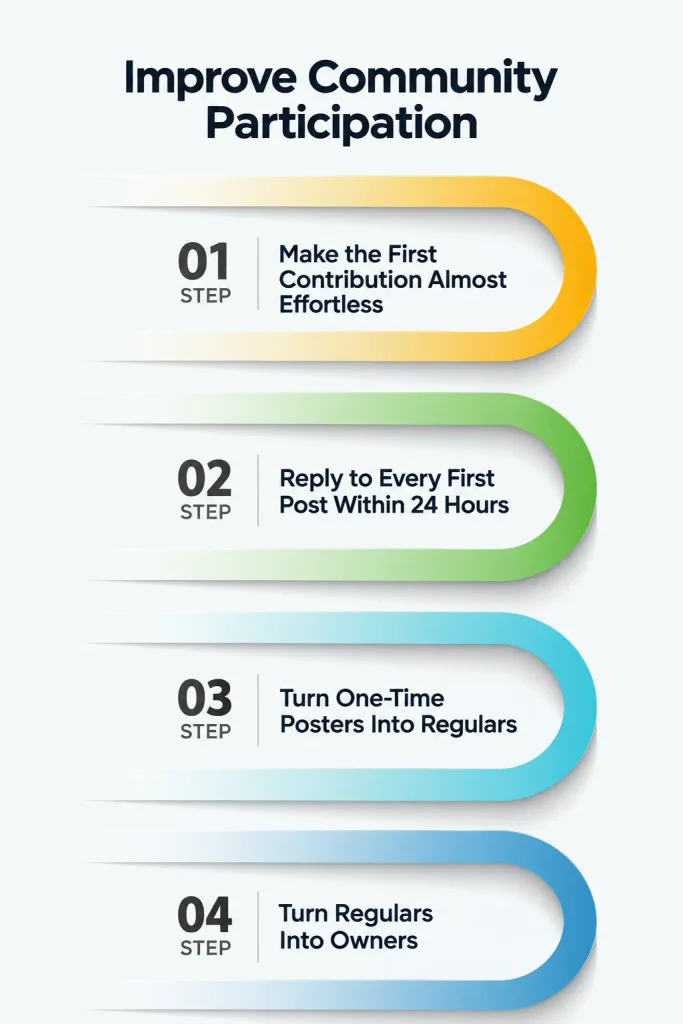
Step 1: Make the First Contribution Almost Effortless
The first contribution is the hardest one, so every bit of friction you remove here pays off later.
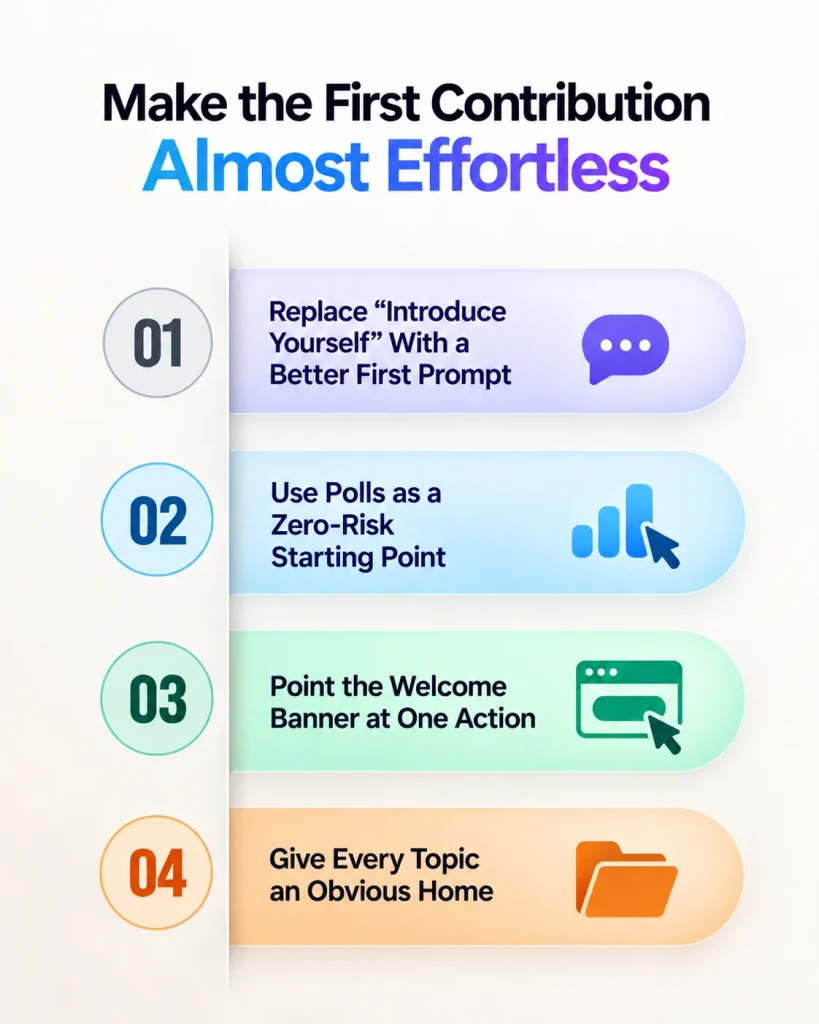
Replace “Introduce Yourself” With a Better First Prompt
“Introduce yourself” feels like a job interview. Many people freeze. A better prompt gives them something specific and easy to answer.
Robert Kraut’s research on newcomers found that introductions referencing commitment to the group were more likely to get replies than ones that just talked about the topic. So ask about their goal, not their résumé.
Try prompts like these:
- “What’s one thing you want to get done in the next 30 days?”
- “What made you join this week?”
- “Share a photo of your setup, your desk, or your project”
- “What’s one question you were too shy to ask anywhere else?”
Use Polls as a Zero-Risk Starting Point
A poll vote is the smallest possible contribution. It takes one tap, nobody can judge it, and it still counts as participation. FluentCommunity has built-in polls you can add to any post.
Make polls about the member, not about you. “Which topic should our next workshop cover?” works better than “Did you like our last update?” And always follow up with a post that shares the results and what you’ll do about them. That closes the loop and tells people their vote mattered.
Point the Welcome Banner at One Action
FluentCommunity’s Welcome Banner sits on top of the global feed. You can set one version for logged-in members and another for logged-out visitors, and add a call-to-action button.
Here’s the mistake to avoid: listing five things to do. Pick one action. For new members, that’s usually “Answer this week’s welcome question” linking straight to the thread. One clear ask beats a menu of options every time.
Give Every Topic an Obvious Home
People hesitate when they don’t know where to post. FluentCommunity lets you create spaces, nest them in collapsible space groups, and add topics and tags so members can filter the feed.
But here’s the catch. Too many spaces at launch spreads your activity thin and makes everything look empty. Start with three to five spaces that match what members actually talk about. Add more only when a topic keeps spilling out of its current home.
Step 2: Reply to Every First Post Within 24 Hours
If you only change one thing after reading this, make it this one. How a community responds to a newcomer’s first post shapes whether they ever come back.
The research here is clear. A CHI 2006 study of 6,172 messages across eight Usenet groups found that 27% of posts got no response at all, and newcomers were less likely to get a reply than regulars. Kraut’s larger analysis of over 200,000 messages from almost 25,000 newcomers across 99 groups found that newcomers were much more likely to keep participating when their first posts got replies, especially friendly ones.
Think about it from the newcomer’s side. They worked up the courage to post. Silence feels like rejection. A warm reply feels like a door opening.
Build a Small Welcome Crew
You can’t personally reply to everything forever. So recruit three to five people who check the community daily and own new-member replies. These can be staff, early members, or your most helpful regulars.
FluentCommunity lets you assign managers who can help run the community without full WordPress admin access. That’s handy when you want a trusted member to help without giving them the keys to your whole site.
Make the Reply Personal, Not a Template
“Welcome! Glad you’re here!” is better than nothing, but not by much. A reply that works does three things:
- Mentions something specific they wrote
- Asks one easy follow-up question
- Tags another member who can help, using an @mention
That last point is underrated. When you @mention someone, they get notified, and the newcomer now has two people paying attention instead of one.
Watch Your Approval Queue
FluentCommunity can hold first posts for review, and members can flag content into a moderation queue. That’s great for keeping spam out.
Just remember that a held post is a newcomer waiting. If your queue sits for two days, the 24-hour reply window is already gone before anyone can respond. Check the queue at least once a day, or give your welcome crew permission to approve.
Step 3: Turn One-Time Posters Into Regulars
A first post is a great start. A habit is what keeps a community alive. This step is about giving people a reason and a rhythm to come back.
Create Weekly Rituals
Rituals are recurring threads with a predictable format. Because members know what to expect, posting feels less risky. Some that work in almost any community:
- Monday Wins: share one thing that went well last week
- Wednesday Questions: ask anything, no question too basic
- Friday Feedback: share work in progress and get input
FluentCommunity’s post scheduling lets you queue these ahead of time, so your rituals keep running even when you’re on vacation or buried in a launch week.
Ask for Small Commitments
Here’s a finding that goes against the usual “make everything optional” advice. A 2024 study from Stanford researchers tested groups where members had to commit to participating at regular intervals. Compared to groups that only got friendly nudges, commitment doubled contributions. By week three, 87% of committed members were still active, versus 19% in the nudge group.
It was a small study, with 57 people over three weeks, so treat it as a direction, not a guarantee. But it lines up with what many community builders see. A practical version: run a four-week challenge where members agree to post one update per week in a dedicated space. Participants said commitment gave them “cover” to post even when they felt nervous.
Bring People Back With Digests, Not Spam
Most members don’t open your community every day. That’s fine. FluentCommunity’s email notifications can tell members when someone comments on their post, and the Email Digest bundles unread notifications into one summary email.
Members can manage their own notification preferences, which matters more than people think. Someone who gets ten emails a day will unsubscribe from all of them. Someone who gets one useful digest will click back in.
Keep Conversations Inside Your Community
When a great thread moves to a private Slack, WhatsApp group, or Discord server, your community loses that energy.
FluentCommunity has one-to-one and group messaging built into the portal, so quick back-and-forth can happen without members leaving.
Step 4: Turn Regulars Into Owners
This is where participation becomes involvement. Owners don’t wait for you to start conversations. They start them, welcome people, and protect the culture. A community with even five owners feels completely different from one run by a single founder.
Give Real Roles With Real Responsibility
A title with nothing attached feels hollow. A role with a clear job feels like trust. Good starter roles include:
- Space host: keeps one space active and answers questions there
- Welcome lead: owns the first-reply process from Step 2
- Ritual host: runs one weekly thread
- Moderator: helps review flagged content
Write down what each role does and how much time it takes. Most people say yes to “two hours a week hosting the Friday Feedback thread.” Few say yes to “help out with the community.”
Recognize Contribution in Public
Recognition tells everyone what kind of behavior the community values. FluentCommunity supports user badges you can create and assign to members, plus verification badges to mark experts or paying members so trust is visible at a glance.
Use badges for things that matter, like “Top Helper” or “Founding Member,” not for logging in. And pair them with a short monthly spotlight post that names who helped and how. Public thanks costs nothing and often means more than any prize.
Let Members Shape What Comes Next
Involvement grows when members see their input change things. Ask your regulars to vote on next quarter’s workshop topics. Invite a member to run a live session on something they’re good at. Let an experienced member propose and host a new space.
Each of these says the same thing: this community belongs to you too.
Use Gamification That Rewards Helpfulness, Not Noise
Gamification gets a bad name because many systems reward volume. Give points for every post, and you get a lot of “Great post!” replies. Honestly, that’s worse than silence.
FluentCommunity takes a different approach. According to its points system documentation, a member earns one point for each reaction their posts and comments receive from other people. Writing a post earns nothing on its own. Giving a reaction earns the giver nothing. Points only come from content that other members found useful.
That small design choice changes the incentive. The fastest way up the leaderboard is to write things people appreciate.
Tune the Levels for Your Community Size
Points unlock nine levels, and you can rename each one and set its minimum points. The defaults top out at 25,000 points, which is out of reach for a new or small community. If everyone sits at level one, the system motivates nobody.
The docs suggest a gentler ladder for a 200-member community, starting at 0 and rising through 5, 15, 40, 100, 250, 600, 1,500, and 4,000. Name the levels in your own voice, too. “Space Initiate” fits some brands. “New Gardener” or “Rookie Builder” might fit yours better.
Use the Weekly Board for Newcomers
The leaderboard shows the top 10 members across 7-day, 30-day, and all-time windows. Point newcomers to the 7-day board. They can’t beat a three-year member’s lifetime total, but they can absolutely land in this week’s top 10.
If you also use FluentCRM, a level-up can trigger an automated email, like a congratulations note with a tip for the next level. You can see the full set of engagement tools on the FluentCommunity features page.
Participation Ideas for Different Types of Communities
The ladder works everywhere, but the details change depending on who you serve. Here are starting points for common community types:
| Community type | Easy first prompt | Weekly ritual | Ownership move |
| Course creators | “What’s your goal for this module?” | Homework share thread | Past students become peer mentors |
| Coaches | “What’s one win from this week?” | Monday Wins | Clients host accountability pods |
| Brands and ecommerce stores | “Show us how you use the product” | Monthly photo thread | Power users join a beta tester space |
| Agencies and SaaS | “What’s blocking you right now?” | Weekly office hours Q&A | Champions answer questions in their specialty |
| Nonprofits | “Why does this cause matter to you?” | Volunteer update thread | Volunteer leads run regional spaces |
| Clubs and associations | “Introduce your chapter or team” | Event recap thread | Chapter leads moderate their own space |
Notice the pattern: easy personal prompts, rituals on a schedule, and real responsibility for members who already show up.
Mistakes That Quietly Kill Participation
Knowing what not to do is just as useful. These are the most common ways communities lose momentum without anyone noticing:
- Launching with ten empty spaces instead of three busy ones
- Letting first posts sit unanswered for days
- Only posting announcements, so the feed reads like a newsletter
- Rewarding post count instead of helpful contributions
- Calling out lurkers publicly or guilt-tripping quiet members
- Sending so many notifications that members mute everything
- Moving the best conversations to an outside chat app
The broadcast trap deserves a special mention. If every post comes from you, members learn that the community is a place to receive, not to contribute. Try a simple ratio: for every announcement, post at least two questions or prompts that invite members to talk.
How to Measure Community Participation
You can’t improve what you don’t track. You don’t need a fancy analytics stack, though. Four numbers, checked once a month, tell you most of what you need to know:
- Participation rate: members who contributed in the last 30 days divided by total active members
- Time to first reply: the average hours between a newcomer’s first post and the first reply
- Newcomer return rate: the share of new members who post a second time within 30 days
- Contributor spread: the share of all posts written by your top 10 members
The first two tell you if the bottom of the ladder is working. The third tells you if people are sticking. The last one is your risk check. If your top 10 members write 80% of the posts, your community depends on very few people, and Step 4 should be your next focus.
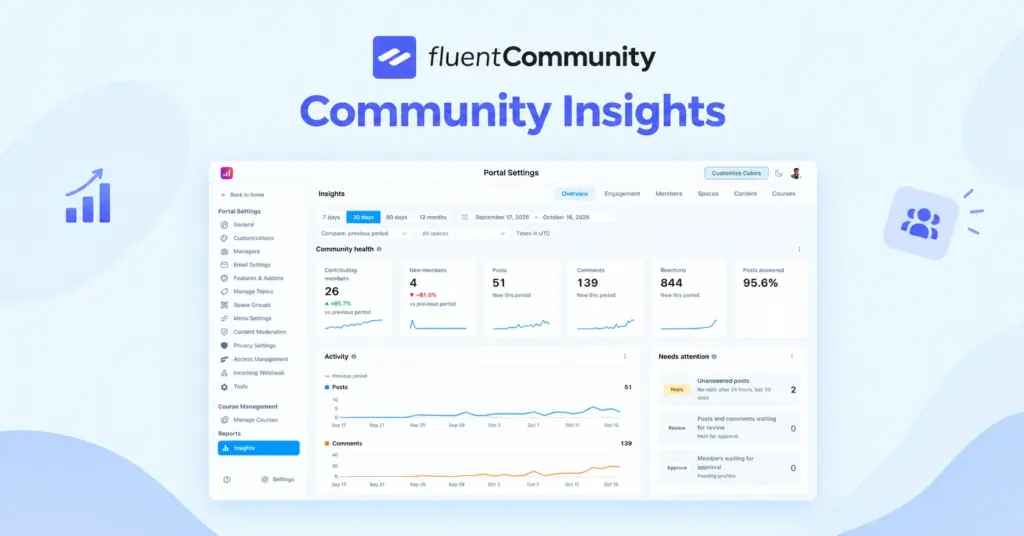
FluentCommunity’s insights reporting shows activity trends, top members, top commenters, and your most popular spaces, which covers a good part of this. Track the newcomer numbers in a simple monthly spreadsheet alongside it.
Your 30-Minute FluentCommunity Setup Checklist
If you run your community on FluentCommunity, you can set up the foundation for everything above in one sitting:
- Trim your spaces to three to five and group the rest
- Turn on the Welcome Banner with one button pointing to your welcome thread
- Post a welcome thread with a goal-based question
- Schedule your first two weekly ritual posts
- Assign one or two managers to your welcome crew
- Confirm your email digest and comment notifications are on
- Lower the leaderboard thresholds to fit your community size
- Create two meaningful badges, like Top Helper and Founding Member
Then put a 15-minute block on your calendar each morning for the first month to clear the approval queue and reply to new posts. That habit alone will do more than any feature.
Conclusion
Community participation isn’t about getting everyone to post. It’s about making the next step easy for anyone who’s ready to take it. Start at the bottom of the ladder, because that’s where most communities lose people without noticing.
This week, pick one thing: reply to every first post within 24 hours. Watch your newcomer return rate for a month and see what changes. Once that’s working, add a weekly ritual, then start handing out real roles.
If you’d rather build all of this on a site you own, with no per-member fees and no platform deciding your rules, FluentCommunity gives you spaces, polls, digests, moderation, and a leaderboard that rewards helpful members inside WordPress. You can compare plans on the pricing page or start with the free plugin on WordPress.org.
Frequently Asked Questions
What Is a Good Participation Rate for an Online Community?
There’s no universal benchmark, because it depends on community size, purpose, and whether access is paid. As a rule of thumb, the 90-9-1 pattern means only about 10% of members contribute in a typical community. Compare your own rate month over month rather than chasing an industry number.
How Do You Get Lurkers to Participate?
Start with the smallest possible action, like a one-click poll or a goal-based welcome question. Reply quickly and personally when they do post. Don’t call out quiet members publicly. Some people prefer to read, and that’s fine.
What’s the Difference Between Community Engagement and Community Participation?
Engagement includes any interaction, even passive ones like reading or opening an email. Participation means a visible contribution that others can respond to, like a post, a reply, or a poll vote.
Does Gamification Increase Community Participation?
It can, if it rewards the right behavior. Systems that give points for every post tend to create low-quality replies. Systems that reward content other members find useful, like reaction-based points, encourage helpful contributions instead.
How Fast Should You Reply to New Members?
Aim for within 24 hours. Research on newcomers shows they are much more likely to keep participating when their first post gets a reply, especially a friendly, personal one.
Can I Run a Participatory Community on My Own WordPress Site?
Yes. A WordPress community plugin like FluentCommunity gives you spaces, polls, notifications, digests, moderation, and gamification on your own site, so you keep your member data and avoid per-member platform fees.

Ashik Elahi
Ashik Elahi is a seasoned Digital Marketing Strategist with a passion for Content Marketing. He believes in the power of storytelling and crafting valuable content that resonates with readers.
![SEO Title: 5 Best Community Portal Software [WordPress + SaaS Options]](https://fluentcommunity.co/wp-content/uploads/2026/10/community-portal-software-featured-1-1024x536.webp)

Add your first comment to this post