

How to Use Email Digest in FluentCommunity to Bring Members Back Without Spamming Them

Table of Content
Subscribe To Get
WordPress Guides, Tips, and Tutorials


Most members don’t check your community every day. They join, engage for a while, get busy, and drift, not because they lost interest, but because nothing reminded them to come back. Meanwhile, real conversations, useful posts, and answered questions keep happening without them ever seeing it.
The instinct to fix this is often to email more. But more emails, sent every time something happens, train members to ignore your notifications entirely, or unsubscribe outright. In a HubSpot survey of 400 consumers, 51% said “emails come too often” was the most common reason they unsubscribe from a list, and 34% specifically pointed to receiving more than one email a day. What you actually need is a single, well-timed summary that reminds members what they missed, without flooding their inbox in the process.
That’s exactly what Email Digest does in FluentCommunity. Instead of sending a notification for every single post, comment, or reaction, it bundles recent activity into a single, scheduled email, giving members a reason to come back without wearing out their patience for your notifications.
What Email Digest Actually Does?
Email Digest automatically compiles recent activity across your community. New posts, popular discussions, unanswered questions, upcoming events, whatever’s relevant- are compiled into a single email sent on a schedule you control. Daily, weekly, or whatever cadence fits your community’s pace.
Instead of a member getting fifteen separate notification emails throughout the week, they get one email that summarizes what happened, with links back to the specific posts or discussions that might interest them.
Why This Matters More Than It Seems?
First, it keeps active members from unsubscribing over notification overload. As the HubSpot data above shows, frequency, not content quality, is the top reason people unsubscribe from emails. A single scheduled digest replaces a stream of one-off notification emails with one predictable message, which is exactly the kind of consolidation that keeps engaged members from opting out entirely.
Beyond just reducing volume, a digest also surfaces content that already scrolled past members who check in regularly. A busy feed moves fast, and even a member who visits daily won’t see every post from every Space. A digest pulls the most relevant items back into view, giving them a second chance to be seen instead of disappearing under whatever got posted next.
For members who’ve stopped checking in altogether, the digest serves a different purpose entirely. It’s your one remaining touchpoint. An active member and a lapsed one need different things from a digest. For someone who hasn’t opened your community in weeks, a digest is often the only message that still reaches them, and the only chance to remind them there’s a reason to come back.
Underlying all of this is a shift in where the responsibility sits. Some members will build a habit of checking your community daily on their own. Most won’t, not because they don’t care, but because nothing prompts them to. A digest arrives on a fixed schedule regardless of whether that habit ever forms, so members who never built it still stay informed.
How to Set Up Email Digest in FluentCommunity
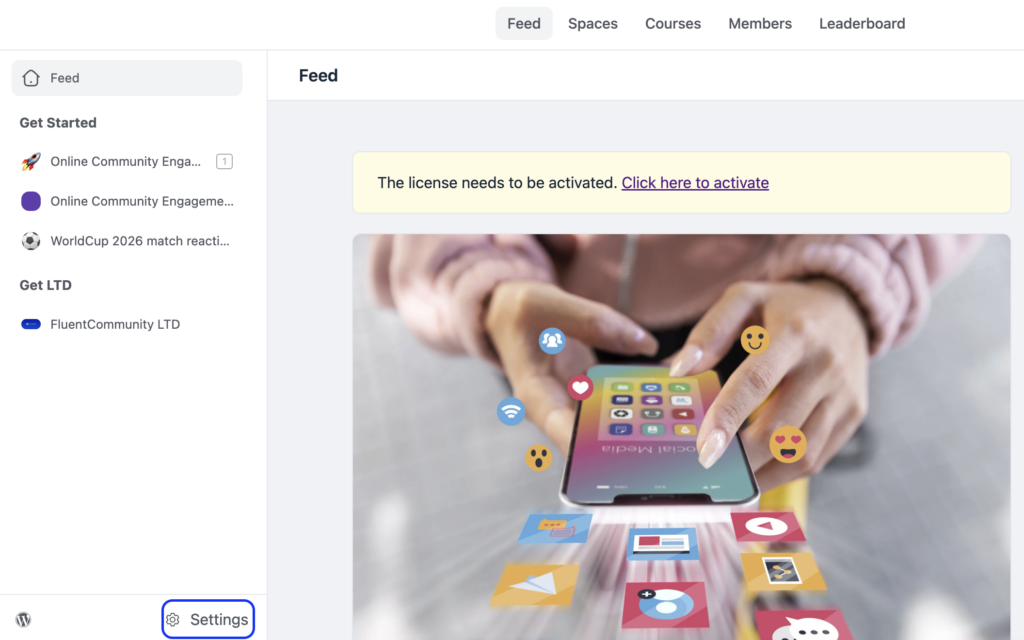
From your FluentCommunity dashboard, click the Settings button in the bottom-right corner.
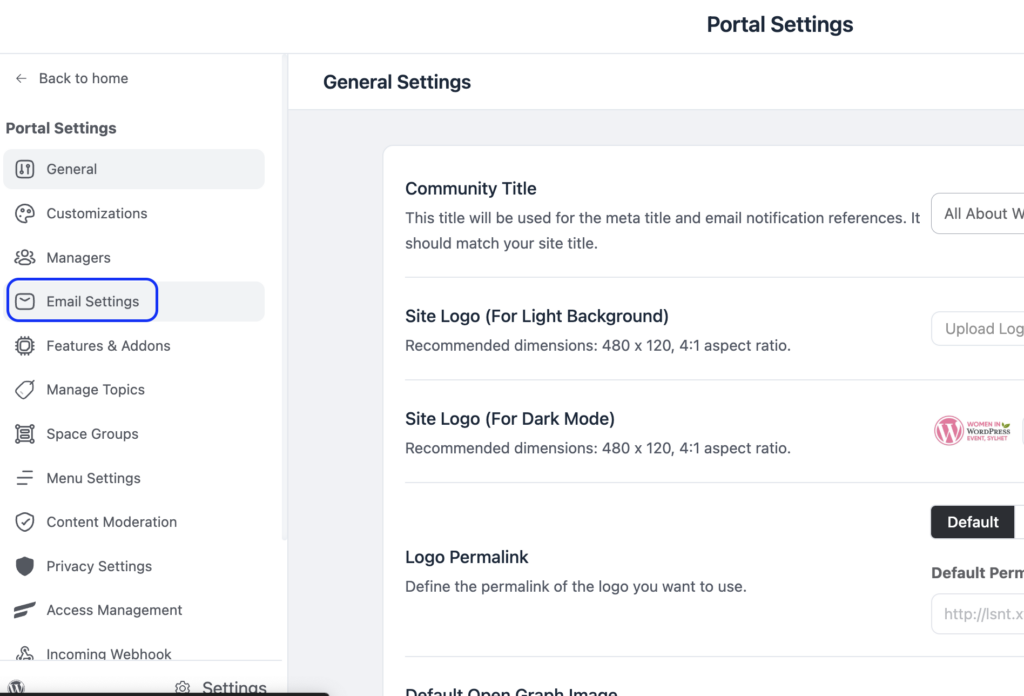
Navigate to the Email Settings section in the sidebar.
Then scroll down to the Email Notifications Settings from the Email Settings section.
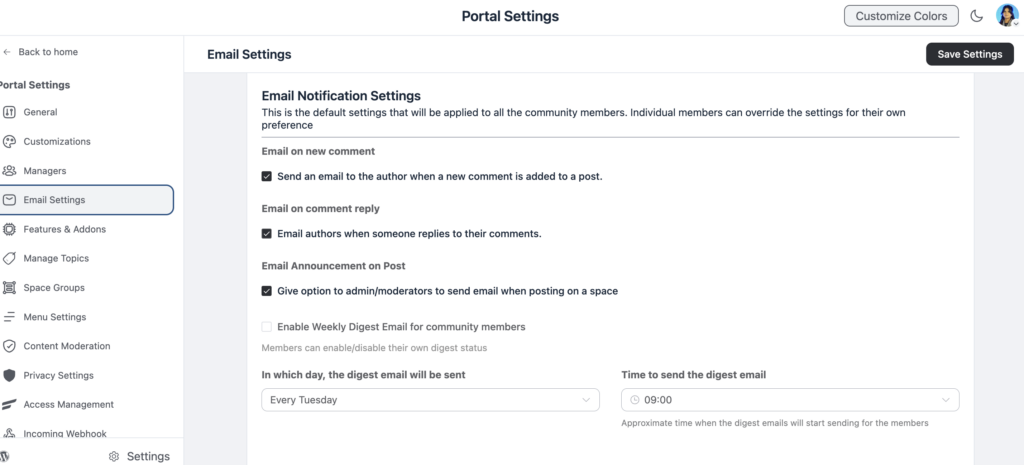
Choose your digest frequency. Weekly is a reasonable default for most communities, and daily digests work better for highly active communities with a lot of daily content. Set a consistent send time and day.
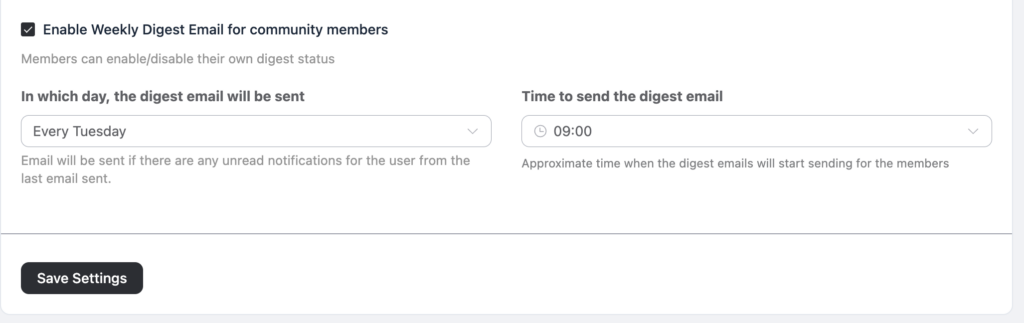
Consistency matters here. Members start to expect and look for a digest that arrives at a predictable time.
Preview the digest as a member would see it, and adjust the content mix if it feels too sparse or too crowded. Give members the ability to opt in or out of the digest from their notification preferences, respecting that not everyone wants the same communication cadence.
Writing a Digest Members Actually Open
The subject line and content mix matter as much as the schedule. A few things make a real difference:
Lead with the most interesting or highest-engagement item, not a generic “here’s what happened this week” summary. Specificity gets opens, vagueness gets ignored.
Keep it scannable. Members should be able to tell what’s inside within a few seconds of opening it, use short sections and clear links rather than dense paragraphs.
Rotate what you highlight. A digest that always surfaces the same type of content (only announcements, say) trains members to stop opening it. Mixing in discussions, questions, and member wins keeps it feeling alive.
Include a clear reason to click back into the community, not just a summary to read passively. A digest that only informs, without inviting action, does half the job it could be doing.
Segmenting Your Digest by Member Type
Not every member wants the same summary, and treating your entire community as one audience for a single digest often means the content feels generic to everyone rather than genuinely relevant to anyone specific.
If your community includes distinct groups, students in different courses, members in different Spaces, paid versus free tiers, consider whether your digest can reflect that. A student actively working through a course benefits more from a summary of new lessons and discussion in their specific course Space than from general community-wide announcements unrelated to what they’re doing.
A long-time, highly engaged member might want a lighter-touch digest that only highlights genuinely new or unusual activity, since they’re likely already seeing most of what happens in real time.
Even without advanced segmentation tools, you can approximate this by adjusting what content categories get pulled into the digest based on the Spaces a member actually belongs to, keeping the summary relevant to their specific corner of the community rather than everything happening across all of it.
Digest Timing and Community Rhythm
The best send time for a digest depends heavily on when your specific community is naturally active, not on a generic best practice pulled from elsewhere. A community made up mostly of members checking in during evenings after work will respond differently to a digest sent early Monday morning versus one sent Sunday evening, when they’re more likely to be planning their week.
Pay attention to open rates and click-through behavior if that data is available to you, and treat your first choice of schedule as a starting point to test, not a final decision. Small shifts, a different day, a different hour, can meaningfully change how many members actually open and act on the digest, and it’s worth revisiting this periodically rather than assuming the original schedule remains the right one as your community’s rhythms shift over time.
Final Thoughts
Email Digest is the feature that keeps your community present in members’ lives even when they’re not actively checking in. Done well, it’s a single, welcome touchpoint rather than another piece of inbox clutter, and it’s often the quiet reason a lapsed member comes back before they ever fully disengage.

Prema Anjum
My full name is Anzuman Ara Chowdhury. But people know me as Prema Anjum. I’m a Digital Marketer by profession, a WordPress community contributor, and a travel enthusiast by heart.
![SEO Title: 5 Best Community Portal Software [WordPress + SaaS Options]](https://fluentcommunity.co/wp-content/uploads/2026/10/community-portal-software-featured-1-1024x536.webp)

Add your first comment to this post