

FluentCommunity 2.5.0: Sequential Lesson Lock, Smarter Notifications and a Smoother Mobile Experience

Table of Content
Subscribe To Get
WordPress Guides, Tips, and Tutorials


FluentCommunity 2.5.0 is here, and it’s all about the little things that make community life better every day. We looked at how people learn, how they keep up with activity, and how everything feels on a phone — then made each one easier.
Here’s what’s new at a glance: Sequential Lesson Lock for courses, a fresh Notifications page with its own Unread tab, a Recent popover, and a brand new ping when someone reacts to your comment. You also get post scheduling for Space admins, a Courses tab on profiles, clean URLs for non-English communities, and a smarter admin Customization page that keeps your work safe.
Sequential Lesson Lock for Courses (Pro)
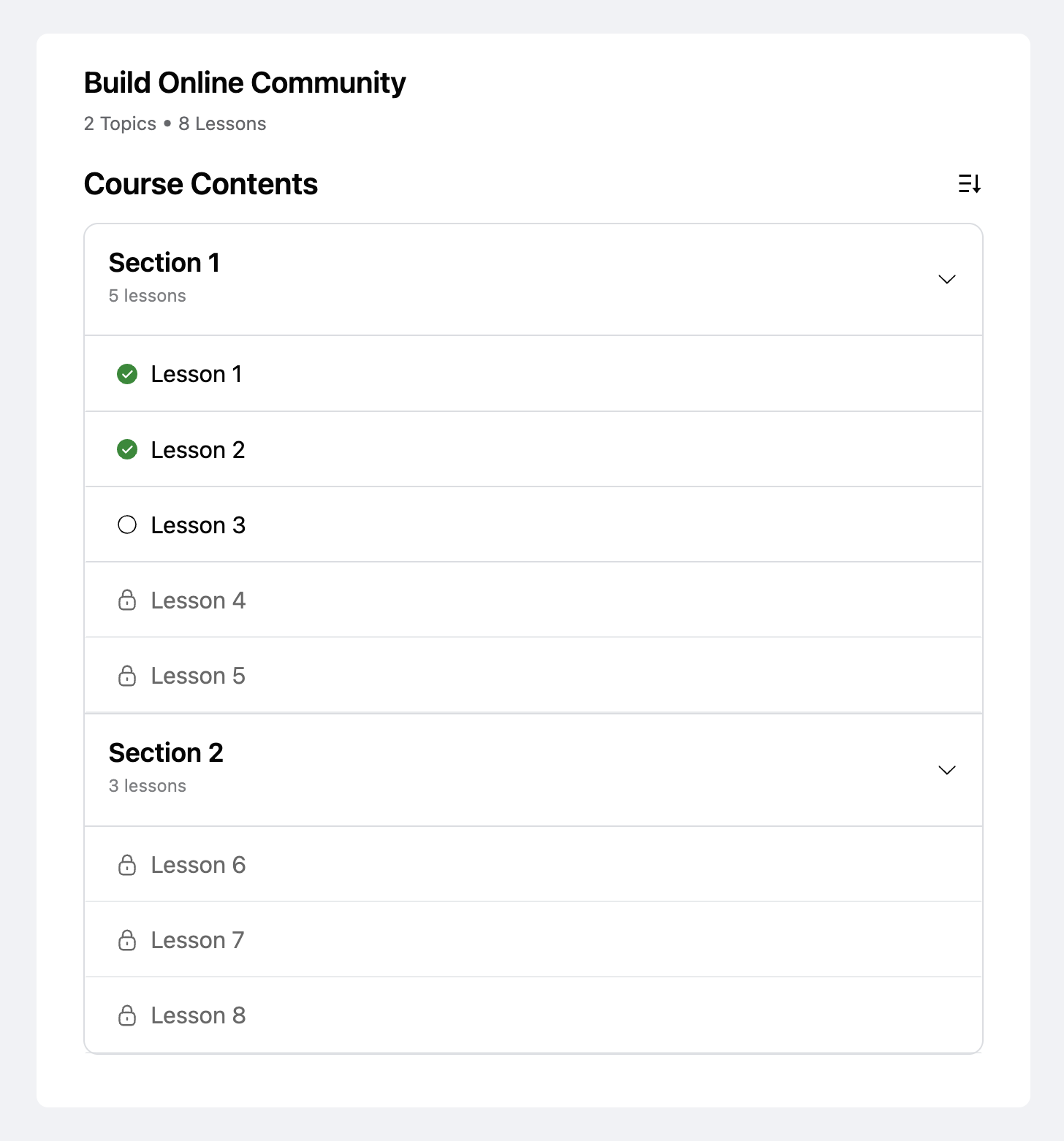
You asked, we built it. With Sequential Lesson Lock, Lesson 2 stays locked until Lesson 1 is done. Then Lesson 3 opens, and so on.
This is great for training programs, certification prep, and any course where order matters. Learners see a clear path forward. Instructors get steady, predictable progress. You can turn it on for one course and leave it off for another — both work fine in the same community.
A Smarter Notifications System
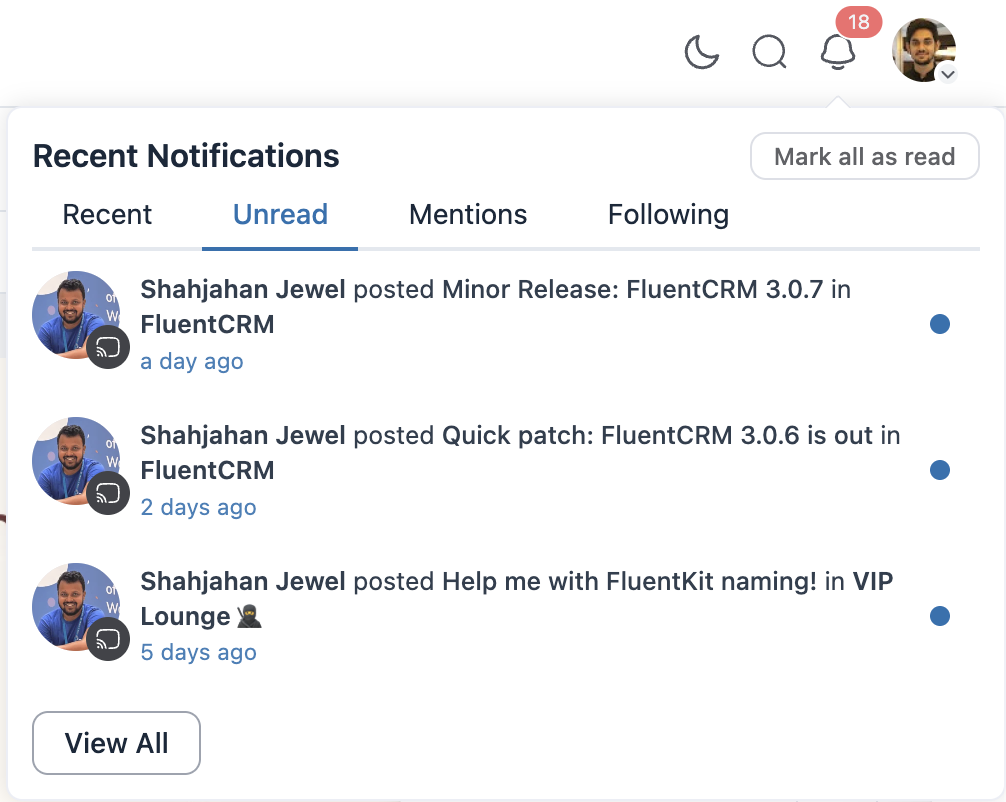
Busy communities mean busy notifications. We made it easier to find what matters.
The new Unread tab shows only what you haven’t seen yet. The Recent popover gives you a quick look at the last twenty without leaving the page. Read state, badges, and counts all stay in sync — no more guessing what you’ve already opened.
And here’s the fun one: Comment Reaction Notifications. Before, only post reactions pinged you. Now, when someone reacts to your comment, you’ll see it in the bell. If a few people react to the same comment, it shows up as one tidy notification instead of a pile.
- One person reacts: “Alex reacted to your comment…”
- A few people react: “Alex and 3 other people reacted to your comment…”
- React to your own comment? No ping. You already know.
Bulk Import Welcome Email Opt-In
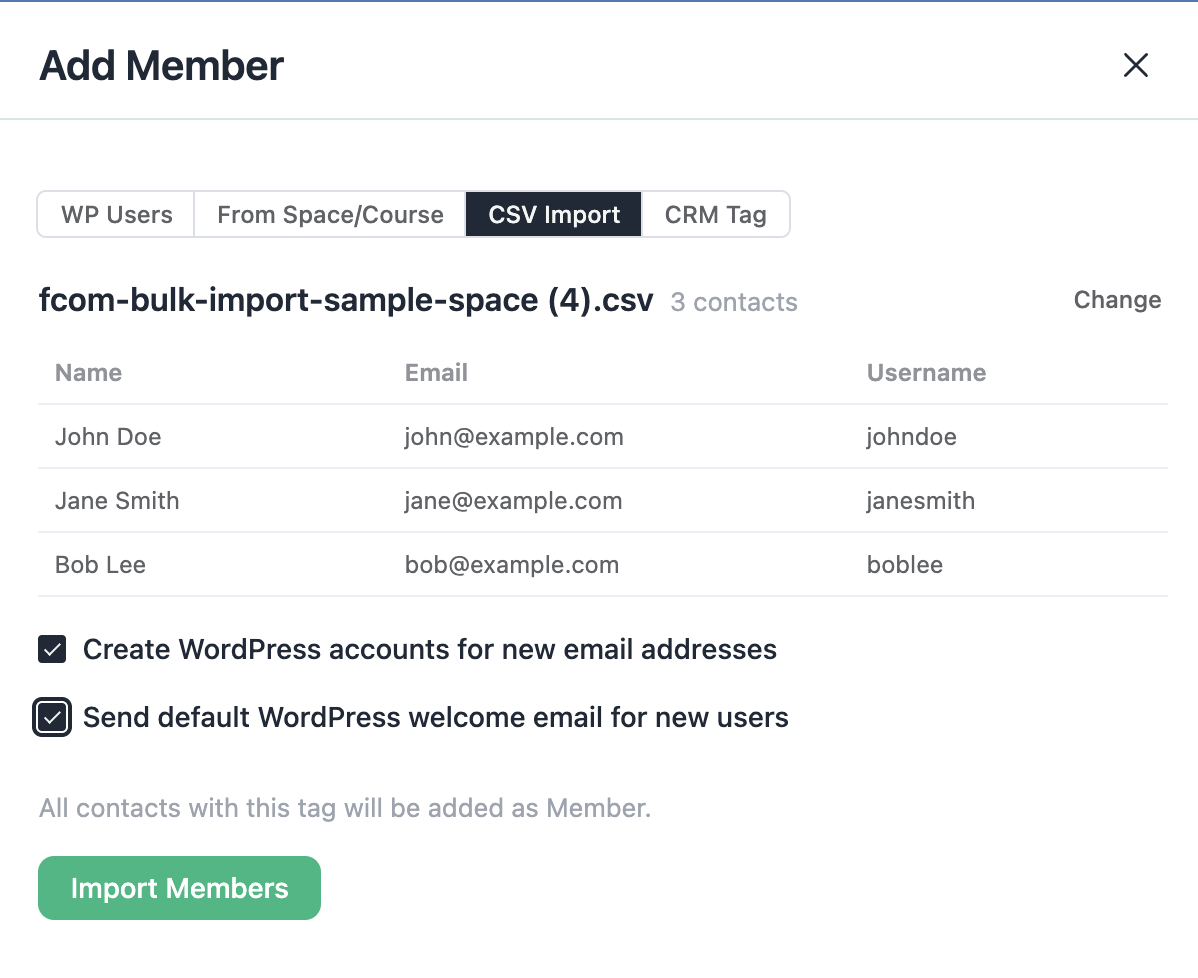
Importing a big list of members? You now get a say in whether they hear from WordPress right away. We added a simple checkbox to the bulk import screen — tick it, and every newly created user gets the standard WordPress welcome email with their login details. Leave it off, and the import stays completely silent.
This solves a real headache. Before, bulk imports either notified everyone by default or skipped the welcome step entirely. Now you pick what fits the moment — a quiet migration from another platform, a fresh cohort launch where everyone needs their password, or a small group of VIPs you’d rather greet personally.
The checkbox only fires for users who are actually new. Existing accounts skip the email, so nobody gets a confusing “welcome back” message. One small toggle, much smoother onboarding.
Hide Mobile Header and Footer on Scroll
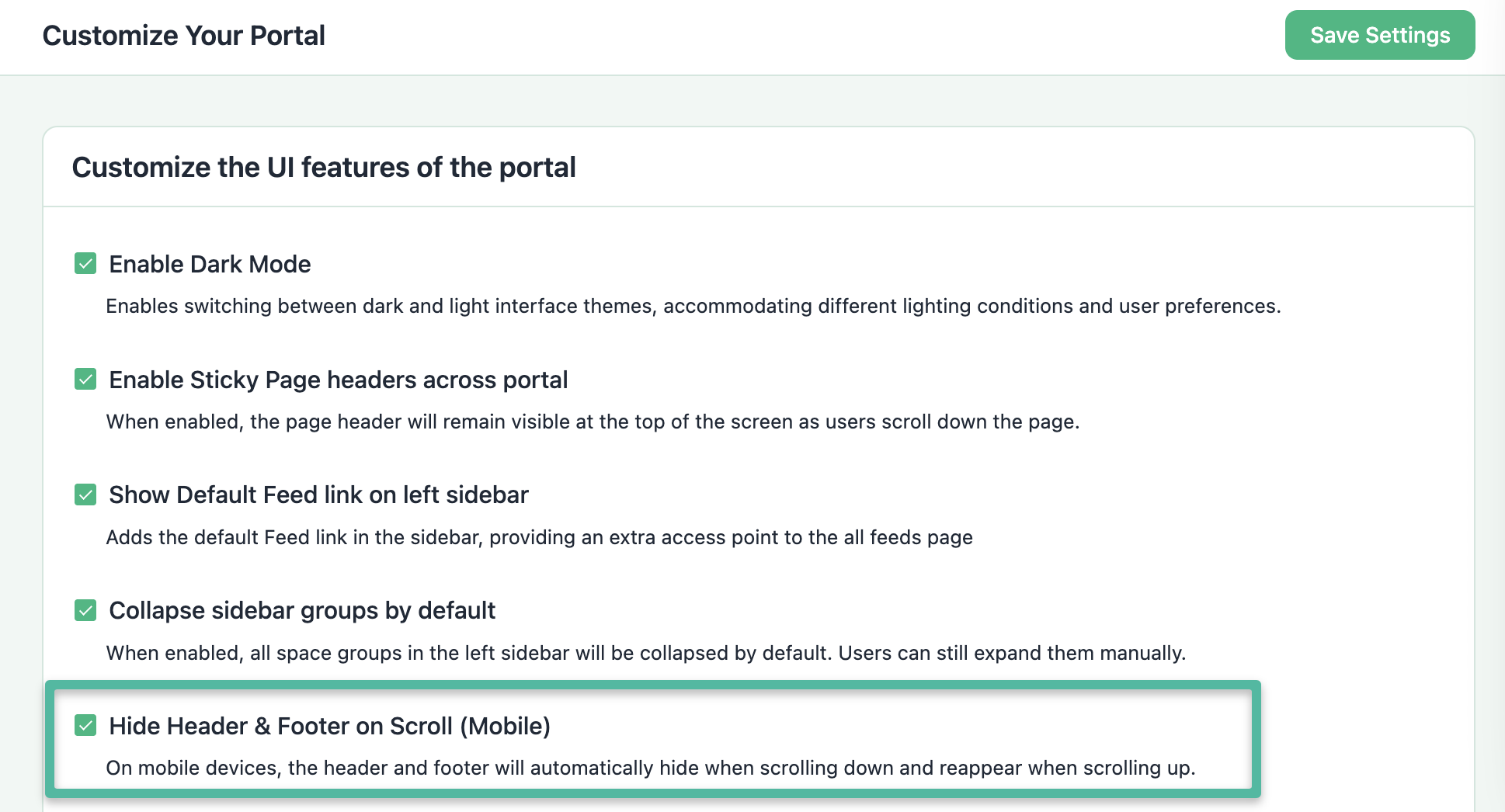
Phone screens are small, and every pixel counts. With this release, the top header and bottom navigation slide away as you scroll down, then come right back the moment you scroll up. The result feels native — like a proper mobile app instead of a website squeezed onto a phone.
You get more room for posts without losing quick access to navigation. Admins can turn this behavior on or off, so you stay in control of how your community feels on mobile.
A Better Feel on Mobile
Mobile got real love this release. The header and footer slide away as you scroll down and come back when you scroll up. More screen for the stuff you actually want to read.
A new Scroll To Top button shows up everywhere — feeds, lessons, profiles — so you can jump back up with one tap. On iPhone, the Safari URL bar now tucks away properly, giving you a few extra rows of space. Right-to-left layouts work correctly too.
Post Scheduling, Courses Tab, and Editor Polish
Schedule posts ahead of time. Space admins can now set posts to go out later. Plan your weekly recap on Monday and let it publish on Friday — no reminders needed.
Courses tab on member profiles. Every profile now shows the courses a member is taking. Easy way to find study buddies or see what someone is into.
One-click copy on code blocks. Code snippets in posts and comments now have a Copy button. Tap it, get the code. Perfect for tech communities and course discussions.
Remove your profile or cover photo. You can finally take a photo down, not just swap it. A quick confirmation step keeps it from happening by accident.
Admin Improvements and Security
A safer Customization page. The admin Customization page now saves only what you changed. The save button knows when you’ve edited something, and if one piece fails to save, it stops the whole save so nothing ends up half-done.
Cleaner Manage Courses screen. The course list page is faster and easier to read. Empty states make sense, the layout doesn’t flicker, and finding what you need just feels quicker.
Clean URLs in any language. If your community runs in Bengali, Arabic, Chinese, Russian, or any non-Latin script, your post and lesson URLs now look clean and shareable. Search engines like them, and so do your members.
Stronger security. Login errors no longer hint at whether a username exists, which makes it harder for bad actors to guess accounts. Social link icons are also sanitized before they show up, blocking sneaky payloads.
Bug Fixes and Stability
Search remembers where you left off. Close the search modal, reopen it — your results are still there. No more starting over.
Pinned posts stay pinned. They now stick to the top across feeds and layouts, exactly the way you’d expect.
Better iOS video and mobile editing. Videos in FluentPlayer no longer go silent on iPhone when autoplay is off. The Edit Post screen now lays out cleanly on small screens.
Reactions feel snappier. The comment reaction list updates right away after you react or unreact. Missing avatars on the Bookmarks page are back too.
Smoother onboarding. Invite links now take new people to the sign-up screen, not the login page. HTML characters in member lists show properly, and action buttons stay disabled while a request is in flight, so nothing gets double-clicked.
Wrapping Up
FluentCommunity 2.5.0 is about the everyday stuff — learning, reacting, scrolling on your phone, and trusting your notifications. Sequential Lesson Lock gives course creators a real way to guide learners through a path. The notifications refresh, comment reactions and all, keeps the community feeling personal as it grows.
Update from your WordPress dashboard whenever you’re ready. As always, tell us what you’d like to see next.
Full Changelog
- Introduced: Sequential Lesson Lock for Courses (pro)
- Added: Courses Tab on User Profile
- Added: Bulk Import Welcome Email Opt-In
- Added: Scroll To Top Button in Feeds
- Added: In-app Notification for Comment Reaction
- Added: Hide Mobile Header and Footer on Scroll Option
- Added: Unread Notifications Tab and Recent Notifications Popover
- Added: Copy Code Button for Code Blocks in Posts and Comments
- Added: Profile and Cover Photo Removal Options
- Added: Post Scheduling by Space Admins
- Added: Email Invite From Add Members Form
- Added: See More/Less Toggle for Long Comments
- Added: Duplicate Action for Custom Profile Fields
- Added: Theme Color Support in Email Templates
- Added: Filter Hook for Default Post Space Selection
- Improved: Admin Manage Courses Page
- Improved: Settings Drawer with Dirty-State Save Confirmation
- Improved: Confirm Modal for Space Image Remove Actions
- Improved: Error Page CSS Customization Hook
- Improved: Character Limit Error Messages for Posts and Comments
- Improved: Slug Generation for Non-Latin Titles via ICU Transliteration
- Improved: Pending and Blocked Members Tabs
- Improved: Enrollment Cache and Course Thread Context Performance
- Security: Hide User Existence in Login Errors and Sanitize Social Link Provider Icons
- Fixed: Search Modal Context, Persistence, and Clear Button Behavior
- Fixed: Sticky Pin Persistence Across Navigation and Layouts
- Fixed: Edit Post Mobile Responsiveness
- Fixed: iOS Safari Forced Muted When Autoplay Is Disabled in FluentPlayer
- Fixed: HTML Entities in Course/Space Member Lists
- Fixed: Invitation Link Lands New Users on Login Instead of Register
- Fixed: Comment Reaction List Not Refreshing After React/Unreact
- Fixed: Missing Reaction Avatars on Bookmarks Page
- Fixed: Drawer Width in Custom Profile Fields
- Fixed: Status Action Buttons Race Condition
- Fixed: Avatar Upload Accessibility for Touch and Keyboard Users

Shahjahan Jewel
Hello, this is Jewel, CEO & Head of Ideas at WPManageNinja. I am obsessed with WordPress since 2009. My aim is to be a user-centric developer first, and a serial entrepreneur second. You will find me discussing various tech issues and trying to come up with scalable solutions on different forums when I am not busy coding.






Add your first comment to this post