

Community Engagement Report: How to Measure What Keeps Your Members Active

Table of Content
Subscribe To Get
WordPress Guides, Tips, and Tutorials


Every community owner eventually asks the same question: is anyone actually engaged here? Member counts may look impressive, but they rarely tell the full story. A community with thousands of sign-ups can still feel empty if people stop posting, commenting, and showing up. That is exactly where a community engagement report becomes valuable. Instead of relying on gut feeling, you get a clear picture of how members interact, which conversations spark interest, and where activity starts to fade. In other words, it turns scattered activity into insight you can act on.
Moreover, regular reporting helps you spot problems early. If participation drops in a particular space, you can respond before members drift away for good. Similarly, when a certain type of post performs well, you know exactly what to create more of. For community builders on WordPress, FluentCommunity makes this process far simpler because its built-in analytics sit right inside your community portal. As a result, you do not need to stitch together third-party tools or export data into spreadsheets just to understand basic trends. In this post, we will look at what an engagement report should cover and how FluentCommunity helps you read it with confidence.
What Is a Community Engagement Report?
A community engagement report is a summary of how members participate in your community over a specific period. Rather than focusing only on how many people joined, it looks at what those people actually do once they arrive. It shows who is posting, who is commenting, which spaces attract conversation, and when your members are most active. In simple terms, it answers one practical question: is your community alive, and is it getting healthier or weaker over time?
Unlike a one-time snapshot, a good engagement report is something you return to regularly. Each time you review it, you compare the current period with the previous one, which helps you see whether your efforts are working. For example, if you launched a weekly discussion thread last month, the report should tell you whether comments increased after that change. Likewise, if you added a new space for a specific topic, the report shows whether members are using it or ignoring it.
Most importantly, an engagement report is a decision-making tool, not just a scoreboard. The numbers themselves matter less than what they reveal about member behavior. A sudden rise in new members means little if those members never post. On the other hand, a small but steady group of active contributors can be a strong foundation for growth. Therefore, the real value of the report lies in helping you understand patterns, so you can plan content, events, and moderation with purpose instead of guesswork.
Why Engagement Matters More Than Member Count?
Many community owners treat total members as their main success metric. However, member count only tells you how many people walked through the door. It says nothing about whether they stayed, participated, or found value. In fact, a large but silent community can be harder to revive than a small one, because new visitors see little activity and quickly assume the space is inactive.
Engagement, by contrast, reflects the experience members have inside your community. When people post questions, reply to each other, and react to updates, the community feels lively and welcoming. Consequently, newcomers are more likely to join the conversation themselves. This creates a positive cycle where activity encourages more activity, which is exactly what keeps a community growing over time.
Engagement also connects directly to business goals. If you run a paid membership, active members are far more likely to keep paying because they see ongoing value. Similarly, if you use your community to support a course or product, engaged members tend to complete more lessons, ask better questions, and become advocates for your brand. As a result, tracking engagement gives you a much clearer view of long-term health than member count alone.
That said, member growth still matters. The key is to read both numbers together. When new members rise while active members stay flat, it signals an onboarding problem. When both rise together, it shows that your community is attracting the right people and giving them reasons to participate. This balanced view is exactly what a proper engagement report provides.
Key Metrics Every Engagement Report Should Include
A useful engagement report focuses on a handful of core signals rather than every possible number. First, it should show member growth, meaning how many people joined during the selected period. This tells you whether your promotion and sign-up flow are working. Next, it needs to track active members, which are the people who posted, commented, or reacted. This metric is often more revealing than total members because it shows how many people are genuinely involved.
Beyond membership, your report should measure content activity. Posts show how often members start new conversations, while comments show whether those conversations continue. A community with many posts but few comments may have members broadcasting rather than interacting. Meanwhile, a high comment count usually points to discussions that people find worth joining.
Another important metric is contributor distribution. In other words, you want to know who is doing the talking. Identifying your top members, post starters, and top commenters helps you recognize your most valuable participants. At the same time, it shows whether engagement depends on just a few people, which can be risky if those members become less active.
Additionally, timing data deserves a place in your report. Knowing which days and hours bring the most activity lets you publish announcements and discussions when members are most likely to respond. Finally, space-level performance completes the picture. If your community has multiple spaces, comparing their posts, comments, and members helps you see which topics thrive and which ones need attention. Together, these metrics give you a complete yet focused view of community health.
How FluentCommunity Tracks Community Engagement
FluentCommunity brings these metrics together in its built-in Analytics report, which you can open from Portal Settings under the Reports section. The report is organized into three tabs, namely Overview, Members, and Spaces, so you can move from a high-level summary to more detailed insights without leaving your community portal.
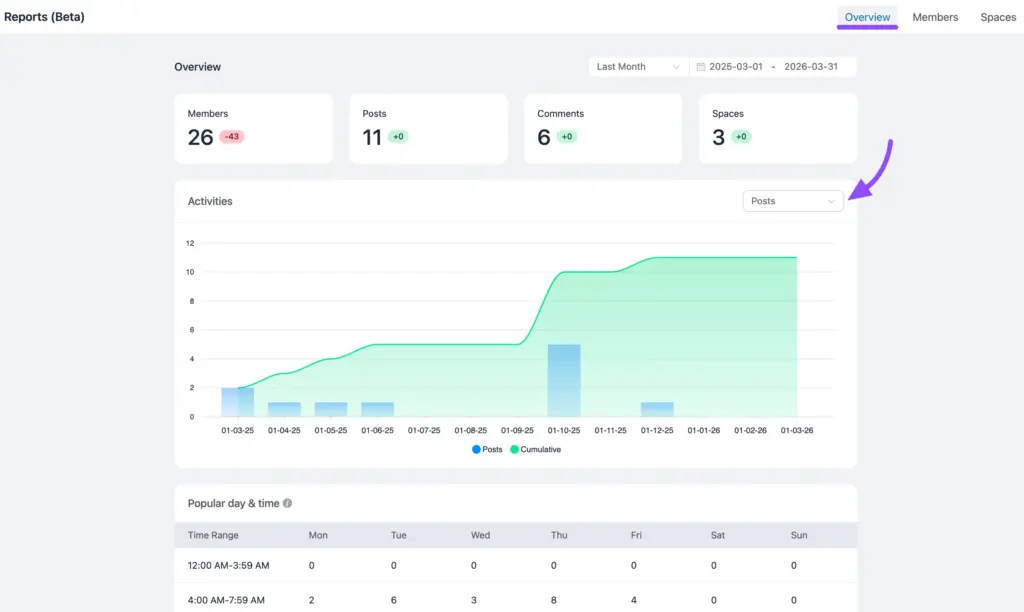
The Overview tab gives you a quick health check. It displays stat cards for members, posts, comments, and spaces, each with a change badge that compares the current period with the previous period of the same length. Below that, an activities chart shows activity over time, along with a cumulative line for the running total. Furthermore, the popular day and time table breaks the week into time blocks, so you can see exactly when your members are most active.
Next, the Members tab focuses on people. It shows total members, active members, new members, and pending members waiting for approval. It also includes leaderboards for top members, post starters, and top commenters. Interestingly, members who appear on both the post starters and top commenters lists are often strong candidates for moderator or space manager roles.
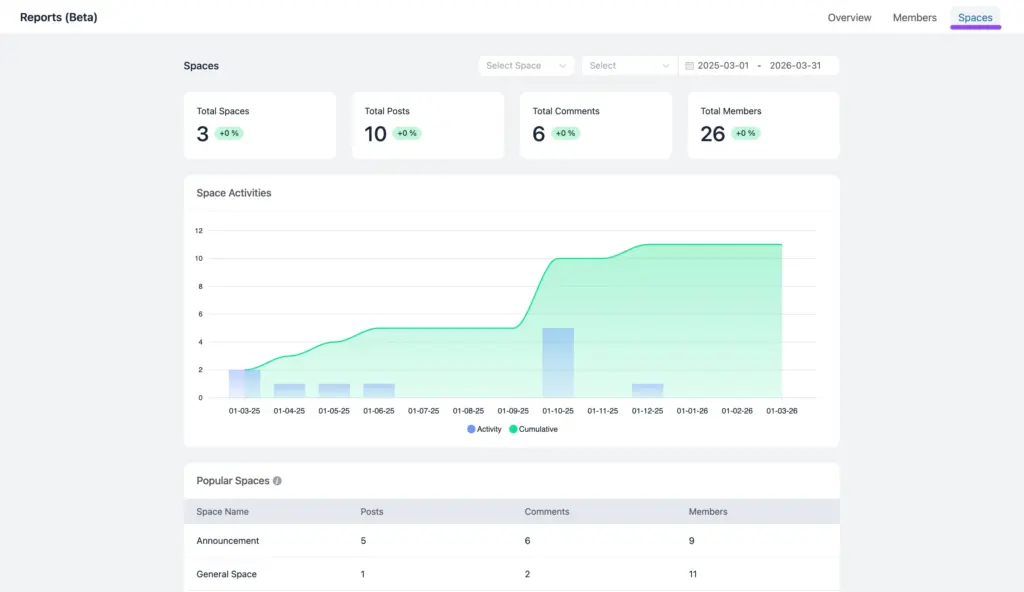
Meanwhile, the Spaces tab helps you compare different areas of your community. It lists total spaces, posts, comments, and members, while the popular spaces table ranks each space by activity. You can also filter the report to a single space when you want a closer look. Across every tab, you can choose a preset period or set a custom date range. However, keep in mind that FluentCommunity currently labels this feature Reports (Beta), so its layout and metrics may evolve in future releases.
How to Read Your Engagement Report the Right Way
Having data is helpful, but reading it correctly matters even more. To begin with, avoid checking your report every single day. Daily numbers naturally rise and fall, which can make normal variation look like a serious problem. Instead, review your report weekly or monthly, since longer date ranges reveal real trends rather than short-term noise.
Next, always look at change over time rather than isolated numbers. A total of fifty posts means very little on its own. However, if that number grew from thirty in the previous period, it shows clear progress. This is why the change badges in FluentCommunity are so useful, because they instantly compare your current results with the previous period of the same length.
It also helps to read metrics in pairs. For instance, compare new members with active members to see whether newcomers are actually participating. Similarly, compare posts with comments to understand whether conversations are gaining traction or stalling after the first message. These comparisons often reveal problems that a single number would hide. In the same way, checking the Spaces tab next to the Overview tab shows whether overall growth comes from the whole community or from just one busy space. That distinction matters, because each situation calls for a different response.
Finally, treat your report as directional insight rather than a permanent audit record. This is especially important because FluentCommunity’s analytics feature is still in beta. The goal is not to chase perfect numbers, but rather to spot meaningful patterns and respond to them. When you approach the report with this mindset, it becomes a practical guide for improving your community instead of a source of stress.
Turning Engagement Data Into Action
An engagement report only creates value when it leads to action. Fortunately, the patterns in your FluentCommunity analytics often point directly to the next step. For example, if new members keep rising while active members stay flat, your onboarding likely needs work. In that case, improving your welcome post or guiding newcomers toward a first discussion can help them participate sooner.
Similarly, if the popular day and time table shows one clear peak, use it to your advantage. Schedule important announcements, live sessions, and new discussion prompts during that window, so more members see them while they are already active. As a result, your content gets more attention without any extra promotion.
On the other hand, if the same few names appear on every leaderboard, your community may depend too heavily on a small group. To broaden participation, you can recognize contributors with moderator roles, badges, or points, which encourages others to get involved as well. Over time, this spreads engagement more evenly across your members.
Likewise, spaces with little or no activity deserve attention. You can either merge quiet spaces with related ones or seed each with a starter discussion to spark conversation. After making any of these changes, check your report again in the next period to measure the impact. Ideally, change one thing at a time, so you can clearly tell which action made the difference. If you adjust your posting schedule, welcome post, and space structure all in the same week, it becomes difficult to know what actually worked. This simple cycle of reviewing, acting, and re-checking turns your engagement report into an ongoing growth system rather than a static summary.
Conclusion
A community engagement report is not just a collection of numbers; rather, it is a tool for understanding your members and making smarter decisions. When you consistently track growth, activity, top contributors, and active spaces, patterns begin to emerge. Over time, those patterns show you what keeps people coming back and what needs attention. FluentCommunity brings this insight directly into your WordPress-powered community, so you can review performance without leaving your dashboard.
Therefore, instead of guessing why engagement rises or falls, you can respond with clear evidence. Start by checking your report weekly, noting trends, and adjusting your content or event timing accordingly.
Ultimately, small, informed changes add up to a more active, loyal, and connected community. So, if you want your members to stay engaged for the long run, make reporting a regular habit and let the data guide your next move.

Prema Anjum
My full name is Anzuman Ara Chowdhury. But people know me as Prema Anjum. I’m a Digital Marketer by profession, a WordPress community contributor, and a travel enthusiast by heart.
![SEO Title: 5 Best Community Portal Software [WordPress + SaaS Options]](https://fluentcommunity.co/wp-content/uploads/2026/10/community-portal-software-featured-1-1024x536.webp)

Add your first comment to this post