

How to Bulk Add Members to Your Online Community in WordPress

Table of Content
Subscribe To Get
WordPress Guides, Tips, and Tutorials


Running an online community is exciting until member management starts becoming a full-time job. At first, manually adding users may feel manageable. But as your community grows, onboarding members one by one quickly becomes frustrating, repetitive, and time-consuming.
The challenge becomes even bigger when you need to migrate members from Facebook Groups, import online course students, onboard agency clients, add employees into internal communities, or launch large cohorts and membership programs. Modern communities need scalable onboarding systems that can handle growth without creating operational headaches.
That’s why FluentCommunity introduced its new Bulk Add Members and Students feature in version 2.4.0.
Instead of adding each person manually, admins can now import and organize hundreds of members in just a few clicks. Whether you are managing a growing learning community, a customer hub, an employee portal, or a membership-based platform, bulk onboarding can save enormous amounts of time while keeping your community organized and efficient.
In this guide, we’ll explore why bulk member management matters, the common challenges community owners face during onboarding, how FluentCommunity’s bulk adding system works, real-world use cases for different types of communities, and the best practices for scaling your WordPress community efficiently.
What is Bulk Member Import in WordPress?
Bulk member importing allows community admins to add multiple users to a WordPress community platform simultaneously, rather than creating accounts one by one. Depending on the platform, this can include CSV imports, importing existing WordPress users, syncing CRM contacts, adding course students, cloning members from another community space, and even automated account creation for users who do not yet have WordPress accounts.
This feature is especially valuable for businesses running membership communities, online courses, coaching programs, client portals, employee communication hubs, and paid communities. As communities continue to grow, managing members manually becomes increasingly difficult, which is why scalable bulk onboarding systems become more important over time.
Why Bulk Member Management Matters?
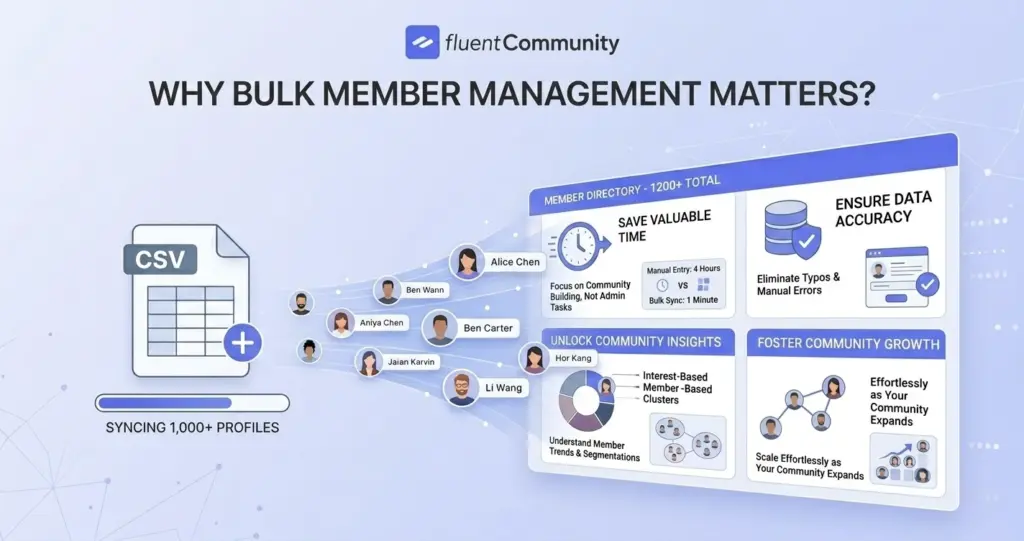
As communities grow, onboarding quickly becomes one of the biggest operational bottlenecks. Manually adding users creates several problems, including wasted admin time, slow onboarding processes, human errors, inconsistent permissions, and a poor experience for new members.
For small communities, this may seem like a minor inconvenience, but for growing businesses, it becomes a serious scalability challenge. Imagine manually adding 500 students to a course, onboarding 1,000 Facebook Group members, importing 200 employees into an internal community, or managing multiple agency clients with separate teams.
Completing these tasks one by one could take days of repetitive work. Bulk onboarding solves this problem by allowing admins to import users in batches while keeping permissions, access controls, and community organization properly structured.
Introducing FluentCommunity’s Bulk Add Members Feature
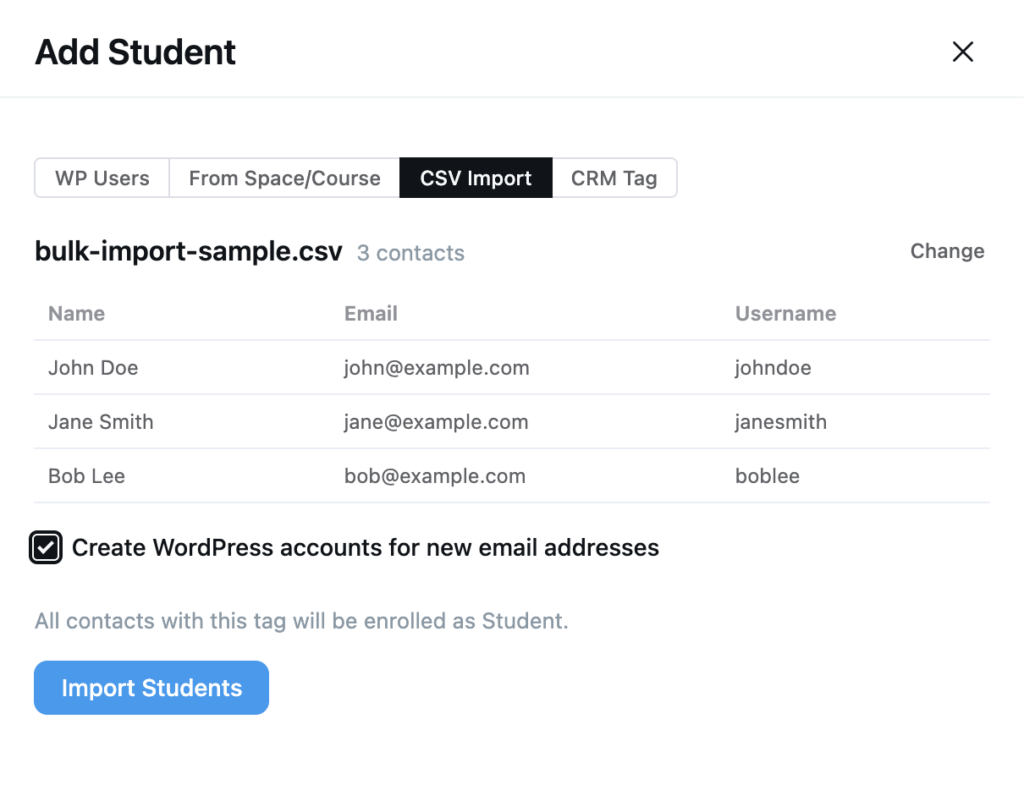
FluentCommunity 2.4.0 introduced a unified Add Members drawer designed specifically for large-scale community management. Instead of relying on slow and repetitive manual workflows, admins can now move dozens or even hundreds of users into a Space or Course in a single action.
This feature was built to support growing communities and streamline operations for cohort launches, course rollouts, community migrations, team onboarding, and marketing campaigns. To make onboarding more flexible and scalable, the system supports four powerful import sources, allowing community managers to choose the workflow that best fits their business needs.
Ways to Bulk Add Members in FluentCommunity
Managing a growing community becomes much easier when you can onboard users in bulk. FluentCommunity offers multiple flexible ways to quickly add members, helping you save time, reduce manual work, and keep your community organized as it scales efficiently.
Add Existing WordPress Users
FluentCommunity allows admins to search and select existing WordPress users directly inside the platform, making member onboarding much faster and more efficient. This is especially useful for websites that already have registered users, such as membership sites, WooCommerce stores, subscriber-based platforms, or communities with existing WordPress accounts.
Since the user accounts are already created, admins can instantly add members to a Space or Course without requiring additional registration steps.
This makes the feature particularly valuable for membership communities, existing business websites, internal platforms, and subscriber communities that want to streamline onboarding and improve user access management.
Import Members From Another Space or Course
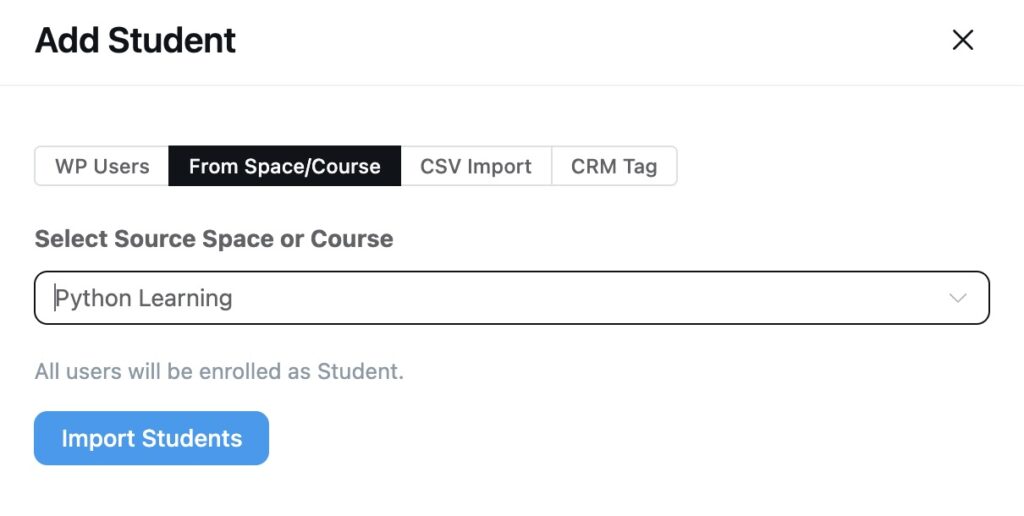
FluentCommunity Pro allows admins to clone the member roster from one Space or Course into another, making it much easier to manage growing learning communities and multi-stage programs.
This feature is especially useful when launching advanced courses, moving existing cohorts into new programs, creating exclusive VIP groups, or building continuation programs for returning members. Instead of manually rebuilding your audience every time you launch a new Space or Course, you can instantly transfer the entire group with just a few clicks.
This streamlined workflow is particularly valuable for course creators, coaching communities, membership upgrades, and multi-level programs that regularly move members between different learning or engagement spaces.
Bulk Add Members With CSV Import
One of the most powerful onboarding options in FluentCommunity is the CSV import feature. Admins can simply upload a CSV file containing user information such as name, email, and username to add large numbers of members quickly and efficiently.
If some users do not already have WordPress accounts, FluentCommunity can automatically create those accounts during the import process, removing the need for manual registration. This dramatically simplifies large migrations and bulk onboarding workflows, especially for communities handling hundreds of users at once.
The CSV import feature is particularly useful for Facebook Group migrations, importing users from external databases, onboarding event attendees, and managing employee onboarding for internal company communities.
Import Members From FluentCRM Tags
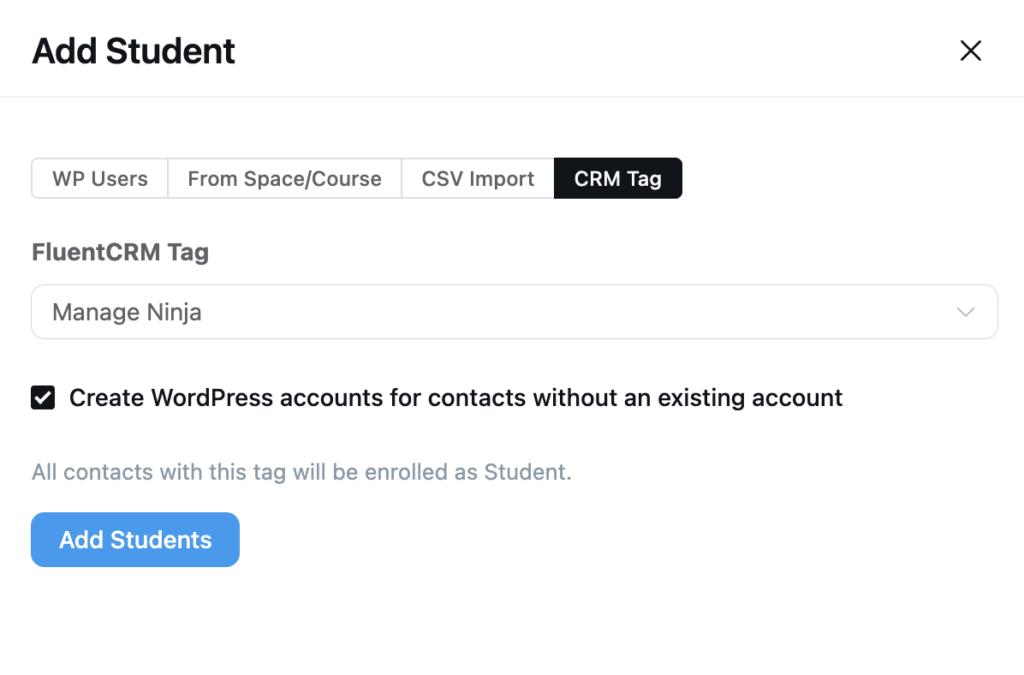
FluentCommunity Pro also integrates with FluentCRM tags, allowing admins to pull contacts carrying a specific CRM tag directly into a community Space or Course. This creates a seamless connection between your email marketing system and your online community. If contacts do not already have WordPress accounts, the system can automatically create them during the import process, making onboarding even more efficient.
This feature helps businesses build a powerful marketing-to-community pipeline where subscribers, leads, and customers can be automatically moved into the right community spaces based on their actions or tags. It is especially useful for managing email subscribers, webinar attendees, lead nurturing campaigns, customer onboarding workflows, and large-scale marketing campaigns.
Built for Performance and Security
Large member imports can create performance and security issues if they are not handled properly. To keep the onboarding process responsive and stable, FluentCommunity includes several safeguards during bulk imports. Imports are capped at 500 rows per request to maintain smooth performance, while role validation runs on every entry to ensure users receive the correct permissions and access levels.
This helps keep access controls protected and permissions properly organized throughout the import process. As a result, community admins can confidently manage large onboarding operations without compromising the stability, structure, or security of their WordPress community.
Different Use Case Examples of Migrating to FluentCommunity
Migrating to FluentCommunity becomes easier when you see it in real-world scenarios. Different use cases show how businesses, educators, and agencies can smoothly move their communities, onboard members efficiently, and maintain better control, structure, and engagement after migration.
Migrating From Facebook Groups
One of the biggest reasons businesses move to WordPress communities is ownership. While Facebook Groups are easy to start and convenient in the beginning, they come with several long-term limitations, including dependency on constantly changing algorithms, limited branding opportunities, lack of ownership over audience data, distractions from ads and unrelated content, and restricted monetization flexibility.
As online communities grow and mature, many creators, educators, and businesses eventually decide to move to self-hosted platforms like FluentCommunity to gain more control over their audience and platform experience.
However, migrating members from Facebook can feel overwhelming, especially for larger communities. Imagine running a Facebook Group with 3,000 members that includes coaching students, customers, and VIP subscribers.
Manually onboarding every single member into a WordPress community would take an enormous amount of time and effort. This is where FluentCommunity’s CSV import feature becomes incredibly valuable, allowing admins to onboard large numbers of members quickly and efficiently.
How FluentCommunity Simplifies Facebook Group Migration?
With FluentCommunity’s CSV import feature, migrating and onboarding members becomes a much simpler process. Admins can export their existing member data, prepare a CSV file with user information, and upload it directly into the platform.
If some users do not already have WordPress accounts, FluentCommunity can automatically create them during the import process, removing the need for manual registration. Once imported, members can instantly be assigned to the appropriate Spaces or Courses.
Instead of spending days or even weeks manually onboarding users one by one, the entire process becomes fast, organized, and manageable within minutes.
Why Businesses Move Away From Facebook Groups?
Self-hosted communities offer several major advantages compared to third-party social platforms. They provide full ownership over your platform, audience, and data while giving you greater control over branding and user experience. Businesses also gain more monetization freedom, allowing them to create membership programs, paid communities, courses, or premium content without platform limitations.
In addition, self-hosted communities create SEO opportunities that can help attract organic traffic, while flexible integrations make it easier to connect your community with other business tools and workflows. Improved privacy control is another important benefit, especially for businesses that want to protect user data and manage access more securely.
Most importantly, your audience becomes a true business asset that you fully control instead of relying on third-party platforms and changing algorithms.
Importing Course Students
Modern online education is no longer limited to just video lessons or downloadable materials. Today’s students expect a more interactive and engaging learning experience that goes beyond passive content consumption.
They want opportunities for peer discussions, meaningful community engagement, networking with fellow learners, access to support channels when they get stuck, and accountability groups that help them stay consistent and motivated throughout their learning journey.
Because of these evolving expectations, course creators are increasingly combining traditional LMS platforms with online communities to create a more complete and immersive learning environment that improves both learning outcomes and student retention.
How FluentCommunity Helps Course Creators?
Using the new bulk add system in FluentCommunity, course creators can streamline the entire student onboarding process by importing student batches in a single action instead of adding them individually. They can also clone previous cohorts to quickly set up new batches, add students directly into relevant Spaces, and automatically create WordPress accounts when needed.
This makes it much easier to organize learners efficiently across different courses, programs, or community spaces. Overall, these capabilities create a significantly smoother and faster onboarding workflow, reducing manual effort while improving the student experience from the very beginning.
Agency Client Onboarding
Agencies are increasingly using online communities to streamline client communication, collect feedback, manage project collaboration, handle support requests, and share resources in a more organized way. However, a common challenge arises when agencies need to onboard multiple clients at the same time, especially during busy project cycles or onboarding phases.
With FluentCommunity’s bulk member import feature, agencies can simplify this process significantly by importing all client stakeholders at once, organizing users into private Spaces, assigning role-specific access, and improving collaboration workflows across teams. This not only reduces manual effort but also creates a more structured and professional client experience.
For example, if a web agency signs 15 new clients during a quarterly onboarding cycle, and each client includes marketing managers, designers, developers, and other stakeholders, the agency would otherwise need to create 60+ accounts manually. Instead, they can simply upload a CSV file, let accounts be created automatically, and assign members directly into their respective private client Spaces. This makes the entire onboarding process far more organized, efficient, and scalable.
Employee Communities
Internal company communities are becoming increasingly important for modern businesses, especially as organizations adapt to remote teams, hybrid workplaces, large-scale operations, and distributed departments across different locations. Companies now rely on internal communities for a wide range of purposes, including internal communication, knowledge sharing, employee training, department-level collaboration, and strengthening overall company culture.
For example, in a SaaS company that hires 120 employees across marketing, engineering, support, and HR teams, onboarding can become a major operational task if handled manually. Instead of creating accounts one by one, HR teams can simply import employee data using CSV files, automatically assign employees to their respective department Spaces, and ensure that training materials and resources become instantly accessible from day one.
This approach makes the entire onboarding process significantly more efficient, structured, and scalable for growing organizations.
How FluentCommunity Helps Employee Communities?
Using bulk member imports, HR or admin teams can streamline employee onboarding by uploading employee data in bulk instead of handling each account individually. They can assign employees directly to their respective department Spaces, ensuring everyone is placed in the right group from the start. If needed, WordPress accounts can be created automatically during the import process, reducing manual setup work.
In addition, permissions can be managed efficiently through role-based access controls, helping maintain proper structure and security across the organization. Overall, this approach simplifies onboarding significantly and reduces the administrative burden on HR and management teams.
Best Practices for Bulk Community Onboarding
To keep your community scalable and well-organized, it’s important to follow a few best practices that make long-term management easier and more efficient.
- Use Role-Based Organization: Create clear roles such as Students, Employees, Clients, Moderators, and VIP members. This helps keep permissions structured and ensures each member only has access to what they need.
- Organize Members Into Spaces: Instead of maintaining one large, unstructured community feed, divide your community into dedicated Spaces for Courses, Departments, Client Groups, Membership Tiers, and specific Topics. Smaller, focused Spaces naturally improve engagement and make navigation easier for members.
- Clean Your CSV Files Before Importing: Before uploading any data, remove duplicate entries, verify email formatting, and standardize usernames. This reduces the risk of import errors and ensures a smoother onboarding process.
- Automate Long-Term Onboarding: While bulk imports are perfect for migrations and initial launches, sustainable growth depends on automation. Integrating CRM systems, LMS platforms, membership plugins, and WooCommerce workflows helps streamline onboarding and dramatically improves scalability over time.
Why WordPress Communities Continue to Grow?
More businesses are choosing WordPress communities because they offer significant long-term advantages over traditional SaaS platforms. They provide full ownership of the platform, better customization options, improved cost efficiency, complete control over data, and greater flexibility in monetization strategies.
Unlike SaaS-based community solutions, WordPress gives businesses full control over key areas such as branding, integrations with other tools, member data management, community structure, and revenue models. This level of control allows businesses to shape their communities exactly according to their needs and goals without platform restrictions.
As online communities continue to grow into core business assets, ownership and control have become more important than ever for sustainable growth and independence.
Final Thoughts
Managing community growth should not feel overwhelming, especially as your audience expands and manual onboarding quickly becomes unsustainable. This is exactly why FluentCommunity’s new Bulk Add Members and Students feature represents a major improvement for growing WordPress communities.
With support for existing WordPress users, Space and Course cloning, CSV imports, and FluentCRM tag-based imports, businesses can onboard hundreds of members efficiently while still keeping access controls organized and secure.
Whether you are migrating from Facebook Groups, importing online course students, onboarding agency clients, or managing employee communities, bulk member management can save a significant amount of time and reduce operational effort.
As your community scales, having a streamlined onboarding system becomes one of the most critical factors for ensuring long-term success and sustainable growth.

Prema Anjum
My full name is Anzuman Ara Chowdhury. But people know me as Prema Anjum. I’m a Digital Marketer by profession, a WordPress community contributor, and a travel enthusiast by heart.


Add your first comment to this post