


Introducing Reviews for Courses, Mobile-First UI and Many More – FluentCommunity 2.16

Table of Content
Subscribe To Get
WordPress Guides, Tips, and Tutorials


This is the last week of FluentCommunity’s Birthday Month. Four weeks, four releases, each one built around a single idea. This week the idea is proof: letting the people who took your course say what it was worth.
The headline is student reviews for courses, with star ratings, a rating breakdown, a review page for admins and moderation built in. Next to it are an admin quick actions card on every member profile, a profile sheet made for phones, an editable FluentCRM widget, a calmer Insights page and five new color presets. The FluentEvent add-on reaches 1.2.0 with a guest waitlist for full events. And there is the usual round of fixes.
Let Students Rate Your Courses
A course page could tell people what is inside it, but not whether it was any good (pro). Students can now leave a rating from one to five stars, with an optional written review. Markdown works, so a student can bold the part that mattered.
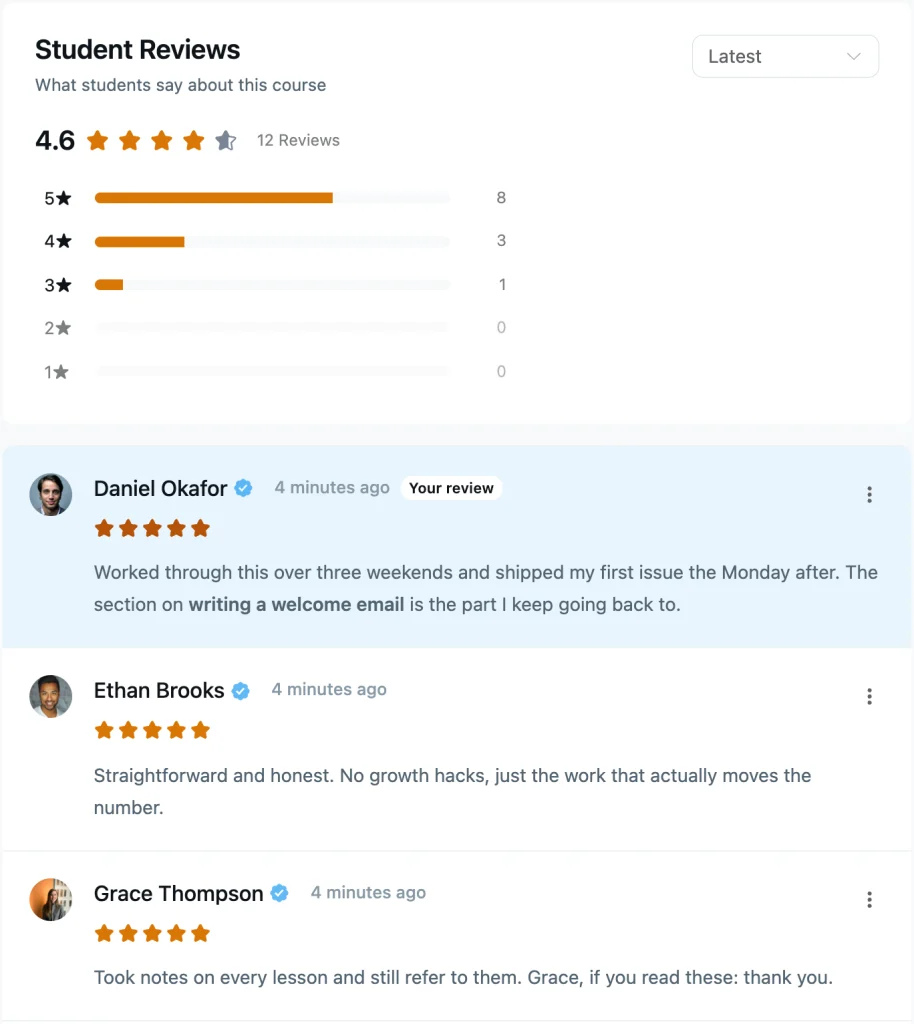
The course page gains two tabs: Course Info and Reviews. The Reviews tab opens with the average, the number of reviews and a bar for each star rating. Students can filter the list by stars and sort it by newest, highest or lowest. Everyone gets one review each, and they can edit or delete their own at any time.
Reviews are off on each course until you turn them on, so nothing changes on your courses until you decide. In the course settings you choose who can write one: any enrolled student, or only students who have reached a progress mark you set. You can also hide the breakdown bars and show the average alone.
Asking at the Right Moment
Nobody reviews a course because a page told them to. They do it right after a lesson lands. FluentCommunity now asks then, with a small bar at the top of the course page and a dialog after the lesson that reaches the progress you set.

Not now is a real answer. Choose it early in the course and the prompt waits until the student finishes, then asks once more. Choose it at the end and it never asks again. A student who is about to see a certificate gets the certificate, not a rating request.
Ratings Where People Decide
A rating is only worth collecting if someone sees it. Course cards now carry the average and the review count, so the list of courses tells a member which one other students rated highest.

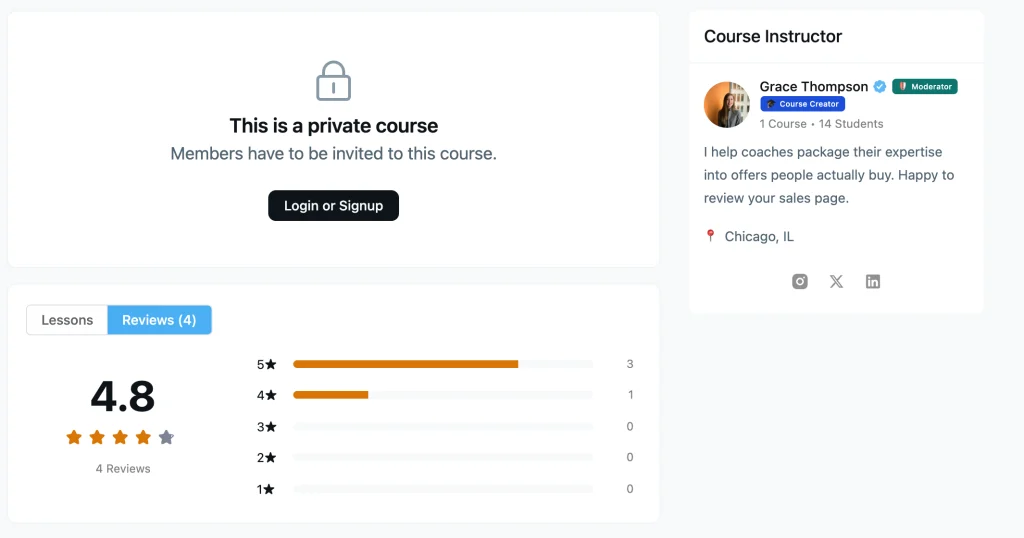
The course lock screen can show them too. Two new settings, Show Lessons and Show Reviews, let a locked course show its lesson list and its rating to someone who has not joined yet. Both are off by default. Turn both on and the lock screen gets tabs; turn on one and it shows that one alone. The locked page also uses the course page layout now, so an instructor card sits beside it instead of a full-width band.
One Place to Manage Every Review
There is a new Reviews page under Course Management. It lists every review across every course you manage, with the student, the course, the rating and the date.
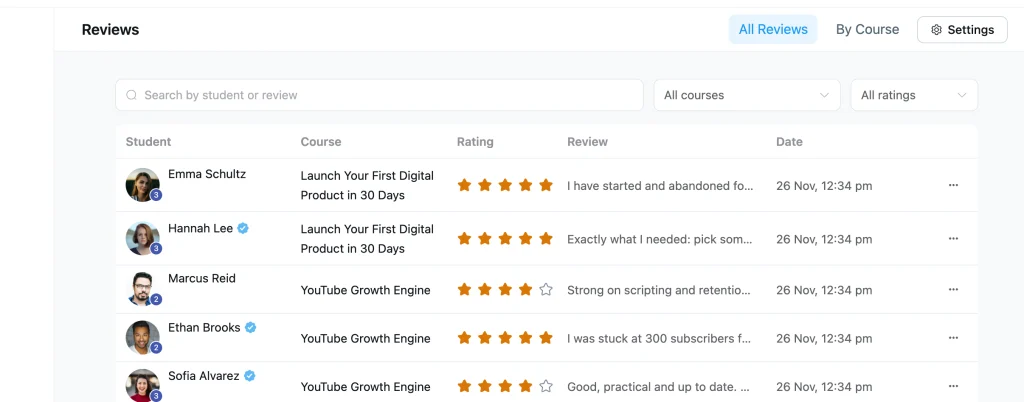
Search by student or by the words in a review, and filter by course or by star rating. A course creator sees only their own courses.
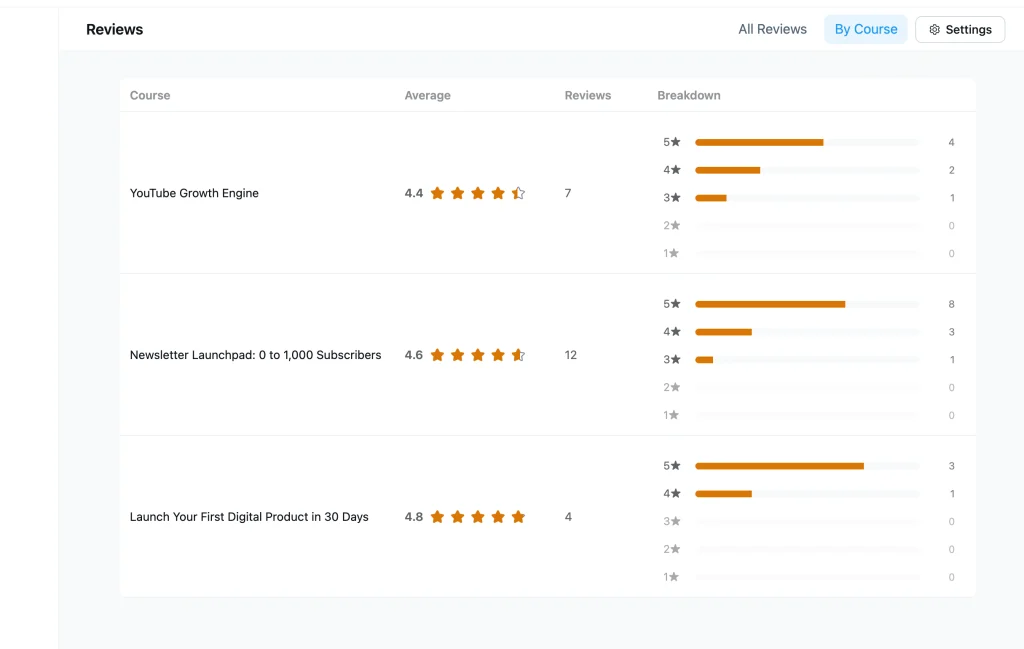
The By Course tab answers a different question: how is each course doing? It shows the average, the review count and the full breakdown per course, sorted lowest average first, so the course that needs your attention is the one at the top.
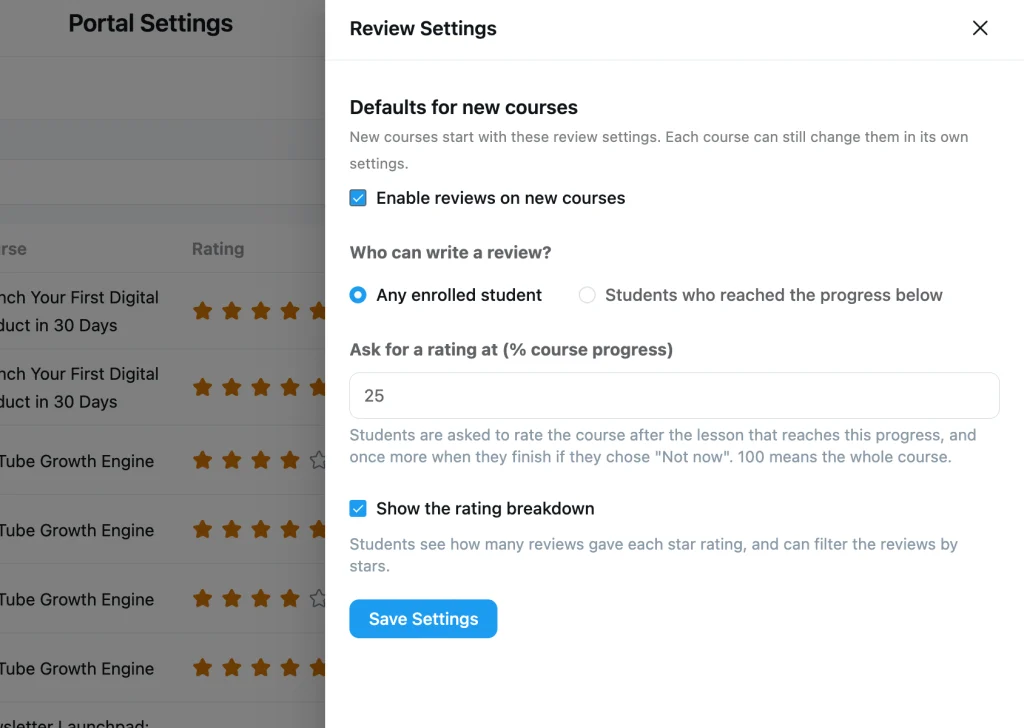
Settings opens a drawer with the defaults for new courses: whether reviews start on, who may write one, the progress mark to ask at, and whether the breakdown shows. Every course can still change its own settings afterwards.
Reviews Go Through Moderation Too
A review is public writing, so it follows the rules you already set for posts and comments. If a member is flagged, or a review uses a word on your blocked list, the review is held instead of published and lands in the Content Moderation queue with a report on it.
Approve it and it joins the list and counts toward the average. Hide it and it stays out of both. Only approved reviews ever reach the rating, so a held review cannot move a course’s score while it waits. Members can report a review they think is unfair, exactly as they report a post.
Everything an Admin Needs on a Member Profile
Moderating a member used to mean leaving their profile. There is now a Quick Actions card in the profile sidebar, which only community admins can see.
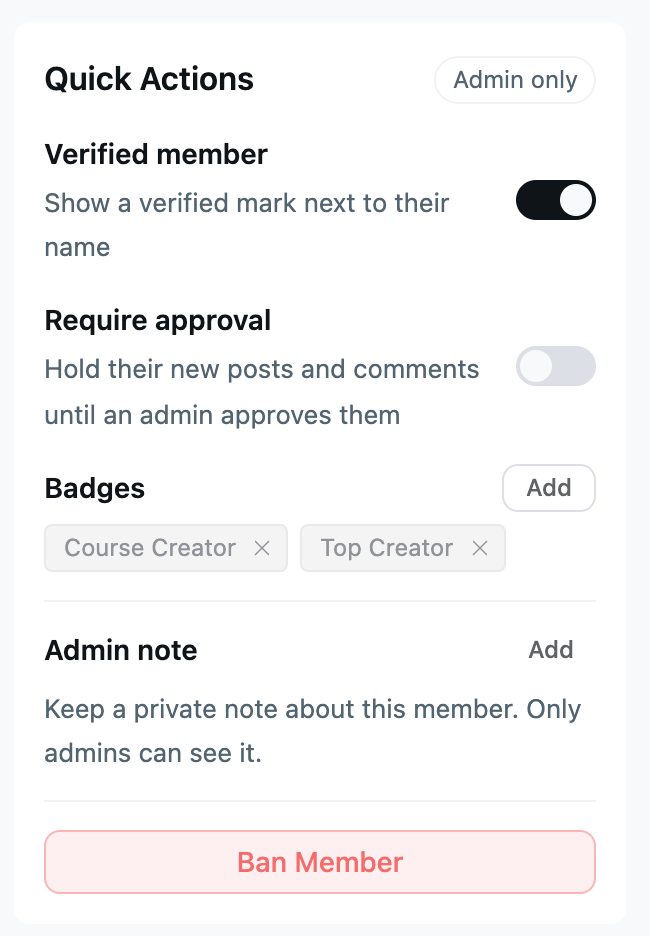
From one card you can mark someone as a verified member, hold their new posts and comments for approval, add or remove badges, and keep a private note that only admins read. Ban Member sits at the bottom, and its dialog can also remove that member’s posts, comments, chat messages and course progress. A large clear-out does not time out: what fits runs now and the rest finishes in the background.
Mobile UI Improvements
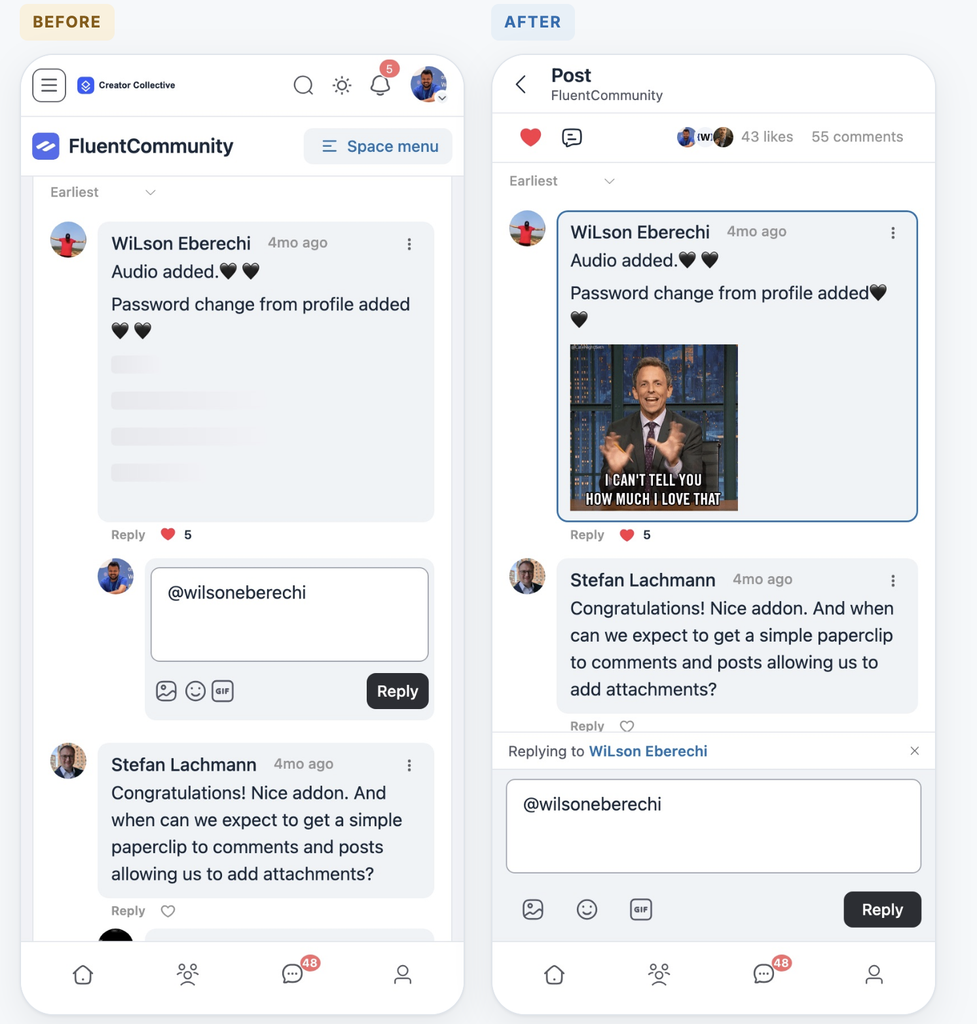
We have improved a ton of mobile UI for many interactions that our users do. Here are some screenshots and details
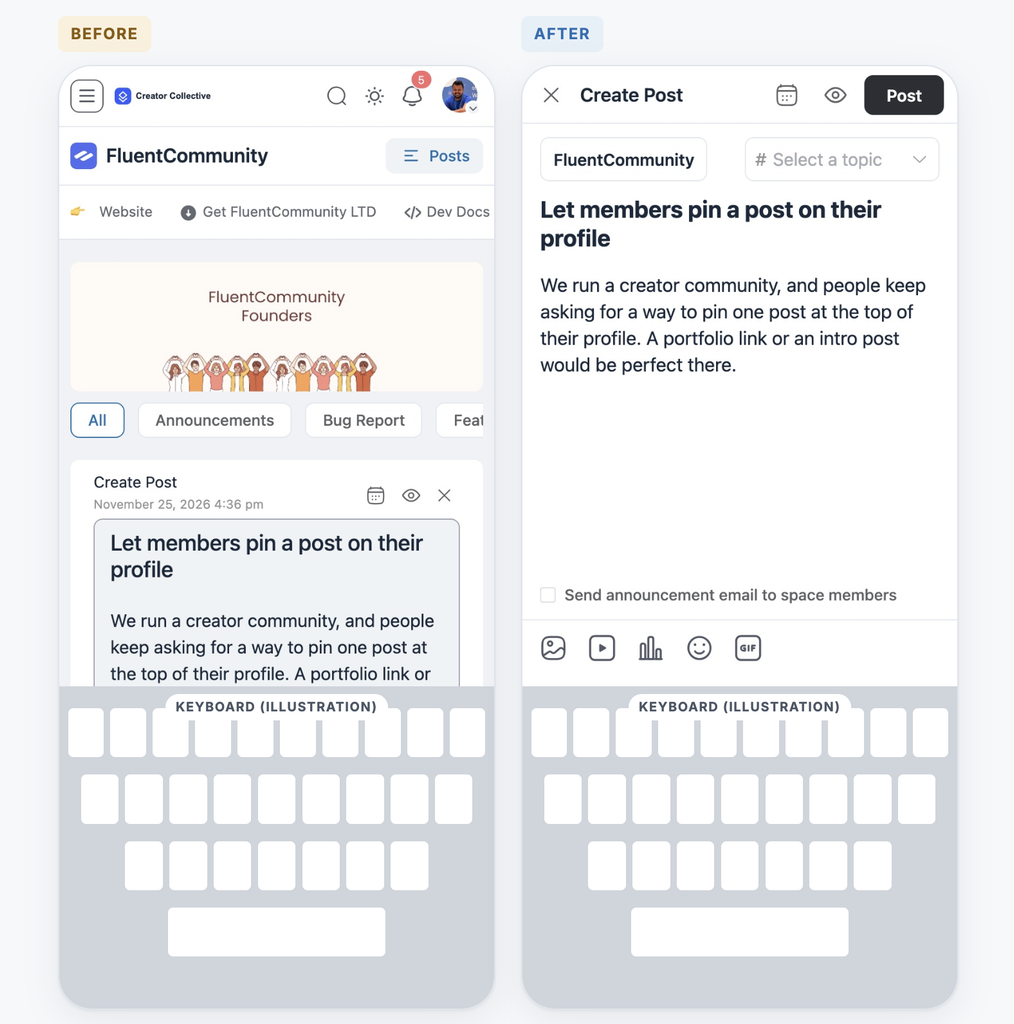
Writing a post on a phone
The old composer opened in place, in the middle of the feed. The site header, the space header and the cover image stayed above it. When the keyboard came up, it covered the topic picker, the attachment buttons and the Post button. To publish, you had to close the keyboard first.
Opening a post on a phone
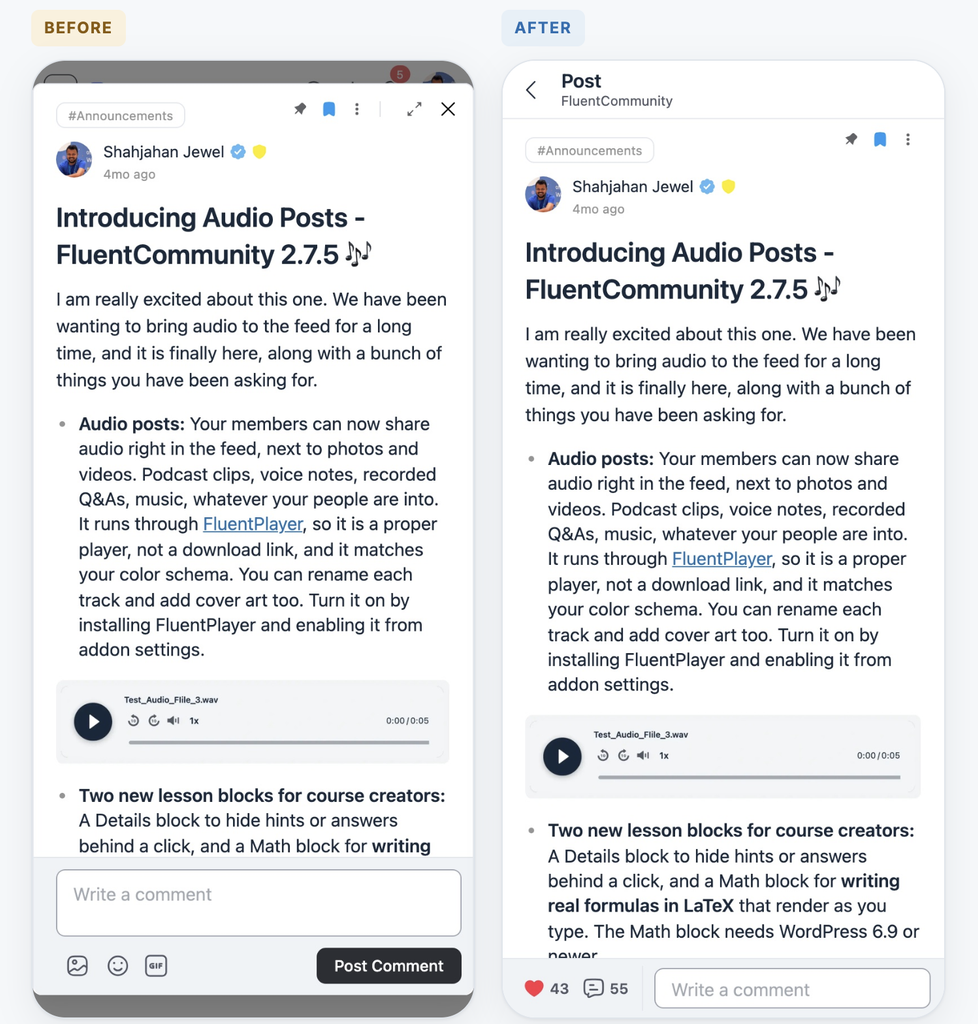
A post used to open in a dialog: a card floating over a dimmed feed, with a gap above and below, a round close button in the corner and an Expand button next to it. On a phone that dialog already filled the screen, so the dialog look added clutter without adding anything.
Replying on a phone
Tapping Reply used to open a second editor inside the thread. With the keyboard up, its Reply button could end up off screen, and the main comment box was still there below it, so there were two places to type.
Desktop UI/UX Improvements
We also improved the UI/UX for desktops.
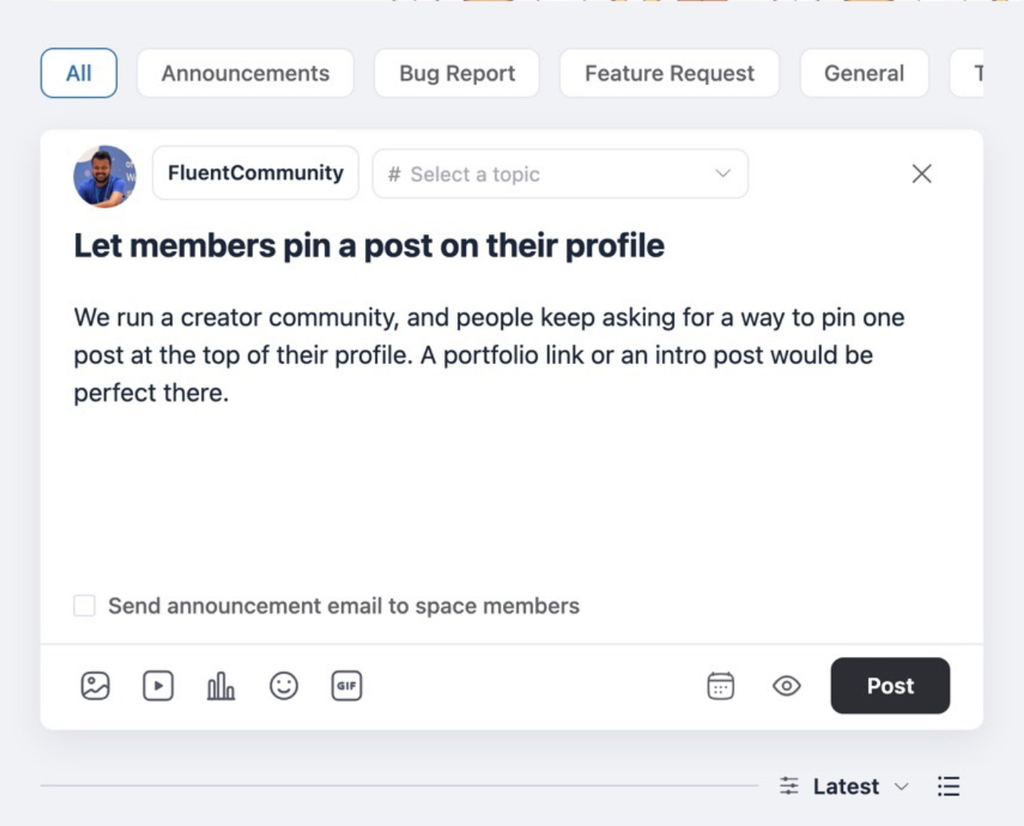
New Composer
Our new composer for new post is cleaner and more user-friendly.
Long threads you can read
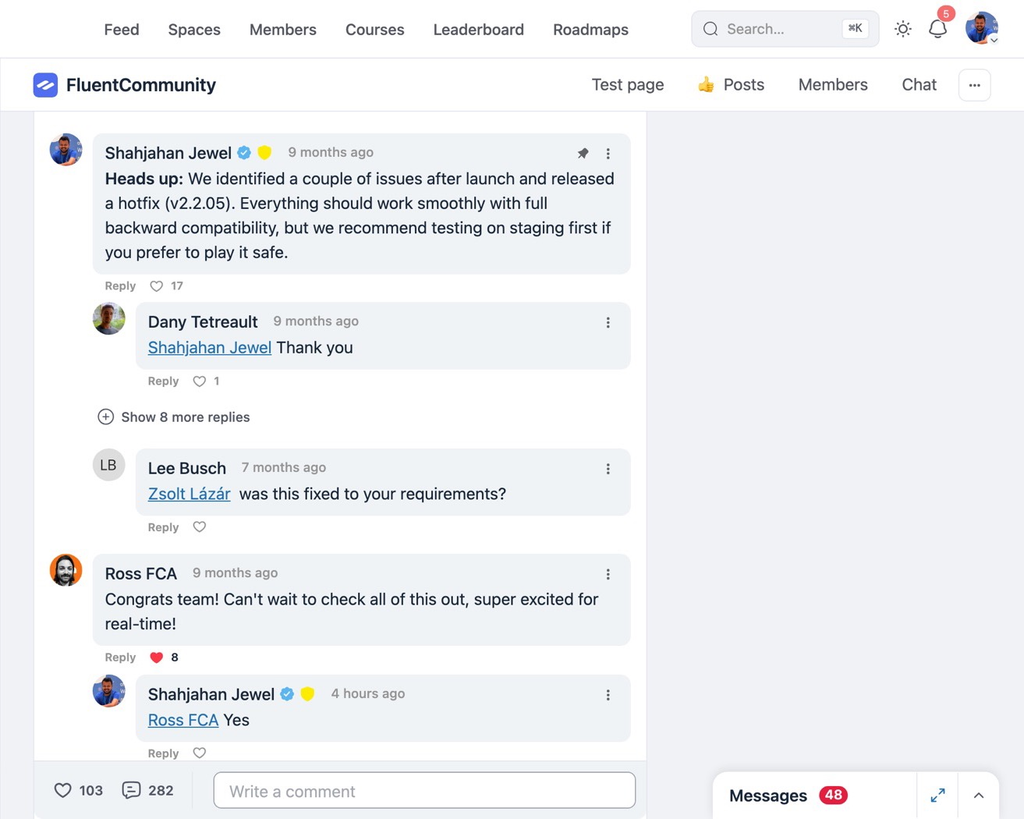
One of our own announcements has 281 comments: 101 top-level comments and 180 replies. With every reply open, the discussion was 51,079px tall, about 64 screens. The largest single thread ran for five screens. To reach the next top-level comment you scrolled through every reply to the one before it.
New Post Reading UI
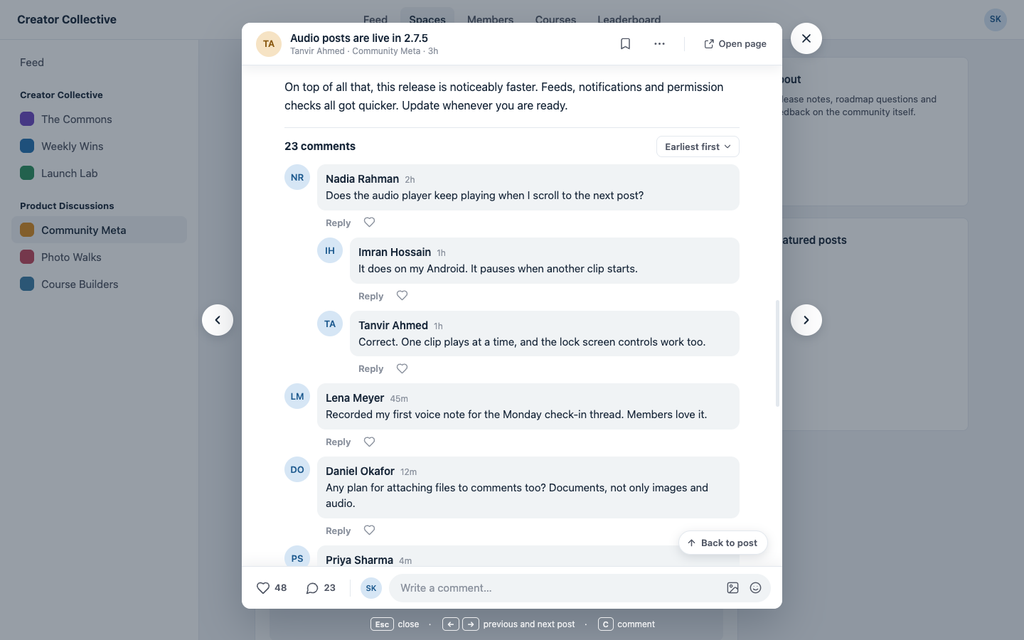
We have improved the UI of each post popup, and it’s very sleek
FluentCRM Details Without Leaving the Profile
The CRM box on a member’s profile used to be a read-only block (pro). Changing a list or a tag meant opening FluentCRM in another tab.
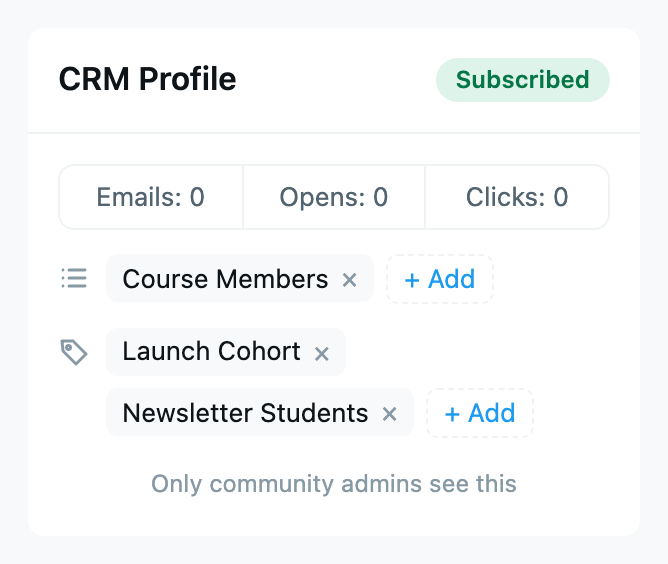
It is now a live widget. You see the contact status, the email stats and the lists and tags, and if you are allowed to manage contacts you can add and remove them from a searchable picker. A tag that is mapped to a space says so, because changing it changes who is in that space. Lifetime value shows under the stats on stores that track it.
A Calmer Insights Page
Insights showed too much at once. Six tiles with little charts, a card for every trend, hint lines under each number. It was a lot of screen for one question.
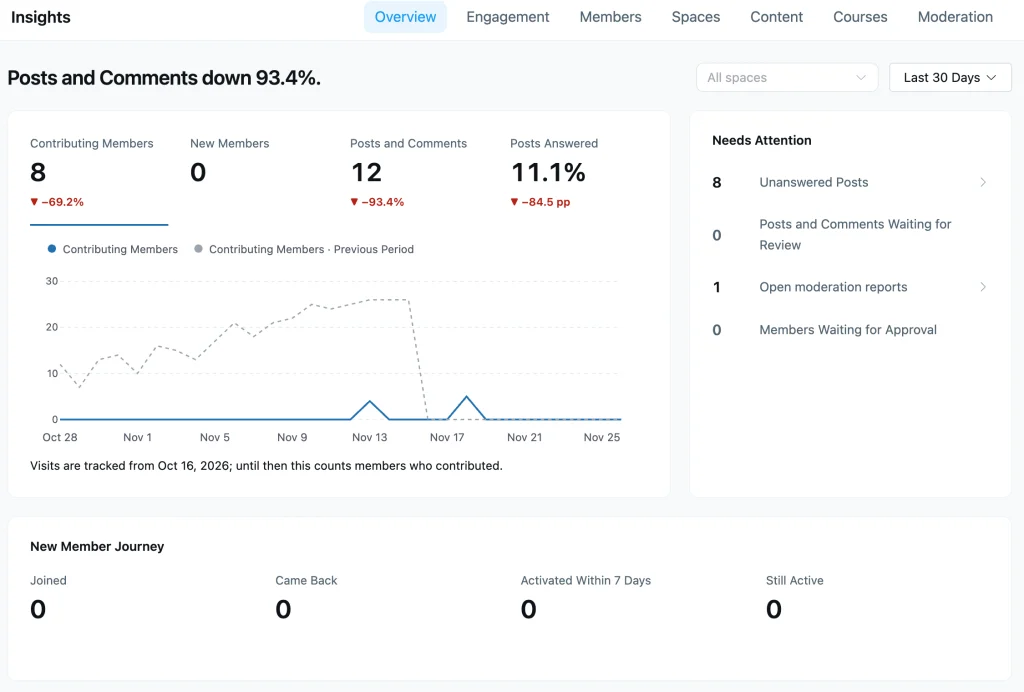
Each page now opens with one sentence telling you what changed, then the filters, then a single card with four numbers and the chart of whichever one you pick. Below that sit plain cards with single-line rows. The date button holds the presets, a custom range and the comparison. Nothing was removed from the data: the cards a summary replaced still answer through the REST API, an AI agent and the CSV export.
Five New Color Presets
The portal had five built-in color presets and two of them were blue. There are now ten.
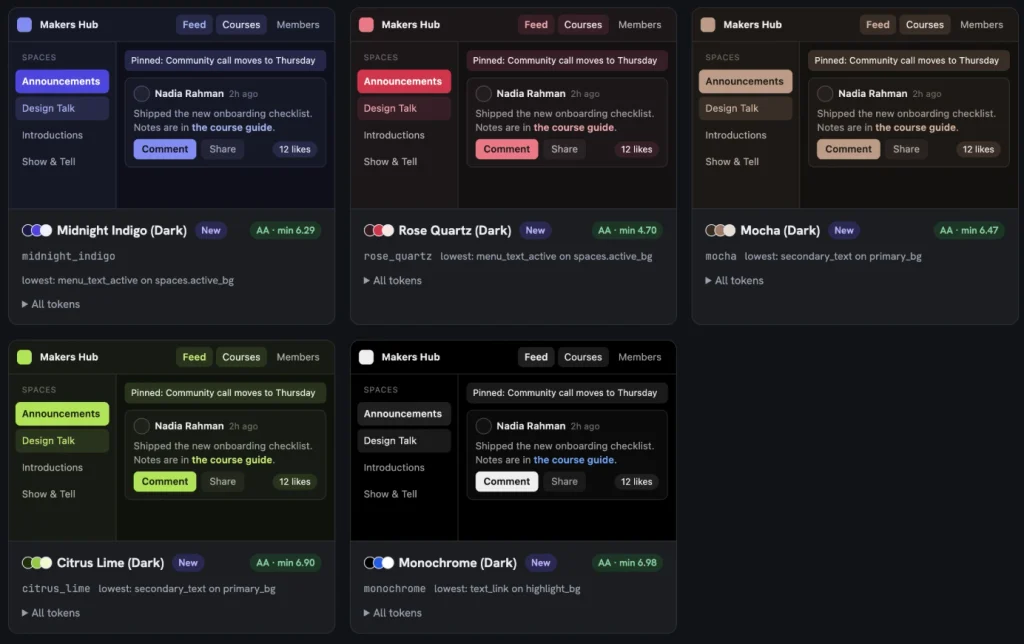
Midnight Indigo, Rose Quartz, Mocha, Citrus Lime and Monochrome join the list, each with a matching light and dark version and a swatch in the dropdown so you can see it before you pick it. Each one passes AA contrast, so a new look does not cost you readability.
A Waitlist for Full Events
Community Events arrived two releases ago and the FluentEvent add-on now reaches 1.2.0, with a home of its own at fluentevent.com. Last release gave events a guest capacity. This one answers the obvious next question: what happens to the people who arrive late?
Already running FluentEvent? Update it from Plugins as usual. New to it, or on the free plugin where the one-click install is not available? Download fluent-event.zip and upload it under Plugins → Add New Plugin → Upload Plugin. It is free either way.
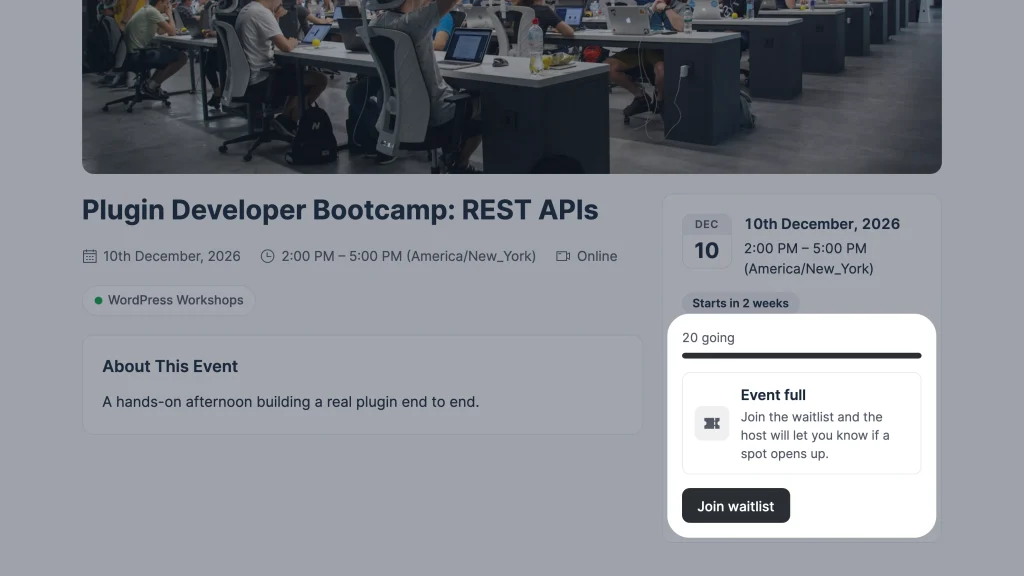
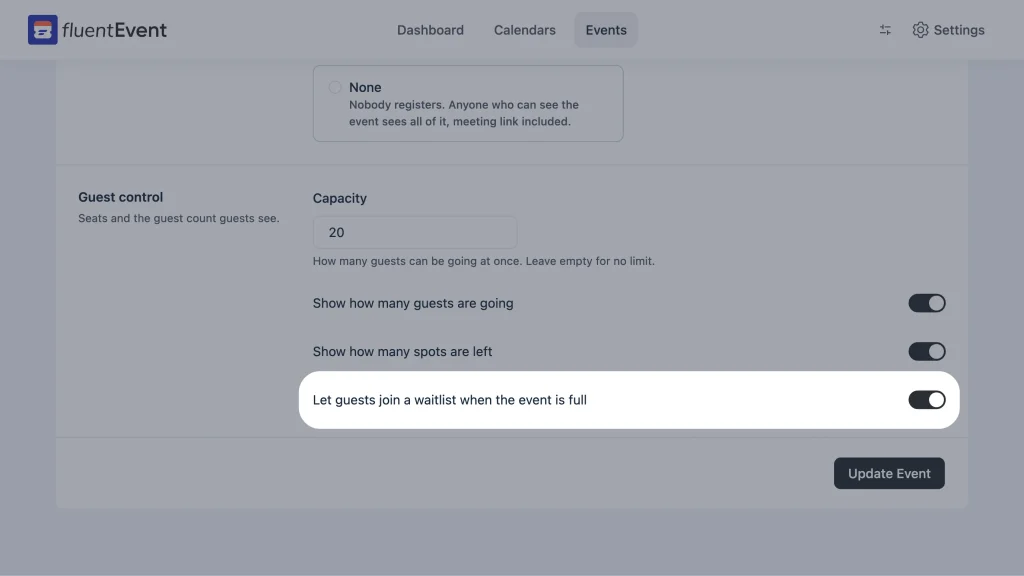
Turn the waitlist on for any event that has a capacity, and a full event takes late arrivals as waitlisted instead of turning them away. It works on the public page and in the portal, for members and visitors alike.
A waitlisted guest holds no seat. They are left out of the going count and the spots left, they get no meeting link and no reminders, and they receive their own waitlist email. Only an admin moves someone from the waitlist to going, so a seat that opens up goes to the person you choose.
Two more FluentEvent additions are worth your time. Clone Event opens the create form with every field of an existing event already filled in, including the post text, title, topics and space in the portal, and never copies its guests. And the guest list now has bulk actions: tick the rows, then change their status or delete them in one go, with the matching email offered rather than assumed.
Upcoming Events in the Space Sidebar
Members asked to see what is coming up without leaving the space they are reading. Each space now has a Show Upcoming Events on the Sidebar setting, which appears while FluentEvent is active.
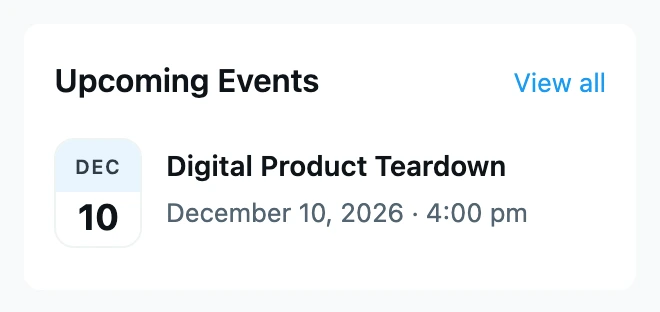
Turn it on and the space sidebar lists its next events under About. There is a new filter behind it, so any add-on can put its own widget in that sidebar, not only FluentEvent.
Smaller Things Worth Knowing
Visitors can log in from a post. The single post page hides the site header on phones, which hid the only Login button with it. There is now a Login button in the post top bar, and it brings the visitor back to the post they were reading.
Deleting a big space no longer stalls. A space delete runs the full cleanup for every post in it, which can take longer than a web request allows. What fits is deleted straight away, the rest finishes in the background, and an hourly check restarts any delete that was interrupted.
FluentHub installs in one click. The MCP screen can activate FluentHub for you, and Pro can install it outright, so connecting an AI agent no longer sends you to the plugin search.
FluentCommunity speaks Serbian. A complete sr_RS translation ships with this release, beside German and Spanish.
Security Hardening
This release carries a round of hardening across both plugins. Request input is sanitized in every controller. REST routes no longer accept a path or a query key that could reach somewhere they should not. Profile fields are kept out of the responses that should not carry them, including the raw custom fields in a profile’s JSON, moderation reports and the follow APIs. SmartCode values are escaped for the exact place in the HTML they land in. No action is needed on your side beyond updating.
Bug Fixes and Stability
Comments off now means off. Turning comments off on a course still served them through a few paths, and the comment actions stayed on screen. Pinning a post on a comments-off space made its comments disappear. A free preview lesson in a private course threw an error. All fixed, and secret course lessons stay invite-only.
Comments behave at the edges. An empty comment showed an internal error instead of a message, a comment of just “0” was rejected or saved blank, a reply in a course dropped its GIF, and deleting a comment could remove media that belonged to another one.
Edits keep what you wrote. Editing a post or a comment dropped its mentions and its moderation flags, and a comment edit could show the old mentions in the preview.
Deleted spaces stay deleted. Posts from a deleted space could still show in a profile, be edited, be saved, be pinned or be published on a schedule, and the delete could leave notifications behind with nothing to open.
Photos and uploads. A photo upload could get stuck or let the post go out before it finished, and adding an inline image cleared the upload state of the photos already attached.
Everyday polish. Deleting a post removed the course completions that pointed at it. Unread notifications were skipped after marking one read. Portal pages were served as an RSS feed at the site root. A moderator could block another moderator. An MCP image limit of zero was ignored, and MCP tools broke on a custom REST namespace. Code blocks were unreadable in light mode. Course settings and profile pages went blank with Certificates active, and saving a FluentCRM profile removed tags that had been added somewhere else.
Wrapping Up
2.16.0 is about proof. Your courses can now carry what students actually thought of them, on the course page, on the cards and on the lock screen, with the same moderation you already trust for everything else.
That closes our Birthday Month: four weeks, four releases. Thank you for building your communities with us. Update whenever you are ready.
FluentCommunity 2.16.0
- Introduced: Student Reviews for Courses (pro)
- Added: Course Review Management, Ratings on Cards and Content Moderation
- Added: Lessons and Reviews on the Course Lock Screen
- Added: Admin Quick Actions Card on Member Profiles
- Added: Profile Preview Sheet for Members on Mobile
- Added: Editable FluentCRM Profile Widget With Lifetime Value (pro)
- Added: Five New Portal Color Presets
- Added: Inline Image Descriptions for Screen Readers
- Added: Upcoming Events on the Space Sidebar
- Added: One-Click FluentHub Install From the MCP Screen
- Added: Login Button in the Post Top Bar for Visitors on Phones
- Added: Serbian (sr_RS) Translation
- Improved: Post and Comment Composers and Post View on Mobile
- Improved: Post Modal on Desktop, With Next Loading More Posts
- Improved: Long Reply Threads Collapse to the First and Last Reply
- Improved: Photo Reordering, Descriptions and Upload Progress in the Composer
- Improved: Calm Layout for the Insights Pages
- Improved: Large Spaces Deleted in the Background
- Security: Plugin-Wide Input Sanitization, REST Route and Profile Data Hardening
- Fixed: Posts of Deleted Spaces Still Listed or Published
- Fixed: Comments Served on Courses and Lessons With Comments Off
- Fixed: Error on Free Preview Lessons of Private Courses
- Fixed: Empty Comments and a Comment of “0” Rejected or Saved Blank
- Fixed: Post and Comment Edits Losing Mentions and Moderation Flags
- Fixed: Post Delete Removing Course Completions
- Fixed: Photo Uploads Stuck, Posting Too Early or Dropping Media
- Fixed: Unread Notifications Skipped After Mark Read
- Fixed: Portal Pages Served as RSS at the Site Root
- Fixed: Moderators Able to Block Other Moderators
- Fixed: MCP Image Limit of Zero and Tools on a Custom REST Namespace
- Fixed: Unreadable Code Block Text in Light Mode
- Fixed: Insights Activation Rate and Dark Mode Progress Bars
- Fixed: Course Settings and Profile Pages Blank When Certificates Are Active
- Fixed: FluentCRM Profile Saves Removing Tags Added Elsewhere

Shahjahan Jewel
Hello, this is Jewel, CEO & Head of Ideas at WPManageNinja. I am obsessed with WordPress since 2009. My aim is to be a user-centric developer first, and a serial entrepreneur second. You will find me discussing various tech issues and trying to come up with scalable solutions on different forums when I am not busy coding.






Add your first comment to this post