

Turn a Free Course Lesson Into a Complete Enrollment Funnel

Table of Content
Subscribe To Get
WordPress Guides, Tips, and Tutorials


You already have a course. What you don’t have is proof that it works before someone pays, or any signal that they finish after they do.
I’ll show you how to open one lesson as a public teaser, capture and nurture the email it generates, and track completion once they enroll.
Key Takeaways
- Opening one lesson as a Free Preview lets prospects experience your teaching before they buy.
- An email capture layer inside that lesson turns a passive viewer into a tagged, nurturable lead.
- Chapters and Timestamp Links help you win back viewers who stall partway through.
- Required Video Completion and Auto-Complete keep enrolled students from stalling again after they pay.
- Every step here runs on FluentPlayer’s free tier.
Why a Landing Page Doesn’t Sell a Course
Most course pages sell on description. A curriculum outline, a few star ratings, maybe an instructor bio. None of that lets a stranger watch you teach. They’re asked to pay before they see if your teaching style fits how they learn.
Enrollment doesn’t end the problem either. FluentCommunity tracks who enrolled, not who actually watched. A student can sit at 0% completion for weeks, and nothing tells you until they ask for a refund or simply disappear.
What This Funnel Does
One lesson from an existing course goes public. Its video captures an email mid-watch. A short sequence nurtures the lead and pulls back anyone who stalls. Enrollment happens in one click. Then completion tracking keeps them moving once they’re paying students.
The shape, in order:
- Open one lesson as a Free Preview
- Add chapters so viewers can navigate it fast
- Capture the email mid-video
- Recover viewers who stall
- Let them self-enroll
- Track completion once they’re in
Choosing and Structuring the Teaser Lesson
Say you’re running a FluentCart course inside FluentCommunity. Module 2, “Set Up Your Online Store in WordPress with FluentCart,” isn’t the intro module and isn’t the hardest one. By the end of it, a viewer has an actual working store. That’s a real result, not a preview of one.
Set Up Your Online Store beat the other thirteen lessons in the course for three reasons. Get Ready for FluentCart is an overview, not a finished result. Coupons, Taxes, and Report Dashboard assume a store that already exists.
Connect Payment Gateways and Ship Products Worldwide only make sense once the store is built.
The lesson that wins your teaser slot isn’t the one with the flashiest topic. It’s the earliest lesson that produces a complete outcome on its own, doesn’t depend on lessons before or after it, and finishes in one sitting.
Skim your course for that lesson before picking one.
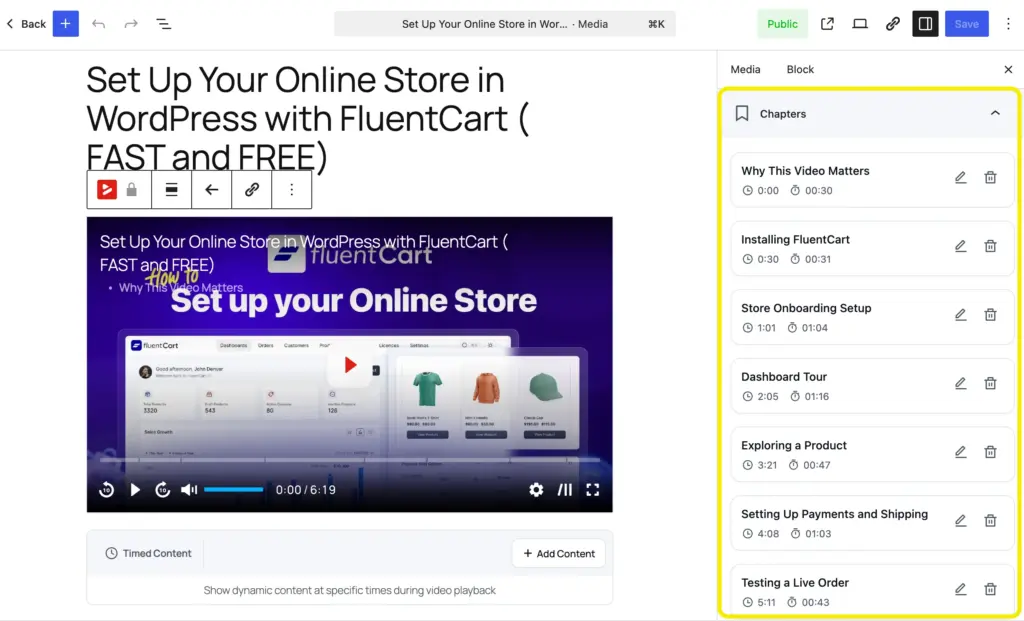
Before opening it up, add Video Chapters to the lesson’s FluentPlayer media. A stranger skimming for “connect a payment gateway” shouldn’t have to scrub through six minutes to find it.
Chapters turn the lesson into something a visitor can navigate, not just watch.
Download FluentPlayer to add chapters to your videos for free!
Making the Lesson Public
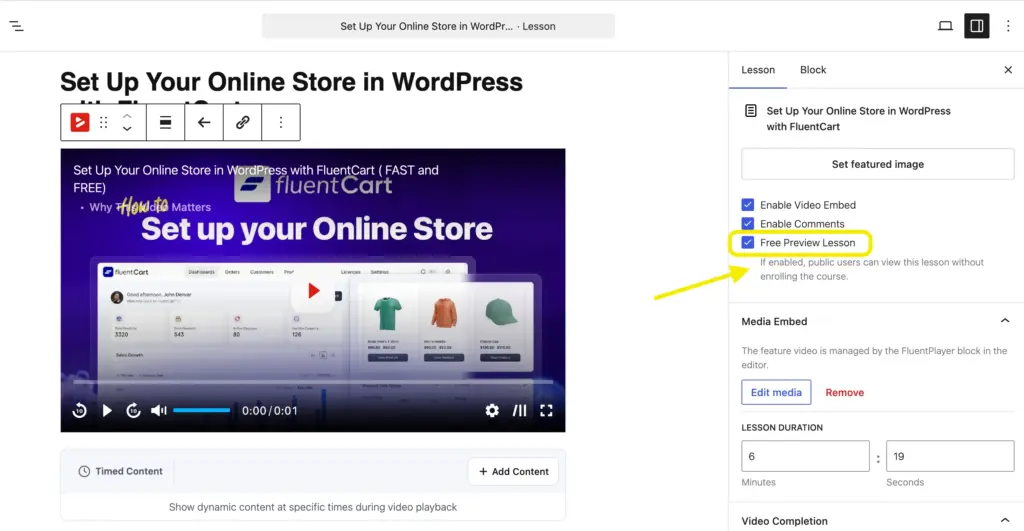
Set the course’s Privacy to Public. Free Preview Lesson only works on Public or Secret courses, not Private ones.
Then open the chosen lesson’s edit panel and check Free Preview Lesson. That one lesson is now visible to anyone. The rest of the course stays exactly as locked as before.
Turning the Video Into a Lead Magnet
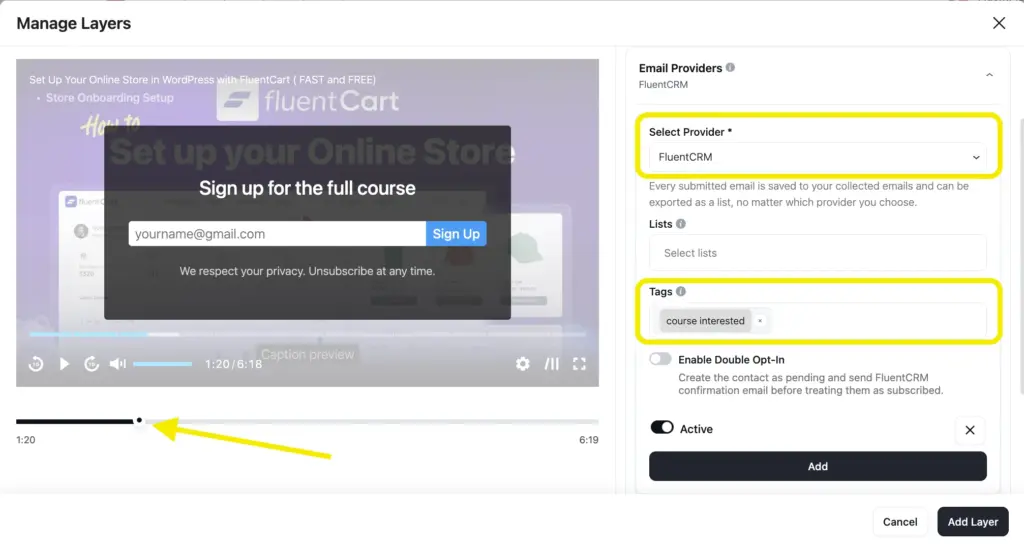
The lesson’s video is a FluentPlayer media item, so it carries the same Email Capture layer any FluentPlayer video does.
Set it around 15 to 20 percent into the runtime, early enough that the viewer hasn’t gotten their result yet, late enough that they’ve decided to keep watching.
The layer sends the address to FluentCRM and applies a tag: course-interested. No third-party form tool, no separate landing page. The prospect fills it out inside the video and keeps watching.
Install FluentPlayer from FluentCommunity’s settings panel and every course lesson gets this same layer, not just the teaser.
If you want CTA, Ad layer, or hotspot, get FluentPlayer Pro now!
Nurturing Before They Buy
A short FluentCRM sequence fires on the course-interested tag. The first email delivers something small and useful on its own, not a pitch.
Second makes the case: what the full course covers, what changes once someone finishes it. Third is the enrollment link, direct, no countdown timer.
Recovering the Ones Who Stall
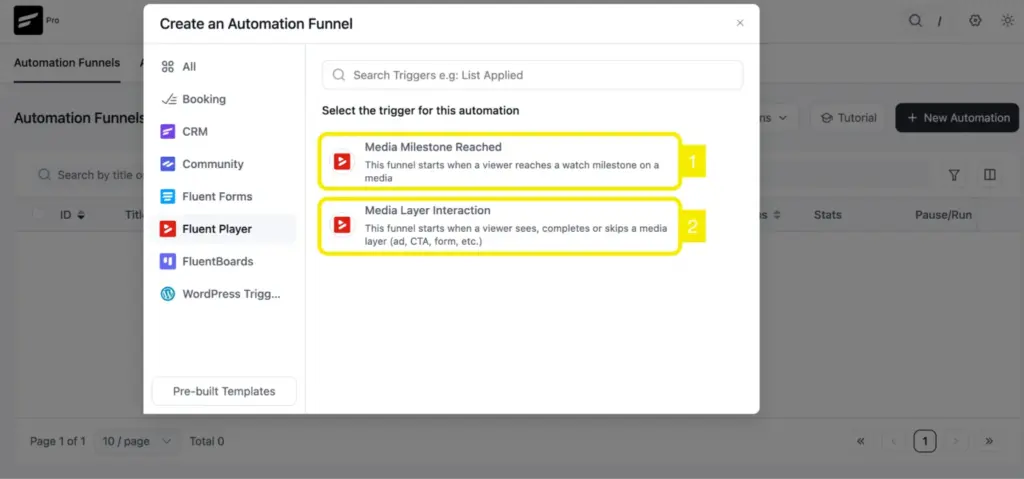
Not everyone who submits an email watches to the end. Some stall at 40 percent, some at 70. A Media Milestone Reached trigger set at 50 percent flags them, and if they don’t reach Completed within a set window, a recovery email goes out.
That email uses a Timestamp Link pointing at roughly where they stalled, not a generic “come back and watch again.” The viewer clicks, the player on the lesson page jumps straight to that point, and the chapters from earlier give them a way to reorient fast.
Getting Them Enrolled
Because the course is Public, enrollment is one click from the course page. No extra automation, no waiting for an admin to add them. The prospect who followed the nurture sequence to the enrollment link becomes a student in the same session.
Making Sure They Don’t Stall Again
This is the part most course funnels skip. They solve for enrollment and stop. Every lesson in the course, not just the teaser, gets two settings: Required Video Completion to Complete Lesson, and Auto-Complete Lesson When the Feature Video Ends.
A student can’t mark a lesson done without watching it, and they don’t need to click anything when they do. The stall that used to happen after checkout now shows up as data instead of silence.

Confirm It Works, Then What to Measure
Five numbers tell you whether this funnel is working:
- Capture rate on the preview lesson: viewers who watched vs. viewers who submitted an email
- Chapter engagement: whether viewers jump around or watch straight through
- Stall-recovery rate: how many recovery emails bring a viewer back to Completed
- Capture-to-enrollment conversion
- Completion rate across the course, now that watching is actually tracked
Ready When You Are
A course page can describe the material. Only a lesson can prove it. Open one, capture the email while attention is highest, and let chapters and Timestamp Links do the recovery work instead of hoping people come back on their own.
Once they’re enrolled, completion tracking keeps the same discipline going.
Install FluentPlayer and start with one lesson. And if you are planning to do more with your videos, track analytics for pinpoint data; upgrade to FluentPlayer pro.

Ashik Elahi
Ashik Elahi is a seasoned Digital Marketing Strategist with a passion for Content Marketing. He believes in the power of storytelling and crafting valuable content that resonates with readers.

Add your first comment to this post