

WordPress LMS Audio Lessons: How FluentCommunity’s New Audio Tab Works

Table of Content
Subscribe To Get
WordPress Guides, Tips, and Tutorials


To start, many communities rely on more than just text and video. Podcast episodes, voice notes, recorded Q&A sessions, music, and meditation tracks audio is already part of how members share and learn together. For course creators and community owners running a WordPress LMS, that gap meant either skipping audio lessons entirely or routing students somewhere else to hear them, away from the discussion happening in the feed.
FluentCommunity 2.7.5 closes that gap with a dedicated Audio tab in the feed composer, right next to Photos and Videos. Members upload audio files the same way they already share images and clips, and it plays back through a real embedded player instead of a bare download link. The upload runs through FluentPlayer, so the player matches the community’s theme, tracks can be renamed and given cover art before posting, and everything that gets shared collects into a browsable Audios tab in the space media gallery. For anyone running courses on
FluentCommunity’s built-in WordPress LMS, that means audio lessons, recorded office hours, and voice-note discussions now have a proper home too. Here’s what the feature does and where it’s useful.
Turning On FluentPlayer Audio
The Audio tab doesn’t appear until FluentPlayer is installed and audio playback is switched on for it.
- Install and enable the FluentPlayer plugin.
- Open FluentPlayer’s settings.
- Turn on Enable FluentPlayer Audio.
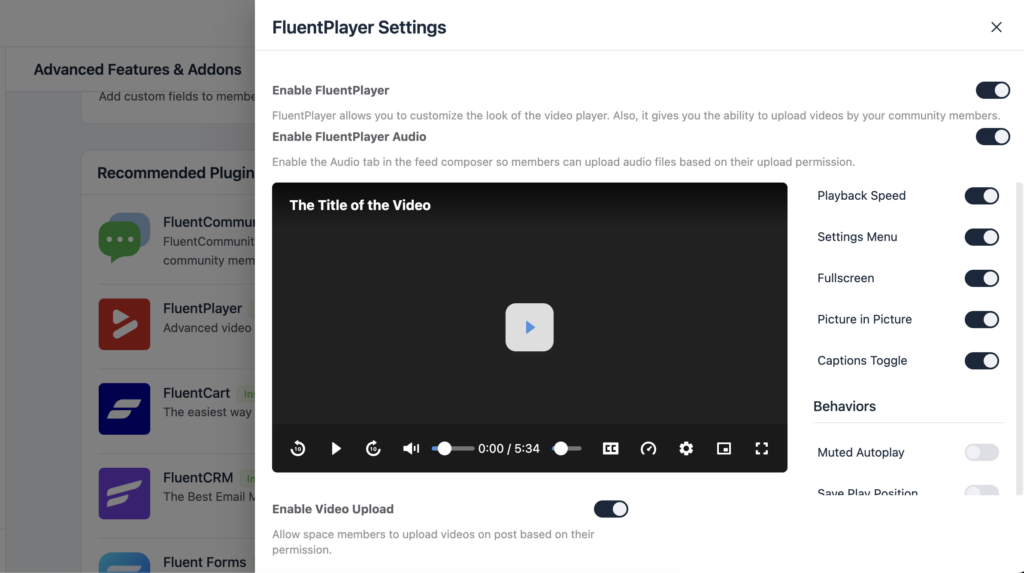
That one toggle is the whole setup. Once it’s on, the Audio tab shows up in the feed composer automatically, and the player takes on your community’s existing theme without any extra styling work.
What the Audio Tab Actually Does?
Open the feed composer in any space, and Audio now sits alongside the existing Photos and Videos tabs. Members select it, upload a file, and the audio posts to the feed with a working player attached. Not a filename members have to click and download to hear.
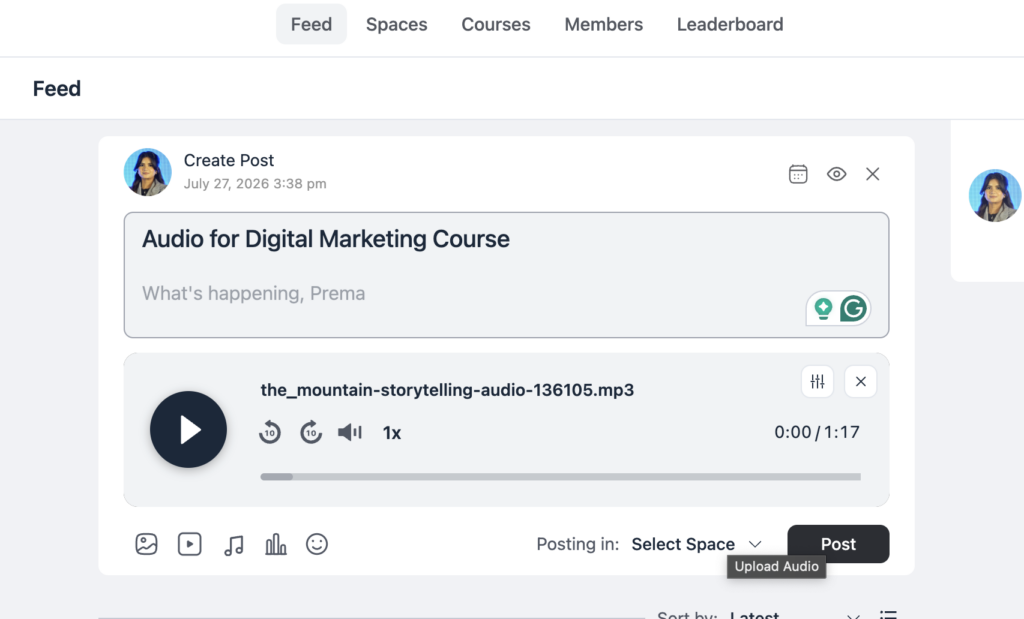
That player comes from FluentPlayer. Instead of the browser’s default audio controls, or nothing at all, listeners get a proper player interface that looks like it was built for the community rather than bolted onto it. Who can actually upload audio hasn’t changed. It’s governed by the same upload permissions already controlling photo and video posts, so there’s no separate permission system to configure.
Practically, this means a member recording a quick voice update for their group no longer has to think about where to host it first. They upload the way they’d upload a photo, and the post is ready to play the moment it’s live.
Audio Lessons for Your WordPress LMS Community
FluentCommunity isn’t just a feed plugin. It ships with a built-in course builder, which is why it’s positioned as a WordPress LMS in its own right rather than a community layer bolted onto someone else’s course tool.
Courses can already be linked to a Space, so students enrolled in a course land in a discussion area built for that course specifically, with lessons, modules, and progress tracking handled inside the same plugin.
Because a course’s discussion area is a Space like any other, the new Audio tab works there too. A course creator can post a short audio recap after a live session, and a student who missed it can catch up from inside the course discussion instead of chasing down a recording link.
Students working through a program together can leave voice notes on a lesson the same way they’d leave a comment, which matters for programs built around spoken practice. Language learning, coaching, public speaking, where typing out a question doesn’t really capture what someone’s stuck on.
This fits the broader case for running courses on FluentCommunity instead of pairing a separate LMS plugin with a separate community tool: courses, discussion, and now audio all live under one license, starting at $159/year, rather than three subscriptions that don’t talk to each other.
Cleaning Up Each Track Before You Post
Raw upload filenames are rarely something you’d want sitting in a feed. Think voice-memo-final-v3.mp3 instead of something a member would actually recognize. Every audio upload gets an Edit option to fix that before it goes live.
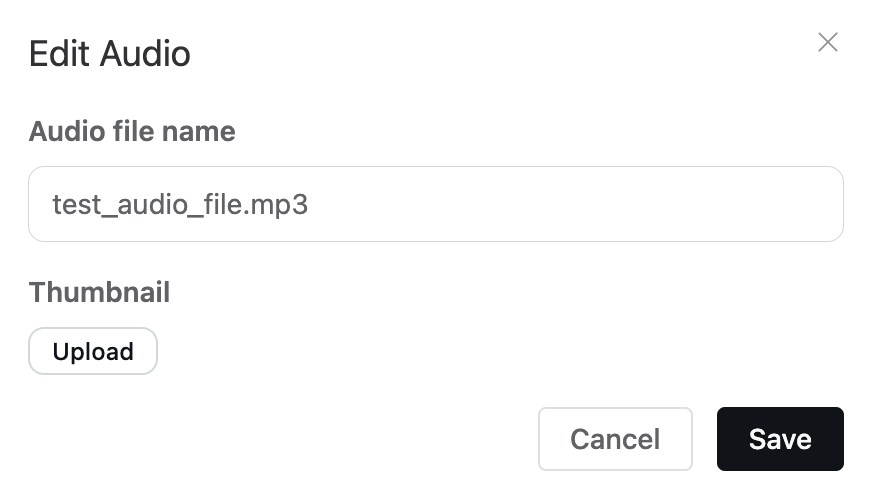
From Edit, you can rename the file to something readable, like “Episode 12: Community Q&A” instead of the original filename, and add a thumbnail so the player displays cover art rather than a blank square. Both settings apply per audio file, so a single post with multiple tracks. Say, three separate voice notes, or a few songs can give each one its own name and its own image rather than sharing generic defaults.
Where Audio Lives Afterward: The Space Media Gallery
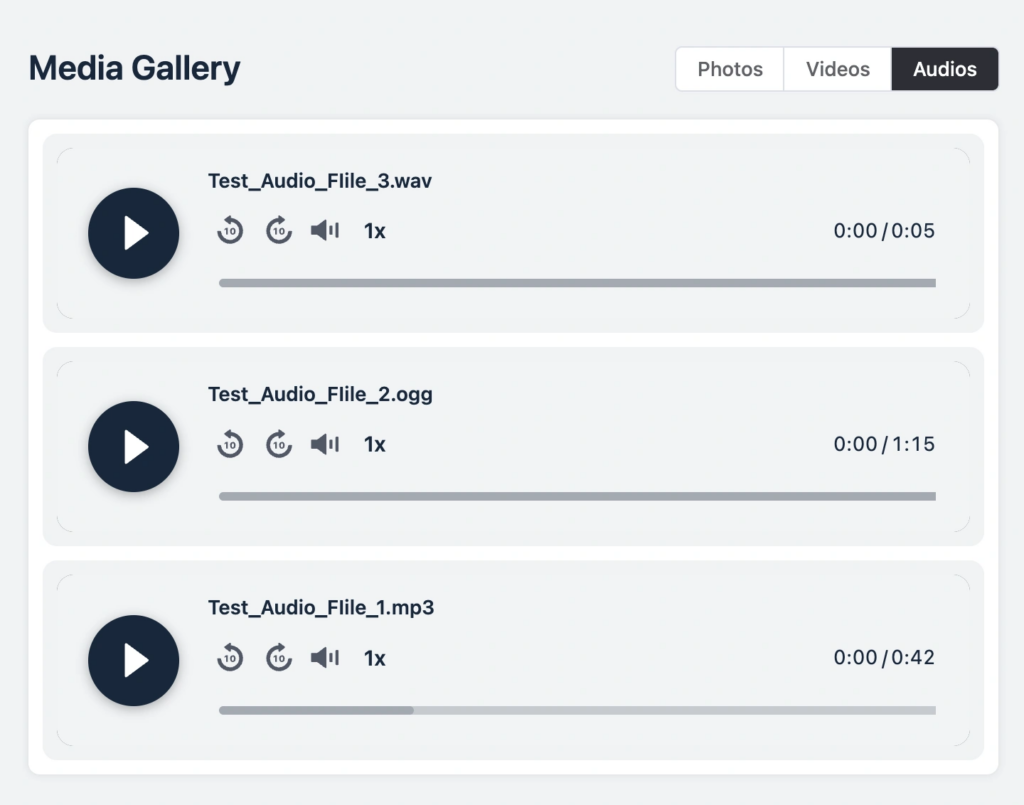
Once audio starts getting posted, it doesn’t just sit in the feed waiting to scroll out of view. It collects automatically in the space media gallery (pro) under a new Audios tab, sitting next to the existing Photos and Videos tabs.
That Audios tab only shows up in spaces that actually have audio in them. So a text-heavy discussion space won’t suddenly show an empty tab cluttering its navigation. Open any track from the gallery, and it plays inside a lightbox, with keyboard arrows letting listeners move to the next or previous track without closing out and reopening the gallery each time.
Over weeks or months, that’s the difference between a dozen voice notes scattered across old feed posts and a space where a new member can open one tab and browse everything that’s been shared, in order, without scrolling back through unrelated posts to find it.
If FluentPlayer Isn’t Available
FluentPlayer is what powers the in-feed player, but it isn’t a hard dependency for playback itself. If FluentPlayer fails to load for any reason, the post falls back to the browser’s built-in audio player instead. The experience is plainer without the themed player, but members can still press play and listen. Nobody’s left with a broken post.
How Audio Fits Into the Rest of FluentCommunity
An audio upload isn’t a separate content type sitting off to the side. It’s a normal feed post, which means it plugs into everything else FluentCommunity already tracks. It shows up in the space’s activity, counts toward the same posts-and-comments activity the leaderboard measures, and triggers the same notifications members already get on any post: a reply, a reaction, or a mention on an audio post pulls someone back in the same way a text post or photo would.
That also means an audio post benefits from FluentCommunity’s existing member-engagement tools without any extra setup. Real-time chat can carry a quick back-and-forth about a track someone just posted. FluentCRM automations, which already run on member activity and can be filtered by Space or course enrollment, work the same way whether the activity in a space is text, video, or audio. There’s no separate system to configure just because the content type changed.
Audio Without Leaving WordPress
The alternative to all this is hosting audio somewhere else. A podcast host, a plain file-sharing link, or a SaaS community platform that handles media through its own infrastructure and its own monthly fee. FluentCommunity’s audio uploads run through FluentPlayer, on your own WordPress site, under the license you’re already paying for the rest of the community, not a second subscription for a podcast host on top of it.
That’s consistent with how FluentCommunity is positioned generally: Spaces, the built-in course builder, chat, and now audio, in one plugin, on your own domain, instead of stitching together a podcast host, a discussion forum, and a course tool from three different companies.
FluentCommunity has over 8,000 active installations and won a Gold Award at WPAwards 2025 in the Membership and LMS category for site owners weighing whether audio needs its own subscription, that’s the alternative already built in.
Final Thoughts
Audio has been part of plenty of communities for a while. It just never had a proper place to live inside FluentCommunity until now. With the Audio tab, a real player, per-track editing, and a dedicated space in the media gallery, podcast episodes, voice notes, recordings, and music finally get treated the same way photos and videos already are: shared, playable, and organized right where the conversation is happening.
For anyone building a WordPress LMS on FluentCommunity, that means courses, community, and now audio lessons all run from the same plugin. No separate podcast host, no separate LMS, and no extra subscription to make it work.

Prema Anjum
My full name is Anzuman Ara Chowdhury. But people know me as Prema Anjum. I’m a Digital Marketer by profession, a WordPress community contributor, and a travel enthusiast by heart.


Add your first comment to this post