

How to Use the FluentCommunity Leaderboard to Drive Real Member Engagement

Table of Content
Subscribe To Get
WordPress Guides, Tips, and Tutorials


Running an online community is one thing. Keeping your members engaged, active, and coming back every day is a completely different challenge. Most community owners struggle not because they lack content but because they lack the right motivation tools to keep members involved. That is where gamification comes in, and the numbers back it up.
On a broader scale, the global gamification market reached $19.4 billion in 2025 and is on track to hit $92.5 billion by 2030, signaling that game mechanics are no longer a nice-to-have feature but a core engagement strategy. FluentCommunity understands this shift, which is why it comes built in with a powerful Leaderboard feature designed to recognize your most active members, create healthy competition, and transform passive visitors into loyal contributors. In this guide, you will learn exactly how to set it up, manage it, and get the most out of it for your community.
What Is the FluentCommunity Leaderboard?
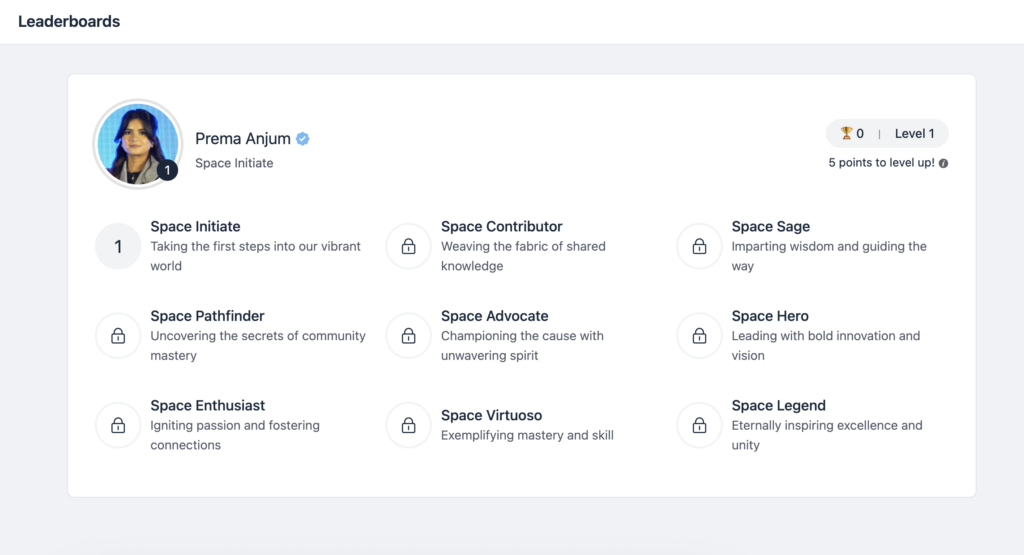
Before getting into the setup, it helps to understand what the Leaderboard feature actually does. Simply put, it is a built-in engagement tool that ranks your community members based on their activity and participation. The more a member contributes by posting, commenting, or receiving likes, the more points they accumulate. Those points push them up the leaderboard and unlock new ranks with unique titles.
This is not just about showing who is most active. It creates a sense of recognition and status within your community. Members who see their name climbing the board feel appreciated and motivated to stay engaged. At the same time, newer or quieter members are inspired to participate more when they see what consistent contribution can lead to. The leaderboard, in other words, turns engagement into a visible, rewarding experience for everyone in the community.
How do Members Earn Points?
Understanding the points system is essential before you configure anything. FluentCommunity keeps it straightforward: members earn one point for every as they receive on their posts, article, or comment they receive.
This design is intentional. Instead of rewarding members simply for posting frequently, the system rewards quality. A member who writes a thoughtful post that resonates with others and receives 50 likes earns far more points than someone who posts ten times with little response. As a result, the leaderboard naturally surfaces your most valuable contributors. The ones who genuinely add to the conversation rather than just fill the feed with noise.
This also creates a natural incentive loop. Members who want to move up the leaderboard are motivated to contribute in ways that are genuinely useful to others, which, in turn, raises the overall quality of your community.
How to Enable the Leaderboard in FluentCommunity?
Getting the leaderboard up and running is a quick process. Here is how to do it step by step.
First, log in to your WordPress dashboard and navigate to the FluentCommunity admin area. From there, go to the Features and Addons section in the left sidebar. You will find the Leaderboard Module listed among the available features.
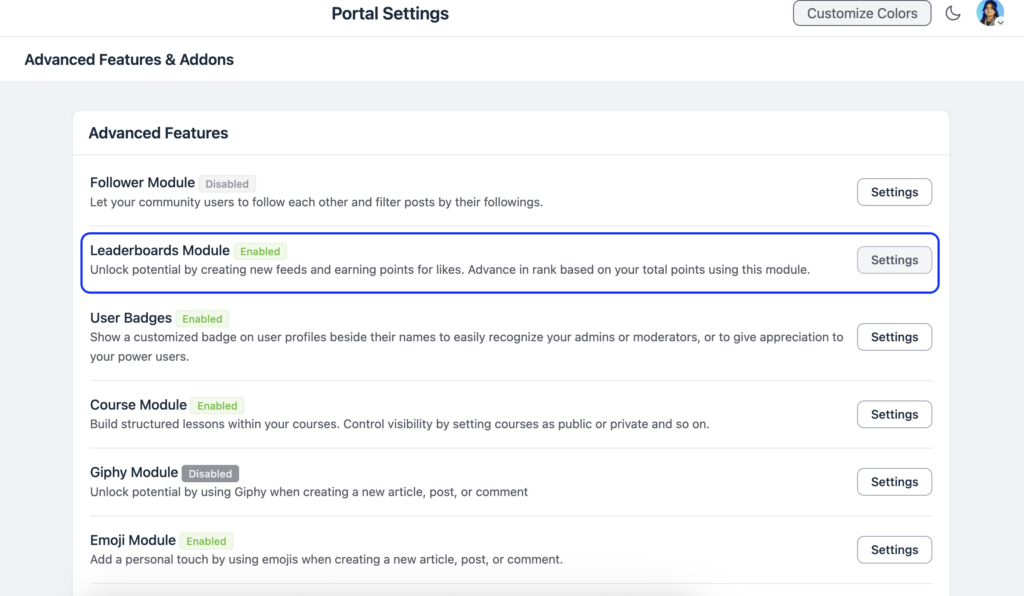
Click on the Settings option next to the Leaderboard Module. A pop-up will appear with a checkbox labeled Enable Leaderboard Module. Simply check that box to turn the feature on for your community.
Once enabled, your members will be able to see the leaderboard by clicking on the Leaderboard option in the top navigation bar of your community portal. It is visible, accessible, and immediately ready to use without any additional technical configuration.
How to Manage and Customize Ranks?
One of the most exciting parts of the FluentCommunity leaderboard is the ability to create and manage custom ranks. This is where you can really make the feature feel native to your brand and community culture.
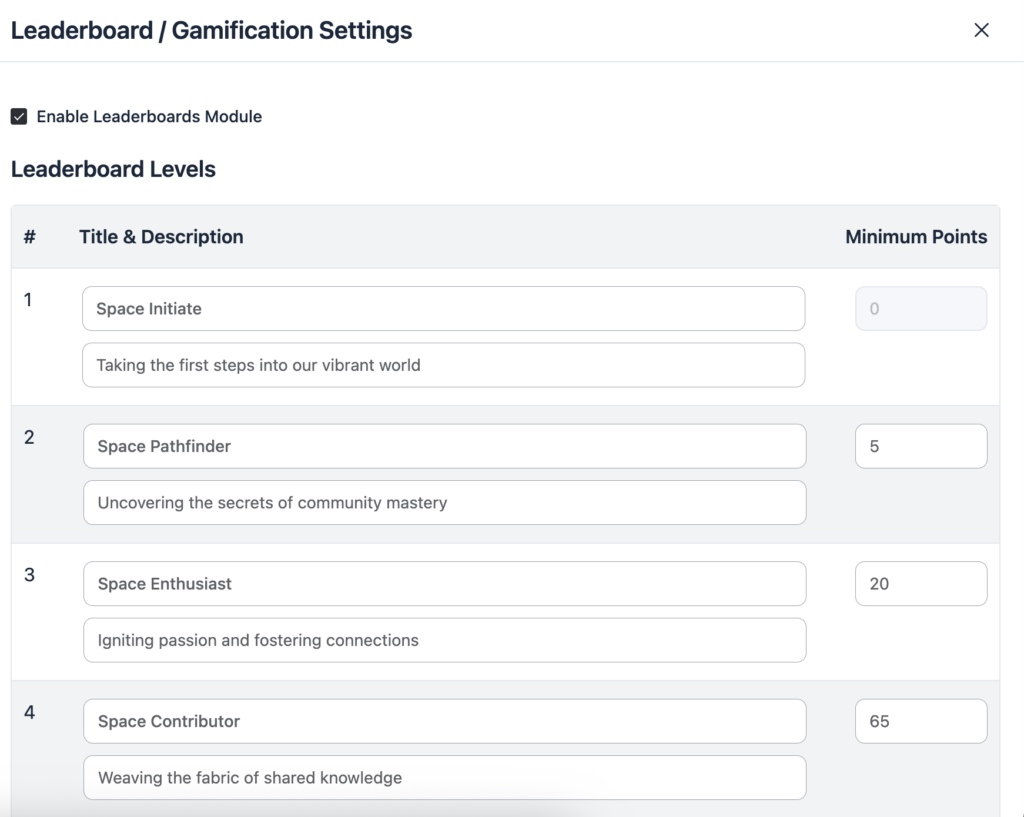
To access rank management, head to the Manage Leaderboard section within your settings. Here you will see the Leaderboard Levels area, which is where all rank customization happens. Each rank has three components you can edit: a Title, a Description, and a Minimum Points threshold.
The Title is the name members will see displayed next to their profile when they reach that rank. This is your opportunity to get creative. Instead of generic labels like “Level 1” or “Beginner,” you can craft rank names that align with your community’s identity. If you run a fitness community, for example, you might name your ranks something like “Warm-Up,” “Active,” “Strong,” and “Elite.” If you manage a creative writing community, titles like “Storyteller,” “Wordsmith,” and “Master Narrator” might feel more natural and exciting to your members.
The Description field lets you add a short line of context about what each rank means or represents. This helps members understand the value of each level and feel a sense of genuine achievement when they reach it.
Finally, the Minimum Points field is where you define exactly how many points a member needs to earn in order to reach and maintain that rank. Setting these thresholds thoughtfully is important because the gap between ranks determines how challenging and rewarding the climb feels. Ranks that are too easy to reach lose their motivational power, while ranks that are too far apart can feel discouraging to newer members. A well-balanced progression keeps members engaged at every stage of their journey.
After making your adjustments, click the Save Settings button to apply all your changes.
Best Practices for Getting the Most Out of the Leaderboard
Enabling the leaderboard is just the beginning. To truly make it a meaningful part of your community culture, there are a few practices worth adopting from the start.
First, communicate the leaderboard to your members. Many community owners activate features quietly and hope members will discover them on their own. Instead, announce it with excitement. Write a post explaining how the points system works, what the different ranks mean, and why being recognized on the leaderboard matters. This sets the tone and gets members curious from day one.
Second, reference the leaderboard regularly. Celebrate the members who move up in rank, give a shoutout to the top contributors each week, and acknowledge when someone reaches a new level. This kind of social recognition amplifies the motivational effect of the feature far beyond what the points system alone can do.
Third, design your ranks with your community’s personality in mind. Generic rank names feel flat. Custom titles that reflect your niche and audience create a sense of belonging and identity that keeps members emotionally invested in their progress.
Finally, revisit your minimum points thresholds over time. As your community grows and activity increases, the points economy will shift. Adjusting the thresholds periodically ensures the leaderboard stays competitive and meaningful as your member base evolves.
Why the Leaderboard Is a Smart Move for WordPress Community Owners?
Unlike SaaS platforms that bolt on gamification as a premium add-on with recurring costs, FluentCommunity gives you this capability built right in as part of your WordPress-based community. You own the data, you control the experience, and you can customize every element to suit your specific audience.
Leaderboards work because they tap into something deeply human — the desire to be seen, recognized, and to feel progress. When your members see their name moving up a visible ranking, that small signal of achievement creates a habit loop that brings them back consistently. Over time, this translates into a more active feed, richer conversations, and a community that sustains itself through member momentum rather than constant manual effort from your side.
Conclusion
The FluentCommunity Leaderboard is more than just a cosmetic feature — it is a practical engagement engine that rewards the members who matter most to your community’s health and growth. By enabling the module, customizing your rank titles and point thresholds, and actively celebrating the members who rise through the levels, you create a culture where contribution is recognized and participation feels genuinely rewarding.
The setup is simple, the customization is flexible, and the long-term impact on member engagement can be significant. If you have not activated the leaderboard in your FluentCommunity portal yet, now is the perfect time to turn it on and let your most active members take their place in the spotlight

Prema Anjum
My full name is Anzuman Ara Chowdhury. But people know me as Prema Anjum. I’m a Digital Marketer by profession, a WordPress community contributor, and a travel enthusiast by heart.

Leave a Reply