

How to Build Customer Communities That Improve Retention and Lower Churn

Table of Content
Subscribe To Get
WordPress Guides, Tips, and Tutorials


Usually, customers don’t quit in a rage.
They quit quietly, after a week of being stuck, a month without logging in, or a renewal email that made them wonder what they’re paying for. Customer communities are good at catching those quiet moments.
Below, you’ll learn how to build one around the exact points where customers leave, how to check whether it’s working, and how to run it on your own WordPress site.
Key Takeaways
- Customers rarely leave for one big reason. They leave at four predictable moments: a slow start, a stuck point, a quiet drift, and renewal doubt.
- A good customer community is designed around those moments, not around a list of topics.
- Research links community membership to higher spending, and the effect comes mostly from member-to-member connections, not from brand content.
- You can test the effect yourself with a simple two-cohort check in a spreadsheet.
What a Customer Community Is (and Isn’t)
A customer community is an online space where your existing customers ask questions, help each other, share results, and talk with your team on an ongoing basis. It usually lives on your own website or a dedicated platform, and its main job is to help customers succeed after they buy.
The key words are “existing customers” and “each other.” Your email list is not a community. Your Instagram followers are not a community either. An audience listens to you. A community talks to each other, and keeps doing it after the webinar ends.
Here’s a quick way to tell the three apart:
| Audience | Customer community | Brand community | |
| Who’s in it | Anyone who follows you | People who bought from you | Fans of the brand, buyers or not |
| Who talks | Mostly you | Customers, to each other and to you | Fans, to each other |
| Main goal | Reach and awareness | Success, support, and retention | Identity and advocacy |
Real examples help here. The Apple Support Community is a classic customer community: people post a problem, and other Apple users answer it. WPManageNinja runs its own customer community for its WordPress plugins too.
A WordPress.org reviewer in November 2026 described it as a place where users help each other, ask questions, and share feedback, with the development team joining in.
That last part matters. When customers answer each other, you get help at 11 p.m. on a Sunday without paying anyone overtime.
Why Customers Leave and the 4 Moments a Community Can Fix
Let’s start with why retention deserves this much attention. Harvard Business Review reports that winning a new customer can cost 5 to 25 times more than keeping one you already have. The same piece cites Bain & Company research showing that a 5% lift in retention can raise profits by 25% to 95%, depending on the industry.
Those numbers are old and wide, honestly. But the direction holds up in almost every business that sells more than once. Keeping customers is cheaper than replacing them.
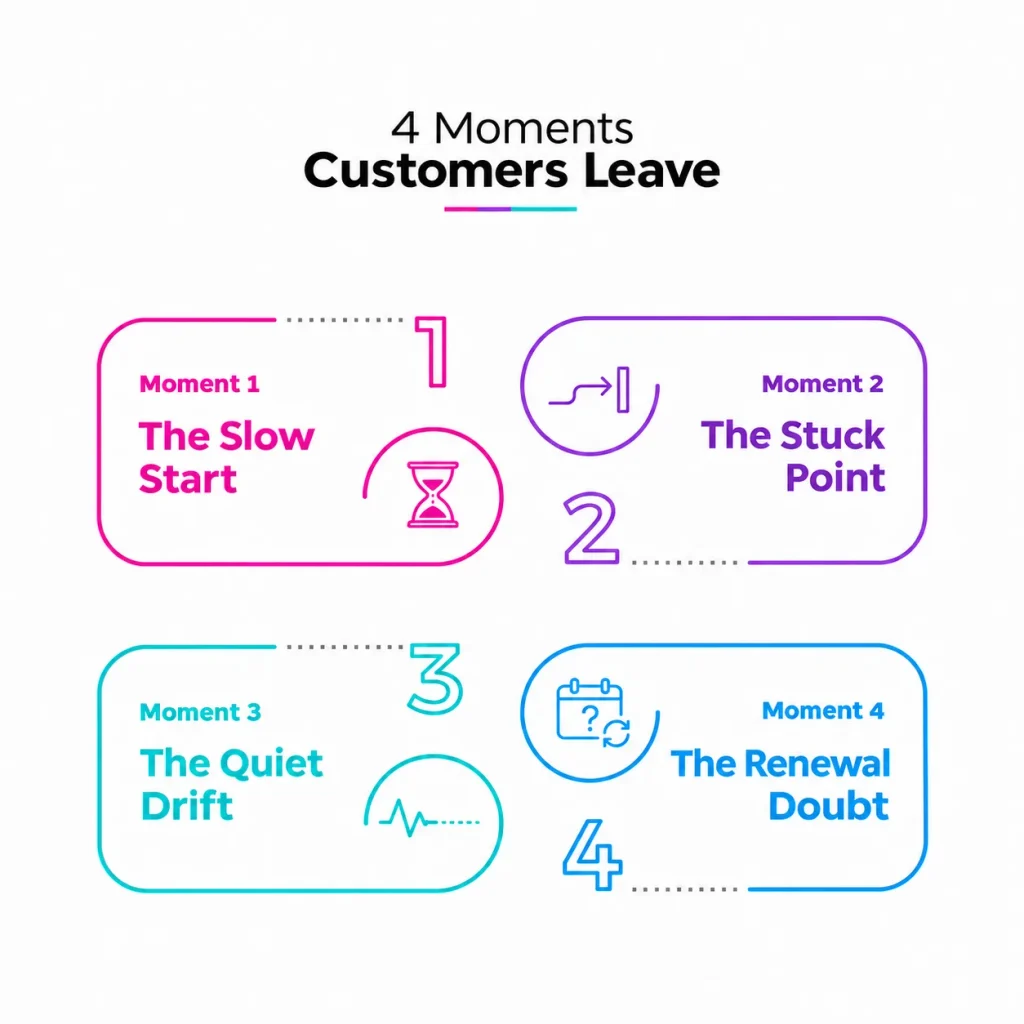
So why do customers leave? If you read enough cancellation notes, a pattern shows up. People don’t usually leave because of one dramatic failure. They leave at one of four moments.
Moment 1: The Slow Start
The customer bought, logged in once, felt lost, and never reached their first win. Think of someone who buys a course, opens Module 1, and never comes back. They weren’t unhappy. They just never got going.
Moment 2: The Stuck Point
The customer hit a problem and couldn’t solve it fast. Maybe your support team was offline, or the docs didn’t cover their exact case. A day of frustration turns into “maybe this isn’t for me.”
Moment 3: The Quiet Drift
Nothing went wrong. The customer simply stopped showing up. Their only relationship is with your product, and products are easy to forget. No one notices they’re gone until the card fails or the renewal is canceled.
Moment 4: The Renewal Doubt
Renewal day arrives and the customer asks, “What did I actually get this year?” If the value is invisible to them, the answer feels like “not much,” even when that’s not true.
How a community answers each moment
Here’s how each moment maps to something a community can do:
| Churn moment | What the customer feels | Community answer | Signal to watch |
| Slow start | “I don’t know where to begin” | A Start Here space with a first-win checklist and peers who just did it | Share of new customers who post or complete onboarding in week 1 |
| Stuck point | “Nobody can help me right now” | A Q&A space where other customers answer, backed by your team | Share of questions answered, and time to first answer |
| Quiet drift | “I forgot this exists” | Connections to other customers, plus digests that pull people back | Members active in the last 30 days |
| Renewal doubt | “What am I paying for?” | A wins thread, a roadmap or feedback space, and visible recognition | Renewal rate of active members vs everyone else |
Notice that a support inbox can only fix one of these four. A community touches all of them.
What the Research Says About Customer Communities and Retention
There’s real evidence here, and it’s more interesting than most vendor stats.
The strongest study comes from Marketing Science, a peer-reviewed journal. Researchers looked at a retailer that launched its own online customer community and compared 15 months of data before and after. Customers spent about 19% more after joining the community, compared with their own past spending and with similar customers who didn’t join. The lift didn’t fade after the novelty wore off.
The most useful detail is where the money came from. In the full paper, members who posted generated more value than members who only read. Members with more social ties in the community generated more than those with fewer. The authors concluded the benefit was more social than informational.
In simple terms, people didn’t stay and spend because the brand published great content. They stayed because they knew other people there. Keep that in mind, because it shapes every step below.
Industry data points the same way. The 2025 CMX Community Industry Report, a survey of 589 community professionals, found:
- Customers are the most common member type, at 70% of communities
- Retention and loyalty are the top business goal for 19% of community teams
- Among those teams, 72% measure customer retention directly
- Teams whose community data connects to their CRM were about twice as likely to rate their community “extremely successful” (24% vs 11%)
An older survey from Higher Logic’s State of Community Management 2019 reported that 61% of communities had improved customer retention. It’s dated, so treat it as supporting evidence rather than a headline.
An honest caveat about the data
People who join a community are often already more engaged. That’s called self-selection, and it can make any community look better than it really is. The Social Dollars researchers tested for it and still found a real effect, but your business isn’t their retailer.
The 2026 CMX report also notes that confidence in proving ROI actually dropped this year, even though teams have more data than before. That’s why the measurement section later in this guide matters as much as the build steps.
How to Build a Customer Community That Improves Retention
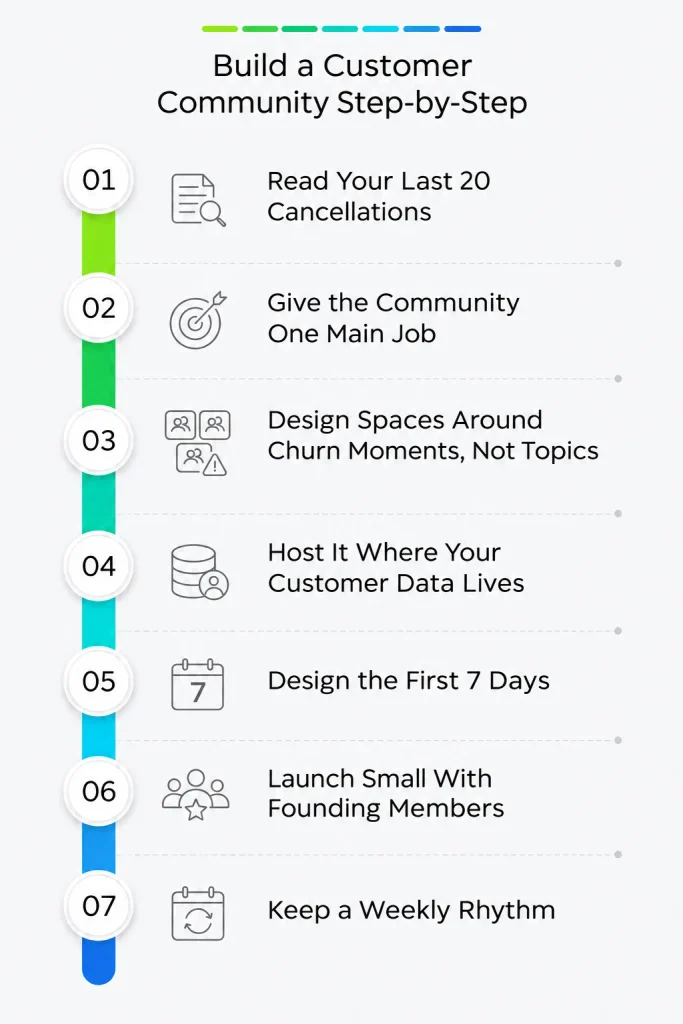
Here’s the plan. Each step builds on the one before, so it helps to follow them in order.
Step 1: Read Your Last 20 Cancellations
Before you pick a platform or name a single space, pull your last 20 cancellations, refund requests, or lapsed customers. Read the reasons, support tickets, and any exit survey answers. Then sort each one into the four moments: slow start, stuck point, quiet drift, or renewal doubt.
You’ll usually find one or two moments doing most of the damage. A course creator might find that most refunds come from people who never finished Module 1. A software company might find that most churn follows an unanswered support ticket. That tells you what your community needs to fix first.
If a reason doesn’t fit any moment, like “too expensive” or “closed my business,” note it and move on. A community can’t fix everything, and that’s fine.
Step 2: Give the Community One Main Job
Communities that try to do everything on day one usually do nothing well. CMX’s data shows the most common top goals are customer support (24%), customer success (22%), acquisition (20%), and retention (19%). Pick the one that matches your biggest churn moment.
- If most churn comes from slow starts, the main job is success
- If it comes from stuck points, the main job is support
- If it comes from drift or renewal doubt, the main job is connection
You can add other jobs later. Starting with one keeps your launch focused and your spaces busy.
Step 3: Design Spaces Around Churn Moments, Not Topics
Most new communities launch with a dozen topic channels and then wonder why they feel empty. Start with three or four spaces, each tied to a churn moment.
A simple starting layout that works for most businesses:
- Start Here: welcome post, first-win checklist, and an intro thread
- Ask and Answer: questions from customers, answered by customers and your team
- Wins: screenshots, results, and small victories
- Ideas and Feedback: requests, votes, and “we shipped this” updates
The Wins space quietly fixes renewal doubt. When a customer scrolls through months of their own posts and other people’s results, the value is right there in front of them.
Step 4: Host It Where Your Customer Data Lives
This step decides whether you can ever prove the community works.
A free Facebook group is easy to start. But you can’t reliably tell which group members are paying customers, which ones canceled, or whether the active ones renew more often. Your member list and your customer list live in two different companies’ systems.
Remember the CMX finding: teams with community data connected to their CRM were about twice as likely to call their community extremely successful. When the community runs on your own site, the community member and the customer are often the same user account. That makes retention easy to compare.
Owning the space also means you set the rules. No algorithm decides whether your customers see the post that answers their question.
Step 5: Design the First 7 Days
The slow start is the most fixable churn moment, so give it extra care. Every new customer should get the same short path:
- Get added to the community automatically after purchase, so nobody has to find it
- Land in the Start Here space with a pinned welcome post
- Get one simple prompt to post, like “Introduce yourself and tell us what you want to get done this month”
- Get a reply from a real person within one business day
- Complete one small win, like a setup checklist or the first lesson
The first post matters most. Once someone has posted and gotten a warm reply, coming back feels normal instead of awkward.
Step 6: Launch Small With Founding Members
Don’t open the doors to every customer on day one. Invite 20 to 50 of your happiest, most active customers two weeks early. Call them founding members, because that’s what they are.
Ask each one to do three things: introduce themselves, answer two questions, and share one win. Meanwhile, seed the Ask and Answer space with 10 to 15 real questions from your support inbox, rewritten so no customer is identified.
When everyone else arrives, the community already feels alive. Empty rooms make people leave, and nobody wants to be the first person to post.
Step 7: Keep a Weekly Rhythm
Communities don’t run on launch energy. They run on habits. CMX found that consistent engagement is the top frustration for community teams, cited by 41% of respondents. A simple weekly rhythm solves most of it:
- Monday: a “What are you working on this week?” thread
- Wednesday: live office hours or a Q&A thread with your team
- Friday: a Wins thread and a short “what we shipped” update
Recognize helpful members in public. It’s the most common reward in the CMX report, used by 67% of communities, and it costs nothing. A simple shout-out in the weekly update can turn a quiet member into your best answerer.
Also set one service standard and stick to it, such as “Every question gets a reply within one business day.” Unanswered questions are the fastest way to turn a community into a churn moment of its own.
How to Measure Whether Your Customer Community Reduces Churn
You don’t need a data team for this. You need a spreadsheet, a few months of data, and some honesty.
The two-cohort check
Follow these steps once a quarter:
- Pick customers who started in the same month, so they had the same time to churn
- Split them into two groups: joined the community and didn’t join
- Check how many in each group are still customers after 90 days
- Compare the two retention rates
Here’s an illustration with made-up numbers, just to show the math. Say 400 customers started in March and 120 joined the community. After 90 days, 108 of the 120 members are still customers, which is 90%. Among the 280 non-members, 224 are still customers, which is 80%. That’s a 10-point gap worth watching.
Test for self-selection
Now be skeptical. Maybe the members were already your most motivated customers. Two quick tests help:
- Compare “joined but never posted” members with “joined and posted” members. If posters retain better, participation matters, not just signing up.
- Compare the same customers before and after they joined, like the Social Dollars study did. Did their logins, purchases, or support tickets change?
If both tests point the same way, you can take the result to your team or boss with a straight face.
Leading and lagging metrics
Retention takes months to show up. These early signals tell you if you’re on track while you wait:
| Type | Metric | Why it matters |
| Leading | Share of new customers who post in week 1 | Catches slow starts early |
| Leading | Time to first answer on questions | Shows if stuck points get resolved |
| Leading | Active members in the last 30 days | Shows drift before it becomes churn |
| Lagging | 90-day retention, members vs non-members | Your main retention signal |
| Lagging | Renewal rate of active members | Shows if renewal doubt is shrinking |
| Lagging | Support tickets per customer | Shows if peers are answering questions |
Finally, ask members directly. CMX found that 44% of community teams never send a community health survey. A short three-question survey twice a year puts you ahead of almost half the field.
How to Run a Customer Community on WordPress With FluentCommunity
If your business already runs on WordPress, you can host your customer community on the same site with FluentCommunity, a community and course plugin built by WPManageNinja. It has a free version on WordPress.org with more than 8,000 active installations.
Why owning the community makes retention easier to measure
Remember Step 4. When your store, membership, or course and your community share one WordPress site, a community member and a paying customer are usually the same user. Your data stays on your server, and you can run the two-cohort check without exporting lists from three different tools.
That’s the real reason to own it. It’s not just about avoiding platform fees. It’s about being able to answer “Is this working?”
Map your churn moments to FluentCommunity features
Here’s how the four moments line up with what’s in the plugin today:
| Churn moment | FluentCommunity feature | Plan |
| Slow start | Spaces (public, private, or secret), a welcome banner, and onboarding courses with progress tracking | Free |
| Stuck point | Q&A-style spaces with mentions, search, and bookmarks, plus the Fluent Support portal inside the community | Free |
| Quiet drift | Real-time chat, email digests, push notifications through FluentNotify, and an installable web app (PWA) | Free |
| Renewal doubt | Polls and surveys for feedback, plus leaderboards, badges, and course certificates for visible progress | Polls free, the rest Pro |
Moderation tools come built in too, including profanity filtering, auto-flag thresholds, first-comment approval, and a review queue. That helps when a small team can’t watch every thread.
Connect it to FluentCRM for onboarding and win-back emails
FluentCommunity connects with FluentCRM, the email marketing plugin from the same team. FluentCRM includes community triggers like Joined in a Space, Left from a Space, Enrolled in a Course, Completed a Course, and User Level (Leaderboard) Upgraded. It also has actions like Add to Space and Remove from Space.
Here’s what that looks like in practice:
- Joined Start Here: send a three-email onboarding series with links back into the community
- Left from a Space: send a short personal check-in asking what wasn’t working
- Completed the onboarding course: tag the customer as “onboarded” so you can compare their retention later
If your store runs on WooCommerce or FluentCart, a FluentCRM purchase automation can add new buyers to your Start Here space automatically. That covers the first item in your 7-day path.
Put support inside the community
Fluent Support, the helpdesk plugin from the same team, can embed its customer portal inside FluentCommunity. Members open and track tickets without leaving the community, and agents see the member’s course context inside each ticket.
This closes a common gap. A customer who’s stuck can search the Ask and Answer space first, then open a ticket in the same place if nobody has the answer.
Track it with built-in analytics
FluentCommunity’s analytics show totals for members, posts, comments, and spaces, plus the most popular days and times for activity. The Members view breaks down total, active, new, and pending members, along with top members, top starters, and top commenters. Recent versions added Insights reports for members, content, and courses.
Your active member count is your drift signal. Your top commenters are the people to recognize in Friday’s update.
The core plugin is free, and Pro adds leaderboards, badges, follows, the media gallery, quiz tools, certificates, and more. If you sell to other businesses, the FluentCommunity page for brands shows how teams set it up for customers.
Mistakes That Quietly Kill Customer Communities
Most communities don’t fail loudly. They fade. These are the usual causes:
- Launching with 12 empty spaces instead of 3 or 4 busy ones
- Using the community as a broadcast channel, when the research shows connections drive the value
- Letting questions sit without replies for days
- Hiding the link, so customers never find the community after purchase
- Tracking only total members, which says nothing about retention
- Building on a platform where you can’t match members to customers
The broadcast mistake is the sneakiest one. Posting announcements feels productive. But if customers only talk to you and never to each other, you’ve built a newsletter with extra steps.
Start With Your Last 20 Cancellations
You don’t need a big launch to start. You need to know where your customers are slipping away, and one space that catches them there.
So this week, pull your last 20 cancellations and sort them into the four moments. You’ll know within an hour whether your first space should be Start Here, Ask and Answer, or Wins.
Then test it cheaply. Install the free FluentCommunity plugin from WordPress.org on a staging copy of your site, create two spaces, and invite 20 of your best customers as founding members. Watch what they ask, who answers, and who comes back without a reminder.
Run the two-cohort check after 90 days. If members stay longer, you’ll have the numbers to prove it.
FAQs
What is a customer community?
A customer community is an online space where existing customers ask questions, answer each other, share results, and talk with the company on an ongoing basis. It’s usually hosted on the company’s own website or platform. Its main goals are helping customers succeed, reducing support load, and improving retention.
How do customer communities reduce churn?
Customer communities reduce churn by fixing four common exit points: a slow start, a stuck point, a quiet drift, and renewal doubt. They give new customers a clear first step, let peers answer questions fast, build connections that bring people back, and make the value of staying visible.
What is the difference between a customer community and a brand community?
A customer community is made up of people who bought from you, and its focus is success and support. A brand community includes fans who may never have bought, and its focus is identity and advocacy. Many companies run a customer community first because it ties directly to retention.
How do you measure whether a customer community improves retention?
Compare customers who started in the same month, split into community members and non-members. Check how many in each group remain after 90 days. Then test for self-selection by comparing members who posted with members who only joined. Track leading signals like week-one posts and time to first answer.
How many members do you need to start a customer community?
You can start with 20 to 50 founding members. A small group of engaged customers who post and answer questions makes the space feel active for everyone who joins later. Seed the community with real questions from your support inbox before opening it to all customers.
Can you run a customer community on WordPress?
Yes. Plugins like FluentCommunity add spaces, profiles, activity feeds, chat, courses, and moderation to a WordPress site. Because the community lives on the same site as your store or membership, members and customers share one account, which makes it easier to track retention.
Is a Facebook group good enough for a customer community?
A Facebook group is free and quick to start, but it makes retention hard to measure. You can’t reliably match group members to paying customers or see who renews, and the platform controls reach and rules. Hosting the community on your own site keeps member and customer data together.

Ashik Elahi
Ashik Elahi is a seasoned Digital Marketing Strategist with a passion for Content Marketing. He believes in the power of storytelling and crafting valuable content that resonates with readers.
Add your first comment to this post