

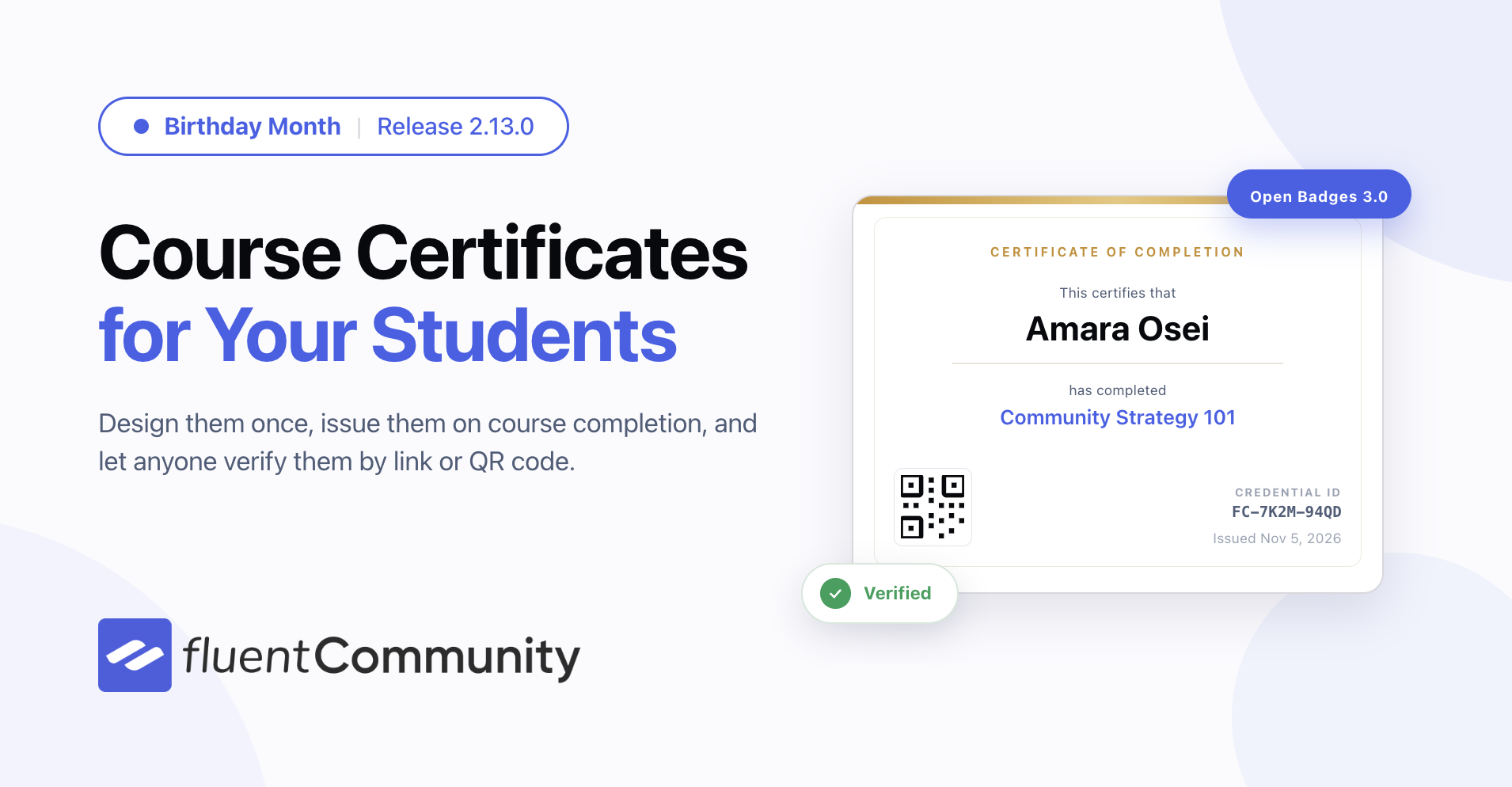
Introducing Course Certificates, Unified Search and Smarter Quizzes – FluentCommunity 2.13

Table of Content
Subscribe To Get
WordPress Guides, Tips, and Tutorials


It is FluentCommunity’s birthday month, and we are celebrating the way we know best: a new release every week. This is the first one, and it brings the feature course creators have asked for most — Course Certificates.
Alongside certificates, 2.13.0 adds a unified search that finds anything in your community from one box, and gives your quizzes time limits, attempt limits, and proper grading. More is on the way each week this month.
Reward Every Student With a Certificate They Can Show Off
Finishing a course should feel like an achievement. Now it looks like one. Complete a course and FluentCommunity issues a certificate automatically — designed by you, delivered to the student, and verifiable by anyone they show it to.
Prefer to watch? Here is the whole feature in a few minutes.
Design It Once, Use It Everywhere
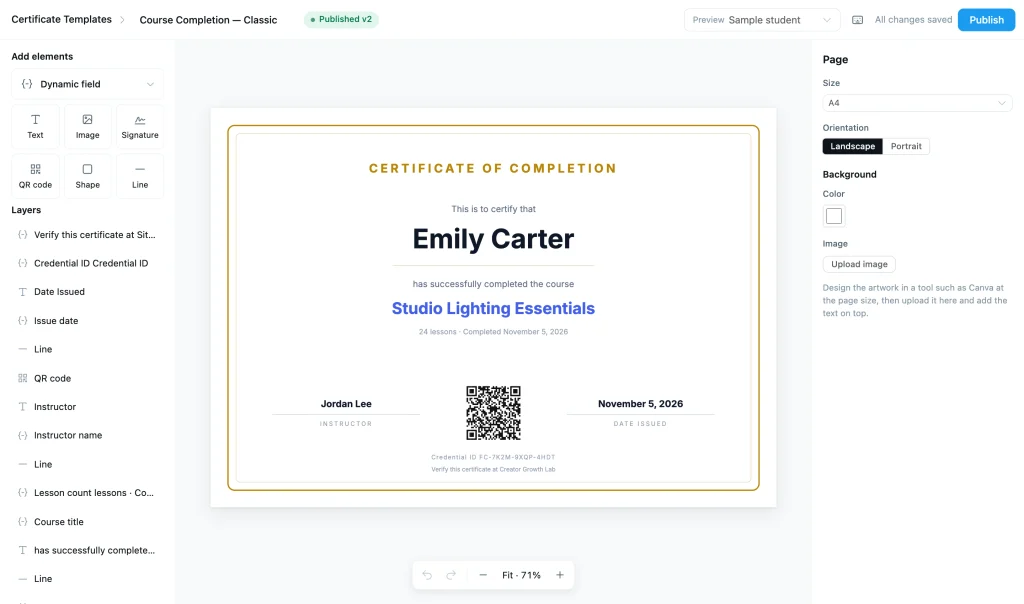
Pick A4 or Letter, portrait or landscape, drop in your background, then place text, images, lines and a QR code where you want them. Text fills itself in as each certificate is issued — student name, course title, instructor, completion date, credential ID. Need a field we did not think of? Name your own.
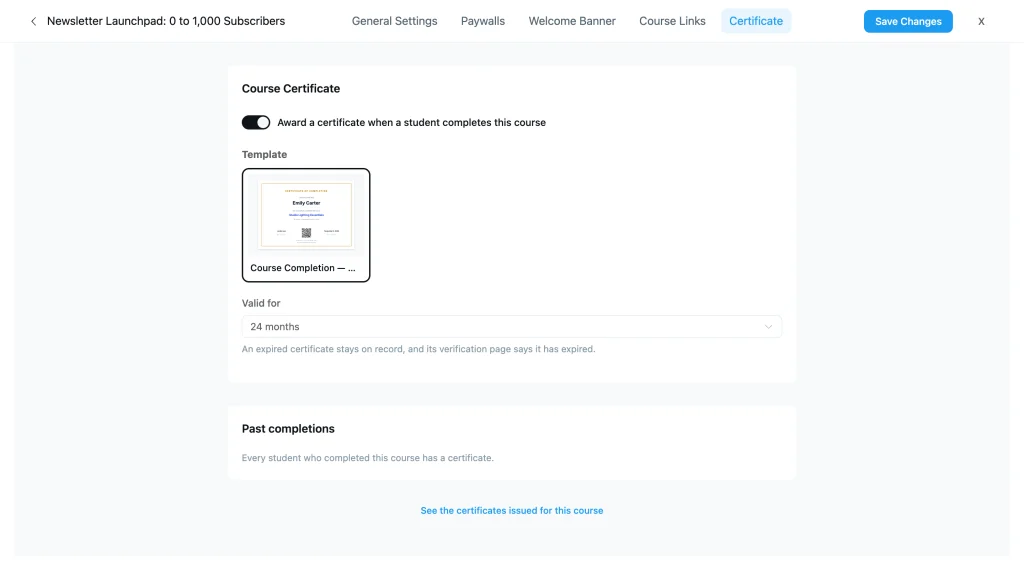
Turn certificates on per course, choose the template, optionally set an expiry. Students who finished before you switched it on are not left out — a backfill issues theirs too, dated to when they actually completed.
Students Get Something Worth Sharing
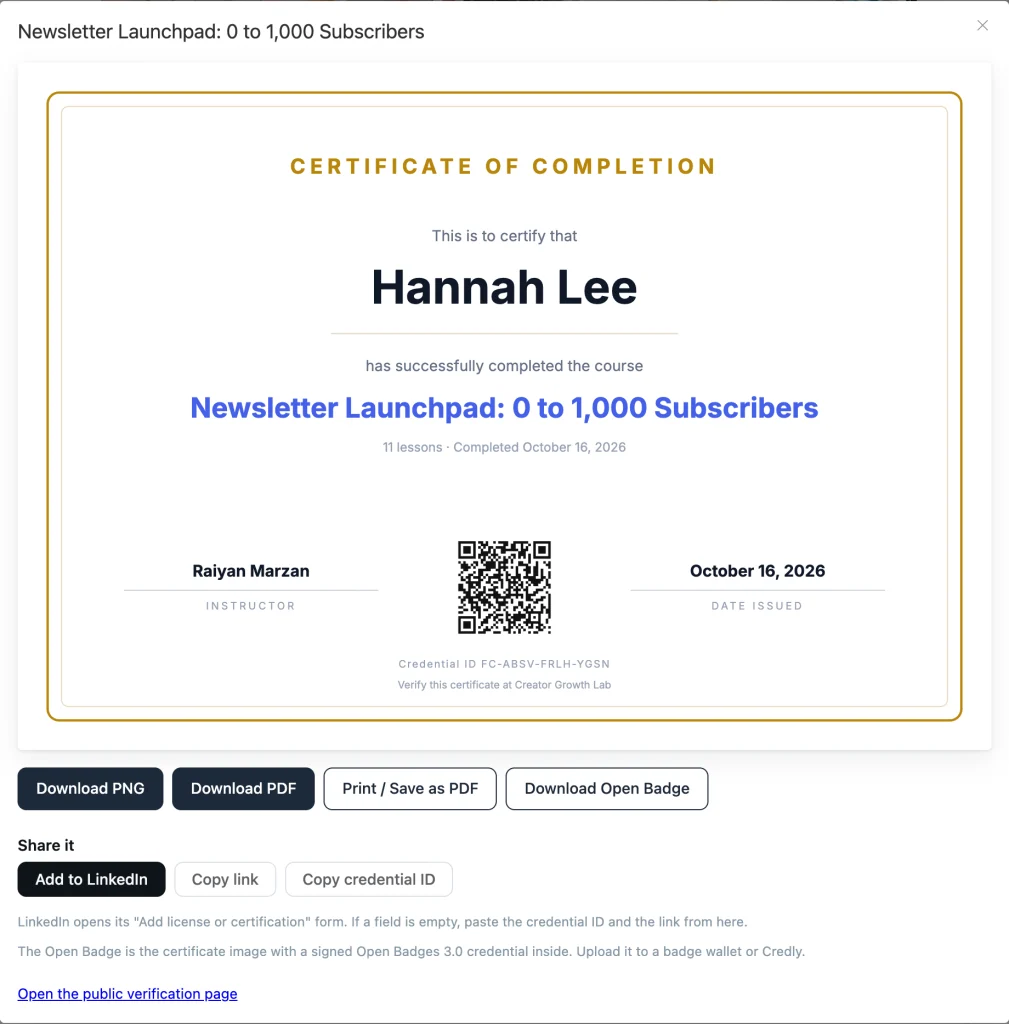
A congratulations dialog shows the certificate the moment a student finishes, and we email it to them so it does not vanish when they close the tab. They can download a PNG or PDF, print it, or send it to LinkedIn’s “Add license or certification” form.
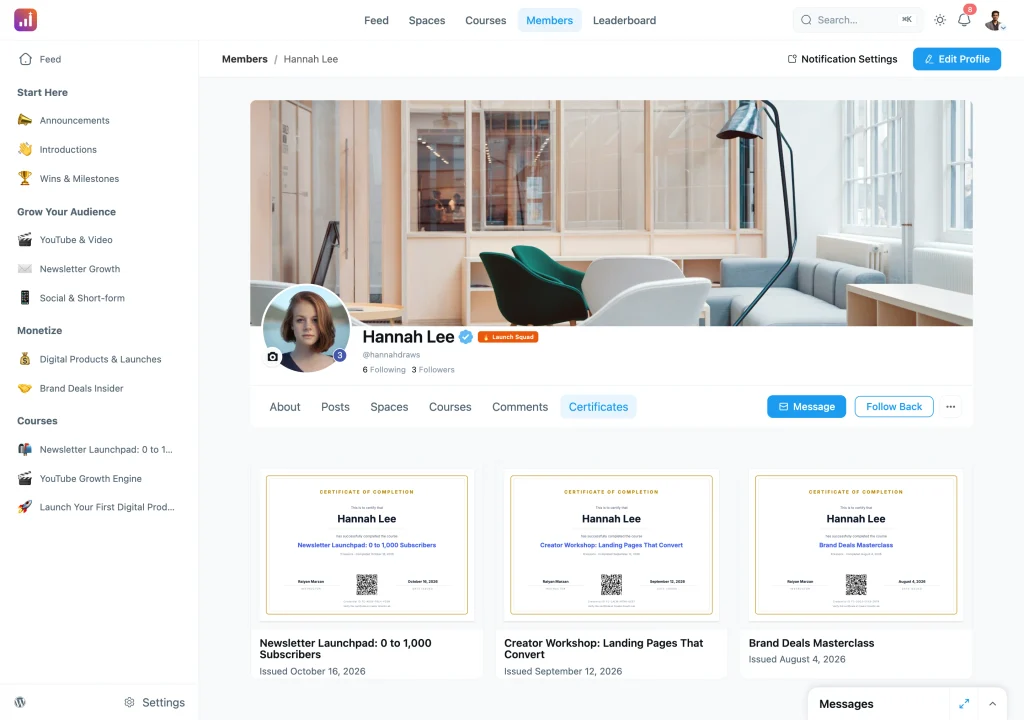
Every certificate also lives on a Certificates tab on the member’s profile. Students choose whether each one is public or private; you choose who can see that tab on someone else’s profile — only the member, any logged-in member, or anyone.
Anyone Can Check That It Is Real
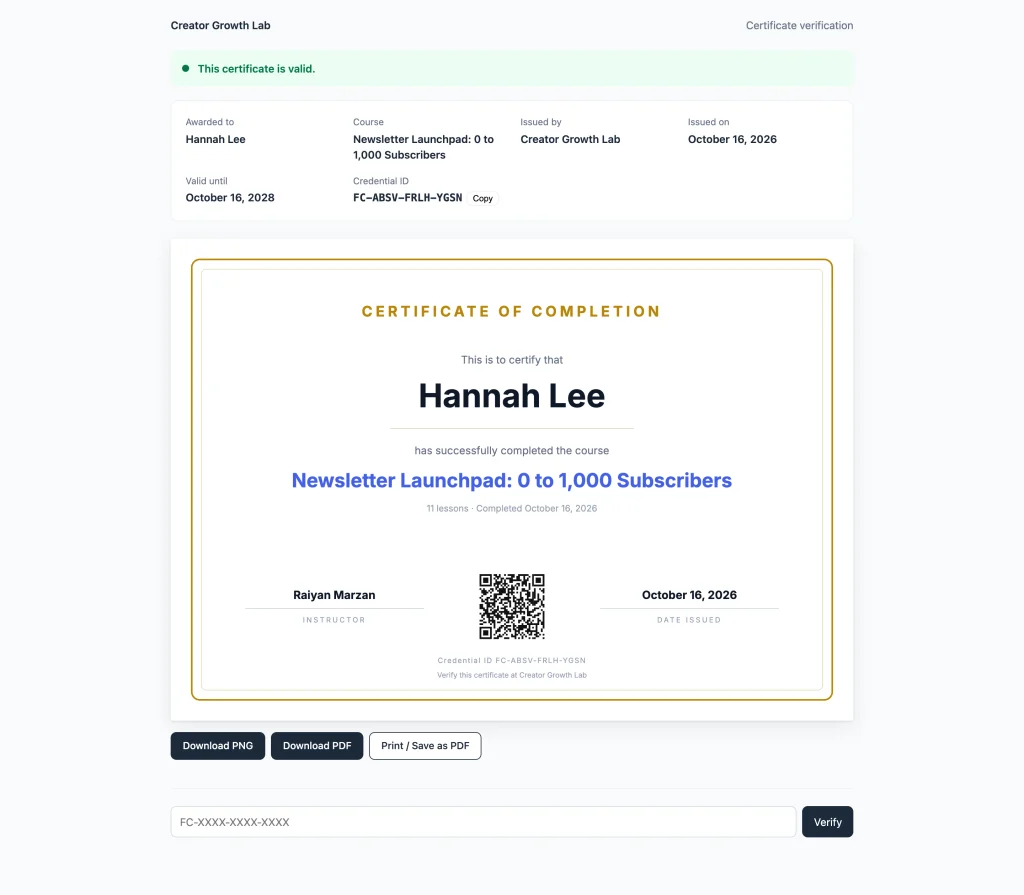
A certificate nobody can verify is just a picture. Each one gets a public verification page and a QR code pointing at it. An employer can open the link, or scan the code off a printed copy, and see whether it is valid, who holds it and what they completed.
That page works even on a private community, because verification sits outside your login. It reads the live status from your site, never the downloaded file — so if you suspend or revoke a certificate, the link says so straight away. A private certificate gives away nothing but the answer: valid, or not.
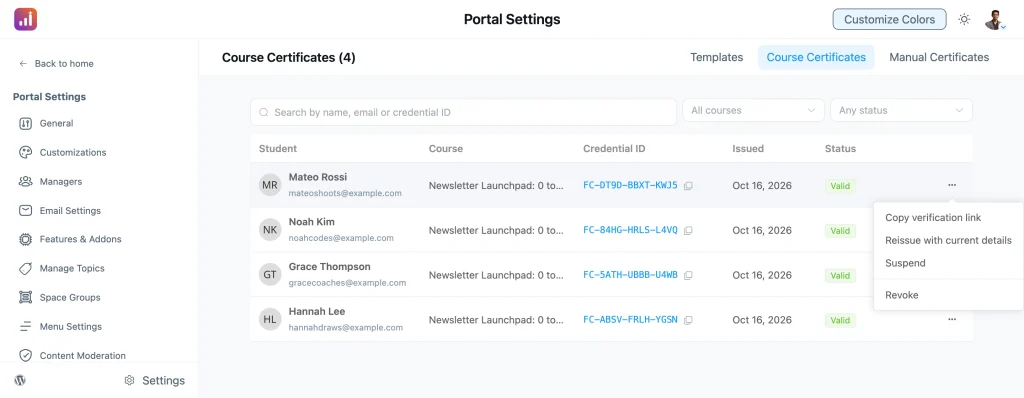
You keep a full list of everything issued, with suspend, reinstate, revoke and reissue one click away.
Certificates are issued as Open Badges 3.0 credentials too, the open standard built on W3C Verifiable Credentials. Students download a badge-baked image and import it into a badge wallet or Credly, where it stays verifiable — status changes included.
Certificates for Anything, Not Just Courses
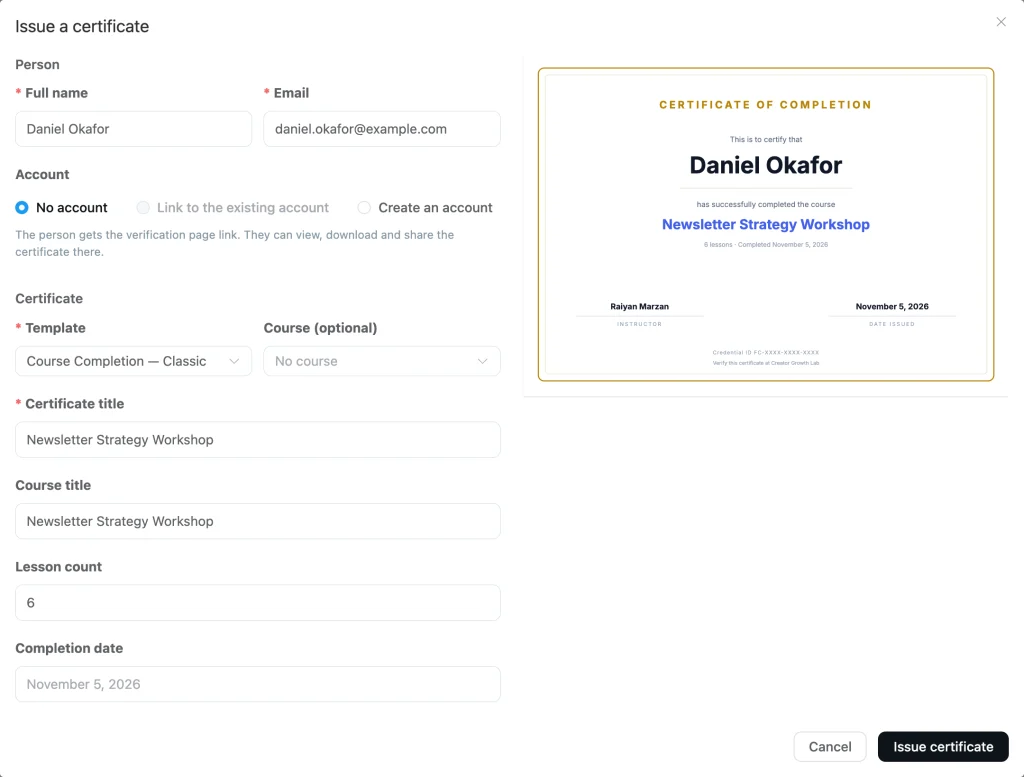
Not every achievement happens inside a course. Issue one by hand to anyone — a workshop attendee, a speaker, a volunteer — on any published template, with the values typed in yourself.
They do not even need an account. Issue to a name and an email and they get a holder link to their certificate. If they have an account, link it; if you want them to have one, create it as you issue. Manual certificates can be edited later, and every change is recorded.
Certificates run on top of the Course module and come with FluentCommunity Pro.
Find Anything in Your Community From One Box
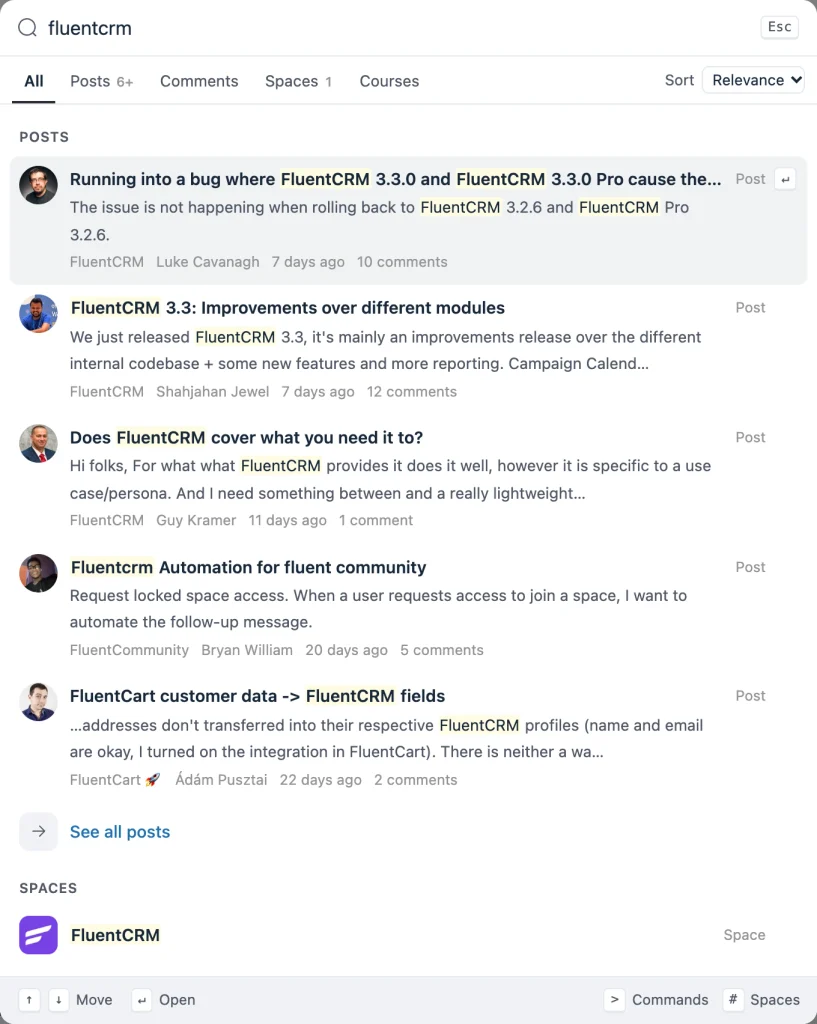
Search used to mean choosing where to look first. Now there is one box for everything. Press ⌘K or Ctrl+K anywhere in the portal and type: posts, comments, people, spaces, courses and individual lessons come back together, grouped by type, matching words highlighted in context.
Arrow keys move, Enter opens, Escape closes. Sort posts by relevance, newest or most popular, and narrow to a single space when you know roughly where something was said. Members only see results they already have access to.
Quizzes That Can Actually Assess
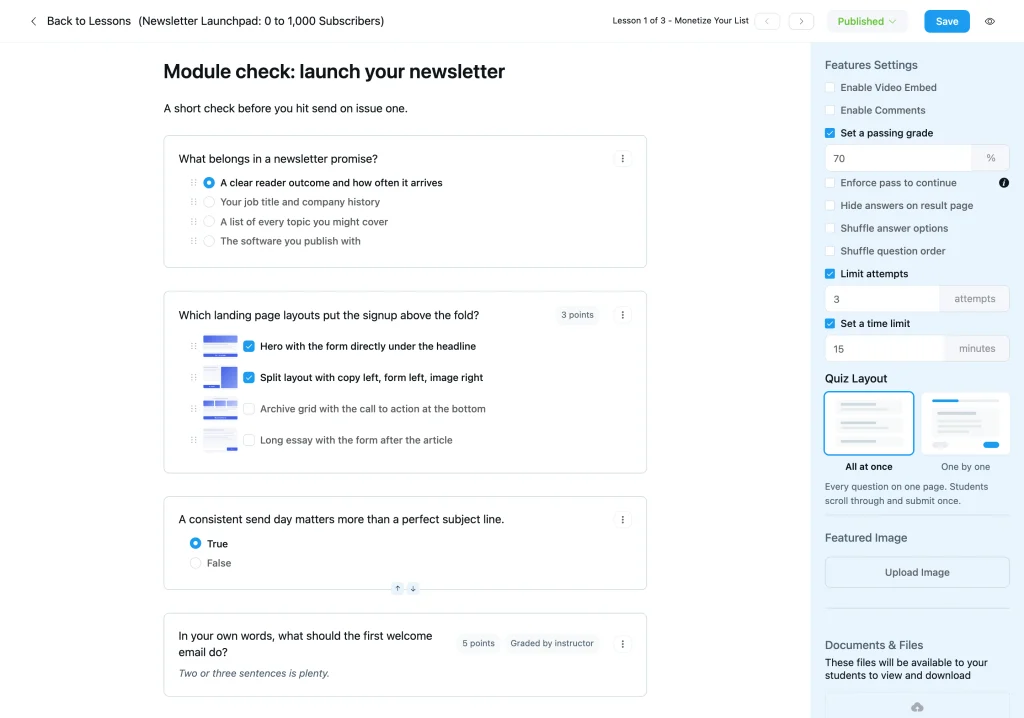
Put a time limit on a quiz and cap the attempts, and a quiz becomes a real assessment instead of an open book. The timer runs on your server, not in the browser, so closing the tab buys nobody extra minutes — and whatever is answered when time runs out gets submitted. Instructors can still grant an individual student extra attempts.
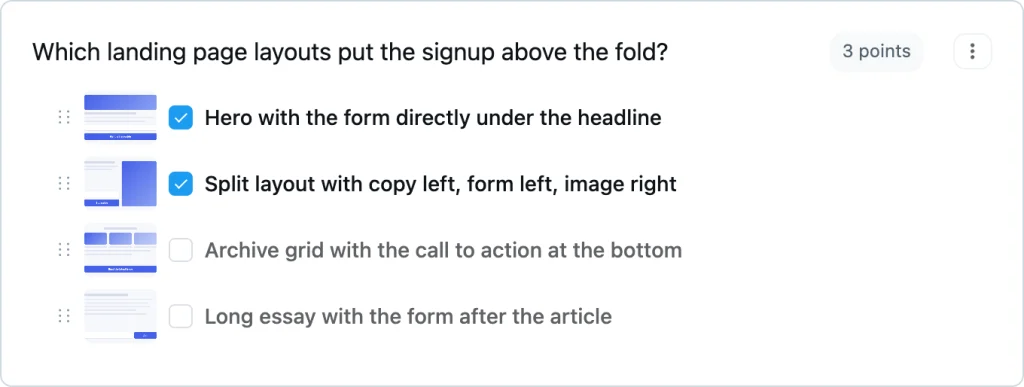
Each question can be worth a different number of points, so the hard ones count for more. Two new question types join the list: image options make single and multiple choice visual — pick a diagram, a product, a photo — and a rating scale collects opinions at the end of a course without affecting the score.
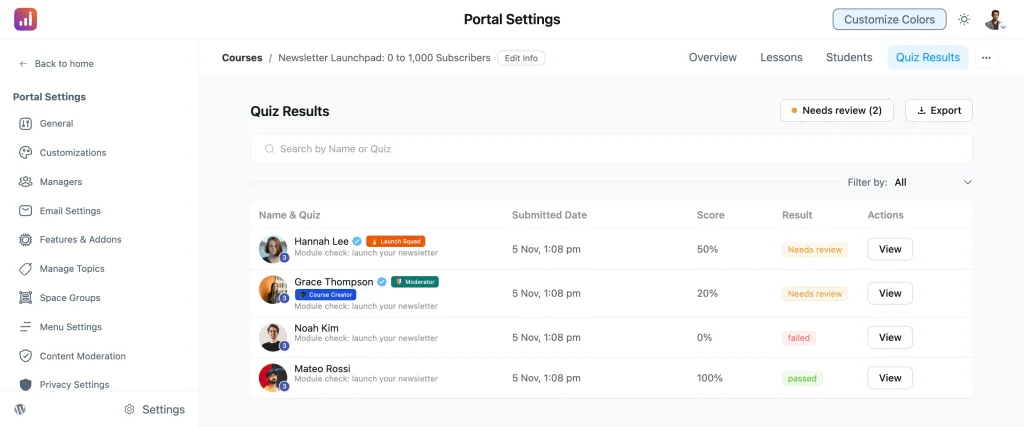
Written answers can be set aside for you to mark by hand. Until you do, the result stays pending and never counts as a pass, and a Needs Review shortcut takes you straight to what is waiting. Students see the pass mark and their attempts left before they start, and again on their result card.
Quizzes are part of FluentCommunity Pro.
Smaller Things That Add Up
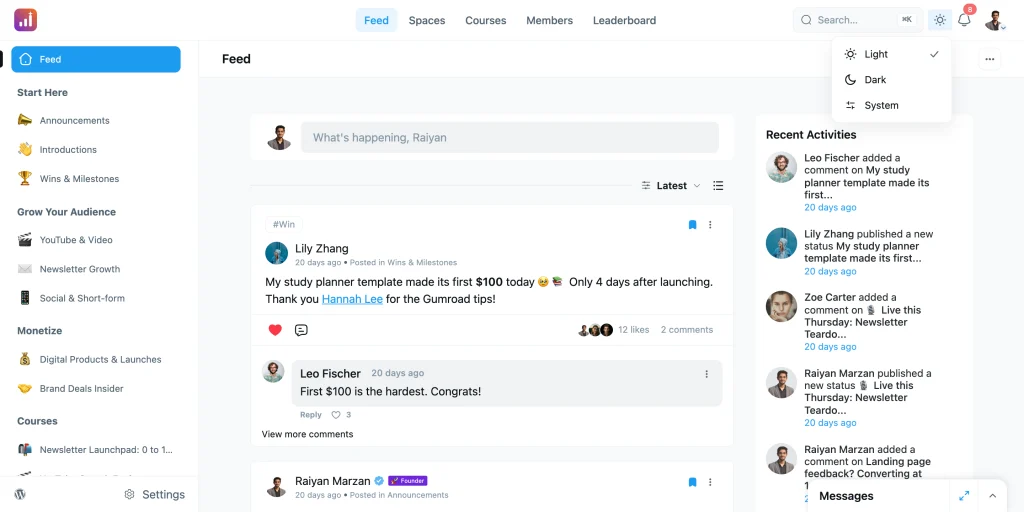
A theme that follows the device. The switcher has a third option — System — so the portal matches whatever light or dark mode a member’s device is set to, and changes with it through the day.
Quieter sidebars. A space group can show a member only the spaces they have joined. New members still see everything until they join something, so nobody lands on an empty sidebar.
Real help when notifications are blocked. Members who once dismissed the browser prompt had no way back. The blocked dialog now walks them through turning it on again, with the exact steps for their browser — Chrome, Edge, Firefox, Safari, Android or the installed app.
Strip hidden data from member photos. A new privacy setting removes GPS location, camera details and other hidden metadata from uploaded images. Off by default; turn it on if your community shares phone photos.
Shared posts behave like real posts. An embedded post opens instantly in the post modal, can be reported and moderated like anything else, and no longer slips past your moderation queue.
Popular means popular. The Popular sort now leans on recent activity, so last year’s thread stops outranking today’s conversation.
For developers. Add-on modules load through a shared import map, so an add-on can use FluentCommunity’s own Vue, Element Plus and UI kit instead of shipping its own. New hooks cover course completion, admin course menu items and settings tabs.
Security Hardening
This release closes a batch of findings from a full security review of the plugin, covering access control across spaces, courses and lessons, and the data that requests are allowed to return. No action is needed on your side — update and it is applied.
Bug Fixes and Stability
Settings that stick. The header logo updates right after you save it, and a profile’s extra fields survive background saves and badge actions.
Topics and posting rules. Admin-only topics can no longer be attached through the API, editing a post that only carries forbidden topics stops clearing them, and a topic rule leaving nothing to pick no longer blocks posting. Required profile fields are marked required again.
Uploads. When a file is too large — for your limit or your server’s — members are told, instead of watching an upload fail silently.
Navigation and routing. The sidebar updates as soon as you join a space or enrol in a course, and a lesson’s checkmark appears the moment you complete it. Feed settings no longer 404 on reload when the portal lives at your site root, and share and login URLs are encoded properly.
Emails and moderation. Join-request emails no longer turn display names into stray Bcc recipients. Moderators can schedule posts, restore an unpublished post from the post page, and see the right report count on a review.
Everyday polish. Member cards, pagination, Insights tabs and the top menu stop overflowing on mobile, and the profile photo button is visible on RTL sites again. Polls accept one vote per member on single-choice questions. Draft or deleted paywall products can be removed. Posts can be edited when comments are off, free previews show the right lesson number in private courses, a member’s requested role survives being re-added, and sites using week-number or ordinal date formats no longer crash.
Wrapping Up
FluentCommunity 2.13.0 gives your courses a proper finish line, your members one place to search, and your quizzes the tools to assess for real — on top of a thorough security review.
This is release one of our birthday month. Update whenever you are ready, and keep an eye out — there is another one coming next week.
FluentCommunity 2.13.0
- Introduced: Course Certificates With Public Verification and Open Badges (pro)
- Introduced: Add-on Module Runtime via Import Map
- Added: Unified Global Search With a Command Palette
- Added: Time Limit and Attempt Limit for Quizzes (pro)
- Added: Rating Scale and Image Choice Questions for Quizzes (pro)
- Added: Points per Question and Instructor-Graded Answers in Quizzes (pro)
- Added: Needs Review Shortcut in Quiz Results (pro)
- Added: Manual Certificates for People Without an Account (pro)
- Added: Option to Strip Image and GPS Metadata From Uploads
- Added: Show Only Joined Spaces in a Space Group Sidebar
- Added: System Option in the Dark Mode Switcher
- Added: Courses Enable Page When the Module Is Off
- Added: Course Completion Hooks for Add-ons
- Added: Admin Hooks for Course Menu Items and Settings Tabs
- Added: FluentCRM Pro Action Placeholders
- Improved: Popular Sort Favors Recent Activity
- Improved: Embedded Posts Open in a Modal and Follow Post Rules
- Improved: Quiz Result Card Shows Pass Mark and Attempts Left (pro)
- Improved: Step-by-Step Help When Browser Notifications Are Blocked
- Improved: Meaningful SEO Page Titles for Posts Without Titles
- Security: Plugin-Wide Access Control and Data Exposure Hardening
- Fixed: Admin-Only Topic Rules on Post Create and Edit
- Fixed: Multiple Votes on a Single-Choice Poll Through the API
- Fixed: Clear Message When an Upload Is Too Large
- Fixed: Mobile and RTL Layout Issues Across Portal Pages
- Fixed: Required Fields Shown as Optional or Unmarked
- Fixed: Sidebar Not Updating After Joining a Space or a Course
- Fixed: Lesson Checkmark Missing Right After Completing a Lesson
- Fixed: Portal Routing and URL Encoding at the Site Root
- Fixed: Display Names Adding Bcc Recipients to Join-Request Emails
- Fixed: Drip Emails Sent to Blocked Students (pro)
- Fixed: Moderator Actions on Unpublished and Scheduled Posts
- Fixed: Profile Meta Lost on Background and Badge Saves
- Fixed: FluentPlayer YouTube Embeds Saved Without a Source
- Fixed: Feed Link Visibility Rules Not Applied
- Fixed: Lesson Number for Free Previews in Private Courses
- Fixed: Post Edit Blocked When Comments Are Off
- Fixed: Leave Space Confirmation Calling the Space a Community
- Fixed: Crashes With Week Number and Ordinal Date Formats
- Fixed: Stale Feed and Comment Timestamps
- Fixed: Cloud Document Downloads Opening Inline (pro)

Shahjahan Jewel
Hello, this is Jewel, CEO & Head of Ideas at WPManageNinja. I am obsessed with WordPress since 2009. My aim is to be a user-centric developer first, and a serial entrepreneur second. You will find me discussing various tech issues and trying to come up with scalable solutions on different forums when I am not busy coding.

Add your first comment to this post