

FluentCommunity: The Best Social Network Builder for WordPress

Table of Content
Subscribe To Get
WordPress Guides, Tips, and Tutorials


In June 2025, thousands of Facebook Group admins woke up to find their communities suspended by what Meta later called a technical error. Years of conversations, locked overnight.
That’s the risk of renting. This guide shows how a social network builder on WordPress works, what to look for, and how FluentCommunity fits.
Key Takeaways
- A social network builder lets you run your own network with profiles, groups, feeds, and chat
- Owning the platform protects you from reach drops, sudden bans, and per-sale fees
- FluentCommunity turns a WordPress site into a full social network, with courses built in
- Your first 50 members matter more than your feature list, so plan the launch too
What a Social Network Builder Actually Is
A social network builder is software that lets you create your own social networking site, with member profiles, groups, activity feeds, and messaging, without coding it from scratch. You brand it, you set the rules, and you decide who gets in.
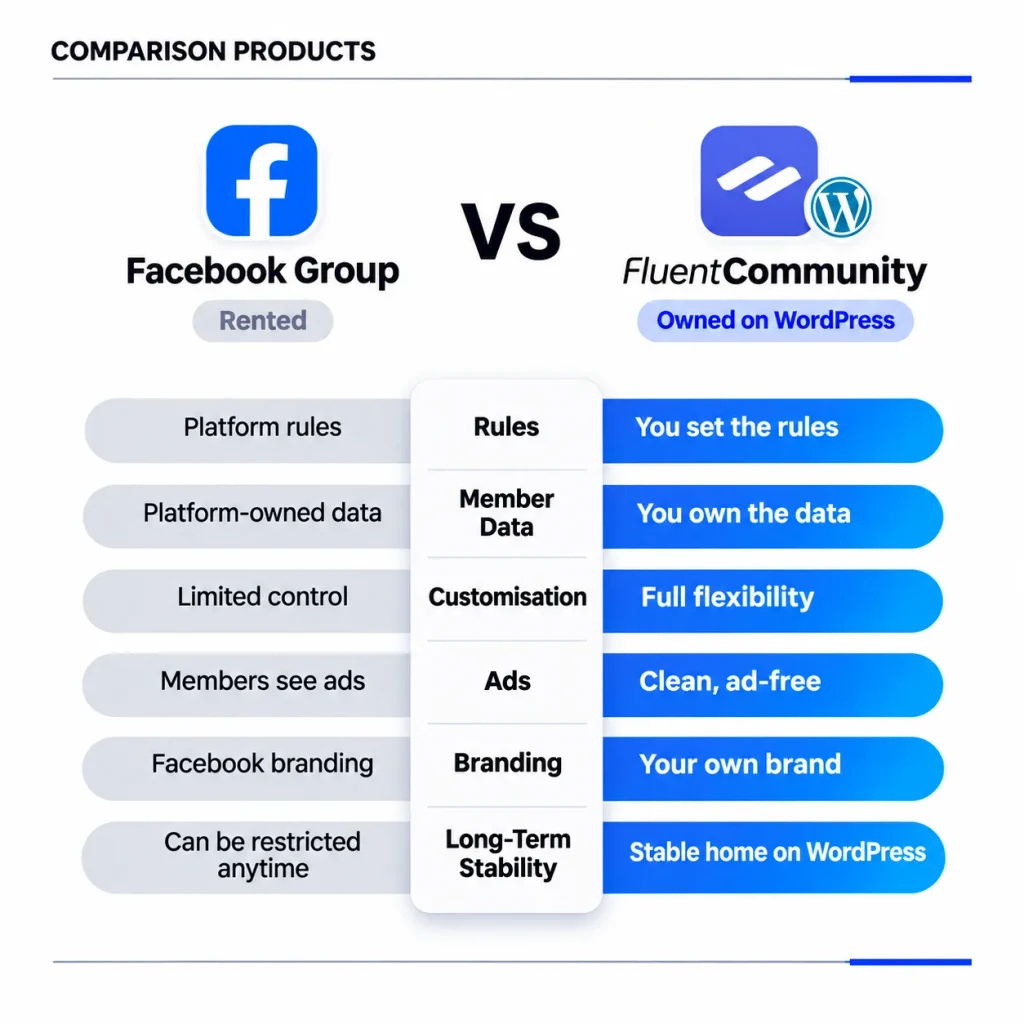
Here’s a simple way to picture it. A Facebook Group is a room inside someone else’s house. They set the house rules, they own the furniture, and they can lock the door. A social network builder gives you the whole house.
That house can be public, like a hobby network anyone can browse. Or it can be private, like a paid membership, an alumni network, or a customer community that only verified members can see.
Social Network Builder vs Social Media App Builder
Search for this term and you’ll notice two kinds of tools mixed together. App builders like Appy Pie focus on publishing a native mobile app to the App Store and Google Play. Social network builders focus on the community itself: members, conversations, spaces, and moderation.
Honestly, most people searching here need the second one first. If your members will join from a link in your newsletter or on your website, a web-based network gets you live faster. You can add an app layer later once people actually show up.
The 3 Main Types of Social Network Builders
Almost every option on the market falls into one of these three buckets:
- Hosted platforms like Circle and Mighty Networks, where the vendor runs everything
- Self-hosted scripts like SocialEngine, OSSN, and HumHub, installed on your own server
- WordPress plugins like BuddyPress, BuddyBoss, and FluentCommunity, added to a site you already run
Each bucket trades convenience for control. Hosted platforms are the easiest to start but cost more each month and keep your data on their servers. Scripts give you control but usually mean a separate stack to maintain. WordPress plugins sit in the middle: you own everything, and you manage it from the dashboard you already know.
Why Renting Your Social Network Gets Expensive
“Free” platforms and monthly SaaS tools both feel cheap on day one. The bill shows up later, in three different forms.
The Reach Problem
When a platform owns the feed, it decides who sees your posts. Socialinsider’s 2026 benchmarks put the average Facebook engagement rate at 0.15%. In simple terms, that’s about one or two interactions for every 1,000 followers.
You can still build a following there. But every post competes with ads, video, and whatever the algorithm favors this quarter. On your own network, a post in a space goes to the people in that space. No bidding required.
The Platform Risk Problem
Back to that June 2025 story. TechCrunch reported that admins of groups about parenting, savings tips, and gaming got vague violation notices. Meta’s spokesperson said the company was aware of a technical error and was fixing it.
Many groups came back. But think about what that week felt like for an admin with 20,000 members and no support phone number. Some admins who paid for Meta Verified were able to get help. Many others just waited. When the platform owns your members, you’re always one policy change away from silence.
The Fee Problem
Paid SaaS platforms solve the reach and risk problems, but they add a different cost. Circle’s pricing page lists the Professional plan at $89 per month billed annually with a 2% transaction fee. The Business plan is $199 per month with a 1% fee.
That’s not unfair. It’s the price of convenience. But the fee grows as you grow. If your community brings in $3,000 a month, 2% is another $60 every month, on top of the plan and your Stripe fees.
There’s also a quiet advantage to building where your website already lives. WordPress runs about 40% of all websites, according to W3Techs. If your site is one of them, your network can share the same domain, the same login, and the same database.
What the Best Social Network Builder Needs to Handle
Before you compare tools, it helps to know what a healthy network actually needs day to day. Here’s the checklist I use when testing a social network builder:
- Profiles people want to fill in, with photos, headlines, and custom fields
- Groups or spaces with public, private, and hidden options
- A feed with posts, comments, reactions, mentions, and polls
- Private messaging that feels real-time
- Notifications that bring people back, by email and on their phones
- Moderation tools that work without a full-time moderator
- Mobile access that doesn’t force an app store download
- A way to charge for access when you’re ready
That moderation point matters more than it looks. The 2025 CMX Community Industry Trends Report surveyed 589 community professionals. The most common team size was just two to five people, and 17% said nobody worked on community full time. Your builder has to do some of the work for you.
The same report found something else worth planning around. Teams whose community data connects to their CRM were about twice as likely to rate their community “extremely successful” (24% vs 11%). So a builder that talks to your email and CRM tools isn’t a bonus. It’s how you prove the network is working.
How FluentCommunity Works as a Social Network Builder
FluentCommunity is a WordPress plugin by WPManageNinja that turns your site into a social network and learning platform. It has 8,000+ active installs and a 4.8 out of 5 rating on WordPress.org, and version 2.12.0 shipped on October 16, 2026.
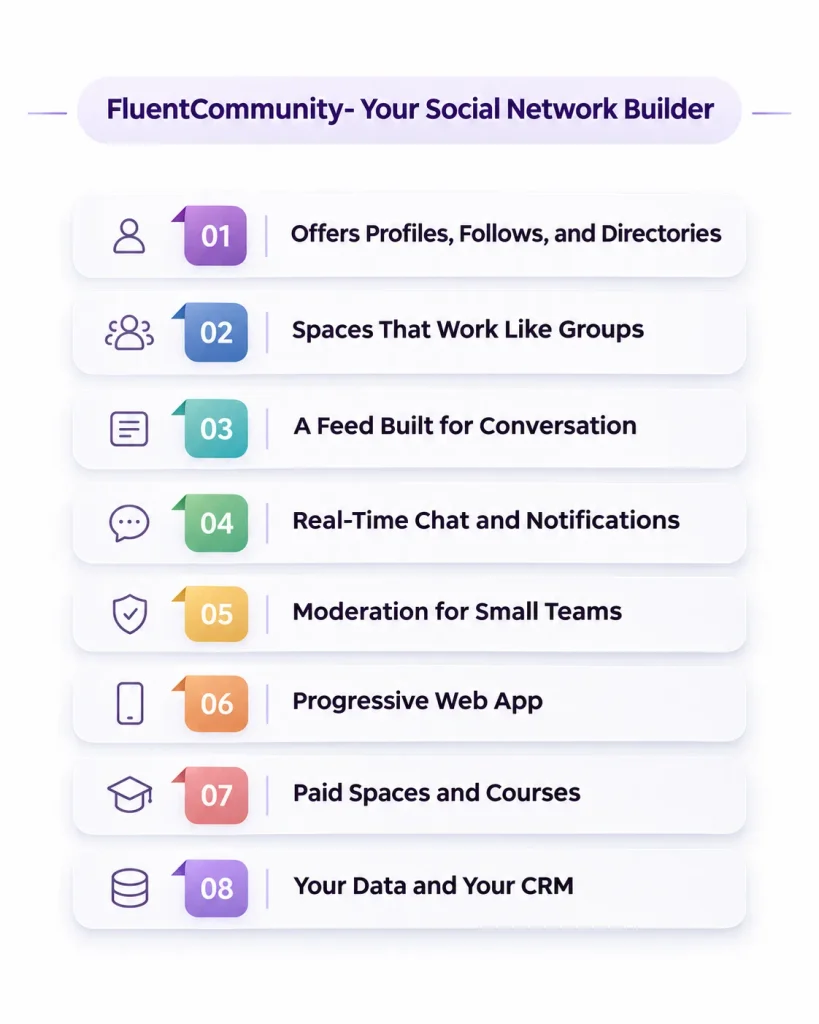
The portal runs as a single-page app built with VueJS. In practice, that means clicking between the feed, a space, and a profile feels like an app, not a string of full page reloads. Let’s map it against the checklist.
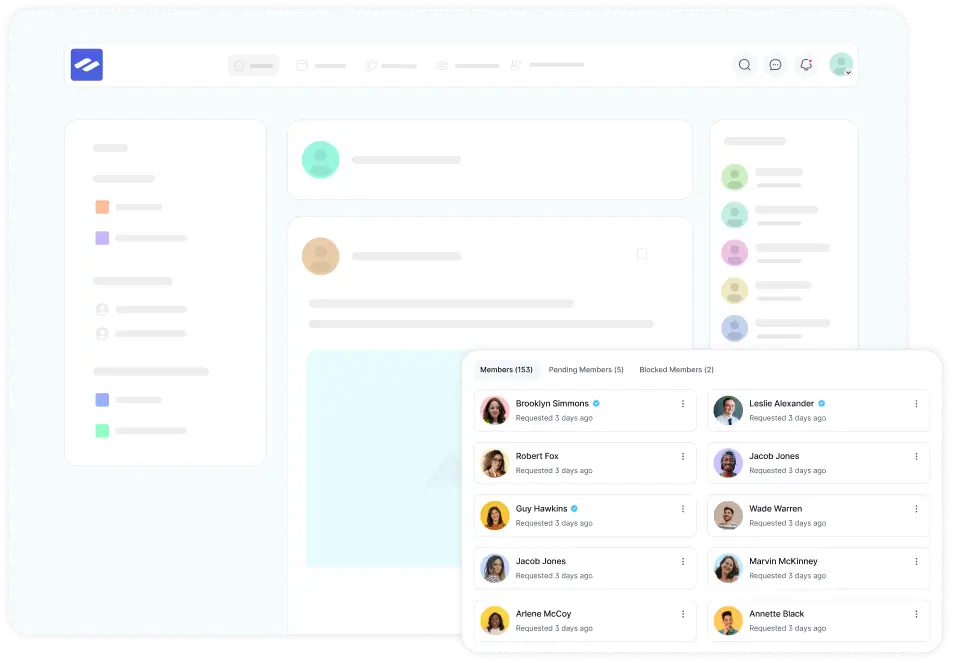
Profiles, Follows, and the Member Directory
Every member gets a profile with a photo, cover image, headline, and bio. You can add custom profile fields, so a coaching network might ask “What are you working on this month?” while an alumni network asks for graduation year.
Members can follow each other, and followers see new posts from people they care about. There’s also a member directory and a block option for people members don’t want to hear from. Follow/following is a Pro feature.
Spaces That Work Like Groups
Spaces are FluentCommunity’s version of groups, and you can create as many as you want. Each space can be public, private, or secret, and you can bundle related spaces into space groups in the sidebar.
Spaces can also hold more than a feed. Recent versions added a media gallery per space (Pro), a secure document library (Pro), and static pages, so a “Start Here” space can host your rules and resources in one place.
A Feed Built for Conversation
The activity feed is where your network lives. Members can post updates with images, video, audio, documents, GIFs, and emoji, and they can comment and react. Mentions, hashtags, polls, and bookmarks are all on the official feature list.
Two features help small teams a lot. Post scheduling lets you line up a week of conversation starters in one sitting. A card layout view turns a space into a visual grid, which works well for showcases and member wins.
Real-Time Chat and Notifications That Bring People Back
Private, real-time chat comes through the FluentCommunity Chat add-on, which the WordPress.org listing includes in the free version. There’s also a chat widget inside the portal, so conversations don’t pull people away from the feed.
Getting people to come back is the other half. FluentCommunity covers in-app notifications, email digests, and since version 2.9.0, push notifications through FluentNotify. Members choose their own notification preferences, so the loud ones stay engaged and the quiet ones don’t unsubscribe.
Moderation for Small Teams
This is where FluentCommunity earns its keep for one-person teams. The built-in moderation tools include:
- Profanity filtering that works across languages
- Auto-flag thresholds that send content to review automatically
- First-comment approval for brand-new members
- A review queue for flagged posts
- User approval, so you OK new members before they get in
- A “verified members only” posting option for spaces
Pair that with the role manager and space moderators, and you can share the load without handing out full admin access.
Mobile Access With a Progressive Web App
Version 2.8.0 introduced a Progressive Web App (PWA) module. Members can install your community to their phone’s home screen, and it opens like an app, without an App Store listing. Later releases added full-site PWA support and pull-to-refresh on iOS.
Combined with push notifications, that covers most of what people want from “an app” on day one. If you need a branded app listed in the app stores, that’s a different product category, and we’ll talk about it below.
Paid Spaces and Courses When You’re Ready
You don’t need to charge on launch day. But when you do, FluentCommunity’s native monetization runs through FluentCart. You can sell spaces and courses with multiple pricing plans and paywalls. FluentCart charges zero transaction fees on both its free and Pro versions, so you only pay your payment processor.
There’s a full LMS built in, too. The course builder, drip content, lesson discussions, and quizzes (Pro) live in the same portal as your feed, so learners don’t bounce between two platforms.
Your Data and Your CRM
Because everything sits in your WordPress database, your member list is yours. FluentCommunity connects natively with FluentCRM, so you can tag members by the spaces they join, trigger emails when someone completes a lesson, and send messages from CRM automations.
Remember that CMX finding about CRM-connected teams? This is what it looks like in practice. Pro also adds webhooks and automation actions if you use other tools.
You can see how all of this comes together on the FluentCommunity for social networks page.
How to Build a Social Network on WordPress in 7 Steps
Here’s the build in the order I’d actually do it. The first five steps take an afternoon. Steps six and seven decide whether anyone sticks around.
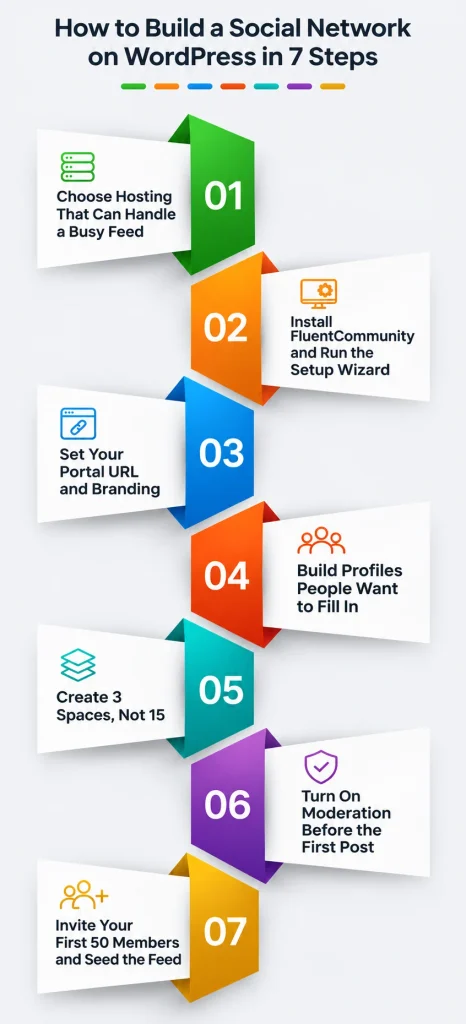
Step 1: Choose Hosting That Can Handle a Busy Feed
A social network is busier than a blog. Every like, comment, and notification hits your server. FluentCommunity’s own recommendation is a VPS or cloud server instead of shared hosting.
The suggested setup is PHP 8.1 or higher, MySQL 8.0+ or MariaDB 10.5+, Nginx, and Redis object caching, with at least 2 CPU cores and 4GB of RAM. You can start smaller and upgrade, but don’t launch a 2,000-member network on a $3 shared plan.
Step 2: Install FluentCommunity and Run the Setup Wizard
In your WordPress dashboard, go to Plugins, then Add New, and search for FluentCommunity. Click Install, then Activate. The free version is enough to build and test everything in this guide.
Next, open FluentCommunity from the admin sidebar. The setup wizard walks you through the basics of your portal.
Step 3: Set Your Portal URL and Branding
Your community lives at its own address on your site, by default under /portal. You can change the slug to something that fits your brand, like /members or /hub.
Then upload your logo, set your colors, and choose a default light or dark mode. Spend ten minutes here. A network that looks like your brand feels like a place, not a plugin.
Step 4: Build Profiles People Want to Fill In
Add two or three custom profile fields that spark conversation. “City,” “What are you working on?” and “Ask me about” work for almost any network.
Keep required fields to a minimum. Every extra required field is one more reason to abandon signup. You can always ask for more once people feel at home.
Step 5: Create 3 Spaces, Not 15
This is the mistake I see most. New owners create a space for every topic they can imagine, and then 40 members spread across 15 empty rooms. An empty space feels like a party nobody came to.
Start with three:
- Start Here, a space for introductions, rules, and resources
- General, the main feed for open conversation
- One space for your core topic, the reason people joined
Add more only when a topic keeps taking over the general feed. That’s your signal.
Step 6: Turn On Moderation Before the First Post
Set up moderation before you invite anyone. Turn on the profanity filter, set an auto-flag threshold, and enable first-comment approval for new members. If your network is private, turn on user approval so you review every signup.
Write five or six community guidelines and pin them in your Start Here space. Clear rules on day one are much easier than new rules on day ninety.
Step 7: Invite Your First 50 Members and Seed the Feed
Your first members set the tone for everyone after them. Use bulk add or email invites to bring in your most engaged customers, students, or followers first.
Before they arrive, schedule a week of posts: a welcome thread, an introduce-yourself prompt, a quick poll, and one useful resource. Then reply to every introduction yourself for the first two weeks. Well, it sounds small, but personal replies are what turn a signup into a regular.
Screenshot needed: fluentcommunity-bulk-add-members-invite.webp Alt text: FluentCommunity add members screen with bulk import and email invite options
For a deeper look at planning and growth, our guide on how to create an online community picks up where this step ends.
FluentCommunity vs Other Social Network Builders
Here’s how the main options compare on the things that cost money or control. Prices come from each vendor’s own page, checked November 2026:
| Builder | Type | Starting price | Platform fee on sales | Where your data lives | Mobile |
| FluentCommunity | WordPress plugin | Free; Pro $199/year or $399 lifetime | None (via FluentCart) | Your WordPress database | Installable PWA with push |
| BuddyBoss | WordPress theme and plugin | Web from $199 first year | None through its integrations | Your WordPress database | Branded app from $499/year |
| Circle | Hosted SaaS | $89/month, billed annually | 2% (1% on Business) | Circle’s servers | iOS and Android apps; branded app on Circle Plus |
| Facebook Groups | Social platform | Free | Not applicable | Meta’s servers | Facebook app |
A few honest notes on that table. Circle includes hosting, support, and its own apps in the price, so you’re paying for convenience you’d otherwise handle yourself. BuddyBoss lists its first-year price, so check the renewal before you commit. And FluentCommunity’s $199 is the list price; there’s often a first-year discount on the pricing page.
If you’re weighing two of these closely, our detailed breakdowns of BuddyBoss vs FluentCommunity and Circle vs FluentCommunity go feature by feature.
A 3-Year Cost Example
Let’s make this real. Say you run a paid network with 200 members at $15 per month. That’s $3,000 a month, or $36,000 a year.
On Circle Professional, you’d pay:
- 1,068peryearfortheplan(89 x 12)
- $720 per year in transaction fees (2% of $36,000)
- About $5,364 over three years, before Stripe fees
On FluentCommunity Pro with FluentCart, you’d pay:
- $597 over three years at the $199 list price, or $399 once for lifetime
- About $1,080 for three years of hosting, using an estimated $30 per month VPS
- $0 in platform transaction fees
- About $1,677 over three years, before Stripe fees
That’s roughly $3,700 kept in your business over three years, and the gap widens as revenue grows. Stripe fees apply in both cases. Your hosting cost will vary, so plug in your own number.
When FluentCommunity Isn’t the Right Fit
No tool fits everyone, and pretending otherwise doesn’t help you. FluentCommunity probably isn’t your best choice in these situations:
- You don’t want to manage hosting, updates, or backups at all
- You need a branded app listed in the App Store and Google Play from day one
- Your site isn’t on WordPress and you don’t plan to move it
- Your group is 15 friends who already chat happily on WhatsApp
For the first two, a hosted platform or a dedicated app product will save you headaches. For the last one, honestly, you don’t need a social network builder yet. Come back when the group chat starts breaking.
If you’re moving an existing network, FluentCommunity has one-click migration from BuddyBoss and BuddyPress, with a WP-CLI option for large communities. The migration guide covers profiles, activity, and media.
Your Next Step
You don’t need to decide everything today. The smartest first move is cheap and reversible: install the free FluentCommunity plugin on a staging copy of your site and build the three starter spaces from Step 5.
Invite five people you trust and watch what they actually do for a week. Do they post? Do they reply to each other? Do they come back without a reminder? Those answers will tell you more than any comparison table.
If the test goes well, Pro adds follows, leaderboards, badges, the media gallery, and more. When you’re ready, download FluentCommunity from WordPress.org and start with the version that costs nothing. Your network, your domain, your members.
Frequently Asked Questions
Do I Need Coding Skills to Use FluentCommunity?
No. You install it like any WordPress plugin, and a setup wizard handles the basics. Spaces, profiles, branding, and moderation are all managed through settings screens. Developers can go further with the REST API, hooks, and webhooks, but you don’t need any of that to launch.
Can I Move My BuddyBoss or BuddyPress Community to FluentCommunity?
Yes. FluentCommunity offers one-click migration from BuddyBoss and BuddyPress, covering content, activities, media, and user profiles. For very large BuddyBoss communities, you can run the migration with a WP-CLI command instead, which avoids browser timeouts.
Can I Charge Members to Join My Social Network?
Yes. FluentCommunity’s native monetization runs through FluentCart, so you can sell access to specific spaces or courses with multiple pricing plans and paywalls. FluentCart charges no transaction fees, so beyond your plugin license you only pay your payment processor.
Is There a Limit on How Many Members I Can Have?
FluentCommunity doesn’t charge per member, and its plans include unlimited spaces and members. Your practical limit is your hosting. A small network runs fine on a modest VPS, while a busy network with thousands of daily active members will need more CPU, RAM, and object caching.
Will FluentCommunity Slow Down My Website?
FluentCommunity is built as a single-page app, which keeps page loads light as members move around the portal. The bigger factor is your server. Follow the recommended setup (PHP 8.1+, a modern database, Redis caching, and at least 4GB of RAM) and your community and main site should both stay fast.
Can Google Index My Community Content?
Public content can be indexed. Version 2.10.0 added server-rendered portal pages for search engines, and recent versions add canonical tags for spaces, courses, and lessons. Pro includes SEO and XML sitemap features. Private and secret spaces stay out of search results.

Ashik Elahi
Ashik Elahi is a seasoned Digital Marketing Strategist with a passion for Content Marketing. He believes in the power of storytelling and crafting valuable content that resonates with readers.

Add your first comment to this post