


FluentCommunity Unread Badges That Keep Up

Table of Content
Subscribe To Get
WordPress Guides, Tips, and Tutorials


Few things in a community feel so small, yet matter as much as the little number beside a sidebar space. That badge is often the first thing members notice when they open your community, and it quietly decides where their attention goes next. When it is accurate, it guides people straight to fresh conversations. When it is wrong, however, it trains them to ignore it altogether.
Until now, FluentCommunity’s unread badge leaned toward the second outcome more often than it should have. It counted from your last visit to the site, so it stayed frozen while the page was open and sometimes reappeared after a simple reload. As a result, members saw numbers that did not match what they had actually read. The latest update rebuilds the badge around a much simpler idea: it should reflect what you have and have not seen in each space, right now.
In this post, we walk through what changed, why each change matters for your members, and how large sites can fine-tune the behavior. By the end, you will know exactly what the new badge counts, what it ignores, and why that makes your community easier to follow.
Why the Old Badge Fell Behind?
To understand why this update matters, it helps to look at how the badge used to work. Previously, the count was calculated from the last time you visited the site as a whole. On paper, that sounds reasonable. In practice, though, it created a badge that was always slightly out of step with reality.
For one thing, the number never moved while you had the page open. If three new posts landed in a space while you were reading something else, the badge simply sat there, unaware. Members had to refresh to discover anything new, which defeats the purpose of a notification in the first place.
On top of that, because the count was tied to a site-wide visit rather than to individual spaces, a reload could bring back a badge you thought you had already cleared. Naturally, this left people wondering whether they had missed something or whether the number was just wrong.
Over time, that kind of uncertainty adds up. Once members stop trusting a badge, they stop using it, and the sidebar loses one of its most useful jobs: pointing people to where the conversation is happening.
Badges Now Follow Each Space You Open
The biggest change is also the most intuitive one. Instead of counting from your last visit to the site, the badge now tracks when you last opened each space. In other words, every space keeps its own sense of what you have already seen.
This shift solves the reload problem almost entirely. When you open a space and catch up, that space’s count resets, and it stays reset until something genuinely new appears there.
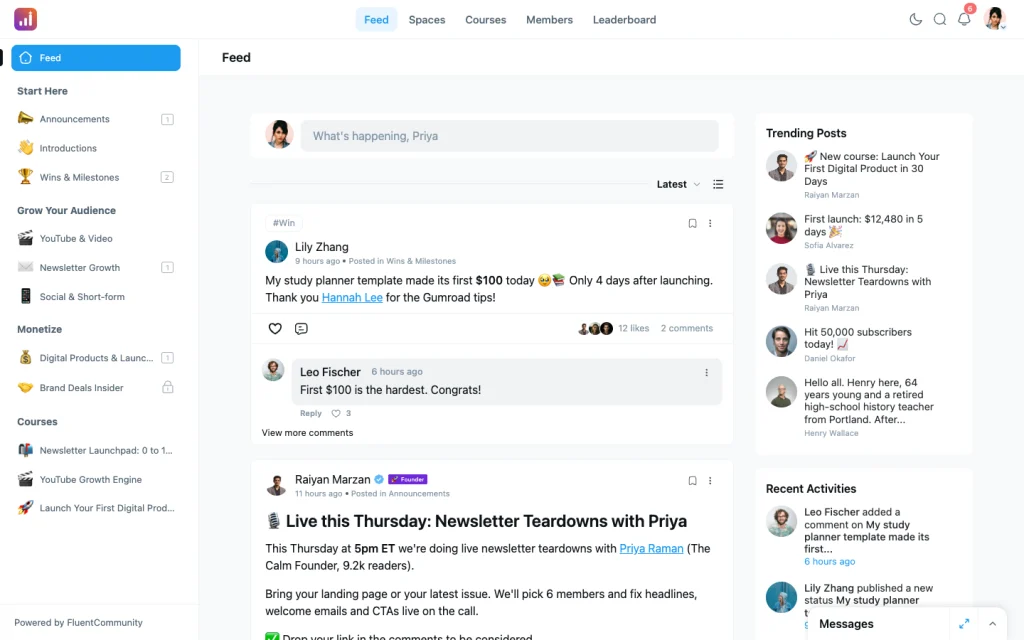
Meanwhile, spaces you have not opened keep their counts, so you can still see at a glance where unread activity is waiting. Consequently, the sidebar now reads like an honest map of your community rather than a rough estimate of it.
For members who belong to several spaces, this per-space tracking makes a real difference. Someone might check the announcements space every morning but visit a project group only once a week. Under the old system, both were judged against the same site visit. Now, each space reflects the member’s actual habits, which is exactly how people expect unread counts to behave.
Live Counts as New Posts Arrive
Beyond tracking each space separately, the badge now updates in real time. When a new post arrives in a space you belong to, the count bumps up live, without any refresh.
This is a small detail that changes how a community feels. Instead of a static page that you have to poke to get news, the sidebar becomes a quiet, living signal of activity. As a result, members who keep the community open in a tab can see conversations starting as they happen and jump in while they are still fresh. For community managers, that responsiveness often translates into faster replies and livelier threads, since people notice new posts sooner.
Just as importantly, live updates work hand in hand with per-space tracking. Because each space knows when you last opened it, the live count only reflects posts that are genuinely new to you. So the number you see climbing is one you can actually act on.
More Honest Numbers
Accuracy is not only about timing, however. A badge can update instantly and still mislead if it counts the wrong things. That is why this update also tightens up what gets counted in the first place, in three specific ways.
First, badges now appear only for spaces you have joined. Previously, members could see unread activity hinted at in places they had no real connection to. Now, the sidebar focuses on the spaces you have actually chosen to be part of, which keeps attention where it belongs.
Second, your own posts no longer count against you. It always felt odd to publish something and then see a badge telling you there was something new to read, when the new thing was your own post. With this fix, writing in a space no longer creates an unread count for yourself, so the badge reflects other people’s activity only.
Third, duplicate memberships no longer inflate the number. In some setups, a member could end up linked to the same space more than once, and the badge would quietly double-count posts as a result. Now, each space is counted once per member, regardless of how that membership came about.
Taken together, these three changes mean the number beside a space is one you can trust. When it says there are five unread posts, there are five posts from other people, in a space you joined, that you have not seen yet.
The 14-Day Window
Even with accurate counting, there is one more problem worth solving: the badge that never goes away. In most communities, some spaces are busy while others are quiet. A quiet space might receive a single post, and if a member never opens it, that badge could sit in the sidebar indefinitely. Over time, these lingering counts turn into visual clutter that members learn to tune out.
To prevent this, posts older than 14 days never count as unread. Once a post passes that age, it simply drops out of the unread calculation, even if you have not opened the space. Consequently, a quiet space does not keep a badge forever, and the sidebar stays focused on recent activity rather than old leftovers.
This window strikes a sensible balance. Two weeks is long enough to cover vacations, busy work weeks, and members who check in only occasionally. At the same time, it is short enough that the sidebar never fills up with stale numbers that no longer mean anything.
Tuning the Window for Large Sites
Of course, not every community runs at the same pace. On a large, highly active site, two weeks of unread posts can add up to a lot of database work and a lot of numbers in the sidebar. For that reason, FluentCommunity lets site owners lower the window using the fluent_community/unread_badge_max_days filter.
In practice, this means a developer can add a short snippet, for example in a site-specific plugin or a code snippets tool, to set a smaller limit:
php
add_filter( ‘fluent_community/unread_badge_max_days’, function ( $days ) {
return 7;
} );
With a change like this, only posts from the last seven days would count toward unread badges. As a result, busy communities can keep the sidebar lighter and more focused, while smaller communities can simply leave the default of 14 days in place. Either way, the choice stays in your hands, which fits FluentCommunity’s broader approach of giving WordPress site owners real control over how their platform behaves.
What This Means for Your Community?
Stepping back, these changes all point toward the same goal: making the unread badge something members can rely on without thinking about it. A badge that updates live, follows each space, ignores your own posts, avoids double counting, and lets old posts fade away is a badge that tells the truth.
For members, that means less confusion and fewer refreshes. For community managers, it means a sidebar that actively steers people toward new conversations instead of being quietly ignored. And for large sites, it means a sensible default with room to adjust when scale demands it.
Conclusion
Ultimately, an unread badge is only useful if people believe it. The old version, which counted from your last visit to the site, often fell out of step with what members had actually seen, so it stayed frozen during a session and sometimes returned after a reload.
The new badge fixes that by tracking each space individually and updating live as new posts arrive. In addition, it now counts more honestly, showing badges only for joined spaces, ignoring your own posts, and avoiding inflated numbers from duplicate memberships. Finally, the 14-day window keeps quiet spaces from holding onto a badge forever, while the
fluent_community/unread_badge_max_days filter gives large sites a simple way to tighten that limit. Together, these improvements turn a small sidebar number into a reliable guide that helps members find fresh conversations faster and keeps your community feeling active and easy to follow. For more updates, check out FluentCommunity 2.12.0.

Prema Anjum
My full name is Anzuman Ara Chowdhury. But people know me as Prema Anjum. I’m a Digital Marketer by profession, a WordPress community contributor, and a travel enthusiast by heart.
![SEO Title: 5 Best Community Portal Software [WordPress + SaaS Options]](https://fluentcommunity.co/wp-content/uploads/2026/10/community-portal-software-featured-1-1024x536.webp)


Add your first comment to this post