


20 Must-Have Online Community Features for Your Business

Table of Content
Subscribe To Get
WordPress Guides, Tips, and Tutorials


Picking a community platform feels easy until you actually launch one. Then you realize a business community needs more than a comment box and a login page.
It needs the right features working together, or members drift off within weeks. So which features actually matter?
Here are 20 must-have online community features that keep people engaged, coming back, and spending.
Key Takeaways
- A strong business community blends engagement, structure, safety, growth, and management features, not just a basic forum.
- Engagement tools like activity feeds, member profiles, and chat keep people active on a daily basis.
- Privacy settings, moderation, and role controls protect both your brand and your members.
- Courses, monetization, and gamification turn a community from a hobby into a real revenue channel.
- FluentCommunity bundles all 20 features into one fast WordPress plugin, so you avoid the plugin pile-up.
What Counts as a Must-Have Community Feature?
A must-have online community feature is any tool that helps members connect, stay safe, find value, and keep coming back, without extra plugins or manual work.
For a business, that means features that spark engagement, protect your brand, deliver something useful like courses or support, and give admins real control and insight.
Not every feature is worth chasing. Some just add clutter.
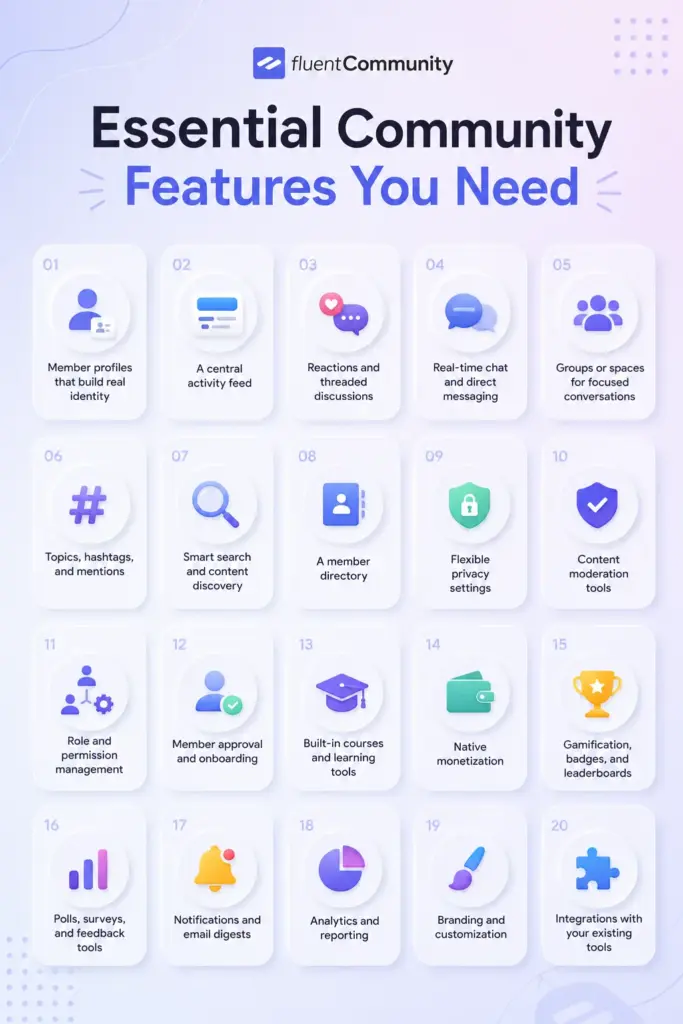
The 20 below are the ones that actually move the needle for a business, and we grouped them into five jobs your community has to do well: spark connection, stay organized, build trust, drive growth, and stay manageable as you scale.
Communities are not a soft bet either. Around 82% of marketers say actively managing a community increases their marketing ROI, according to Gitnux. The features you pick decide whether you land in that group.
Features That Spark Engagement and Connection
If nobody talks, you do not have a community. You have a member list. These four features are what get people posting, reacting, and showing up again tomorrow.
1. Member profiles that build real identity
People engage more when they feel seen. A good profile lets members add a photo, a headline, links, and custom fields so they are a real person, not a username. That small thing builds trust between members fast.
Think of a coaching community where each profile shows the member’s goal or role. Suddenly people know who to reply to. FluentCommunity supports full member profiles with custom profile fields, so you can collect the details that matter for your niche.
2. A central activity feed
The activity feed is the heartbeat of your community. It is the scrolling home base where posts, updates, and reactions show up in one place. Without it, conversations get buried and members have no reason to log back in.
A feed works like a private social timeline for your brand. Members post a win, others react, a thread starts. FluentCommunity runs on a single-page app setup, so the feed loads fast and feels smooth instead of reloading the whole page every click.
3. Reactions, comments, and threaded discussions
Not everyone will write a paragraph, and that is fine. Reactions and quick comments give quiet members an easy way to join in. Threaded replies keep longer conversations tidy so people can actually follow them.
This matters more than it sounds. Posts with images get about 2.4 times more engagement than plain text, per Marketing LTB, so rich posts plus easy reactions is a strong combo for keeping discussions alive.
4. Real-time chat and direct messaging
Sometimes members want to talk privately or in the moment. Real-time chat and direct messaging let them do that without leaving your platform for WhatsApp or email. That keeps the relationship, and the data, inside your community.
Picture a member with a quick question for a mentor. A direct message gets it answered in seconds. FluentCommunity includes real-time chat and one-to-one messaging built right into the portal, so members never have to wander off-site.
Features That Keep Your Community Organized
Growth is great until your feed turns into noise. These features keep everything findable so a busy community still feels calm and useful.
5. Groups or spaces for focused conversations
One giant feed does not scale. Separate groups, or spaces, let you split conversations by topic, product, cohort, or membership tier. New members instantly know where they belong.
Say you run a marketing community. You might have one space for SEO, one for paid ads, and a private space for paying clients. FluentCommunity is built around unlimited spaces, and each can be public, private, or secret depending on who should see it.
6. Topics, hashtags, and mentions
Inside a busy space, you still need ways to sort and surface content. Topics and hashtags group related posts, while mentions pull the right person into a conversation. Together they make content easy to route.
A member tags a post with a topic like “onboarding,” and now everyone interested can filter straight to it. FluentCommunity supports topics, hashtags, and user mentions, so conversations stay connected instead of scattered.
7. Smart search and content discovery
Old posts hold real value, but only if people can find them. A strong search feature lets members pull up an answer, a discussion, or a resource in seconds instead of asking the same question again.
Good search quietly cuts down repeat questions and lightens the load on your team. It is a small feature that saves everyone time, and FluentCommunity includes global search across community content.
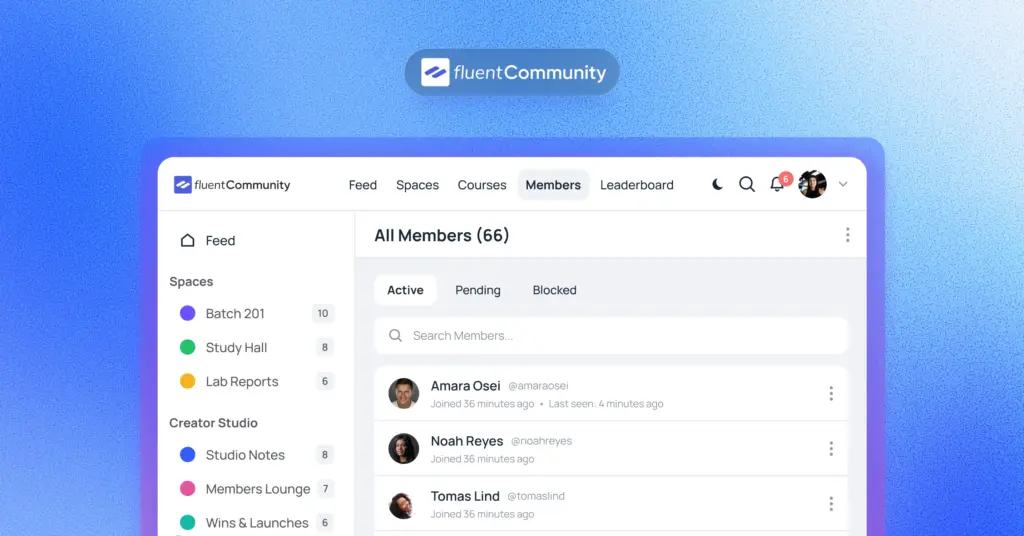
8. A member directory
A directory turns a pile of members into a network. People can browse who else is in the community, find peers in the same industry, and reach out. That networking angle is often why members stay.
For a professional or agency community, the directory is a selling point on its own. FluentCommunity offers a member directory so people can discover and connect with each other, not just with your brand.
Features That Build Trust, Safety, and Control
One spam wave or one bad actor can wreck the vibe. These features protect your community and your reputation.
9. Flexible privacy settings
Different communities need different doors. Public spaces help you grow and rank in search. Private and secret spaces protect paid or sensitive content. You want control over both.
The ability to set public, private, or secret access per space is essential for any business running free and paid tiers side by side. FluentCommunity gives you exactly that level of privacy control on every space and course.
10. Content moderation tools
The bigger the community, the more you need guardrails. Moderation tools like profanity filters, auto-flagging, first-comment approval, and a review queue help you catch problems before members do.
Imagine a spammer joins overnight. With auto-flag thresholds and a review queue, their posts get held instead of blasting your feed. FluentCommunity ships with these moderation tools so a small team can keep a large community healthy.
11. Role and permission management
Not everyone should have the keys. Role management lets you assign admins, moderators, and managers with different powers, so you can delegate without handing over full control.
This becomes critical as you grow past a few hundred members. FluentCommunity includes a role manager, plus a dedicated manager role in the Pro version, so you can share the workload safely.
12. Member approval and onboarding
A strong first impression keeps members around. Approval controls let you screen who gets in, and a proper welcome flow shows new people where to start so they do not bounce on day one.
Retention is cheaper than acquisition. In fact, winning a new customer can cost 5 to 25 times more than keeping an existing one, as noted by Gitnux. FluentCommunity supports user approval and welcome messages to help new members land softly and stick.
Features That Drive Growth and Revenue
A community can be more than a cost center. These features turn engagement into learning, loyalty, and actual income.
13. Built-in courses and learning tools
If you teach anything, a built-in course system is gold. It lets you deliver lessons, quizzes, and progress tracking in the same place people already gather, so learning and discussion feed each other.
Instead of paying for a separate LMS, you keep students and community members together. FluentCommunity has a full built-in Learning Management System with a Gutenberg course editor, quizzes, lesson discussions, progress tracking, and drip content, so your courses live right next to your community.
14. Native monetization
At some point you may want the community to pay for itself. Native monetization lets you sell memberships, paid spaces, and paid courses without stitching together third-party checkout tools.
Communities can carry real financial weight when this is done well. FluentCommunity offers native monetization through FluentCart, so you can sell courses and spaces with multiple pricing plans and paywalls, all inside WordPress.
15. Gamification with points, badges, and leaderboards
People love a little friendly competition. Points, badges, and leaderboards reward the members who show up and contribute, which nudges everyone else to do the same.
The effect is measurable. About 36% of members engage more when there is gamification like ranks and badges, according to Marketing LTB. FluentCommunity includes leaderboards, points, titles, and user badges in the Pro version to keep motivation high.
16. Polls, surveys, and feedback tools
Your community is a goldmine of customer insight, if you ask. Polls and surveys make it easy to gather opinions, test ideas, and let members feel heard, all without leaving the platform.
A quick poll on your next product feature does two jobs at once. It boosts engagement and gives you real data. FluentCommunity supports polls and surveys directly inside posts, so feedback becomes part of the daily conversation.
Features That Help You Manage and Scale
The last four features are the ones you appreciate at 2 a.m. when you are running a community solo. They keep members coming back and keep you sane.
17. Notifications and email digests
Members forget you exist unless you remind them, gently. In-app notifications pull people back for replies and mentions, while email digests round up activity for those who do not log in daily.
This is your retention engine. A weekly digest can revive members who went quiet. FluentCommunity includes notifications and email digests so your community stays top of mind without you sending manual updates.
18. Analytics and reporting
You cannot improve what you cannot see. Reporting shows you member growth, engagement, and activity trends so you know what is working and what is fading.
Even simple numbers help you spot a slowdown early and act on it. FluentCommunity provides a reporting and analytics overview from a central dashboard, so you can track the health of your community at a glance.
19. Branding and customization
Your community should feel like your brand, not a generic template. Custom colors, logos, and layout options make members feel like they are in your house, which builds trust and recognition.
Little touches like a matching color scheme and a dark or light mode go a long way. FluentCommunity offers branding customization, custom colors, logos, and dark or light mode, so the space looks like an extension of your business.
20. Integrations with your existing tools
No community lives alone. Integrations connect it to your email marketing, CRM, forms, and payment tools so members flow smoothly through your whole system instead of getting stuck in silos.
This is where a lot of platforms fall short. FluentCommunity connects natively with FluentCRM, FluentCart, Fluent Forms, Fluent Support, and FluentSMTP, so signups, tags, sales, and support all talk to each other automatically.
How to Get All 20 Features Without Juggling Plugins
Here is the honest problem. You can technically build most of this with a stack of separate WordPress plugins. A forum plugin here, an LMS there, a membership tool, a chat add-on, an analytics widget. But those pieces rarely play nice, they slow your site down, and every update becomes a gamble.
That is the gap FluentCommunity is built to close. It combines multifaceted capabilities, like social networking, an LMS, monetization, moderation, and analytics in one no-code plugin, and it is built for speed using a single-page app structure so it does not drag on your server.
The reception backs it up. FluentCommunity has 8,000-plus active installs and a 4.9 out of 5 rating on WordPress.org, with a free core version you can start using today and a Pro version for advanced features like leaderboards, badges, secure documents, and cloud storage. If you are moving from another platform, it even offers one-click migration from BuddyBoss and BuddyPress.
So instead of hunting down 20 features across a dozen plugins, you get them under one roof, in one dashboard, with one support team. For most businesses, that is the difference between a community that grows and one that quietly stalls.
Conclusion
Building a business community is not about grabbing every shiny feature. It is about picking the ones that keep members engaged, protect your space, deliver real value, and give you room to grow. Nail those, and your community becomes a genuine business asset instead of another dead group.
The tricky part is finding all 20 features in one place. Most setups end up as a stack of plugins that fight each other and slow your site down. FluentCommunity brings the whole list together in one fast WordPress plugin, with a free core you can start with today. Install FluentCommunity from WordPress.org, run the setup wizard, and your community can be live in a few minutes. Your members are ready when you are.
Frequently Asked Questions
What is the difference between a community feature and a social media group?
A social media group lives on a platform you do not own, with limits on data, design, and monetization. A community feature on your own site gives you full control over branding, member data, privacy, and revenue. You own the audience instead of renting it.
Which community features matter most for a small business?
Start with member profiles, an activity feed, spaces or groups, moderation, and notifications. Those five keep members engaged, organized, and safe. Once you have traction, layer in courses, monetization, and gamification to grow revenue.
Can I add courses to my community?
Yes. Platforms with a built-in LMS let you run courses and community discussions together. FluentCommunity includes a full LMS with a course editor, quizzes, progress tracking, and drip content, so you do not need a separate course plugin.
How do I keep my community safe from spam?
Use moderation tools like profanity filters, auto-flagging, first-comment approval, and member approval. These hold risky content for review before it reaches your feed. FluentCommunity includes these tools in the core plugin.
Do I need multiple plugins to get all these features?
Not necessarily. Some all-in-one platforms cover most of these features on their own. FluentCommunity brings social networking, an LMS, monetization, moderation, and analytics into a single WordPress plugin, which cuts down on plugin conflicts and site slowdown.
Is FluentCommunity free?
FluentCommunity has a free core version on WordPress.org that covers most of the essential features. A Pro version adds advanced tools like leaderboards, user badges, secure documents, and cloud storage for teams that need more.

Ashik Elahi
Ashik Elahi is a seasoned Digital Marketing Strategist with a passion for Content Marketing. He believes in the power of storytelling and crafting valuable content that resonates with readers.


Add your first comment to this post