

How to Use Polls & Surveys in FluentCommunity

Table of Content
Subscribe To Get
WordPress Guides, Tips, and Tutorials


Most community admins guess. They guess what content to post next, what course to build, what feature members want most, because asking directly feels like extra work, or because they don’t have an easy way to ask without sending people to a separate form or a third-party survey tool.
That guessing is expensive. You spend hours creating something based on what you assume your community wants, only to find out afterward that you read the room wrong.
FluentCommunity’s Polls & Surveys feature exists so you don’t have to guess. It lets you ask your community direct questions, right inside the feed they’re already scrolling through, and get answers in real time. No external tools, no extra clicks, no members lost to a form that opens in a new tab.
If you’ve never used this feature, or you’re using it occasionally instead of as a core part of how you run your community, this post walks through what it does, why it matters more than it seems, and exactly how to set one up.
What Polls & Surveys Actually Do?
Polls & Surveys let you post a question directly into your community feed, with selectable answer options, and watch responses come in live. Members vote with a click, no typing required, and can usually see the results update as more people respond.
This isn’t a separate tool bolted onto your community. It lives inside the same feed as your regular posts, which means the friction to participate is close to zero. A member scrolling through their feed can vote on your poll in the same motion they’d use to like a post.
Why This Feature Matters More Than It Looks?
It replaces guesswork with data. Instead of assuming your members want a live Q&A session next month, you ask them. Instead of assuming they’d prefer weekly content to daily, you ask them. Small decisions, made with actual input, compound into a community that feels built for its members rather than around an admin’s assumptions.
It’s one of the easiest ways to get quiet members to participate. A lot of members lurk. They read every post and never comment. A poll lowers the bar for participation to a single click, which means people who’d never write a comment will still vote. That’s often their first interaction with your community, and first interactions matter.
It creates a visible feedback loop. When members see that a poll you ran last month directly shaped a decision you made this month, they learn that participating actually changes something. That’s what turns a passive audience into an invested one.
It works for more than casual questions. Product feedback, course topic requests, event scheduling, pricing sensitivity- all of it can run through a poll instead of a separate survey tool that adds friction and drops response rates.
How to Create a Poll or Survey in FluentCommunity?
Open the post composer from your community feed, the same place you’d write a regular update. Look for the Poll option among the post type choices (alongside text, image, or video posts).
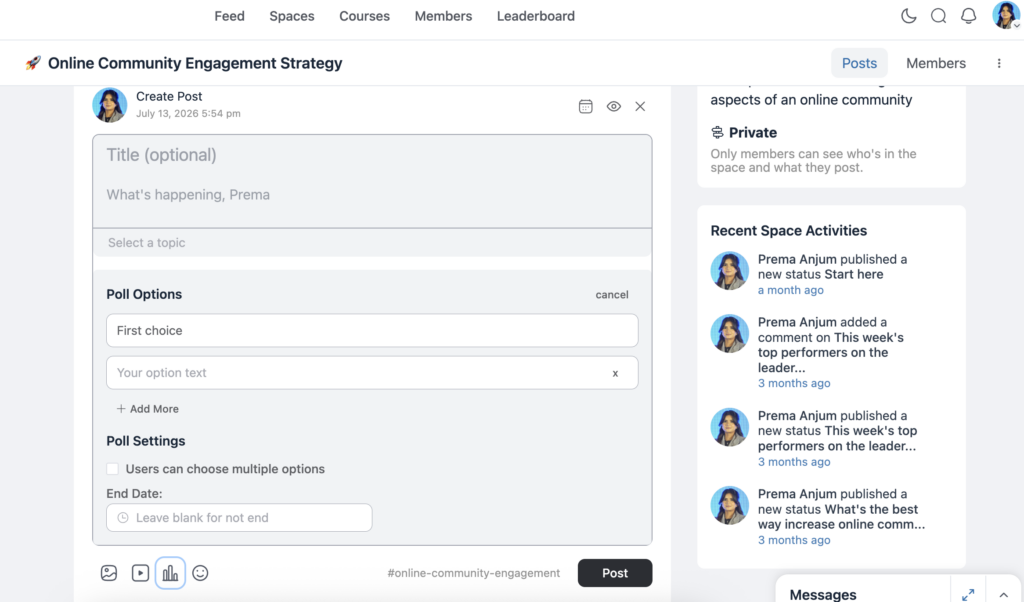
Write your question clearly and specifically. “What should we focus on next?” gets vague answers. “Which topic should next month’s workshop cover: SEO basics, email marketing, or paid ads?” gets useful ones.
Add your answer options. Keep the list short. Three to five options usually get better response rates than ten. Set a duration for the poll if the option is available. Giving members a clear window to respond keeps urgency without dragging the poll out for weeks.
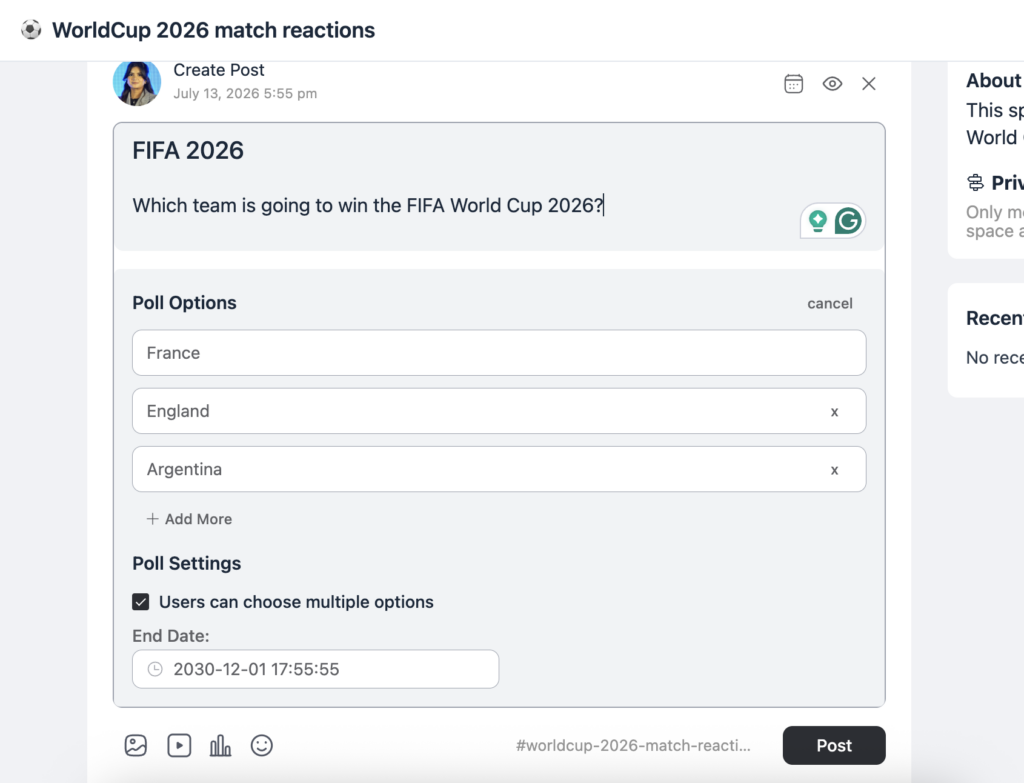
Choose which Space the poll should post in. If you’re running multiple Spaces, post it wherever the relevant audience actually is.
Publish, and pin the post if you want to guarantee visibility for the first day or two.
Once it’s live, keep an eye on the results as they come in. If turnout is low after a day, a short reminder comment or a re-share often brings in a second wave of responses.
Getting Better Response Rates
A poll only works if people actually respond to it. A few things make a measurable difference:
Ask questions your members actually have opinions about. Nobody engages with a question that feels like it doesn’t affect them.
Keep the options limited and clear. If members have to think too hard to choose an answer, they’ll skip it.
Post at a time when your community is naturally active, not at 2 am your server’s time zone.
Follow up publicly. If you ran a poll and it changed a decision, say so in a follow-up post. That single habit does more for future response rates than any amount of reminder messages.
Use Cases by Community Type
Course creators can use polls to decide what topic to cover in the next live session, or to gauge how confident students feel about a module before moving to the next one.
Coaches can run quick surveys before a group call to understand what specific challenges members are facing that week, so the session addresses real problems instead of a generic agenda.
Brands running customer communities can use polls to test messaging, gauge interest in a new feature before building it, or simply ask which of two designs members prefer.
Nonprofits and clubs can use polls to schedule events around member availability instead of guessing at a time that works.
Professional networks can use surveys to understand what kind of content or networking events members actually want, rather than defaulting to whatever the admin assumes is valuable.
Common Mistakes to Avoid
Don’t run polls too often. If every third post is a poll, members start ignoring them the same way people ignore constant email surveys. Use them when you genuinely want input, not as a filler content type.
Don’t ask a question you’ve already decided the answer to. If members sense that a poll is performative rather than a real decision-making input, participation and trust both drop.
Don’t make the options too narrow. If none of your choices reflect what a member actually wants, they’ll either pick the closest option dishonestly or skip the poll entirely; either way, you lose useful data.
Don’t forget to close the loop. A poll without a visible outcome teaches your community that responding doesn’t matter, which is the opposite of what you’re trying to build.
Turning Poll Results Into Actual Content
A poll that gets fifty responses is more than a one-time engagement bump. It’s raw material for what you create next, and treating it that way is what separates admins who run polls occasionally from ones who build a real feedback loop.
If a poll reveals that most of your community wants more beginner-level content, that’s a direct answer to a question you’d otherwise have to guess at. If a survey shows most members are struggling with the same specific step in your course, that’s your next lesson written for you, before you’ve typed a word.
Keep a simple running log of what you’ve asked and what you learned, even something as basic as a pinned post or an internal note. Over a few months, this becomes a genuinely useful record of your community’s shifting needs and preferences, and it makes it much easier to notice patterns, questions that keep coming up, preferences that have changed since you last checked, that a single poll wouldn’t reveal on its own.
Polls & Surveys at Different Stages of Community Growth
A brand-new community with 30 members can use polls almost conversationally, quick, informal questions that double as a way to get quiet members participating for the first time.
A mid-sized community, a few hundred members, benefits from slightly more structured surveys, particularly around content planning and feature requests, since there’s now enough of a sample size to spot real trends rather than one-off opinions.
A large, mature community can use polls strategically to test ideas before fully committing to them, gauging interest in a new course topic, a pricing change, or a new Space before investing the time to build it. At this stage, a poll isn’t just a feedback tool. It’s closer to market research, run at zero cost, with an audience that already trusts you enough to answer honestly.
Final Thoughts
Polls & Surveys are a small feature with an outsized effect on how your community feels to be part of. They lower the barrier to participation, replace assumptions with real data, and, when used well, show your members that their input actually shapes what you build next.
You don’t need a separate survey tool or a complicated process. You need a clear question, a short list of options, and a habit of following up on what you learn.

Prema Anjum
My full name is Anzuman Ara Chowdhury. But people know me as Prema Anjum. I’m a Digital Marketer by profession, a WordPress community contributor, and a travel enthusiast by heart.

Add your first comment to this post