

Circle Alternative for WordPress: Why Self-Hosting Beats Circle and Mighty Networks

Table of Content
Subscribe To Get
WordPress Guides, Tips, and Tutorials


Every week, creators and community builders ask the same question: “Should I use Circle or Mighty Networks for my community?” Both are popular SaaS platforms, and they do offer solid features to get started.
But there’s another option that often gets overlooked. Building your community on WordPress.
With WordPress, you’re not just using a platform. You’re owning your platform. Instead of relying on a closed ecosystem, you have full control over your community, data, integrations, and growth.
Circle and Mighty Networks are good tools, and they work well for many creators. But after seeing more and more community builders shift from SaaS platforms to self-hosted WordPress solutions, it’s clear that ownership, flexibility, and long-term control matter more than most people initially realize.
In this guide, we’ll break down the key differences and help you decide which approach actually makes sense for your community.
The Real Cost of SaaS Community Platforms
Let’s start with pricing, because that’s where most creators begin when choosing a community platform. Circle’s pricing starts with the Professional plan at $89 per month (billed annually), which comes to about $1,068 per year. Their Business plan costs $199 per month, or $2,388 per year, and higher tiers like Enterprise or Circle Plus come with custom pricing that can reach several thousand dollars annually, depending on features like branded apps.
Mighty Networks has a similar subscription model. Their Community plan starts at $49 per month ($588 per year), the Courses plan costs $119 per month ($1,428 per year), and the Business plan is around $219 per month ($2,628 per year). Their premium Path-to-Pro plan can exceed $360 per month, which means over $4,300 per year. These costs are not one-time payments. They are recurring subscriptions you’ll continue paying every year as long as your community exists.
Now compare that with a self-hosted WordPress community. With WordPress, the main cost is hosting, which typically ranges between $15 and $30 per month ($180–$360 per year) depending on your provider. A community plugin like FluentCommunity Pro costs $159 per year or $399 for a lifetime license. That means the total first-year cost usually falls between $339 and $519, and if you choose the lifetime license, your ongoing yearly cost drops to just the hosting cost of $180–$360.
Over three years, the difference becomes even clearer. Circle Professional would cost around $3,204, while Mighty Networks Business would reach about $7,884 over the same period. A self-hosted WordPress setup would typically cost between roughly $699 and $1,239, depending on hosting and whether you choose the lifetime plugin license.
For many creators and small teams, that can mean saving thousands of dollars money that could instead go toward marketing, hiring help, or growing the community itself.
Of course, pricing is only part of the decision. What really matters is what you gain and what you give up. Depending on whether you choose a SaaS platform or build your community on infrastructure you control.
Data Ownership: The Argument Nobody Takes Seriously Until It’s Too Late
Here’s a scenario. You’ve built a thriving community on Circle. 2,000 members, years of discussions, course content, relationships, shared resources. Then Circle changes its pricing. Or gets acquired. Or shuts down a feature you depend on. Or decides your content violates their updated terms.
What do you do?
On a SaaS platform, your options are:
- Accept the change
- Export what data they let you export (if they have an export tool)
- Migrate to another platform, and hope you don’t lose too much
On WordPress:
- Your database is on your server
- Your files are on your server
- Your member data, content, courses, discussions — all yours
- You can switch plugins, switch hosts, or even switch CMS without losing your data
“But that won’t happen to me” is what everyone says until it does.
Ning killed their free tier in 2010, and thousands of communities scrambled. Google+ vanished and took communities with it. Clubhouse went from 10 million users to irrelevant in 18 months. Platforms change. Your business shouldn’t depend on someone else’s business decisions.
Customization: Yours vs Theirs
Circle and Mighty Networks offer customization within the boundaries they’ve set. You can change colors, add your logo, and arrange some sections. But the fundamental structure, the navigation, the member experience, that’s their design, their decisions, their product roadmap.
Want a feature they don’t offer? Submit a request and hope enough people upvote it. Want to change how notifications work? You can’t. Want to add a custom integration with your specific CRM? Maybe they support it, maybe they don’t.
With WordPress:
- You can customize everything literally
- Install plugins that add any feature you need
- Hire a developer to build custom functionality
- Modify the code yourself if you’re technical
- Integrate with any service through APIs, webhooks, or plugins
Is this more work than SaaS? Sometimes, yes. But it’s your work on your platform, and the result is exactly what you want, not the closest available option.
Where SaaS Platforms Actually Win?
We’re not going to pretend self-hosting is better in every way. SaaS platforms have real advantages:
Setup Speed
Circle and Mighty Networks get you from zero to live community in about 30 minutes. Choose a template, add your content, and invite members. Done.
WordPress takes longer. You need hosting, a domain, WordPress installation, plugin setup, and configuration. If you’ve never used WordPress, add a learning curve. That said, if you already have a WordPress site (and most content creators do), adding a community plugin is a 10-15 minute process.
Mobile Apps
Mighty Networks offers branded mobile apps. Circle has a mobile app for its platform. Both provide native iOS/Android experiences with push notifications. WordPress community plugins mostly don’t. BuddyBoss is the exception with their $2,148/year app. FluentCommunity offers a responsive web experience that works well on phones, but it’s not a native app with a home screen icon.
We’re working on this. But right now, if a native mobile app is essential for your community, SaaS platforms have an edge.
No Server Management
With SaaS, you don’t think about hosting, security updates, backups, or server performance. That’s their problem. With WordPress, it’s your problem. Managed WordPress hosting handles most of it, but you still need to keep plugins updated, run backups, and handle the occasional issue.
For non-technical creators, this is a real consideration. Not a dealbreaker — millions of non-technical people run WordPress sites — but it’s an additional responsibility.
Built-in Marketing
Circle has built-in workflows and automation. Mighty Networks has its AI Cohost feature. These platforms invest in making it easy to grow and manage your community within their ecosystem.
WordPress requires you to assemble your own marketing stack. FluentCRM, FluentForms, and FluentSMTP handle this within the Fluent ecosystem, but it’s separate tools working together rather than one unified SaaS.
The Cases Where Self-Hosting Wins Decisively
Not every community is the same, and not every creator has the same priorities. But there’s a clear pattern among the communities that consistently thrive on self-hosted WordPress. They’re built by people who think in years, not months.
They want control over their data, flexibility over their features, and they’re not willing to pay a permanent tax on something they could own outright. If any of the scenarios below sound familiar, self-hosting isn’t just a viable option. It’s probably the smarter one. Let’s see the cases where self-hosting platforms win.
You Already Have a WordPress Site
If your blog, business site, or online store runs on WordPress, adding a community on the same platform is a no-brainer. Same login, same domain, same admin dashboard. Members don’t need to create a separate account or visit a different URL.
Circle and Mighty Networks are always a separate destination. Even with custom domains, your members know they’re leaving your main site. With WordPress, the community is just another section of your site.
You’re Building a Long-Term Business
SaaS fees are a permanent tax on your business. They never go away, and they usually go up. If you’re building a community you plan to run for 5+ years, the cumulative cost of SaaS subscriptions is staggering.
WordPress is an infrastructure you own. The cost is front-loaded (hosting + plugin), and it gets cheaper over time (especially with lifetime licenses). In year five, your SaaS alternative is paying the same monthly fee. You’re paying just for hosting.
You Need Deep Integrations
If your business uses specific WordPress plugins. WooCommerce for payments, FluentCRM for email, LearnDash for advanced courses, and GravityForms for data collection. A WordPress community plugin integrates with all of them naturally.
SaaS platforms integrate with popular tools through APIs and Zapier, but it’s always one step removed. Native WordPress integration means tighter, faster, more reliable connections.
You Value Privacy and Control
Some communities handle sensitive topics. Health, finance, legal, and mental health. Members share personal information. Having that data on your server, under your control, with your security measures, matters.
SaaS platforms store your data on their servers, under their security policies, subject to their data processing agreements. For most communities, this is fine. For some, the additional control of self-hosting is worth the trade-off.
You’re Running Multiple Communities
SaaS pricing typically scales per community or per member count. Running three separate communities on Circle could cost $267-$597/month.
With WordPress, you can run multiple communities on one site, or multiple sites on a multi-site plan. FluentCommunity’s 5-site license is $319/year. That’s three separate community sites for less than one month of Circle’s business plan.
What to Use: FluentCommunity for WordPress
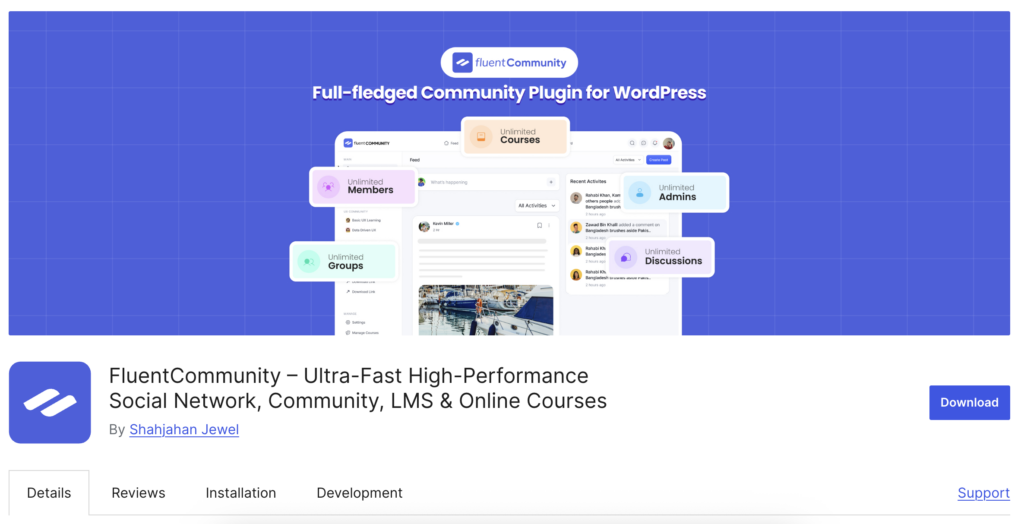
If self-hosting your community on WordPress makes sense for you, the next step is choosing the right plugin to power it. One option built specifically for WordPress site owners is FluentCommunity.
FluentCommunity is designed to bring modern community features. Similar to what platforms like Circle and Mighty Networks offer directly into your WordPress site. Instead of running your community on an external SaaS platform, everything lives on your own website, which means you keep control of your data, branding, and integrations without paying recurring SaaS subscription fees.
Out of the box, FluentCommunity includes the core features needed to run an engaged online community. You can organize discussions into Spaces, which work like topic-based groups similar to the spaces feature in Circle or Mighty Networks. Members can interact through activity feeds, where posts, comments, and updates appear in a real-time scrolling feed. The plugin also includes member profiles and directories, direct messaging between members, and real-time notifications so users can stay engaged without leaving your site.
For engagement, it supports leaderboards, points, and gamification elements to encourage participation. It also includes a built-in course feature, allowing creators to host learning content without relying on a separate LMS plugin.
One of FluentCommunity’s biggest advantages is how it connects with the broader WordPress ecosystem. It’s built by the same team behind FluentCRM, Fluent Forms, and FluentSMTP, which means it integrates naturally with those tools.
For example, you can gate community access based on CRM tags, automatically enroll members in courses when they join a space, or trigger email sequences when someone completes a course. On many SaaS platforms, similar automation often requires higher-tier plans or third-party integrations.
In terms of pricing, FluentCommunity offers a free version with no trial expiration, so you can start building a community and upgrade only when you need advanced features. The Pro version costs $159 per year for a single site license, which includes one year of updates and priority support. If you run multiple communities, the 5-site license costs $319 per year, and a 15-site license costs $559 per year.
For those who prefer a one-time purchase, a lifetime license is available starting at $399 for a single site, with higher tiers such as $799 for five sites and $1,599 for fifteen sites. Compared to SaaS platforms like Circle, where plans typically start around $89 per month, the long-term cost difference can be significant for creators and businesses building communities over several years.
However, for many communities, a fast, responsive web experience is more than enough. For WordPress users who want flexibility, ownership, and deep integrations, FluentCommunity is one of the most modern self-hosted community solutions available today.
How to Make the Switch
If you’re currently on Circle or Mighty Networks and considering self-hosting, here’s the practical path:
Set up your WordPress community in parallel. Don’t tear down your existing community before the new one is ready.
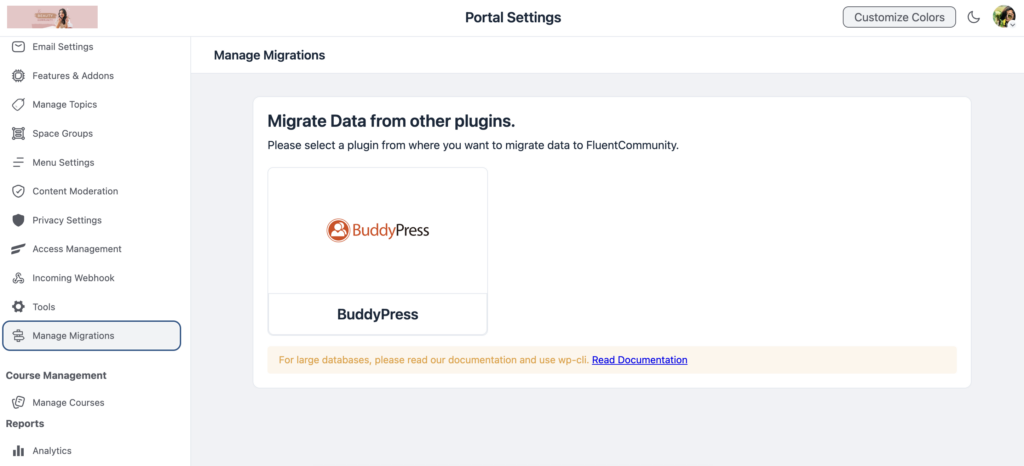
Migrate your content. Export whatever your current platform allows. Member lists, discussion posts, and course content. Manual migration isn’t fun, but it’s a one-time effort.
Move members gradually. Announce the move, explain the benefits, and give people time to transition.
Keep the old platform running temporarily. 30-60 days of overlap ensures nobody falls through the cracks.
Shut down the SaaS once migration is complete. Cancel your subscription and enjoy the savings.
The migration process typically takes 2-4 weeks for a community under 1,000 members. Larger communities might need a month or two.
The Middle Ground: Start Self-Hosted
The strongest argument for self-hosting isn’t about switching. It’s about starting right.
If you’re building a new community today, starting on WordPress means:
- You never face a painful migration later
- You build habits around a platform you own
- Your costs are lower from day one
- Your data is yours from the first post
The SaaS platforms will always be there if you change your mind. But migrating from WordPress to SaaS is trivially easy compared to migrating from SaaS to WordPress. Start with ownership. You can always rent later.
Making the Decision
Choosing between SaaS platforms and a self-hosted solution depends largely on your priorities. Platforms like Circle and Mighty Networks can be a good fit if you’re non-technical and want the fastest possible setup with minimal configuration. They’re also useful if a fully managed environment and features like a built-in native mobile app are essential right away, or if you’re simply testing a community idea and aren’t sure you’ll continue long term. For businesses where budget isn’t a major concern and convenience is the top priority, these SaaS platforms can provide an easy starting point.
On the other hand, self-hosting your community on WordPress often makes more sense for creators and businesses planning to build a long-term community. If you already run a WordPress website, adding a community with tools like FluentCommunity allows you to keep full ownership of your data and platform while avoiding recurring SaaS subscription costs. It also gives you deeper integration with other WordPress tools, along with the flexibility to customize your community however you want.
We built FluentCommunity after noticing that many WordPress site owners were paying $89 or more each month to external platforms even though they already had a powerful foundation on their own servers. SaaS platforms are solid products, but for many WordPress users, they can become an expensive solution to a problem that WordPress can already solve.

Prema Anjum
My full name is Anzuman Ara Chowdhury. But people know me as Prema Anjum. I’m a Digital Marketer by profession, a WordPress community contributor, and a travel enthusiast by heart.





Add your first comment to this post