
Custom Profile Fields in FluentCommunity: Build Smarter Member Profiles

Table of Content
Subscribe To Get
WordPress Guides, Tips, and Tutorials


Most communities start with the same basic profile setup: name, photo, bio, maybe a website link. That works fine for day one. It stops working once your community gets bigger, more specific, and more useful. A course community may need to know a member’s industry. A creator community may want portfolio links.
A professional network may need country, role, and company. A private membership site may want date of birth, office email, or other details that help members connect better. That is where Custom Profile Fields in FluentCommunity come in. Introduced in FluentCommunity 2.3.0 Pro, this feature gives admins full control over the extra information members can add to their profiles.
Instead of forcing every community to use the same default profile layout, you can shape profiles around the real needs of your audience. This matters more than it sounds. Better profile data leads to better member discovery, more relevant conversations, stronger connections, and a community that feels designed for the people inside it rather than copied from somewhere else. In this article, we’ll look at what Custom Profile Fields do, how they work, where they fit best, and why they are one of the most useful tools in a community admin’s toolbox.
What Are Custom Profile Fields?
Custom Profile Fields let you add extra profile inputs beyond the default member fields in FluentCommunity. That means instead of stopping at basic details, you can ask for the information that actually helps your community function better. For example, you can create fields for:
- Country
- Company
- Gender
- Portfolio links
- Date of Birth
- Office Email
- Role or job title
- Website
- Social profile links
The point is not to collect data for the sake of collecting data. The point is to make profiles more useful. A profile that tells you only a name is shallow. A profile that tells you where someone works, what they do, and what they want to share becomes useful for networking, discovery, segmentation, and trust.
Why Custom Profile Fields Matter?
Most communities underestimate how much profile data affects engagement. When profiles are thin, members feel anonymous. When members feel anonymous, they participate less. They lurk, but they don’t connect. Custom Profile Fields fixes that in a few important ways.
Make profiles more relevant
A photography community does not need the same profile fields as a SaaS customer community. A university alumni network does not need the same details as a creator membership site. Custom fields let you adapt the profile to the community, not the other way around.
Improve member discovery
When members can see useful profile details, it becomes easier to find the right people. Someone looking for a designer can filter by role or company. Someone looking for a collaborator can find people by location or niche. Someone in a business community can identify peers in the same region or industry.
Help members connect faster
Common ground makes connections easier. If members can see that someone else is from the same country, works in the same industry, or has the same type of business, the conversation starts faster. That lowers the awkwardness that usually slows down online communities.
Support personalization
Not every community wants the same public profile experience. Some communities want rich public profiles. Some want private member data for admins only. Some want a mix of both. Custom Profile Fields give you that flexibility.
What does the feature add in FluentCommunity?
The Custom Profile Fields in FluentCommunity works as a flexible admin-controlled system for structured profile data. Here’s what the feature gives you:
Grouping fields into sections
You can organize fields into sections such as “Additional Information” and “Secondary Information” to keep profiles clean and easy to read. Instead of placing every custom field in one long list, grouping them logically improves clarity and usability.
For example, “Additional Information” can include fields like Country, Company, and Role, while “Secondary Information” can contain details such as Portfolio URL, LinkedIn, and Office Email.
Multiple field types
You are not limited to just one type of input when creating fields. Depending on the kind of information you need, you can use different field types to make data collection more effective and structured. Supported options include text, select, radio, date, and URL fields, allowing you to gather both simple freeform responses and more organized, predefined answers based on your use case.
Visibility and access controls
Each field can be configured with different visibility settings, such as visible to logged-in users, visible to admins only, or publicly displayed. This flexibility is important because not every piece of information should be shared openly. Some communities require transparency, others prioritize privacy, and in many cases, a balance of both is necessary.
Required fields
You can mark a field as required if it is essential to the community experience. For instance, a professional network might require users to provide their company and role, while a local group may ask for country or city. Similarly, a paid membership community may require an office email for proper validation, ensuring that only the right members gain access.
Easy editing and reordering
Admins can edit, reorder, and group fields directly from the settings panel. That gives you control without developer work. If your community changes, your profile structure can change with it.
Benefits of Custom Profile Fields in a Community
Custom profile fields let communities collect and display relevant member information, improving connections, networking, and engagement. They help members find peers, mentors, or collaborators while enabling better segmentation, personalization, and meaningful interactions within the community.
Richer member profiles
The most obvious and important benefit of custom profile fields is that they make members feel more real. When profiles include more than just a name and avatar, the community feels less anonymous and more human.
A richer profile can reveal who a member is, what they do, where they are from, what they are looking for, and what they bring to the community. This added context improves every interaction, making connections more meaningful and engagement more authentic.
Better member discovery
A useful community helps people connect with others, and custom profile fields make this easier by allowing members to search, sort, or visually review profiles for relevant details. This is especially important in communities where connection is a key reason for joining.
For example, members can find others from the same country, the same industry, similar companies, creators with public portfolios, or those who share the same goals.
Stronger networking
Networking works best when people have shared points of connection, and custom fields provide that common ground. Rather than encountering strangers with blank profiles, members see meaningful context about each other, which encourages more direct messages, increased replies, greater peer support, and enhanced collaboration.
More personalized community experiences
Not every member should see the same content in the same way. Custom profile fields allow you to tailor the community experience based on the data you collect. This enables workflows and features such as region-based discussions, role-based recommendations, cohort-specific content, and personalized experiences based on membership tiers.
Better moderation and admin insight
Sometimes profile data helps admins gain a deeper understanding of the community. Knowing which industries members represent, where they are from, or what roles they hold allows for smarter moderation, planning, and support. This insight can improve event planning, content creation, member segmentation, and support prioritization.
More trust and credibility
A community with real, detailed profiles feels more trustworthy. When members can verify context, they are more likely to believe the people they interact with. That matters in business communities, alumni groups, paid memberships, and professional networks.
Example Setup for a FluentCommunity Profile
Here’s a step-by-step guide to setting up Custom Profile Fields in FluentCommunity based on the FluentCommunity 2.3.0 update.
Step 1: Enable Custom Profile Fields (Pro)
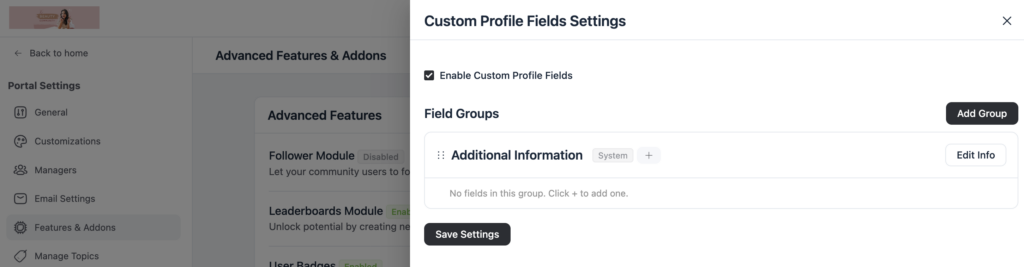
First, ensure that the Custom Profile Fields (Pro) feature is enabled in your community settings. This gives you the ability to create and manage additional fields beyond the default profile options.
Step 2: Create Field Sections
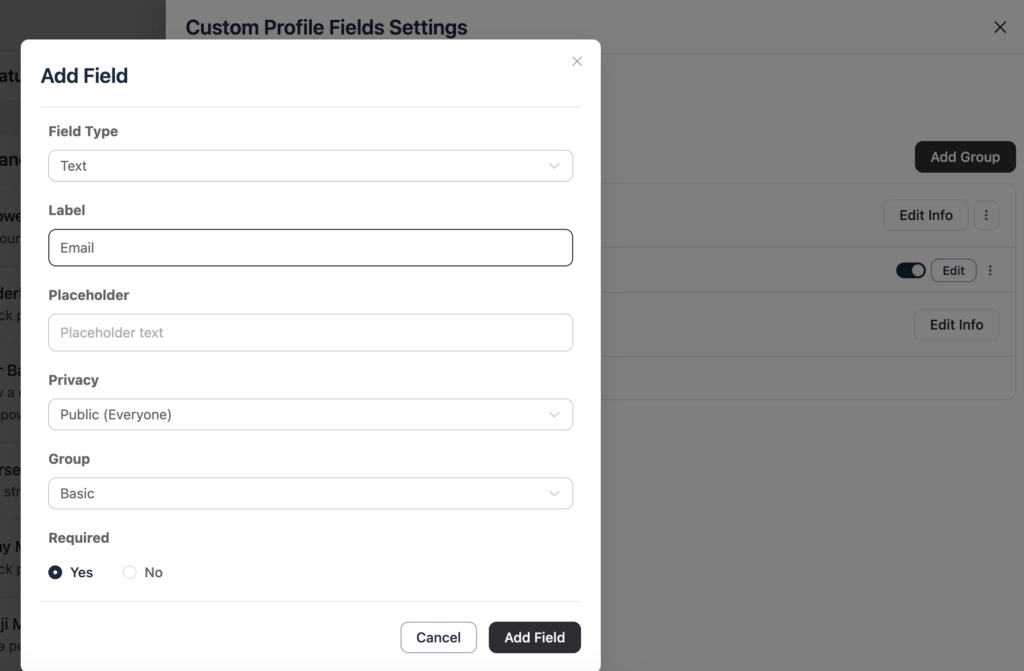
Organize your fields into structured sections to make profiles easier to read and navigate. For example, Basic Info can include name, profile photo, and bio. Additional Information might cover country, company, role, and industry.
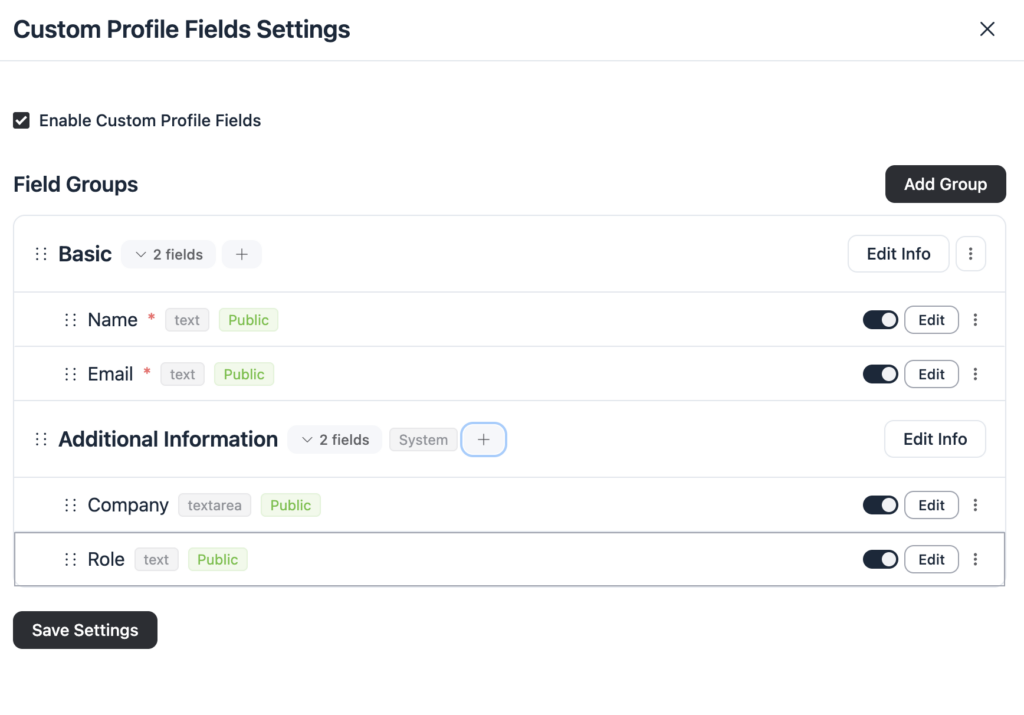
Links can hold website, portfolio URL, and LinkedIn profile, and Private Fields can include office email, date of birth, and member ID. Using sections helps members quickly find relevant information without having to scroll through a long, unorganized list.
Step 3: Add Field Types
Within each section, add the fields you need to capture the right information. FluentCommunity supports several field types. Text for open-ended responses, select for standardized options, radio for single-choice questions, date for birthdays, anniversaries, or join dates, and URL for portfolios, websites, or social links. Choose the field type that best fits the kind of data you want to collect, ensuring profiles are both useful and easy to complete.
Step 4: Configure Visibility and Privacy
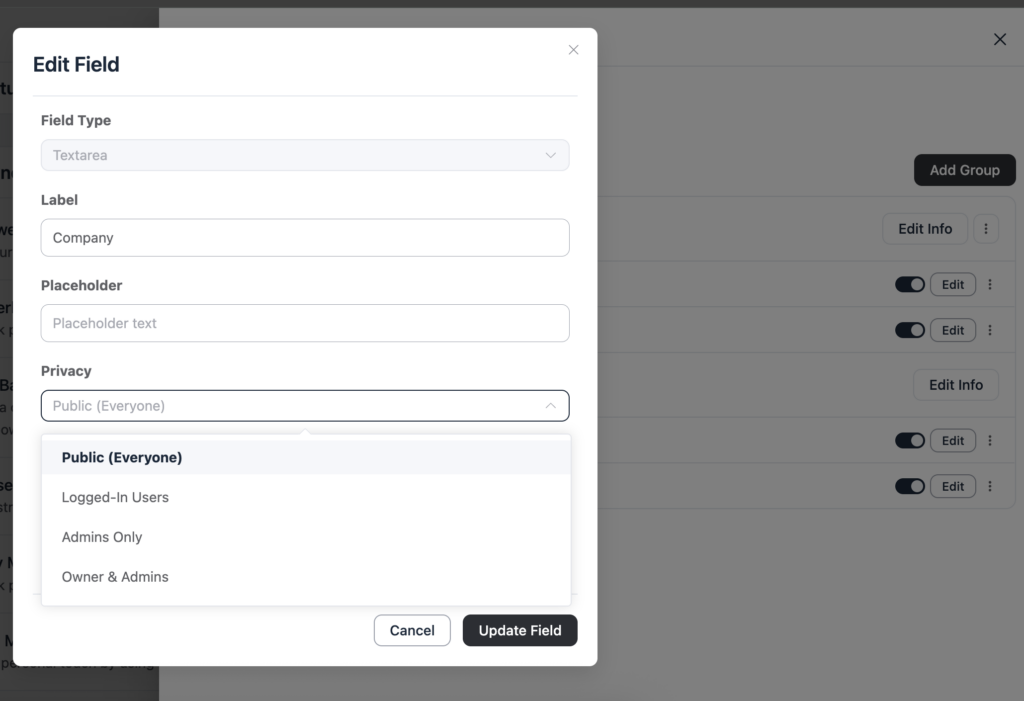
Decide who can view each field to manage privacy effectively. Fields can be public and visible to everyone, restricted to logged-in users, or set as admin-only for administrators. This approach keeps sensitive data private while still providing useful information on member profiles.
Step 5: Mark Fields as Required
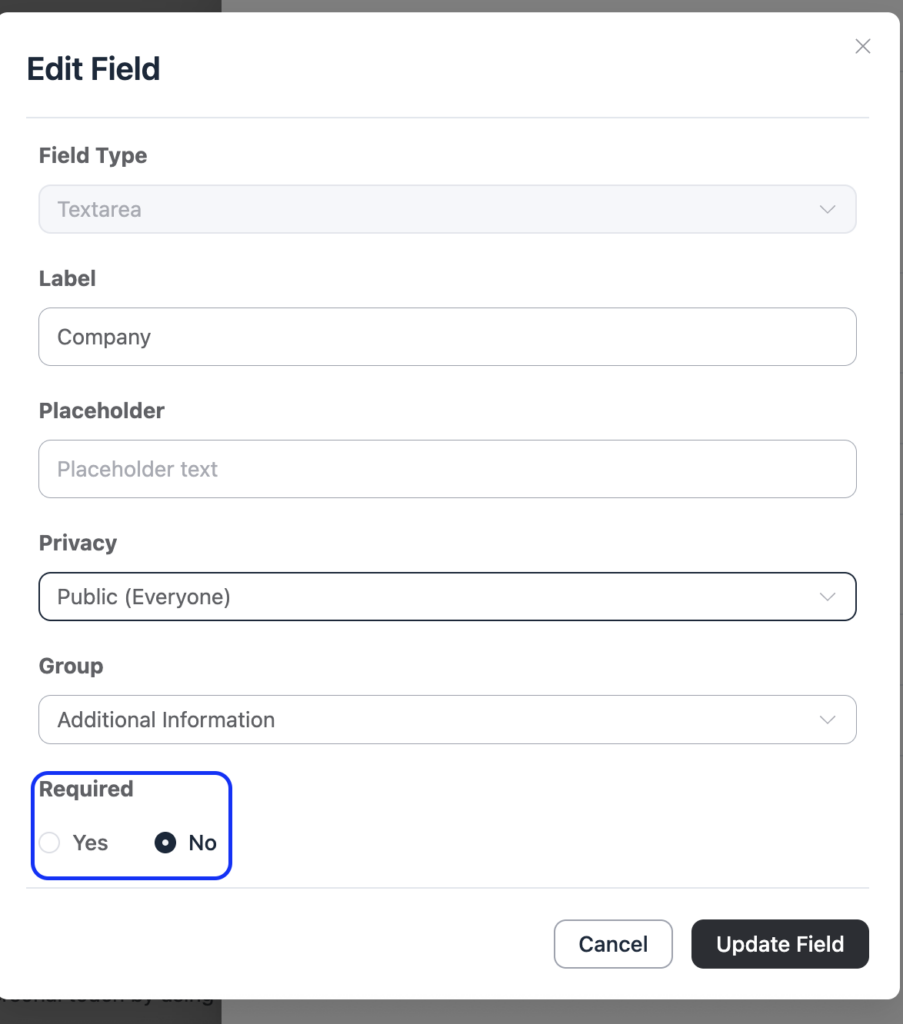
For essential information, mark fields as required to ensure your community gathers the data it truly needs. Examples include company and role for a professional network, country or city for a local group, and office email for paid memberships. Required fields help maintain the quality and relevance of member profiles.
FluentCommunity is a complete community platform designed for businesses. Download now to create and manage your community.
Step 6: Edit, Reorder, and Manage Fields
You can edit, reorder, or group fields anytime from the settings panel. This flexibility allows you to adjust your profile structure as your community evolves without rebuilding the system.
Step 7: Use Profiles to Enhance Engagement
With custom profile fields in place, your community gains several benefits. Member profiles become richer and feel more human, making it easier to discover peers, mentors, or collaborators. You can also provide tailored experiences based on roles, regions, or membership tiers, and improve planning for events, content, and support.
By following these steps, FluentCommunity makes it simple to collect meaningful user data while keeping profiles organized, useful, and privacy-conscious.
Best Practices for Using Custom Profile Fields
Just because you can ask for more data does not mean you should ask for everything. Too many fields create friction. People quit halfway through signup or leave their profiles incomplete. Here is how to use them well.
Keep it minimal at first
Start with only the fields you truly need. A good approach is to have one or two required fields, a few optional fields, and a clear purpose for each. If a field doesn’t add value to the community, it’s best to leave it out.
Use field types intentionally
Choose the right field type for each purpose. Use text for open-ended answers, select for clean, standardized options, and radio when a single clear choice is needed. Use date fields for birthdays, anniversaries, or join dates, and URL fields for portfolios, websites, or social links. Structured inputs make data easier to manage and use later.
Think about privacy
Not every field should be visible to everyone. FluentCommunity’s visibility controls let you choose whether a field is public, visible only to logged-in users, or restricted to admins. For example, public fields might include country, website, or portfolio; fields visible to logged-in users could include company or role; and admin-only fields might hold office emails, internal notes, or validation details. This approach allows you to create useful, informative profiles while maintaining privacy where needed.
Group fields logically
Avoid placing all fields in a single block. Instead, organize profiles into sections such as Basic Details, Additional Information, Secondary Information, Professional Info, and Community Preferences. When profiles are structured this way, members are more likely to read and engage with them.
Review and update over time
Communities evolve, and your profile fields should evolve with them. You might start with basic fields like country and company, but later find the need to add membership tier, event preferences, product usage level, or certification status. Since fields are editable and can be reordered from the settings panel, you can make these adjustments without having to rebuild the entire system.
How to Use Custom Profile Fields in a Community?
The best way to think about Custom Profile Fields is not as a settings feature, but as part of your community design. Here are a few practical ways to use them.
For professional communities
A business or career-focused community can use fields such as job title, company, industry, website, LinkedIn profile, and country to build richer member profiles. This structured information makes it easier for members to discover and connect with relevant peers, potential buyers, vendors, or even mentors within the community.
For creator communities
A creator or freelancer community may include fields such as portfolio URL, niche, service type, social media links, and years of experience to build more meaningful profiles. This kind of information makes it easier for members to network, showcase their work, and get referrals within the community.
For course communities
A learning community can include fields such as cohort, skill level, learning goal, country, and preferred language to create more relevant member profiles. This information helps individuals connect with others who are at a similar stage in their learning journey, making collaboration and support more effective.
For membership communities
A paid community might include fields such as membership tier, company name, department, date of birth, and office email to manage its members better. This information can be used to control access, segment users based on different criteria, and offer personalized benefits or special promotions.
For local communities
A local or regional community may include fields such as city, district, country, interests, and event availability to understand its members better. This kind of information makes it much easier to plan events, organize activities, and help people connect with others in their nearby area.
Why This Feature Matters for WordPress Communities?
This is one of those features that may seem small but can transform the entire community experience. Because FluentCommunity runs on WordPress, all custom profile data stays within your own ecosystem. This means member data remains under your control, workflows stay flexible, and your site can adapt to your audience’s needs.
You don’t need a separate platform to manage richer profiles. The real advantage is that you’re not just collecting data. You’re shaping the social structure of the community itself.
Final Thoughts
Custom Profile Fields in FluentCommunity give admins a better way to understand and organize their members. Instead of forcing every community into the same default profile structure, you can create fields that match your audience, your goals, and your privacy needs. You can group data into clear sections, choose the right field types, control visibility, mark fields as required, and rearrange everything from the settings panel.
The benefit is simple: richer profiles, better discovery, stronger connections, and a community that feels built for real people. If your community needs more than a name and avatar, Custom Profile Fields is the kind of feature that quietly makes everything else work better.

Prema Anjum
My full name is Anzuman Ara Chowdhury. But people know me as Prema Anjum. I’m a Digital Marketer by profession, a WordPress community contributor, and a travel enthusiast by heart.


Leave a Reply